Side: A Lightweight AI Chat Panel That Lives Beside Your Mac Dock

Side is a tiny MIT-licensed AI chat panel that floats beside your Mac Dock with multi-model support.
Side is a lightweight AI chat panel designed for Mac that floats beside the Dock, staying accessible without occupying prime screen real estate. It works across Spaces and full-screen apps, opens instantly with ⌘⇧Space, and lets you switch models, providers, and reasoning levels within a single conversation. You can connect via ChatGPT account login or your own API Key. Fully free and MIT-licensed, Side focuses on reducing the friction of accessing AI rather than packing in features — ideal for power Mac users who want quick, low-interruption AI access throughout their day.
An AI Assistant That Doesn't Hog Your Screen
Most AI chat tools either occupy a browser tab or open as a large standalone window, forcing you to constantly shift focus. Side takes a different approach — it's a tiny chat panel that hugs the space right beside your Mac Dock, neatly filling that sliver of empty space so it's "always in view, never in the way."
The tool earned 71 upvotes and a #19 ranking on Product Hunt, listed under Mac, Productivity, Artificial Intelligence, and GitHub. Its biggest selling point is its restrained interaction model: the panel floats above other windows and works across Spaces and full-screen apps, meaning you can summon it no matter which desktop or full-screen application you're in.
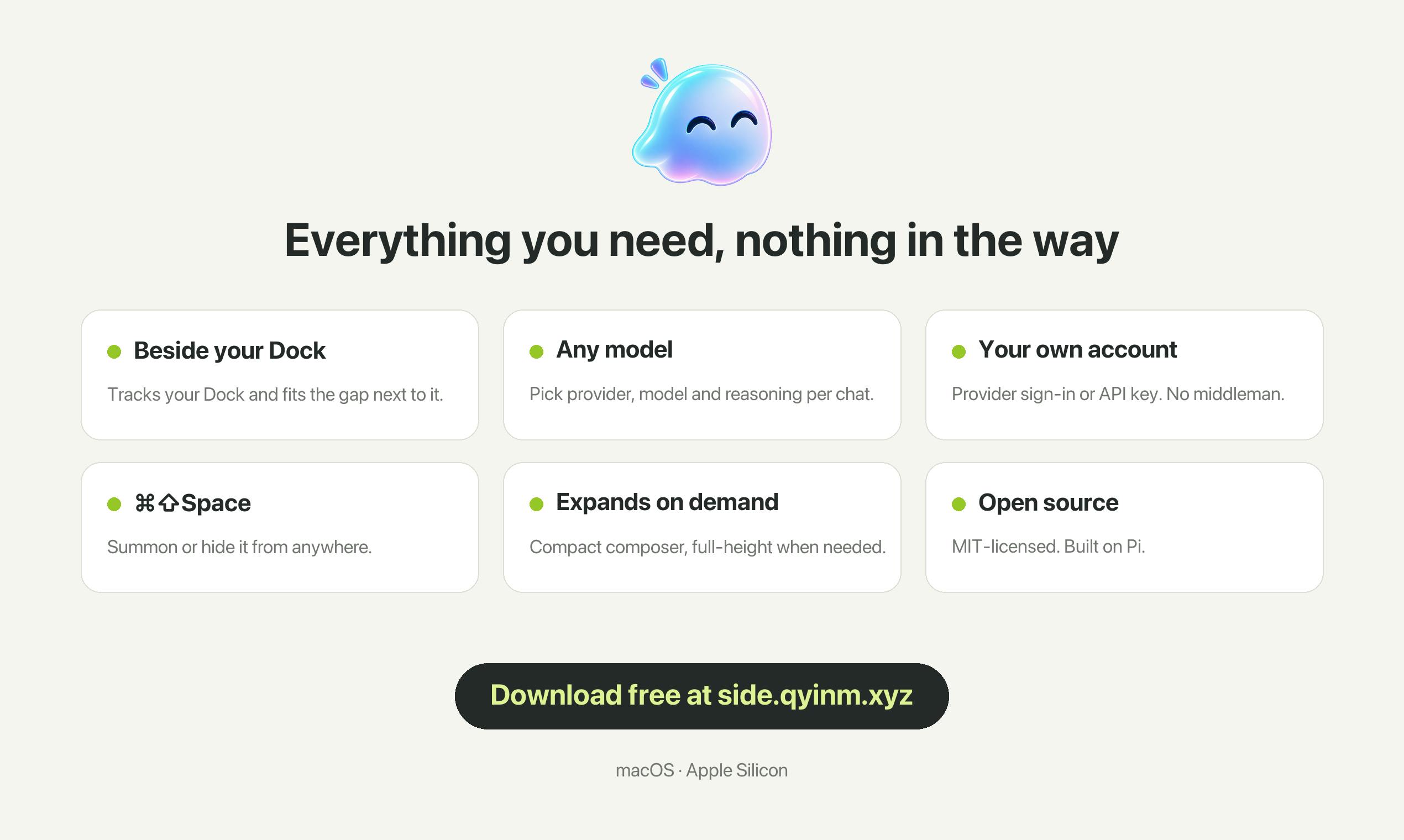
Feature Breakdown
A Panel You Can Summon Anytime
Side is built to be tiny. It snugs into the gap beside the Dock and floats above other windows by default. A ⌘⇧Space shortcut lets you show or hide the panel instantly, making it feel more like a system-level utility than a persistent app window. The input box is compact but can expand to full height when needed, handling both quick one-liners and longer text input.
Switch Models, Providers, and Reasoning Levels Freely
Unlike many tools locked to a single model, Side lets you switch providers, models, and reasoning levels within the same conversation. This is genuinely useful when you need to balance speed and quality across different tasks — use a lightweight model for simple questions, then switch to something more powerful for complex reasoning, all without starting a new session.
What are reasoning levels? This is a concept introduced by major model providers in recent years — it lets users control how long a model "thinks" before responding. OpenAI's o1/o3 series, for example, offers low, medium, and high reasoning intensity: low is close to standard model speed, while high consumes more tokens for chain-of-thought processing, yielding better answers at the cost of higher latency and cost. Anthropic's Claude and Google's Gemini series have similar "extended thinking" options. In practice, adjusting reasoning levels means allocating compute cost on demand — routine queries and short copy don't need high reasoning, while complex math, debugging, or logical analysis benefit noticeably from it. Side exposes this control directly in the chat interface, saving users from juggling different products or API parameters.
Bring Your Own Account
Side supports a "bring your own account" model: you can log in directly with your ChatGPT account or enter your own API Key. This design hands cost and data control back to the user, avoiding vendor subscription lock-in and aligning well with the habits of privacy-conscious Mac users.
BYOK vs. BYOA explained: "Bring Your Own Key" (BYOK) requires users to obtain an API Key from OpenAI, Anthropic, or similar platforms and pay based on actual usage — data flows directly between the user's account and the model provider, with the tool itself never handling the content. "Bring Your Own Account" (BYOA) goes a step further, letting users authorize login via an existing ChatGPT Plus/Pro subscription without needing separate API access. The shared advantage of both approaches: the tool developer cannot cache conversation content on their servers, reducing privacy risk; users also avoid paying twice for the same AI capability. For users already subscribed to ChatGPT, BYOA means repurposing an existing subscription at zero extra cost to access the same model capabilities inside Side.
Open Source and Positioning
Side is released under the MIT license — completely free and open source. This stands out in a landscape where most AI tools have gone the subscription route. Being open source means users can audit the code, modify it, or build on top of it. For users concerned about where their data goes, the combination of a self-supplied API Key and open source code provides a relatively transparent setup.
As a product, Side doesn't try to be a full-featured AI workbench. It focuses on a specific niche: a lightweight, always-accessible entry point. Its value isn't in feature breadth — it's in reducing the friction of "talking to AI" to the absolute minimum.
About the MIT License: MIT is one of the most permissive open source licenses available. Users are free to use, copy, modify, merge, publish, distribute, and even sell the software commercially — the only requirement is retaining the original copyright notice. Compared to GPL (which requires derivative works to also be open source) or Apache 2.0 (which includes patent grant clauses), MIT places almost no barriers on commercial reuse, making it popular among utility projects that want to attract community contributions quickly. For AI client tools specifically, open source also means the community can audit network requests to verify that API Keys and conversation content are only sent to the user-specified provider — not intercepted by the developer. This provides verifiable technical backing for the privacy promises made under a "bring your own key" model.
Who Is It For?
If you're a heavy Mac user who regularly switches between multiple Spaces and full-screen apps and wants to quickly ask AI a question at any moment, a tool like Side can significantly cut down context-switching overhead. Compared to opening a browser or a standalone client, a panel docked beside the Dock that opens instantly with a shortcut fits much better into fragmented, on-the-fly usage.
That said, as a "small and elegant" tool, Side is relatively lean on information right now — it's more of a polished interaction layer than a full-featured AI platform. For users who need complex workflows, plugin ecosystems, or team collaboration, it may only serve as one tool among many. But for individual users who value simplicity and efficiency, that restraint is precisely the point.
Related articles

Gaussian Process Bandit Optimization: Exploration Strategies and Inference Regret Guarantees
Cumulative regret guarantees in Bayesian optimization fail to reflect final recommendation quality. This article examines a new study that provides inference regret guarantees for Gaussian process bandit optimization through exploration query strategies and fill distance analysis, validated on hyperparameter optimization and control tasks.

The Most Detailed Codex Guide on Bilibili: From Installation to Real-World Practice
The most detailed Codex guide on Bilibili: from app store installation to daily work mode configuration, with a real coffee shop project demonstrating file organization, data extraction, dashboard creation, and other practical tasks. Learn to use Plan Mode and desktop pets to leverage Codex efficiently.

Appearance Compensation in Volume Rendering: Why RGB Accuracy Cannot Guarantee Density Correctness
Volume rendering research reveals that volumetric data perfectly reproducing external RGB views may still contain density errors: appearance compensation can double central density and keep external rays unchanged even when L2 error exceeds 14.52%. Density recovery depends on appearance capacity, spatial resolution, and measurement design.