Sider Omni Sidebar: An AI Agent Sidebar for Every Mac App
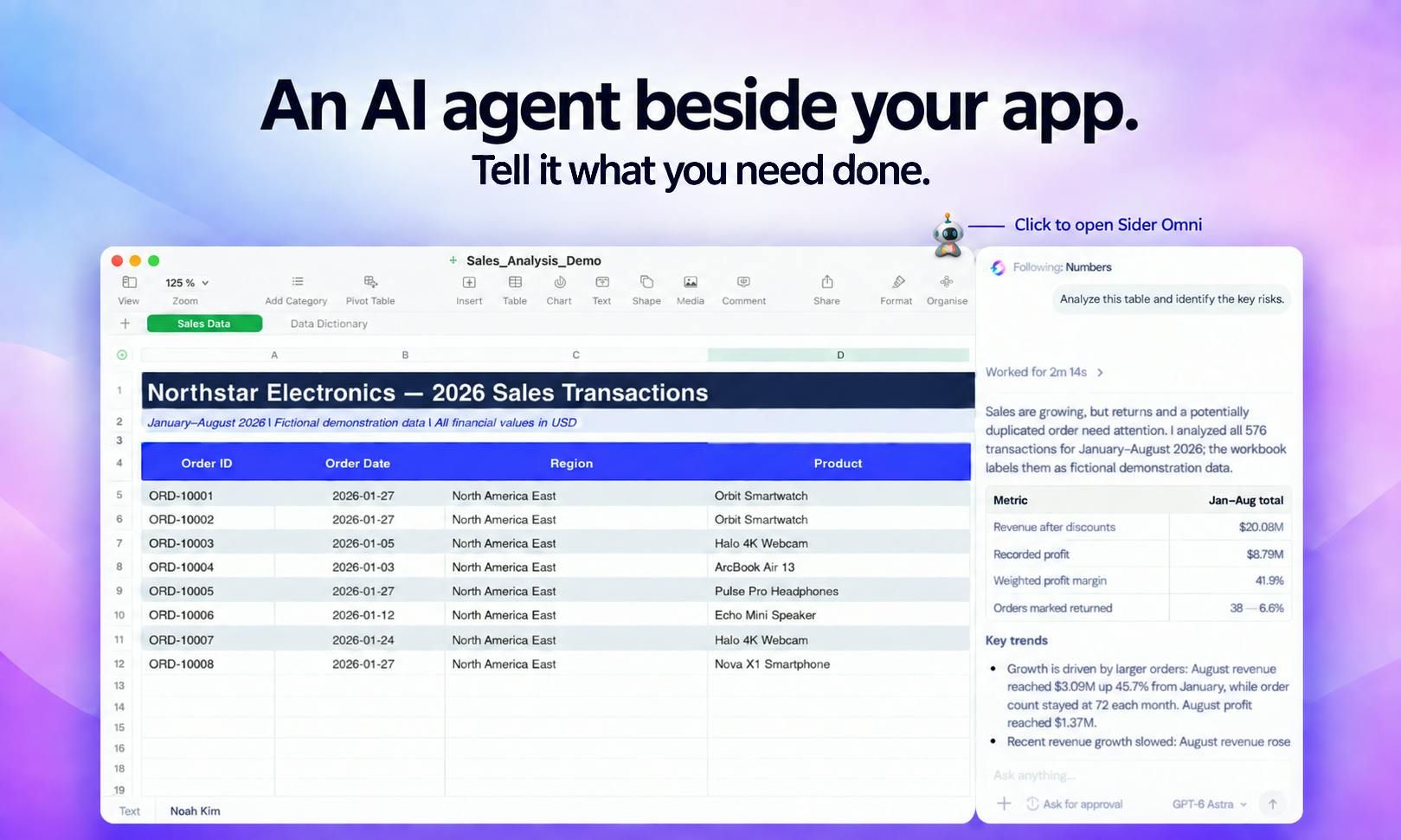
Sider Omni Sidebar is a screen-aware AI agent sidebar for Mac that acts directly in any app — no copy-paste required.
Sider Omni Sidebar is an embedded AI tool for Mac that lives as a persistent sidebar in any app, reads your screen content, and acts directly where you're working — eliminating the copy-upload-paste cycle of traditional AI tools. Built on GPT-6 Astra's multimodal capabilities, it reuses your existing ChatGPT or Codex subscriptions to lower the cost barrier. It ranked #3 on Product Hunt's OpenAI Day category with 211 upvotes and 88 comments. Its core promise is upgrading AI from a standalone chat window to an OS-level companion, though screen perception accuracy, cross-app compatibility, and privacy data handling remain key challenges the product — like all screen-aware AI tools — still needs to fully address.
A Mac Tool That Lets AI Actually "See" Your Screen
In Product Hunt's OpenAI Day category, Sider Omni Sidebar climbed to #3 with 211 upvotes and 88 comments. Its core value proposition targets a real pain point in today's AI tooling landscape: most AI assistants are still stuck in a "copy-paste" interaction model — you copy content out, upload it, then paste results back, constantly breaking your workflow.
Sider Omni Sidebar takes a fundamentally different approach. It lives as a persistent sidebar alongside any Mac app, able to "see" what's on your screen and act directly where you're working. You can review results and request further changes in place — no copying, no uploading required.
The Logic Behind Screen Awareness and In-Place Action
The product's official tagline is "Give every Mac app an Agent Sidebar." This captures its positioning precisely — it's not an isolated AI chat window, but an intelligent agent that embeds itself into the working context of any application.
"Screen awareness" means the agent can read content from your current application interface and understand the task context you're working in. This design eliminates the friction between traditional AI tools and your actual work environment. Whether you're writing, coding, or handling documents, you don't need to switch windows or manually transfer content — the AI can act directly based on what's in front of you.
This "acts on it directly" model essentially upgrades AI from a passive, reactive assistant to a collaborative partner that can actively intervene in your workflow. Review results, make requests, iterate — it forms a tight human-AI collaboration loop.
Built on GPT-6 Astra, Reuses Your Existing Credits
According to the product description, Sider Omni Sidebar is built on GPT-6 Astra. Perhaps more notable: it can run directly on your existing ChatGPT or Codex credits.
This design has real practical implications. For users already subscribed to OpenAI services, there's no need to shoulder an additional AI inference cost just to use this tool — it leverages resources you've already paid for. This lowers the barrier to entry and partly explains why it gained traction in the OpenAI Day category.
GPT-6 Astra refers to OpenAI's multimodal model capabilities, where "Astra" borrows from Google DeepMind's Project Astra concept — a real-time multimodal agent framework capable of continuously perceiving camera or screen content while maintaining conversational context. OpenAI applies this idea to move beyond text-only input, enabling the model to understand screenshots and recognize current interface elements. Codex is OpenAI's model series optimized for code comprehension and generation; for developer users, invoking Codex credits rather than general-purpose GPT credits in coding scenarios is typically more cost-efficient and performant. Sider's support for both credit types means it can automatically or manually switch between calling paths based on your actual use case, rather than locking you into a single model.
Positioned for Productivity Scenarios
Sider Omni Sidebar is tagged under Mac, Productivity, Artificial Intelligence, and OpenAI Day. These categories make clear that its target is efficiency enhancement on the Mac platform.
For users who regularly juggle multiple tasks on Mac, this kind of "always-available AI sidebar" genuinely addresses a real point of friction: AI capabilities are often trapped inside browser tabs or standalone apps, never truly at your fingertips. Sider's approach attempts to make AI an OS-level companion — always present, always contextual.
That said, based on what's shown on Product Hunt, some technical details still warrant further scrutiny — such as the accuracy of screen perception, cross-app compatibility, and how privacy boundaries are handled. These are challenges that screen-aware AI tools broadly face. The 88-comment engagement also signals that the community is both excited and has questions worth exploring.
Privacy challenges for screen-aware AI tools deserve special attention. Tools of this type typically capture screen content via screenshots or live feeds, which means documents, password fields, sensitive communications, and more may enter the AI's processing pipeline. The industry currently has two mainstream approaches: local processing (screenshots are analyzed on-device and never uploaded to a server) and encrypted cloud transmission (content is sent to a cloud model after encryption). Each involves trade-offs between latency, accuracy, and privacy protection. For enterprise users or professionals handling sensitive data, understanding data flow before adopting such tools is essential. This is also a common line of questioning in Product Hunt comment sections, and a core issue that Sider and similar products need to address clearly in their documentation or privacy policies.
Summary
Sider Omni Sidebar represents one direction in the evolution of AI assistant form factors: moving from standalone chat windows toward embedded, screen-aware, in-place-executing agents. With "no copying, no uploading" as its core experience — combined with the cost advantage of reusing existing ChatGPT/Codex credits — it addresses genuine needs for Mac productivity users. For anyone looking to integrate AI more naturally into their daily workflow, this is a product worth watching.
Related articles

Deleted Reddit Post Sparks Debate Over AI Content Moderation
A Reddit post removed with only a 'Removed by Reddit' notice highlights AI content moderation's transparency gaps, misjudgment risks, and appeal challenges for platforms and creators.

DSH + Ollama Local LLM Deployment in Practice: Free Chat with Da Fei Yu
Bilibili creator tests DSH + Ollama local LLM deployment end to end: Ollama install, Xunlei-accelerated downloads, ModelScope GGUF model import, DSH custom API address setup, and a comparison of Qwen 3.5 4B, 8B, Gemma, and other models on 8GB VRAM, with advice on choosing local deployment vs. API calls.

Tested: A $899 Mac Mini vs. a $200/Month AI Subscription
Real-world test of whether an M4 Mac mini can replace a $200 AI subscription: 16GB can't fit large models, and both speed and quality fall short—but privacy, no caps, and near-zero running costs make it an ideal host for an always-on agent. Includes buying advice per configuration and money-saving strategies.