Simon Willison Uses tree-sitter to Build a Tag Cloud for Vibe-Coded Tools
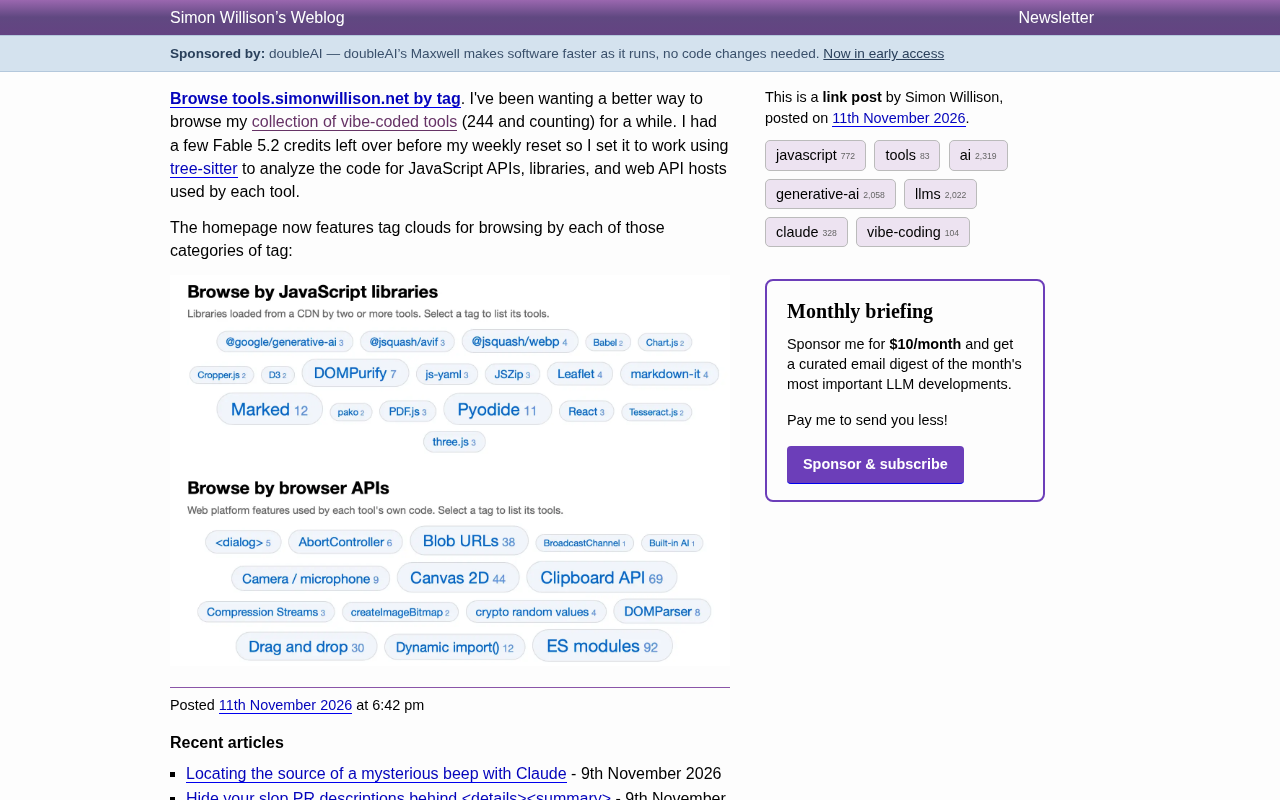
Simon Willison uses tree-sitter to statically analyze 244 vibe-coded tools and auto-generate a tag cloud for navigation.
Simon Willison's personal tools site has accumulated 244 AI-assisted vibe-coded small tools, and even the author finds it hard to quickly locate a specific feature. He uses tree-sitter to perform static analysis on each tool's code, extracting three types of tags—JavaScript libraries, browser APIs, and Web API hosts—and displays them on the homepage as a tag cloud, with font size varying by the number of tools using each tag and clicking to filter. Library tags only count libraries loaded from a CDN and used by more than two tools; browser API tags reflect platform features used in the tool's own code. This approach demonstrates an extension of the AI-assisted development workflow: using a code-analysis toolchain to automatically understand and organize large amounts of rapidly generated code is more sustainable than manually maintaining categories.
A Bigger Problem: Managing Hundreds of Small Tools You've Written Yourself
Simon Willison's tools.simonwillison.net collects the "vibe-coded" small tools he's written with AI assistance, and the number has already reached 244 and is still growing. Most of these tools are short and focused, each solving one specific problem—but over time, even the author himself finds it hard to quickly locate a particular feature.
He recently mentioned on his blog that he'd long wanted a better way to browse this collection of tools. With some Fable 5.2 quota still on hand, he had an AI assistant use tree-sitter to analyze the code of each tool, extract the JavaScript APIs, third-party libraries, and browser Web APIs it uses, and then automatically generate tags.
How the Tagging System Was Built
The key to this approach is static code analysis with tree-sitter. tree-sitter is an incremental parser that can generate a syntax tree for source code, thereby identifying which libraries are called and which browser APIs are used. For each tool, the analysis produces three types of tags:
- JavaScript libraries: libraries loaded from a CDN and used by two or more tools, such as marked, Pyodide, DOMPurify, Leaflet, three.js, and so on.
- Browser APIs: Web platform features used in the tool's own code, such as Canvas 2D, the Clipboard API, Blob URLs, ES modules, drag events, and so on.
- Web API hosts: the external service domains the tool requests (mentioned in the article's first paragraph; the tag cloud screenshot only shows the first two categories).
This approach—automatically tagging based on code facts—is more reliable than manually maintaining tags and better reflects the technology stack the tools actually depend on. As new tools are added, the tags can be continuously updated.
tree-sitter's incremental parsing mechanism: Unlike traditional regular expressions or one-shot parsers, tree-sitter builds a concrete syntax tree for the source code and, after a file is edited, re-parses only the affected parts. This incremental property lets it efficiently handle large numbers of files while preserving syntactic hierarchy information—for example, it can precisely locate "which browser APIs are called inside a given function," rather than merely doing text matching. In addition, tree-sitter offers multi-language grammar support and has Python bindings (py-tree-sitter), making it easy to traverse the AST in a script and extract function call names and object properties. For JavaScript, it can distinguish global object access, member expressions, and CDN addresses inside string literals, so it is well suited to generating structured tags about "what the code actually depends on" rather than relying on manually declared metadata.
CDN loading and library usage statistics: The filter "loaded from a CDN and used by two or more tools" in the original article is essentially identifying third-party libraries introduced via <script src="https://cdn..."> or dynamic import(). Restricting it to "used by more than two tools" filters out accidental or one-off experimental dependencies, so the tag cloud only shows libraries that genuinely have reuse value. This statistical approach also means that if a library is bundled inline or implemented by the tool itself, it won't appear in the tags. The tag cloud therefore reflects "the externally identifiable shared technology stack," not all possible dependencies. It's important for readers to understand what the tag cloud means—it's an approximate statistic based on code facts, not an absolutely complete dependency list.
The Tag Cloud as a Navigation Entry Point
The homepage now uses a tag cloud to display these tags, with font size tied to the number of tools using each tag. Clicking any tag lists all tools with that tag.
As the screenshot shows, the tag cloud is divided into two blocks: "Browse by JavaScript library" and "Browse by browser API." Each block has clear explanatory text—library tags count libraries loaded from a CDN and used by more than two tools; browser API tags count the platform features used in each tool's own code.
This design lets visitors explore the tool collection according to their technical interests. For example, if you want to find tools that use Pyodide, or see which tools use Canvas 2D, just click the corresponding tag. For the author himself, it's also a way to review the distribution of technology choices.
The information visualization logic of the tag cloud: The tag cloud encodes the number of tools through font size, which is a lightweight form of information visualization. Its advantage is that high-frequency tags stand out visually, so users can perceive the distribution of the technology stack without reading a list; its limitation is that the mapping between font size and count is not linear, and the exact number still requires clicking to view. In the original article, the tags are displayed in separate blocks (JavaScript libraries and browser APIs), which in effect splits the tags along dimensions to avoid mixing tags with different semantics. This "categorize first, then scale by frequency" approach suits a personal tool collection of modest scale (hundreds of entries) and also lets the author quickly spot which libraries or APIs are becoming his go-to tools.
Implications for the Vibe-Coding Workflow
Simon Willison is an active practitioner of the vibe-coding concept, and his tool collection is itself a continuously growing sample library. This time, using tree-sitter to automatically analyze code and generate tags demonstrates an extension of AI-assisted development: once AI helps you quickly write large amounts of code, you can likewise use toolchains to automatically understand and organize that code.
From a technical perspective, tree-sitter's syntax tree analysis does not depend on runtime and can quickly process an entire codebase. For a tool collection consisting mainly of single-file HTML or small JavaScript projects, this static analysis approach is low-cost and comprehensive. For developers who are likewise accumulating a personal tool library, this idea is worth borrowing—automatically generating metadata through code analysis is more sustainable than manually maintaining categories.
The applicability boundaries of static analysis in personal projects: tree-sitter's static analysis does not execute code, so it can safely and quickly process an entire codebase, but it can only see calls and imports that appear explicitly at the syntax level. If a tool dynamically loads libraries through string concatenation, reads API names from configuration at runtime, or relies on scripts returned by a server, static analysis may miss them. For a tool collection consisting mainly of single-file HTML or small JavaScript projects, such omissions usually have little impact; but as project complexity rises, it may be necessary to combine runtime probing or manual annotation to fill the gaps. Understanding this boundary helps judge the range within which automatic tagging results can be trusted and when manual review is needed.
Details Worth Noting
The library and API names that appear in the tag cloud also reveal the technical characteristics of this batch of tools: the presence of Pyodide shows that quite a few tools run Python in the browser; the high frequency of Canvas 2D and the Clipboard API reflects that these tools lean interactive and practical; the presence of DOMPurify and markdown-it suggests that many tools involve Markdown rendering and HTML sanitization.
These tags are not only navigation tools but also an indirect statistic about "what vibe-coded tools typically depend on." For anyone who wants to understand the current lightweight AI-assisted development technology stack, this tag cloud provides a real observation window.
Related articles

Hands-On with the Genie 4 World Model: Directing Worlds in Real Time Like a Puppeteer
Google DeepMind's Genie 4 world model in depth: Special Guest X's hands-on demo of real-time scene direction via prompts, custom interactive apps in Project Genie, and prompts-as-seeds reproducibility.

Nvidia RTX Spark Mini PCs Go on Sale, Asus, Dell, and MSI Lead the Launch
Nvidia's RTX Spark N1X chip expands to desktops, with Asus, Dell, and MSI launching the first mini PCs, followed by Acer, Gigabyte, HP, and Microsoft's Surface Dev Box, accelerating the desktop AI PC ecosystem.

If Jensen Huang Steps Down, What Happens to Nvidia's AI Empire?
Is Nvidia's AI dominance overly dependent on Jensen Huang? This article analyzes Silicon Valley's CEO personality cult phenomenon, explores Nvidia's technical moat and organizational risks, and why the AI industry must shed the savior narrative.