snyvi: An Open-Source Desktop App for Managing Multiple Side Projects with Coding Agents

snyvi gives each side project its own desk, integrating multiple coding agents with versioned notes.
snyvi is a free, open-source desktop app that tackles the chaos of running multiple side projects with coding agents. Each project gets a "desk" holding its folder, up to four side-by-side agents (Claude Code, Codex, Gemini, shell), and notes, with agent plans and reviews auto-saved as versioned pages. It runs locally, needs no account, and uses the MIT license. Only a signed and notarized Mac build is available so far, and the developer is asking for test feedback.
When Side Projects Meet Coding Agents, Management Becomes the New Problem
More and more developers are juggling multiple side projects at once, and the arrival of coding agents like Claude Code, Codex, and Gemini has made parallel development easier—and easier to turn into chaos. Each project needs its own folder, agent instances, notes, and version history, and the cost of switching between them is high. snyvi, a new product on Product Hunt, tries to solve this pain point: it's a free, open-source desktop app that assigns each side project a "desk" and brings all related resources together in one calm interface.
snyvi's Core Design: One Desk per Project
The core concept of snyvi is the "desk." Each project maps to a desk containing that project's folder, up to four coding agents running side by side (supporting Claude Code, Codex, Gemini, and any shell), and the project's own notes. Every plan or review an agent writes lands on the desk as a tidy page with a version history. The home screen shows where each project left off, making it easy to pick up context quickly.
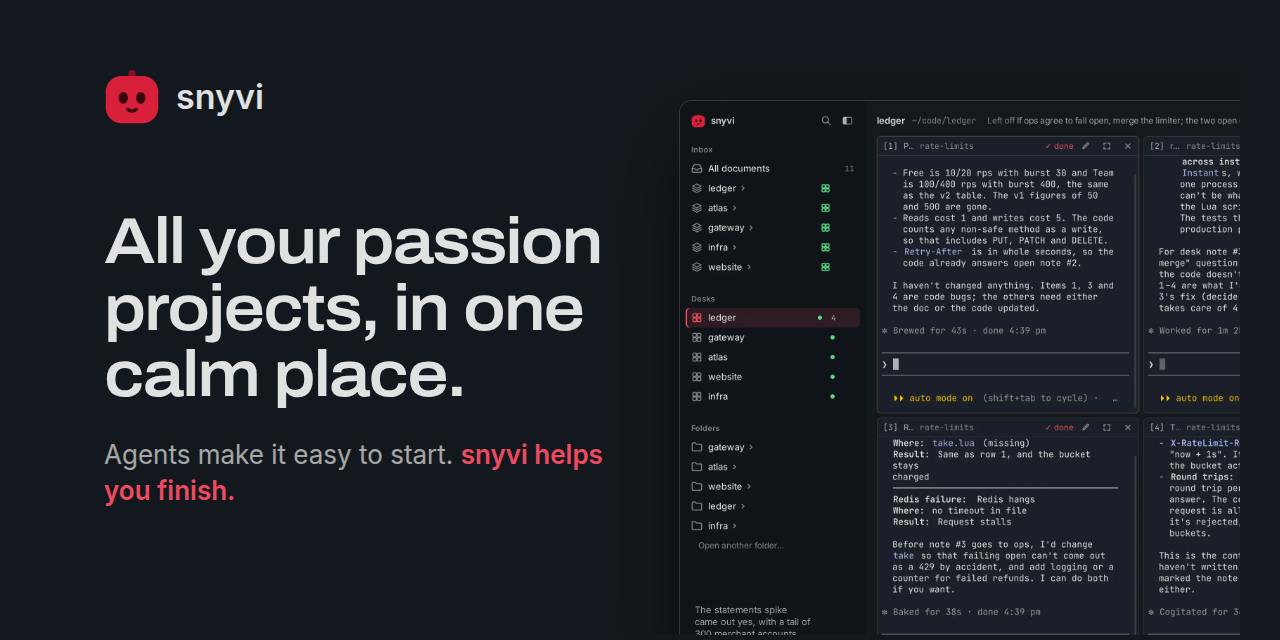
This design treats "project context" as a first-class citizen. The traditional approach is to open multiple terminal windows, take notes by hand, and dig through chat logs for plans; snyvi consolidates all of this into a single interface, reducing the cognitive load of switching. The official description emphasizes "calm," hinting that its target users are developers overwhelmed by running many projects in parallel.
Side-by-Side Agents and Versioned Pages
Running up to four agents side by side means you can have Claude Code handle implementation, Codex do code review, Gemini offer a second opinion, or even open a shell for manual work. Every plan or review produced by an agent is saved as a versioned page, so it won't get lost as the conversation scrolls by. This mechanism is especially useful for side projects where you need to trace "why this decision was made."
Local-First and Open Source: Your Data Never Leaves Your Machine
snyvi is explicitly labeled as local only, requires no account, and is released under the MIT license. This choice is notable at a time when AI tools generally demand cloud accounts and subscriptions. For side projects, code and notes often contain personal ideas and unreleased concepts, so local storage reduces privacy concerns. The MIT license means users can freely modify and distribute it, or even build their own tools on top of it.
Local-first is a software architecture philosophy in which an app's core data and primary computation happen on the user's device rather than relying on remote servers. It emphasizes offline availability, low latency, and user data sovereignty, typically implemented with end-to-end encryption or local storage. Unlike traditional cloud SaaS, local-first tools remain fully functional without a network, with syncing serving only as an optional enhancement. In the coding agent context, local-first means agent calls, project files, and conversation records all stay on the local machine, reducing the risk of leaking sensitive code—though it may also limit cross-device collaboration and team sharing.
The MIT license is a permissive open-source software license that allows users to freely use, copy, modify, merge, publish, distribute, sublicense, and sell copies of the software, with the sole requirement that the original copyright and license notices be retained when redistributing. It does not require derivative works to be open source (non-copyleft), making it highly business-friendly. For a tool like snyvi, the MIT license means developers can integrate it into their own commercial products or modify its interface and features to suit their needs without legal obstacles. It also lowers the barrier to community contributions, which helps early-stage projects build an ecosystem.
Platform Coverage and a Request for Mac Testing
snyvi currently offers a Mac build that is signed and notarized, but the developer candidly admits on the Product Hunt page that "we don't have a Mac" and is publicly asking Mac users to test it and provide feedback. This detail reflects a typical situation for indie developers: the features are ready, but hardware coverage is incomplete. For Windows and Linux users, official information does not clearly state support status, so it may be worth watching for future updates.
Signing and notarization are macOS security mechanisms for app distribution. Signing means the developer uses a certificate issued by Apple to digitally sign the app, ensuring it hasn't been tampered with and comes from a trusted source; notarization means submitting the app to Apple's automated system for malware scanning, after which Apple issues a ticket so the app opens smoothly even with Gatekeeper enabled. Unsigned or unnotarized apps are blocked from running on macOS or trigger warnings. snyvi has completed both steps, indicating that its Mac build meets Apple's baseline security requirements, so users can install it without manually bypassing system restrictions.
Who Is snyvi For?
By design, snyvi targets developers who use coding agents to push multiple side projects forward at the same time. If you're used to running one agent in a terminal, tracking plans in a note-taking app, and hunting for code in a file manager, the integration snyvi offers may reduce friction. But if you only maintain a single project, or prefer the agent integrations built into your IDE, its extra layer of abstraction may not be necessary.
With 73 upvotes and 2 comments on Product Hunt, it's clear snyvi is still in its early stages with limited community feedback. As an open-source tool, its long-term value depends on future iterations and community involvement. For Mac developers willing to try something new, now is the perfect time to test it and influence the product's direction.
Coding agents refer to AI systems that can understand natural-language instructions and autonomously execute programming tasks, such as Claude Code, Codex, and Gemini. They typically run as command-line tools or IDE plugins and can read project files, write code, run tests, review changes, and even plan multi-step tasks. Unlike traditional code completion tools, coding agents emphasize end-to-end task execution and context understanding. When multiple agents run in parallel, coordinating their division of labor, avoiding conflicts, and preserving decision records become new management challenges—which is exactly what snyvi tries to solve through its "desk" and versioned pages.
Editorial Take
snyvi's angle isn't stronger agents but the collaboration interface between agents. As coding agents move from one-off conversations to ongoing projects, the need for a "workspace" to manage multiple agents and multiple projects will gradually emerge. Local-first and the MIT license are differentiating advantages, but the lack of cross-platform support and early-stage maturity are clear shortcomings. Whether it can become the default workspace for side-project developers depends on when Windows/Linux versions arrive and whether core features like versioned pages are smooth enough in real-world use.
One-line Summary
snyvi gives each side project its own desk, integrating multiple coding agents with versioned notes.
Paragraph Summary
snyvi is a free, open-source desktop app designed to solve the management chaos that arises when developers use coding agents to work on multiple side projects in parallel. It assigns each project a "desk" that centrally houses the project folder, up to four coding agents running side by side (supporting Claude Code, Codex, Gemini, and shell), and project notes. Plans and reviews generated by agents are automatically saved as versioned pages, and the home screen shows where each project last left off for quick context recovery. snyvi runs locally, requires no account, and uses the MIT license, emphasizing privacy and modifiability. Currently only a signed and notarized Mac build is available, but the developer lacks a Mac device and is publicly requesting test feedback; Windows and Linux support remains unclear. The product is in its early stages and is well suited to developers willing to try it out while using multiple coding agents on side projects.
Related articles

From Photons to Production: An Open-Source Computer Vision Engineering Reading Path
Reddit user open-sources a computer vision engineering reading path with 16 chapters from image formation to production deployment, emphasizing primary sources, dependency order, and reproducible benchmarks to help engineers understand why models fail and build reliable vision systems.

Prompt Failures? The Truth About Why AI Agents Struggle in Production—and How to Fix It
A Reddit developer built Agents with Copilot and Gemini but faced unstable behavior. This article analyzes three gaps in prompt engineering for Agent scenarios and offers three practical paths to reliable Agent deployment, including structured prompts, workflow-first approaches, and building an evaluation loop.

Tesla Robotaxi to Open Private Vehicle Access Next Year: Promise or Pipe Dream?
At its Q3 earnings call, Tesla said owners can add their cars to the Robotaxi fleet next year. We analyze the technical basis, Musk's missed deadlines, business logic, and competition.