Sonari: Create Music on Mac with Air Gestures
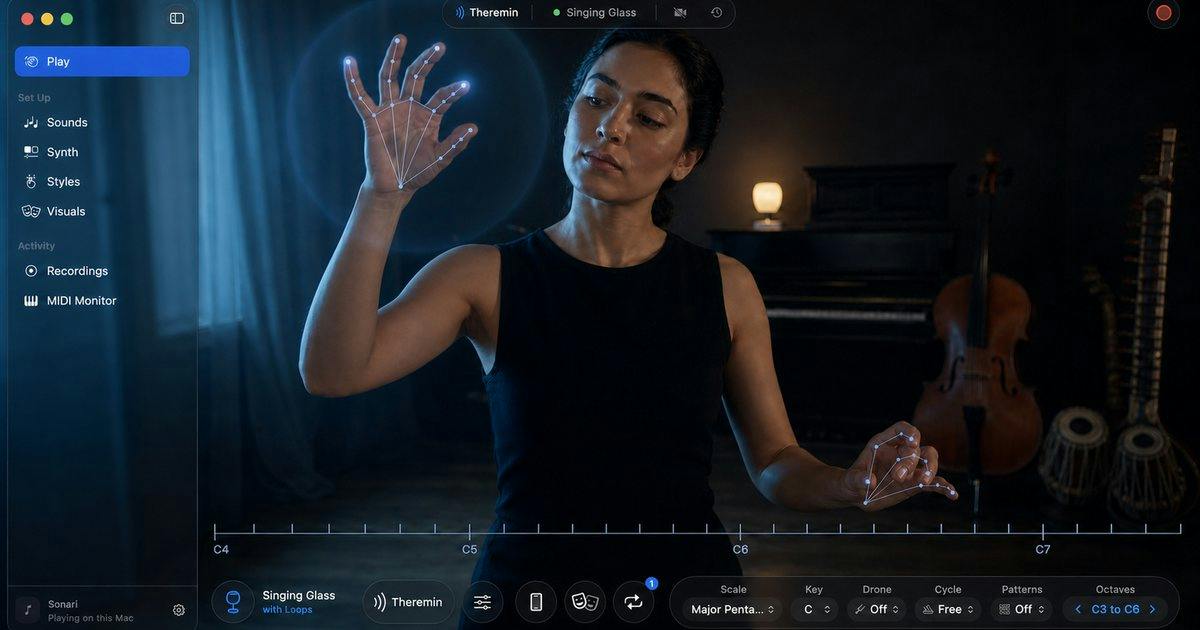
Sonari turns hand gestures into instruments and MIDI control signals using your Mac camera—no extra hardware required.
Sonari is a Mac app by indie developer Shubhra Saha that uses camera-based hand tracking to map movements into sound parameters or MIDI control messages. Users can play built-in sounds directly or send gestures to compatible DAWs as a modulation tool. It features 17 performance styles, a camera-free Key Deck mode, and music-driven visuals, positioning it as a performable instrument rather than a pure utility. It requires Apple silicon and macOS 26+, and offers a 14-day free trial. Gesture precision, latency, and MIDI mapping flexibility still need real-world verification.
Title
Sonari: Create Music on Mac with Air Gestures
Meta Description
Sonari is a gesture-based instrument and MIDI controller for Mac, featuring 17 performance styles, music-driven visuals, and a camera-free Key Deck mode that sends gestures directly to your DAW. This article covers its features, system requirements, and use cases.
Article Content
Making music on a Mac usually means keyboards, mice, and MIDI controllers. Sonari, newly launched on Product Hunt, wants to take a different path: turning your hands into an instrument. Built by indie developer Shubhra Saha, the app combines gesture recognition with music creation—you can play built-in sounds directly, or convert your movements into MIDI signals and send them to a DAW. Since launch, it has picked up 77 upvotes and 6 comments, ranking 19th on the day's leaderboard and drawing attention from music tech enthusiasts in the Mac and audio categories.
How Gestures Become Music
The core logic behind Sonari isn't complicated: it captures hand movements through your Mac's camera, then maps those movements to sound parameters or MIDI control messages. The app ships with 17 performance styles covering different musical genres, so users can "play" without any additional hardware. For producers accustomed to traditional workflows, the more practical feature is its ability to send MIDI directly to compatible DAWs—meaning you can use gestures as an alternative modulation tool, recording automation curves or triggering timbre changes.
This design approach sits at an interesting intersection. Gesture control isn't a new concept—devices like Leap Motion attempted similar directions years ago—but they typically required extra hardware and dedicated integration. Sonari chooses to use the Mac's built-in camera for recognition, lowering the barrier to the software level, which is the key differentiator from similar solutions.
DAW (Digital Audio Workstation) and MIDI Signals
DAW stands for Digital Audio Workstation, referring to software platforms used for recording, arranging, mixing, and mastering—common examples include Logic Pro, Ableton Live, and FL Studio. MIDI (Musical Instrument Digital Interface) is a protocol standard that lets electronic instruments, computers, and controllers communicate with each other. It doesn't transmit sound itself, but rather performance instructions like "which note, what velocity, how long it lasts," along with CC (Control Change) parameters—the latter often used to control volume, pan, filter cutoff frequency, and more. Sonari translates camera-captured gestures into MIDI messages, effectively making gestures recordable and editable automation data within a DAW—this is the technical foundation that allows it to integrate into existing production workflows.
Leap Motion and Gesture Recognition Technology Paths
Leap Motion is a gesture-tracking device that emerged around 2013, using infrared sensors to capture three-dimensional hand and finger movements. It was widely used in VR, interactive art, and music experiments. The difference from Sonari lies in the technology path: Leap Motion relies on specialized hardware for depth sensing—high precision but requiring additional purchase and integration; Sonari uses the Mac's built-in standard RGB camera and relies on computer vision models (such as hand keypoint detection) to infer gestures. The latter is low-cost and requires no peripherals, but is more sensitive to lighting conditions, hand occlusion, and background complexity, and typically offers less precision and higher latency than dedicated hardware. Understanding this technological lineage helps assess the trade-offs Sonari has made between "convenience" and "reliability."
Play Without a Camera: Key Deck Mode
Not everyone wants to have their camera on while creating. Sonari offers a camera-free mode called Key Deck, which operates sounds and visuals in a more traditional way. This design shows the developer's consideration of use cases—gesture performance is cool in demos, but when you actually sit down to arrange music, stability and repeatability often matter more. Key Deck essentially gives users a fallback option, and also keeps the app usable in privacy-sensitive or poorly lit environments.
Sound and Visual Integration
Beyond serving as a MIDI controller, Sonari is itself a standalone instrument app: built-in sounds can be played directly, accompanied by music-driven visuals. This "audio-visual synchronization" positioning makes it closer to a performable instrument rather than just a utility plugin. For livestreaming, improvisational performances, or content creation scenarios, this kind of visual feedback enhances the entertainment value of a performance—and it's also what distinguishes Sonari from pure MIDI tools in terms of product positioning.
Hardware and System Requirements
Sonari has clear requirements for its runtime environment: it needs an Apple silicon Mac and macOS 26 or later. This means Intel Mac users cannot use it, and those on older system versions will need to upgrade first. Given that Apple silicon has been rolled out for several years, this threshold isn't particularly demanding for most active creators, but it does shut out some potential users. The app offers a 14-day free trial, allowing users to thoroughly verify how gesture recognition performs in their own environment before paying.
Apple silicon and macOS 26
Apple silicon is the series of self-designed chips (M1, M2, M3, M4, etc.) that Apple has been gradually using to replace Intel processors across its Mac lineup since 2020. Based on ARM architecture, its Neural Engine significantly accelerates running machine learning models locally. Sonari's requirement for Apple silicon is likely related to the real-time hand recognition model it depends on—performing frame-by-frame inference on a camera video stream requires sufficient compute power to minimize latency. macOS 26 is the system version following Apple's recent change to its version numbering scheme, and newer system APIs (such as camera permission management and graphics frameworks) may also be prerequisites for the app to run. For users still on Intel Macs, this means switching machines or finding alternatives.
Several Questions Worth Noting
Based on currently available information, Sonari's positioning is clear, but several questions remain to be verified through hands-on experience. Gesture recognition latency and precision directly determine whether it can be used for serious creation, and no specific figures for these two metrics have been provided in promotional materials. Additionally, the flexibility of MIDI mapping—whether users can customize the correspondence between gestures and CC parameters—also determines its upper limit in professional workflows. The small number of comments (6) indicates that early user feedback is still limited, and the product remains in an early stage of market validation.
For Mac musicians interested in trying new interaction methods, Sonari offers a low-cost path to exploration: no hardware purchase needed—just download the trial to determine whether gesture control suits your creative habits. It may not replace keyboards and knobs, but as a complementary expressive tool, its approach is worth watching.
One-line Summary
Sonari turns gestures into instruments and MIDI control signals using your Mac camera, no extra hardware needed.
Paragraph Summary
Sonari is a Mac app by indie developer Shubhra Saha that uses camera-based hand tracking to map movements into sound parameters or MIDI control messages—users can play built-in sounds directly or send movements to compatible DAWs as a modulation tool. The app includes 17 performance styles, offers a camera-free Key Deck mode as an alternative, and features music-driven visuals, positioning it closer to a performable instrument than a pure utility. It requires an Apple silicon chip and macOS 26 or later, with a 14-day free trial. The article notes that gesture recognition precision, latency, and MIDI mapping customization flexibility still need real-world verification, and early user feedback remains limited.
Related articles
 Tech Frontiers
Stylome Bot Slammed as Useless Junk: Why Do AI Detection Tools Keep Failing?
Reddit users test the Stylome AI detection bot: Gemini-rewritten text judged human-written, consistently low confidence. An analysis of AI text detection's technical dilemmas, privacy concerns, and credibility crisis in community governance.
 Tech Frontiers
When AI Becomes a Productivity Divide: Clarity or "AI Psychosis"?
A civil engineer's deep use of agentic AI boosted efficiency but bred contempt for peers who refuse to learn. Is this clarity or AI psychosis? An analysis of the cognitive and psychological challenges behind the AI productivity divide.
 Tech Frontiers
Opus 5.5 Benchmark Scores Climb, Community Says Its "Weights Are Blessed"
Reddit community discusses Opus 5.5's rising scores on the Benchmaxxing Bench, with users describing its performance as "weights are blessed." This article interprets the community reaction and cautions against conflating benchmark scores with real capability.