Starkomand: Run Multiple AI Coding Agents in Parallel on an Infinite Canvas

Starkomand orchestrates multiple AI coding agents on an infinite canvas to tackle multi-agent scheduling bottlenecks.
Starkomand, ranked #20 on Product Hunt, runs multiple AI coding agents (Claude Code, Codex, Cursor) simultaneously on an infinite canvas, replacing linear chat with spatial orchestration. Features include auto model selection, voice interaction, one-click handoff, status summaries, and browser previews, with no account or subscription. Multi-agent parallelism can cut serial wait times, but conflict resolution remains unclear—trial with caution.
AI coding agents are evolving from standalone tools into "digital team members" in collaborative workflows. But when multiple agents run simultaneously, efficiently orchestrating and monitoring their workflows becomes a new efficiency bottleneck. Starkomand, a new product ranked #20 on Product Hunt, aims to solve this with an "infinite canvas": it lets you run multiple AI coding agents simultaneously on a single canvas—including Claude Code, Codex, and Cursor—without any additional subscription.
Infinite Canvas: From Linear Chat to Spatial Orchestration
Traditional AI coding tools typically present interactions in a linear chat window, focusing on one task at a time. Starkomand places agents on an infinite canvas, where each agent occupies a node that you can freely drag, zoom, and group—essentially mapping the time dimension of task flows onto a spatial dimension. According to the product page, users can launch multiple agents simultaneously on the canvas and pass work from one agent to another with a single click. This spatial orchestration avoids the fragmented experience of constantly switching tabs and intuitively visualizes task dependencies.
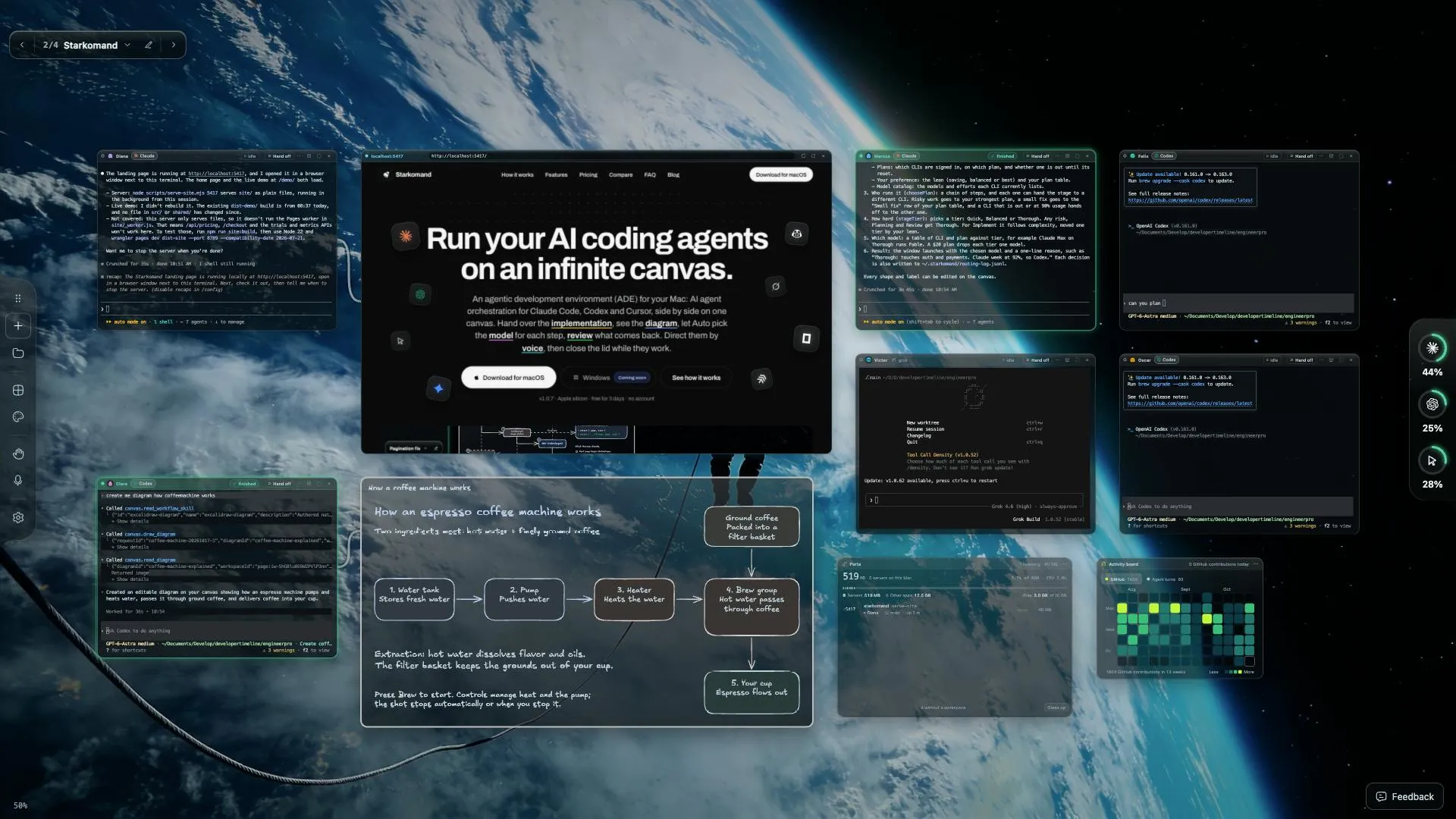
CLI agents (command-line agents) refer to AI coding assistants whose primary interaction mode is the command-line interface, such as Claude Code, Codex CLI, and Cursor's terminal mode. Unlike IDE plugins or chat windows, CLI agents typically run in the terminal, can directly read and write the file system, execute shell commands, run tests, and drive multi-step operations via natural language instructions. They often support long-running and background tasks, making them better suited for "orchestration" than turn-by-turn conversation. By visualizing these agents, Starkomand essentially provides a unified control panel, so users don't have to switch back and forth between multiple terminal tabs while preserving CLI agents' full control over the local environment.
Core Features: Automatic Model Selection, Voice Interaction, and Real-Time Preview
Starkomand's features are built around "reducing operational friction." First, Auto mode automatically selects the best model for each task, so users don't have to manually switch between Claude, GPT, or other models. Second, voice interaction lets you speak directly to any agent—ideal for issuing quick instructions while thinking or with your hands off the keyboard. Third, task handoff takes just one click—for example, after one agent finishes generating code, click to pass its output to another agent for testing. Fourth, a quick summary appears next to each agent, telling you what it did and what it needs from you. Fifth, charts and browser previews can be displayed right next to agent nodes for easy verification of results. Product Hunt comments show that early users are interested in the feature where "agents keep working after you close your laptop," implying background continuous operation capability.
Potential Value and Challenges of Multi-Agent Collaboration
Multi-agent parallelism can compress the wait time of serial tasks—for example, one agent writes the API, another writes the frontend, a third writes tests, and then they pass results to each other. But this also raises new questions: how do you avoid conflicts between agents? Starkomand's "one-click handoff" may simply feed output as input rather than achieving true concurrent conflict resolution. According to the product description, it supports "plans you're already paying for," meaning users don't need extra subscriptions, which lowers the cost of trying it out. However, the maximum number of agents on the infinite canvas, resource consumption, and collaboration latency are not yet specified in publicly available information.
Concurrent conflict resolution is a key engineering problem in multi-agent systems. When multiple agents modify the same codebase simultaneously, issues such as file lock contention, edit overwrites, dependency version mismatches, or interfering test results can occur. Common strategies include: file- or directory-based locking mechanisms, message passing and negotiation between agents, version control branch isolation, and a scheduler that uniformly allocates task boundaries. Starkomand's "one-click handoff" is closer to a serial pipeline than true parallel collaboration, so its conflict handling capability depends on whether the underlying agents share a workspace and whether there is a state synchronization layer. When evaluating such tools, focus on whether agents run in isolated environments, whether outputs go through merge review, and whether failures can be rolled back.
Lightweight Model: No Account, No Subscription
Starkomand explicitly states "no account, no subscription," which stands out in an era where AI tools are overwhelmingly subscription-based. Its business model may be freemium or open source, but the Product Hunt page provides no pricing details. The maker is Rashid, and the official website link points to Product Hunt. For developers who value data privacy or want to avoid vendor lock-in, the no-account model is appealing, but it may also limit advanced features such as cloud sync.
Freemium is a common software business model: basic features are free, while advanced features (such as cloud sync, team collaboration, history, and more concurrent agents) are charged via subscription or one-time purchase. Starkomand's "no account, no subscription" label may mean that core orchestration features run entirely locally without relying on vendor servers, thereby reducing privacy risks and the barrier to trying it. But this also raises sustainability concerns: without a paid tier, development and maintenance may rely on the open-source community or a future enterprise edition. For users, it's worth checking whether the free version limits the number of agents, canvas size, or background runtime, and whether data stays entirely local.
Getting Started Tips and Use Cases
If you're already using CLI agents like Claude Code, Codex, or Cursor, Starkomand can serve as a visual orchestration layer to help you organize multiple agents on a single canvas. Suitable scenarios include: parallel development of multi-module projects, tasks that require frequent switching between code generation and code review, and developers who want to quickly capture ideas by voice. However, with only 4 comments so far, community feedback is limited. It's advisable to start with a small-scale trial and pay attention to stability and the reliability of inter-agent communication.
Overall, Starkomand reimagines the operating interface for AI coding agents with a spatial canvas, elevating multi-agent collaboration from command-line scripts to a visual artifact. Its value lies not in improving the intelligence of any single agent, but in orchestration efficiency. If it can later solve state synchronization and conflict detection between agents, such tools could become a standard component of AI-native development environments.
One-line Summary
Starkomand uses an infinite canvas to orchestrate multiple AI coding agents, aiming to solve the efficiency bottleneck of multi-agent scheduling.
Paragraph Summary
Starkomand is a new product ranked #20 on Product Hunt that lets you run multiple AI coding agents (Claude Code, Codex, Cursor, etc.) simultaneously on an infinite canvas, replacing linear chat windows with spatial orchestration. Core features include automatic best-model selection, voice interaction, one-click task handoff, agent status summaries, chart and browser previews, and agents continuing to work in the background after you close your laptop. The product uses a no-account, no-subscription model that lowers the barrier to trying it, but pricing and advanced feature details are not public. Multi-agent parallelism can compress serial wait times, but conflict resolution and state synchronization mechanisms between agents remain unclear, and community feedback is only 4 comments—so a small-scale trial is recommended. Overall, its value lies in orchestration efficiency rather than single-agent intelligence improvements.
Related articles
DeepSeek Open-Sources DeepInfer: What Is an Inference Framework Actually For?
DeepSeek open-sources its inference framework DeepInfer under Apache 2.0, supporting DeepSeek V4.1 Flash offline inference. This article explains its request scheduling, FlashMLA/DeepGEMM compute optimization, DSPark speculative verification acceleration, and what it means for developers and ordinary users.
Open-Source AI Learning Agent: A Full Workflow Experience from Topology Graphs to Exam Generation
Explore an open-source AI learning agent: built on DeepSeek API, it constructs knowledge systems via topology graphs, with automatic document generation, notes, super documents, and exams. Learn about its Agent workflow and design highlights.

DeepSeek Whale Girl Open-Source MV Meme: AI Industry Coded Slang About Pivoting to Closed Source
Bilibili's DeepSeek Whale Girl rap MV uses fictional memes to tease the AI open-source vs. closed-source debate, with lyrics full of industry slang. This article explains the meme culture, the Whale Girl symbol, and the open/closed tension.