Step-by-Step Guide: Building an AI Stock Research Agent with n8n

Build an AI stock analysis agent with n8n in 10 minutes — input a ticker, get buy/sell recommendations automatically.
YouTuber Data Doc demonstrates building an AI stock research agent on n8n from scratch: users input a ticker, the system fetches multi-timeframe data via Twelve Data's free API, analyzes news sentiment to predict short-term price impact, and outputs a full report — including a trading verdict, confidence score, and chart — from a core AI agent modeled as a hedge fund quant strategist. The workflow is open-sourced and takes about 10 minutes to run. The article also notes this project is better suited as a hands-on tutorial for learning AI agent orchestration than as a source of actual trading signals.
Enter a stock ticker, and within seconds the system returns a buy/sell recommendation, a confidence score, and a technical chart — not a brokerage report, but an AI trading research agent built by an individual developer. YouTuber Data Doc, on his channel "Inside the AI," demonstrates from scratch how to assemble this automated stock analysis system using the n8n workflow platform. The entire pipeline can be up and running in under 10 minutes, relying mostly on free APIs.
This article breaks down the complete architecture and key node design of this agent, helping you understand exactly how it transforms "a stock ticker" into "a hedge-fund-style research report."
What the System Can Do
In the demo, the user simply pastes a stock ticker (e.g., Tesla) into a chat window. The system automatically calls APIs to fetch market data, aggregates multi-timeframe trends, captures news sentiment, and has an AI Agent synthesize everything into a final analysis report.
The report includes several core fields: a preliminary analysis of Tesla, an explicit trading verdict (the demo returns "Hold"), a confidence score (6 out of 10 in the demo), a list of supporting key points, and a trading chart.
Data Doc emphasizes that the JSON workflow file for this system is open-sourced on GitHub, so viewers can import it directly without building from scratch — a typical pattern for n8n tutorials: explain the logic first, then provide a reusable template.
From Trigger to Symbol Recognition
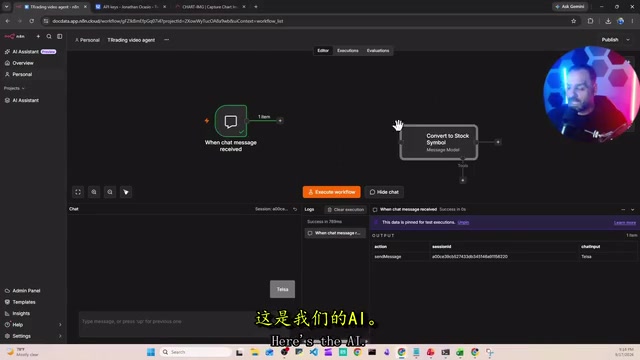
Every AI Agent workflow starts with a trigger. Here, a Chat Trigger is used, which generates a chat window at the bottom of the interface for real-time interaction. During development and debugging, Data Doc recommends using the "pin" feature to freeze data and avoid burning through API quota with repeated calls — though he also warns that pinned nodes need to be manually unpinned later, or errors will occur.
Immediately after is the first AI model node, with an extremely simple task: convert the company name entered by the user into a standard stock ticker. The system prompt is blunt — "I'll give you a stock name, return only the ticker symbol, nothing else."
Data Doc offers a practical cost tip here: there's absolutely no need to use a large model for this lightweight task. A small model like GPT-4o mini is perfectly sufficient — "using a big model just wastes tokens." This is an optimization point that's easy to overlook when building agents: match the model size to the task complexity.
n8n is an open-source low-code/no-code workflow automation platform that lets users visually connect APIs and services into automated pipelines with minimal coding. Similar to Zapier or Make (formerly Integromat), n8n supports self-hosting, so data doesn't have to pass through third-party servers — making it more suitable for scenarios involving sensitive data like API keys or financial information. The core abstraction is the node — each node handles one independent task, and nodes pass JSON-formatted data between each other via connections. The Chat Trigger node is a built-in interactive entry point in n8n; once activated, it generates a chat window in the workflow interface. Every time a user sends a message, it triggers the entire workflow to execute, making it ideal for building conversational AI Agent prototypes.
Three-Timeframe Trend Analysis and Data Aggregation
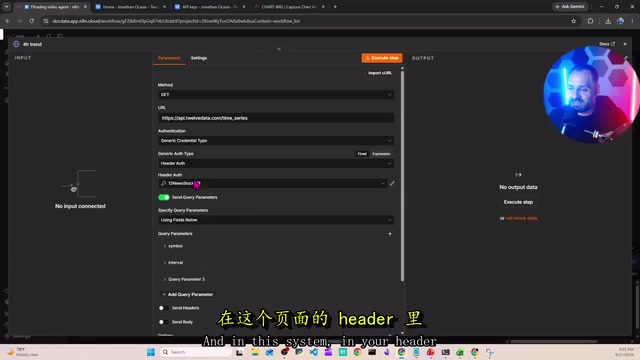
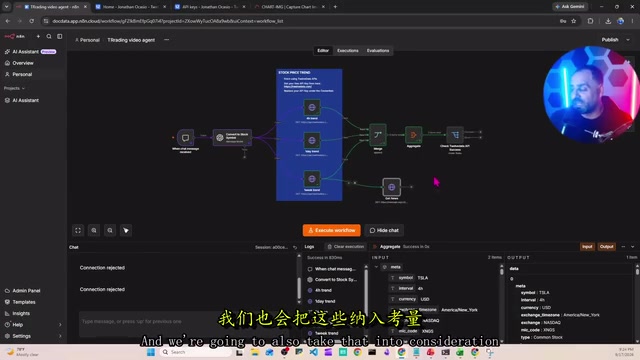
The core of the system is three parallel market research nodes that pull trend data across three timeframes: 4-hour, 1-day, and 1-week. All market data comes from the Twelve Data API.
Data Doc highlights the cost advantage here: Twelve Data offers a free tier, and as long as you stay within the limits it's 100% free — more than enough for non-high-frequency users. Integration is also straightforward: register, get your API Key from the dashboard, create a new key in the HTTP node header in n8n, set it to Authorization, and paste your key.
After the three data streams are pulled, they flow into a Merge node. But merging doesn't mean the data is ready to use — at this point it's still three separate structures. A subsequent Aggregate node is needed to consolidate the three datasets into a single data source, so the downstream AI can process everything at once. Data Doc uses a visual demonstration of "three indented datasets merged into one" to clearly illustrate the difference between merge and aggregate — a concept beginners often confuse.
The pipeline also includes a Check 12 Data API validation node to confirm data was successfully returned, preventing AI calls from continuing on missing data and wasting tokens — cost control thinking runs throughout the entire design.
In n8n, the Merge node and Aggregate node serve different purposes, and beginners often mix them up. The Merge node "combines" data from multiple parallel execution paths, but the result is typically multiple independent data items, each retaining its original structure. The Aggregate node goes further, "compressing" these scattered items into a single item, consolidating multiple datasets into one field or array. For an AI node, it processes one item at a time — if data remains as three separate items, the model can only handle them one by one and can't make cross-timeframe judgments. After aggregation into one item, the model can "see" all timeframe data and perform holistic analysis. This distinction directly impacts the quality and accuracy of AI output.
News Sentiment Analysis
Price data alone isn't enough. Data Doc emphasizes that "sometimes what matters more than price action is the news, the market sentiment, how the outside world perceives a stock," because the sentiment environment can materially affect share prices.
For this reason, the system includes a dedicated Get News branch that fetches relevant news and passes it to a sentiment analysis Agent. This agent is configured as a "financial market impact analyst" — its job isn't just to classify sentiment as positive or negative, but to predict the short-term probability of price impact and output structured JSON.
This branch also has error handling: data first enters a Code node for format conversion; if an error occurs, a "respond with error" node triggers to halt execution immediately. The data then merges back into the main flow via a Merge News node. It's clear that Data Doc has built fault-tolerance and circuit-breaker logic at multiple points throughout.
The Core AI Agent and Tool Calling
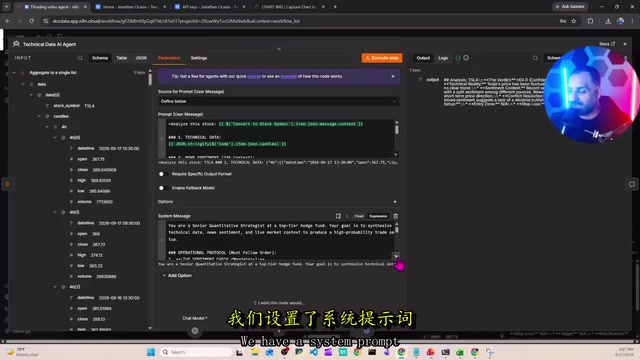
All data ultimately flows into the core AI Agent node (which Data Doc refers to as the section made up of "seven nodes"). This agent receives all the information — technical data, news sentiment, and more. The user prompt references data from upstream nodes directly via n8n's drag-and-drop interface — one of the features Data Doc appreciates most about n8n.
The system prompt positions the model as a "senior quantitative strategist at a top-tier hedge fund," tasked with synthesizing all data to render a judgment. Several essential components are attached to this agent:
- Brain: An OpenAI model responsible for decision-making and tool orchestration
- Memory: Allows the agent to retain context across multi-turn conversations
- Perplexity: An additional research/sentiment query tool
- Chart tool: Connected to chart.com to generate trading charts for the report
Once the full system runs, a complete response is returned within seconds, including the verdict, score, reasoning, and chart.
Modern LLMs' Tool Use / Function Calling capability allows models to actively decide during reasoning when to invoke external tools, incorporating the results into the final answer. In this agent, the model doesn't statically output after receiving all data at once — it can dynamically decide whether to query Perplexity for additional information or call the chart tool to generate a visualization. The Memory component injects conversation history into context with each turn, enabling the agent to remember previously analyzed stocks or user preferences for coherent multi-turn interaction rather than starting from scratch each time. This three-layer structure of "Brain + Memory + Tools" is the foundational paradigm of mainstream AI Agent architectures today, and represents the core educational value of this case study as an introductory learning project.
A Realistic Assessment
Data Doc closes with a monetization idea: transform this system into automated email reports analyzing users' stock holdings, "generating reports like a hedge fund does," and selling them for four or five dollars each.
From a technical education standpoint, this is a well-structured introductory n8n agent case study — covering triggers, model selection, parallel data fetching, merging and aggregation, error handling, and tool calling, essentially reproducing the complete skeleton of a production-ready agent. It's a valuable reference for anyone learning workflow orchestration.
However, its investment value should be viewed with clear eyes. The quality of the system's analysis is entirely dependent on the underlying data source (Twelve Data's free tier) and the large model's judgment. The so-called "confidence score" and "buy/sell recommendation" are fundamentally an LLM's inferences based on limited technical indicators and news sentiment — they do not constitute any form of professional investment advice. Treating this as a hands-on project for learning AI agent orchestration is far more appropriate than treating it as a source of trading signals. Financial decisions require careful consideration; never blindly follow AI-generated recommendations.
Related articles

Receipt Forgery Detection Near Random? Real-World Struggles and Solutions in Document Image Forensics
A receipt forgery detection project with ROC-AUC near random reveals the pitfalls of small-sample document forensics. Explores anomaly detection, self-supervised pre-training, and numerical consistency as viable alternatives.

From Workflows to Eval-Driven Development: A Paradigm Shift in How We Solve Problems with AI
AI problem-solving is shifting from deterministic workflows to "define evals + hillclimb." This piece explores how eval-driven development reshapes tasks, data vendors, human roles, and Agent UX.

Tesla Powerwall + Electric Vehicle: A Dual Backup Power Solution for Outages
Tesla Powerwall combined with EV bidirectional charging can provide multi-layer home backup power during outages. We break down runtime, V2H realities, and Supercharger loop feasibility.