Step-by-Step Guide to Your First Google Cloud Skill Badge: Registration, Labs, and 200 Credits

Complete one free lab in the GeeksforGeeks x Google program to unlock 200+ credits and earn a Google Cloud skill badge.
This article introduces a free Google Cloud certification program for beginners, launched through a GeeksforGeeks and Google partnership. Participants fill out a Google Form, select GeeksforGeeks as their partner, and receive an enrollment email with an access code (with a backup retrieval link if delayed). On skills.google, completing the zero-cost introductory lab "A Tour of Google Cloud Hands-on Labs" unlocks ~209 free credits for further labs covering GCP basics, Vertex AI, Gemini, Kubernetes, and AI Agent deployment. Earned badges can be showcased on résumés and LinkedIn. Note: users with existing Google Skills accounts should create a new one to avoid credit redemption conflicts.
Getting Started with Google Cloud Skill Certification
This live session centers around a community learning program launched through a partnership between GeeksforGeeks and Google. The core goal is to help beginners complete registration, claim free credits, and finish their first hands-on lab — ultimately earning a skill badge they can add to their résumé and showcase on LinkedIn.
The entire program is completely free. The presenter emphasized this repeatedly and walked through every key step live, from filling out the Google Form to launching the lab environment. For learners who want to get started with AI, machine learning, and the Google Cloud toolchain, this is a practical, low-barrier entry point.
Step 1: Fill Out the Registration Form
Registration begins with a Google Form. The presenter demonstrated the full process: navigate to the registration page, scroll to the bottom to enter your email address, accept the terms, then fill in your full name, gender, and other basic information.
Key Fields: Partner Name and Referral Code
Under "select your partner name," choose GeeksforGeeks. The form will generate a referral code — copy it and paste it back into the corresponding field. Then fill in your institution name (your company if you're employed, or your school or university if you're a student) and check the appropriate identity type.
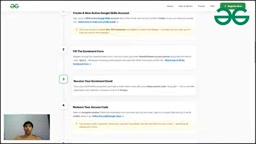
After submitting, the system sends an enrollment email to the address you provided. The presenter made two important notes: first, double-check that your email address is correct; second, the email can sometimes end up in your spam folder, so be sure to check there. The email typically arrives within one to several days of submitting the form, though in some cases it may take up to seven days.
What If You Don't Receive the Email?
For cases where the enrollment email is taking too long, the presenter pinned a dedicated retrieval link in the chat. Simply enter the email address you used when filling out the form, click the "Get Code" button, and you'll receive your access code directly. This backup channel bypasses any email delay issues and was one of the most practical tips shared during the session.
Step 2: Complete Your First Hands-On Lab
Once you have your access code, the next step is to head over to the skills.google platform and complete a lab.
Find "A Tour of Google Cloud Hands-on Labs"
If you don't have a direct link to the lab, search for A Tour of Google Cloud Hands-on Labs in the platform's search bar — it's a self-paced lab. This introductory lab costs zero credits to complete and actually serves as a prerequisite for unlocking 200 credits.
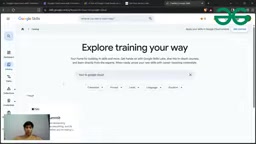
The lab page explains how to create a virtual machine, which components are involved, and the estimated time to complete. Along the way, there are multiple-choice questions (MCQs) that you answer based on what you've read before submitting.
skills.google (also known as Google Cloud Skills Boost, formerly Qwiklabs) is Google's official cloud skills training platform, offering hundreds of hands-on labs that run in real GCP environments. Unlike video courses, the platform temporarily provisions a dedicated Google Cloud project and credentials for each lab. Learners perform real operations inside an isolated sandbox, and the environment is automatically destroyed after the lab ends — no extra charges incurred. The platform uses "credits" as the consumption unit, with different labs requiring different amounts. The introductory lab, "A Tour of Google Cloud Hands-on Labs," is the only lab that starts at zero cost and actually rewards credits in return, making it the standard first step for all learning paths.
Starting the Lab and Using Your Login Credentials
After clicking "Start Lab," the system will provision a set of temporary login credentials (username and password). Follow the prompts to open Google Cloud Console in an incognito/private browsing window and sign in with those credentials to enter the hands-on environment. The presenter recommended following the detailed video guide on the page step by step, as walking through the full process live during the stream would take too long.
Once the lab is complete, head to your Google account's credits page and you'll see the promised approximately 209 credits have been deposited. These credits can be used for additional labs, letting you progressively build up skill certifications.

One Important Note: Consider Using a Brand-New Account
An audience member asked: they already have a Google Skills account and receive roughly 35 credits per month — can they still participate in this program?
The presenter's advice: while not mandatory, creating a brand-new account is strongly recommended. The reason is that existing accounts may have conflicts with this program, preventing credits from being redeemed. A fresh account largely avoids these redemption issues. This is a useful tip worth keeping in mind.

What You'll Learn from These Badges and Credits
The skill badges earned after completing the series of labs can be added to your résumé and displayed on LinkedIn, boosting your visibility and competitiveness in the job market. More importantly, the lab content itself covers a highly practical tech stack:
- GCP (Google Cloud Platform) fundamentals
- Working with Vertex AI
- Hands-on practice with Gemini and other cutting-edge models
- Kubernetes container orchestration principles
- Building and deploying AI Agents from scratch
For working developers, learning to build and deploy an agent for a specific task from the ground up is a genuinely valuable practical skill.
Vertex AI is Google Cloud's unified machine learning platform, integrating tools for data preparation, model training, hyperparameter tuning, deployment, and monitoring — allowing developers to build and ship ML models without managing the underlying infrastructure. Gemini is Google's multimodal large language model series, capable of handling text, images, code, and more, and is deeply integrated across the Google Cloud product line. Kubernetes is an open-source container orchestration platform that originated from Google's internal systems; it automates the deployment, scaling, and management of containerized applications and is now the industry standard for cloud-native development. AI Agents are LLM-based application architectures that can perceive their environment, call external tools, and autonomously plan multi-step tasks — distinct from single-turn chatbots in their capacity for automated execution. These four technical areas happen to cover the skill keywords that appear most frequently in current cloud and AI job postings.
Summary
Overall, this is a clear, zero-cost entry path into Google Cloud skills: fill out the registration form → receive the enrollment email (or use the backup link to retrieve your access code) → complete the introductory lab on skills.google → claim approximately 209 credits → continue unlocking more certification badges. The presenter also mentioned sharing lab solution guides in a Telegram group for learners to reference and follow along. For newcomers looking to systematically build hands-on experience in cloud and AI, this is well worth trying.
Related articles

Chain of Thought Isn't Just for AI: How Humans Can Use CoT to Improve Thinking Quality
Chain of Thought isn't just a prompt trick for large models. Starting from a Hacker News discussion, this article analyzes why CoT works for human thinking too, breaks down actionable ways to transfer it, and highlights the key differences between human CoT and machine CoT.
Cloudflare Teams Up with OpenAI: Closi…
Cloudflare Teams Up with OpenAI: Closing the Loop from Vulnerability Discovery to Defense with AI
Cloudflare uses OpenAI Daybreak to investigate security vulnerabilities and generate reviewable remediation plans, while developers use Codex to boost coding efficiency and quality.

Orca Multi-Agent Orchestration in Practice: A Guide to Parallel Collaboration with Claude and Codex
Orca is Stable AI's free open-source agent workbench supporting 34 agents like Claude Code and Codex in parallel. Learn its Git worktree isolation, multi-model orchestration, and mobile management.