Stop Using Only ChatGPT: An Efficient Checklist for Choosing AI Tools by Task
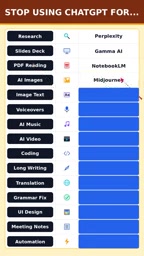
Don't use ChatGPT for everything—match dedicated AI tools to task types for better efficiency.
The article argues that treating ChatGPT as a master key leads to double losses in efficiency and quality, since general chat models underperform dedicated tools in deep research, image generation, long-form writing, and speech synthesis. The author provides a task-based tool checklist: Perplexity for research, Gamma for presentations, Notebook LM for document understanding, Midjourney and Ideogram for images, Figma AI for UI design, 11 Labs for voice, Suno for music, Runway for video, Cursor for programming, Claude for long-form writing, DeepL for translation, Grammarly for grammar, Fathom for meeting notes, and Zapier AI for automation. The article stresses that tool lists will become outdated, but the methodology of identifying task types first and then choosing dedicated tools is reusable, and suggests starting with the most frequent pain points to gradually replace tools—stringing multiple tools into a complete output pipeline.
Many people treat ChatGPT as a master key and throw every task at it. But different AI tools perform very differently in specific scenarios—using the wrong tool not only lowers efficiency but may also yield less-than-ideal results. A YouTube creator compiled a task-based AI tool checklist in a video, with a clear core message: Stop using ChatGPT for everything—the key is to choose the right tool for each scenario.
Why the "One Tool for Everything" Mindset Holds You Back
ChatGPT's strength lies in general conversation and reasoning, but for specialized tasks like deep research, image generation, long-form writing, and speech synthesis, dedicated tools often outperform it. Throw a research question at a general chat model, and you may get a fluent-sounding answer lacking source support; use a chat model to generate images, and the results are far inferior to those from professional image models.
The creator's approach is to break tasks down and match each type with the most suitable tool. The benefits are twofold: higher output quality and a smoother workflow, reducing the cost of trial and error within a single tool.
The video lists recommended tools by functional domain, covering the full chain from research to automation. Below is the organized breakdown.
Research and Document Processing
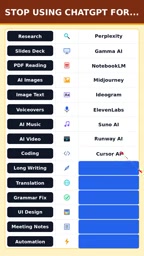
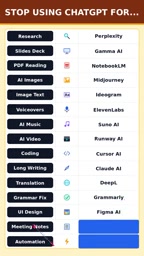
- Perplexity: Used for research (research retrieval), suitable for scenarios requiring source information.
- Gamma: Used to generate slide decks, quickly turning content into slides.
- Notebook LM: Used for PDF reading and document understanding, ideal for handling long documents.
RAG (Retrieval-Augmented Generation) is the key background for understanding the value of tools like Perplexity and Notebook LM. Traditional large language models rely only on parametric knowledge learned during training, making them prone to "hallucinations" and unable to cite sources. RAG works by retrieving relevant snippets from external knowledge bases (web pages, PDFs, documents) before the model generates a response, then feeding these snippets as context to the model so answers are grounded. Perplexity combines real-time web retrieval with generation, making it suitable for research tasks; Notebook LM limits retrieval to user-uploaded PDFs, answering questions "based on the documents you provide." Understanding RAG helps you judge when such tools are needed (requiring traceability and up-to-date information) versus when a general chat model suffices (open-ended reasoning, creative generation).
Image and Visual Content
- Midjourney: The workhorse for AI image generation.
- Ideogram: Focuses on text rendering in images (image text), solving the pain point of garbled text in AI-generated images.
- Figma AI: Used for UI design, embedding AI capabilities into the design workflow.
Audio, Video, and Programming
- 11 Labs: Speech synthesis (voiceovers), generating natural-sounding human voices.
- Suno AI: AI music generation.
- Runway: AI video generation.
- Cursor: AI programming, a code assistance tool for developers.
Text-to-speech (TTS) and voice cloning are the core technologies behind 11 Labs. Early TTS systems based on concatenation or parametric methods had obvious mechanical qualities; modern neural TTS (such as diffusion-based or autoregressive approaches) can generate near-human prosody, pauses, and emotion. 11 Labs stands out by cloning a specific voice with only a small amount of reference audio—convenient but also raising ethical issues around deepfakes and voice theft. When using such tools, pay attention to: licensing terms for commercial use, whether synthetic speech must be labeled, and platform restrictions on cloning others' voices. Understanding these boundaries allows you to safely integrate speech synthesis into production workflows.
Writing, Translation, and Grammar
- Claude: Excels at long writing, suitable for tasks requiring coherent long-form text.
- DeepL: A translation tool with stable performance in language conversion scenarios.
- Grammarly: Grammar fix, used for manuscript proofreading.
Meetings and Automation
- Fathom: AI meeting notes, automatically organizing meeting content.
- Zapier AI: Automation workflow connections, linking different tools into workflows.
Zapier AI belongs to the "automation workflow" domain, where the core concepts are Trigger and Action. Zapier works by connecting two or more apps into a "Zap": when an event occurs in app A (e.g., new email received, form submitted, meeting ended), it automatically triggers app B to perform an action (e.g., write to a spreadsheet, send a notification, call AI for summarization). With AI capabilities added, you can insert steps like text summarization, classification, and field extraction into the flow, so automation is no longer limited to mechanically moving data. Understanding this model helps you judge which repetitive tasks are worth automating: tasks with clear rules, explicit trigger conditions, and frequent cross-tool switching benefit the most; tasks requiring complex judgment or one-off decisions only add maintenance costs when automated.
What's Truly Valuable About This Checklist
The tool list itself will become outdated, but the underlying methodology is worth adopting: first identify the task type, then choose a dedicated tool. Research, writing, images, voice, video, programming, translation, meetings, automation—each category has its optimal solution, rather than cramming all needs into a single chat window.
Another noteworthy point is the complementarity between tools. For example, use Perplexity for information retrieval, Claude for long-form writing, Grammarly for grammar proofreading, and Gamma for generating presentation slides—this is a complete output pipeline, not just isolated tool usage.
How to Put This Approach into Practice
You don't need to replace all your tools at once. Start with your most frequent and painful tasks—such as long-form writing or meeting notes—switch to the corresponding dedicated tools, feel the difference, and then gradually expand. The tool list is a reference, not a standard answer; ultimately, it should match your actual workflow.
The video also reminds viewers to follow the channel on Facebook and YouTube, indicating that this kind of tool roundup content is continuously updated on social platforms. For ordinary users, rather than chasing every new tool, it's better to build a habit of mapping "task to tool"—that's the truly reusable capability behind the checklist.
One-line Summary
Stop using ChatGPT for everything—matching dedicated AI tools to task types is more efficient.
Paragraph Summary
The article points out that treating ChatGPT as a master key leads to double losses in efficiency and quality, because general chat models underperform dedicated tools in specialized tasks like deep research, image generation, long-form writing, and speech synthesis. The author organizes a task-based tool checklist: Perplexity for research, Gamma for presentations, Notebook LM for document understanding, Midjourney and Ideogram for images, Figma AI for UI design, 11 Labs for voice, Suno for music, Runway for video, Cursor for programming, Claude for long-form writing, DeepL for translation, Grammarly for grammar, Fathom for meeting notes, and Zapier AI for automation. The article emphasizes that tool lists will become outdated, but the methodology of "first identify the task type, then choose a dedicated tool" is reusable, and suggests starting with the most frequent pain points and gradually replacing tools, linking multiple tools into a complete output pipeline.
Related articles

A 19-Year-Old's Rental Horror Story: Ceiling Collapse, Bug Infestation, and the Lessons It Taught Me
At 19, my first off-campus rental brought bug infestations, no heat, a collapsed ceiling, and a ruined laptop with no renter's insurance. Here are the hard-won lessons for first-time student renters.

Veda Nurse's Cranial Nerve Exam: Why ASMR Role-Play Is Going Viral
Bilibili creator Veda's cranial nerve exam ASMR video goes viral, blending humor and sensory triggers through nurse role-play. This article analyzes its unique appeal and the audience psychology behind ASMR role-play.

LG Cinebeam AI Review: 120-Inch Giant Screen + 3000 Lumens, a New Choice for the Living Room Theater
LG Cinebeam AI projector review: 3000 ANSI lumens, 4K, 100 inches from about 8 cm and 120 inches from about 18 cm. Built-in webOS, AI Concierge voice recommendations, AI Sound Pro 11.1.2 virtual surround, and Game Optimizer—positioned for fixed living room installation, complementing the portable Cinebeam S.