Streaming-Safe Markdown: Solving Render Flickering in AI Chat Interfaces

anythic/ui fixes streaming Markdown flicker with a prefix-repair strategy and offers a complete Agent UI component library.
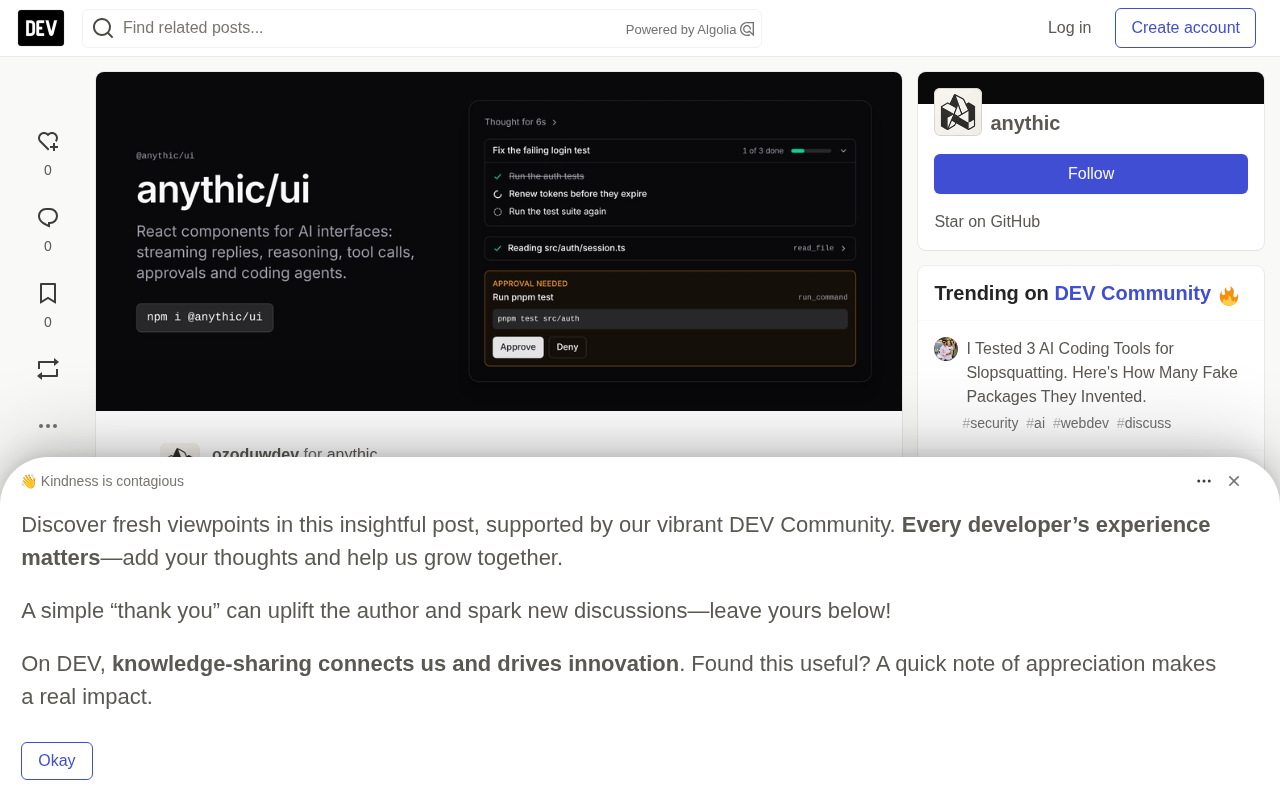
In streaming AI chat interfaces, Markdown parsers frequently break due to incomplete input — unclosed code fences, unpaired symbols, and partial links cause constant layout flickering. The open-source React library anythic/ui solves this by repairing the prefix before parsing: closing open code fences, completing unpaired bold/italic markers, and hiding incomplete links, so the parser always receives valid Markdown. Beyond streaming Markdown, the library provides a full suite of Agent-oriented components including ReasoningBlock, ToolCall, ToolApproval, CodeDiff, and Terminal — all model-agnostic, compatible with major AI SDKs, built with Tailwind v4 and shadcn-compatible tokens, and released under the MIT license.
Most developers who've built AI chat interfaces have encountered this scenario: the model is streaming a code block, and suddenly the entire response turns into a massive jumble of monospace text; a ** opens bold formatting but never closes; a link renders as a broken [text](htt. When the next token arrives, the whole layout instantly snaps back to normal. This flickering experience is extremely common in AI applications, and the open-source React component library anythic/ui was built specifically around this pain point.
The Root Cause: Markdown Was Never Designed for "Incomplete" Input
The core issue is that Markdown parsers inherently assume they're receiving a complete document. But in a streaming context, the parser only ever sees a prefix fragment of the full document at any given moment.
Imagine the model is outputting the following:
Here is the fix:

```ts
function add(a, b) {
  return a +
At this point, the code fence is open, and the parser treats everything that follows — including body text that hasn't arrived yet — as code. With each arriving token, the layout flips back and forth between "code block" and "normal text," producing visible jitter.
The same problem occurs with unclosed bold markers **, italics _, backticks, and incomplete link syntax. These Markdown "paired symbols" are naturally left half-open during streaming, and traditional parsers have no way to handle this gracefully.
A code fence is Markdown syntax that wraps a code block using three backticks (
```) or tildes (~~~). Once a parser encounters an opening fence, it treats all subsequent content as code until it finds the matching closing fence. In a streaming scenario, the closing fence might be seconds away — during which the entire conversation gets incorrectly rendered as a monospace code region. Similarly, Markdown relies on "paired symbols" to define formatting boundaries: bold requires matching**on both ends, italics need paired_or*, and hyperlinks depend on the complete[text](url)structure. What these all have in common is that the parser must see a "closing signal" to correctly determine formatting boundaries — and every frame of streamed output is inherently an incomplete document.
The Solution: Fix the Prefix Before Parsing
The core approach in anythic/ui isn't to rebuild the parser — it's to "complete" the incomplete prefix text before feeding it to the parser.
Specifically, it handles a few things before parsing: closing any open code fences, completing unpaired **, _, and backtick markers, and temporarily hiding links whose URLs aren't yet complete. This ensures the parser always receives syntactically valid Markdown, allowing the response to grow smoothly and progressively rather than flickering between states.
This "fix the prefix" strategy is far more elegant than "wait for the full text before rendering" — the latter sacrifices the real-time feel of streaming output, while the former preserves the character-by-character experience while eliminating visual chaos.
In anythic/ui, all of this is encapsulated inside the Markdown component. Developers simply pass in the streaming text directly:
import { Markdown } from "@anythic/ui";

<Markdown>{streamingText}</Markdown>
No additional configuration needed — the component automatically handles prefix-fixing logic.
Beyond Markdown: A Complete Agent UI Component Ecosystem
Once the Markdown rendering problem was solved, the team went on to fill in the other pieces needed for building Agent interfaces. These components cover the common patterns found in modern AI interactions:
- ReasoningBlock: Collapsible display of the model's "thinking process," with elapsed thinking time
- ToolCall / ToolApproval: Shows operations the Agent is executing, and requests user confirmation before dangerous actions
- Plan: Real-time checklist display of the Agent's execution steps
- CodeDiff: File change visualization powered by a custom Myers diff algorithm implementation
- Terminal: Command-line output with an ANSI color parser and progress bar support
- Citation / Sources: Numbered references that correspond to
[1]markers in the body text - PromptInput / Conversation / Message: Shell components for the chat interface itself
The "confirm before dangerous actions" design in ToolApproval is particularly noteworthy — as Agents become increasingly capable of autonomous execution, UI-level interception mechanisms for high-risk actions are becoming more and more important.
Model-Agnostic and Style-Compatible
All components are model-agnostic: they accept plain props, making them compatible with the Vercel AI SDK, OpenAI, Anthropic, Gemini, or any custom backend — no vendor lock-in.
For styling, the library uses Tailwind v4 with shadcn-compatible design tokens, so it integrates seamlessly into existing shadcn projects, with dark mode supported out of the box. This design lowers the adoption barrier and makes the component library easy to embed into existing tech stacks.
The Myers diff algorithm was introduced by Eugene Myers in 1986 and is widely used by mainstream version control tools like Git. Its core goal is to find the shortest edit distance between two pieces of text — the minimum sequence of insertions and deletions needed to transform one into the other. In AI code editing scenarios, the model outputs a modified file, and the frontend needs to compare it against the original and visually highlight the changes. A custom Myers diff implementation means the component doesn't depend on external diff libraries, enabling targeted optimizations for AI output characteristics (such as full-block replacements and large consecutive insertions), while keeping bundle size and rendering performance under control.
Getting Started
Installation takes just one command:
npm i @anythic/ui
The project repository includes screenshots of every component, along with a demo app you can run locally with your own Gemini API key. The entire library is open-sourced under the MIT license, free to use and modify.
For teams building AI chat or Agent interfaces, streaming Markdown render stability is often the first engineering detail to surface — and the easiest one to underestimate. anythic/ui distills this problem into a reusable component solution. This kind of AI-native UI infrastructure is quietly becoming an indispensable part of the AI application development stack.
Related articles

Random Pruning of the DPO Computation Graph: 1.4x Training Speedup and Lower Peak Memory
DPO training too slow and memory-hungry? This paper proposes a random pruning framework for the DPO computation graph, sampling independently across position, sequence, and branch dimensions; branch pruning achieves a 1.426x step-time speedup and cuts training time by about 30%, with in-depth attribution of memory and time gains.

Why Does JEPA Underperform MLM in Longitudinal EHR Representation Learning?
New study compares JEPA and MLM for longitudinal EHR representation learning on MIMIC-IV: three JEPA variants train stably without collapse but underperform MLM; target size, not heterogeneity, drives prediction error.

Transfer Learning + Visible Light Communication: A New Approach to Energy-Efficient Indoor Positioning
A study proposes a transfer learning-based visible light communication indoor positioning method, achieving 47% accuracy improvement on the BOSCH factory dataset, 67.5% model efficiency under high noise, and introducing the ME composite metric for energy-efficient positioning in energy-constrained industrial IoT scenarios.