Stripo Email Widgets: Embed Game Surveys in Emails with Zero Code
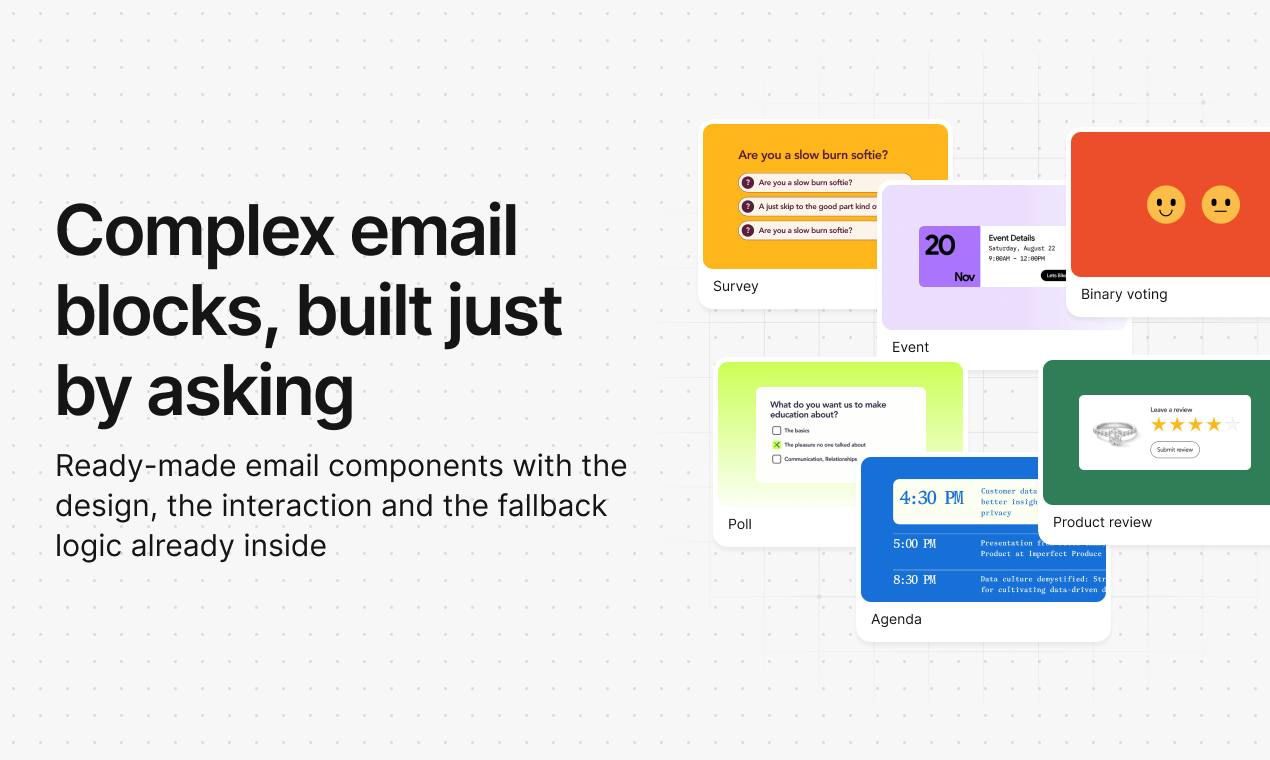
Stripo launches zero-code interactive email widgets with drag-and-drop plus AI editing, fallback compatibility, and availability across all plans.
Stripo released Email Widgets on Product Hunt, offering 20+ interactive widgets for emails covering scratch cards, quizzes, polls, NPS surveys, and event agendas. Users drag widgets in and use the AI Assistant to adjust copy, colors, questions, and prizes in natural language—no code needed. Each widget includes fallback logic to degrade gracefully into static blocks in unsupported inboxes. Configured widgets can be saved as containers and reused across templates to build a brand component library. Available in all plans, including Free, to expand category awareness. The article notes that fallback design quality and data return capabilities are key to practical impact.
Email marketing has long been trapped in the "static image and text" framework: users open, glance, and close—leaving almost no interaction between brand and recipient. Stripo's new feature Email Widgets, launched on Product Hunt, attempts to break this limitation with a "drag-and-drop + AI assistant" approach—no code required to embed scratch cards, quizzes, polls, NPS surveys, and event agendas directly into the email body.
Interactive email: a long-overdue upgrade
Email client compatibility has always been the biggest obstacle to interactive content. Many past attempts got stuck at the "recipient's client doesn't support it" stage and ultimately turned into a pile of images. Stripo's core design this time revolves around this pain point: every widget has built-in design, interaction, and fallback logic. In inboxes that support interactivity, it's a playable, clickable, fillable component; in unsupported clients, it automatically degrades into a clean static block—no blank spaces or garbled content.
This degradation strategy determines whether the feature is truly usable. If only a small fraction of users can experience interactive email, its marketing value is discounted; static fallback means that even with older email clients, brands can still preserve basic display quality and message delivery.
Email client compatibility and graceful degradation
The core technical challenge for interactive email comes from the fragmentation of HTML/CSS support across email clients. Mainstream clients such as Gmail, Outlook (especially the Windows desktop version), and Apple Mail are based on different rendering engines (such as the Word HTML renderer), with vastly different support for CSS animations, <script>, form controls, and other features. The industry-standard approach combines progressive enhancement with graceful degradation: first build the base layout using static HTML tables and inline styles that email clients widely support, then wrap advanced interactive code with @media queries or client-specific conditional comments. When a client doesn't support it, users see pre-designed static fallback content rather than blank spaces or misalignment. AMP for Email once attempted to unify this standard but failed to gain traction due to limited client support, so interactive email implementation still relies heavily on this multi-layered degradation architecture.
Drag-and-drop + AI assistant: edit content without writing code
The workflow has two steps: first drag a widget from the editor, then tell the AI Assistant what to change—copy, colors, questions, and prizes can all be adjusted through natural language descriptions. This design is consistent with the AI capabilities Stripo has been building into its editor in recent years, turning "configuring forms" into "conversational editing" and lowering the barrier for non-technical marketers.
Currently there are over 20 widgets covering fun interactions (scratch cards, quizzes), data collection (polls, NPS surveys), and practical information (event agendas). Interaction logic and visual styles are built in, so users don't need to handle front-end behavior themselves—they only need to focus on content and brand tone. For small and medium teams without development resources, this essentially compresses work that would otherwise require outsourcing or coding into editing operations.
Mapping conversational AI to structured configuration
"Modifying widgets with natural language" seems simple, but behind it lies the need to parse unstructured instructions (such as "change the scratch card's silver coating to brand blue and set the first-prize probability to 5%") into structured configuration parameters. This typically involves three steps: intent recognition, entity extraction, and parameter mapping. The AI model needs to understand which attribute the user wants to modify (color, probability, copy) and safely write it into the corresponding configuration field. Unlike directly generating HTML, this "AI fills the form" approach ensures the output always conforms to the widget's preset layout constraints and compatibility requirements, reducing the risk of generating invalid code. Stripo embeds AI capabilities in the editor rather than a separate chat window, which also allows modifications to be previewed in real time and rolled back instantly, matching marketers' "what you see is what you get" workflow habits.
Container reuse and availability across all plans
An easily overlooked but critical detail is the "container" concept: once a widget is configured, it can be saved as a container and reused in any template. This means teams can build a standardized library of interactive components for their brand and call them directly for future campaigns, rather than configuring each email from scratch. For high-frequency email marketing teams, this saves long-term repetitive work.
Another noteworthy decision is the plan strategy—the feature is available across all plans, including Free. Interactive email is itself a category that needs scale validation: expanding usage through the free tier lets more marketers first encounter the idea that "email can be interactive," which helps both category education and product reputation.
Containerized reuse and template governance
A "container" here is essentially a reusable component abstraction: it encapsulates a widget's visual style, interaction logic, and configuration data as an independent unit, decoupled from specific email templates. Marketing teams can maintain a standardized library of interactive components for their brand much like managing a design system, ensuring consistent interactive experiences across different campaigns and senders. This approach also facilitates version management—when brand visuals are updated or widget logic is upgraded, only the container definition needs to be modified, and all templates referencing that container update synchronously, avoiding the repetitive work of manually adjusting each email. For high-frequency, multi-person marketing teams, container reuse is a key mechanism for controlling quality and efficiency.
Questions worth noting
The feature is exciting, but its practical impact still depends on two things. The first is the design quality of the degraded experience: whether the static fallback block is attractive enough and can guide users to click through to a web version to complete the interaction—this directly determines whether the interactive value can be amplified. The second is data return: how the results collected from polls and NPS surveys are presented and exported is not elaborated in the original text, and this is often the part marketing teams care about most.
Judging from the Category tags (Design Tools, Email Marketing, Artificial Intelligence) and its performance—ranking #3 with 126 votes and 87 comments—this feature hits the common demand among email marketers to "improve post-open engagement rates." Interactive email is not a new concept, but making it a zero-code, all-plan editor capability is a key step toward making such tools practical.
FAQ
Do I need to write code? No. After dragging in a widget, you can adjust copy, colors, questions, and prizes through the AI Assistant using natural language.
What if the recipient's email client doesn't support interactivity? The widget has built-in fallback logic and will display as a clean static block.
Can configured widgets be reused? Yes, after saving as a container, they can be reused in any template.
Can free users use it? Yes, the feature is available across all plans, including Free.
One-line Summary
Stripo launches zero-code interactive email widgets with drag-and-drop plus AI editing, compatibility fallback, and availability across all plans.
Paragraph Summary
Stripo released Email Widgets on Product Hunt, offering over 20 interactive widgets that can be embedded in email bodies, covering scenarios such as scratch cards, quizzes, polls, NPS surveys, and event agendas. Users add widgets by dragging and then use the AI Assistant to adjust copy, colors, questions, and prizes in natural language—no coding required. Each widget has built-in fallback logic and automatically degrades to a static block in inboxes that don't support interactivity, balancing compatibility and display quality. Configured widgets can be saved as containers and reused in any template, helping teams build a brand interactive component library. The feature is available across all plans, including Free, aiming to expand category awareness. The article also notes that the design quality of the degraded experience and data return capabilities are key to determining practical impact.
Related articles
Daybreak Red Deployment Guide: A Reference Architecture for Supervised Security Investigation
A breakdown of the Daybreak Red reference architecture: security control design, deployment configuration process, and runtime monitoring for supervised security investigation.
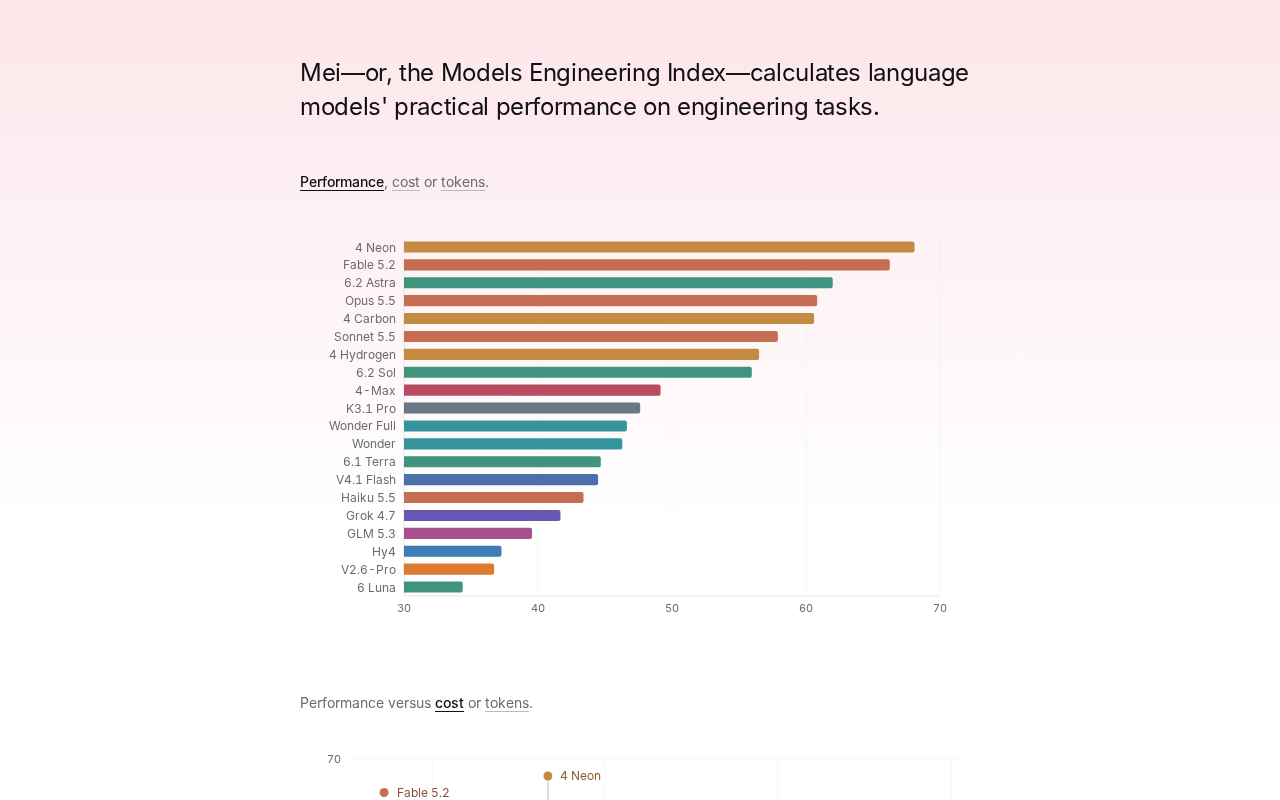
Gemini 4 Neon Tops the Models Engineering Index
Gemini 4 Neon tops the Models Engineering Index, sparking Hacker News debate over ranking credibility and evaluation methods. Here's what it means for developers.

Apple's Self-Developed AI Agent: An Agent That Can Operate Your Mac Is Coming
Apple is reportedly developing an AI agent that can operate a Mac, targeting Meta Muse, Claude, OpenAI Dots, and others. This article analyzes Apple's system-level advantages, the competitive landscape, and likely rollout paths in the agent race.