Subscribe to GPT in 3 Minutes: Alipay Top-Up and Plan Selection Guide

A Bilibili tutorial demonstrates the full process from Google account registration to Alipay direct top-up of GPT membership, with Go/Plus/Pro purchasing advice.
Based on Bilibili creator "No Nonsense"'s tutorial video, this article compiles the complete path from registering a Google account to completing a GPT membership direct top-up with Alipay. It explains how to bypass web-side QR verification via the Google app, compares the Go ($8, limited permissions), Plus (versatile, cost-effective, includes Codex quota), and Pro (5x/20x quota, for high-frequency development) plans, and details the third-party top-up operation of copying the GPT account Session code and paying with Alipay. The author notes that a Session equals a temporary login credential, so handing it to a third party carries privacy and security risks; assess official channels first, and after top-up, change the password or log out of all sessions. Choose based on actual consumption rate, with Plus as a low-risk starting point.
Title
3 Minutes to Subscribe to GPT: Alipay Direct Top-Up and Plan Selection Guide
Meta Description
Based on a Bilibili tutorial: the complete 3-minute process for subscribing to GPT, covering Google account registration, a comparison of the Go/Plus/Pro plans, the Session steps for third-party Alipay direct top-up, and an analysis of the account security risks and purchasing advice for top-up services.
Article Content
For users who want to upgrade to GPT membership but get stuck at the payment step, the process is often more complicated than expected. A tutorial posted by Bilibili creator "No Nonsense" demonstrates the complete path from registering a Google account to completing a GPT membership direct top-up with Alipay, and compares the Go, Plus, and Pro plans. This article is based on that video and adds an independent analysis of account security and plan selection.
Preparation: You Need a Google Account Before a GPT Account
The video emphasizes that the whole process requires no complicated materials in advance—even users without a GPT account can follow along. Since most overseas software supports Google account login, the creator recommends registering a Google account first.
The specific approach is to register through the Google app rather than the web page, because the web version currently easily triggers QR code verification, making the process harder. In the app, tap your avatar → Add account → Create account → Choose "For my personal use," enter any name, set the age between 18 and 20, pick any account name, and then set a password. For phone verification, the creator notes that you can use a +86 number to receive the code, or you can skip it. The account's region follows the nationality symbol selected during registration—for example, choosing the United States sets the region to the US.
After registration, open GPT and choose "Log in with Google account"; an age around 20 is recommended. The account is now ready.
How to Choose Among the Three Plans: Differences Between Go, Plus, and Pro
According to the video, GPT membership is currently divided into three tiers: Go, Plus, and Pro, with Pro further split into 5x and 20x versions, where the multiplier refers to the multiple of usage quota.
The Go plan is the cheapest at only $8, but has limited permissions and suits users who just want to try it out.
The Plus plan is described by the creator as the most versatile and cost-effective choice. It unlocks the entire OpenAI ecosystem and comes with a dedicated Codex quota, with ample usage for ordinary users. Based on the average usage frequency of each feature, the creator judges that Plus suits the vast majority of people.
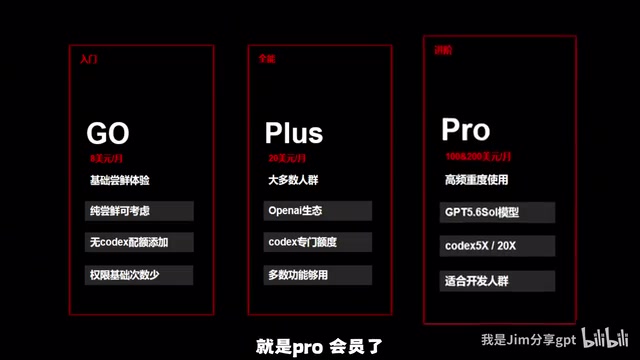
The Pro plan offers 5x or 20x the quota of Plus, with Codex scaled by the same multiplier. It targets people who use it intensively every day, have dense programming tasks, or whose work output is of very high value. The creator uses himself as an example: he works in AI graphic-and-text e-commerce sales, doesn't use Codex, and finds the image generation quota insufficient, so he chose Plus, and subjectively believes that images generated by Plus look more natural and atmospheric than the free version.
Codex and What the "Quota Multiplier" Means
Codex is OpenAI's collection of capabilities for code scenarios (including code generation, completion, and assisted debugging), provided to paid users in the ChatGPT product as a separate quota. Unlike ordinary conversation, Codex calls typically involve longer context and higher computational cost, so the platform limits its usage separately.
The "5x" and "20x" multipliers mentioned in the article refer to the scaling factor of the Pro plan relative to Plus across various quotas (including Codex quota, image generation count, message count, etc.), not an improvement in speed or model capability. In other words, Pro users get "more usage counts," not "a smarter model." This also explains why plan selection should be based on actual consumption rate: if daily usage is far below the Plus ceiling, a higher multiplier brings no extra value.
Alipay Direct Top-Up: Session Information Is Key
Once the plan is decided, it's time for the top-up. The creator uses a third-party official-website direct top-up site that supports Alipay payment; he says he has used it many times and its stability is acceptable.
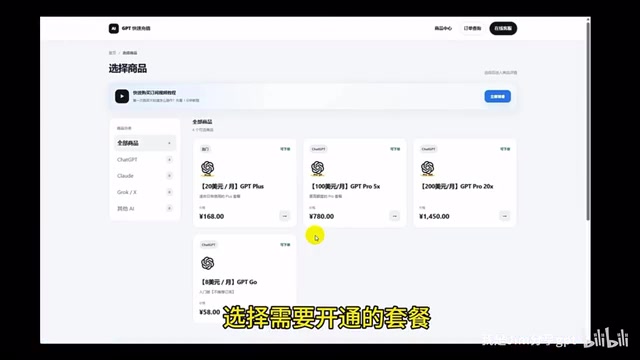
The steps are: on the top-up site, select the target plan (Plus in this example), enter your email for order lookup, and then obtain the account information that needs topping up. First log in to the GPT website in your browser and confirm that the bottom-left corner shows the free version, then return to the top-up site and click "Get Session"; the page will display the GPT account information and a piece of code. If the code is short, it means you haven't logged in to the GPT account correctly. Copy the code completely from start to finish (including the parentheses), paste it back into the top-up site, verify the account is correct, then submit the order and pay.
After the order is processed, it shows a successful top-up; refresh the GPT page and you'll see the Plus badge. The site provides online customer service, which you can contact if you encounter issues during top-up.
The Mechanics of Session and Cookie
A Session is a mechanism websites use to identify a user's login state, typically stored in the browser in the form of a Cookie. When a user logs in to the GPT website, the server issues a set of Cookies containing identity credentials (such as __Secure-next-auth.session-token), which the browser automatically carries in subsequent requests, eliminating the need to re-enter the password. The "code" that third-party top-up sites ask users to copy is essentially this string of session credentials.
Session credentials are as sensitive as a temporary password for the account: the holder can access the account without secondary verification, view conversation history, and even initiate payments. Since GPT account Sessions typically have a long validity period (days to weeks), once leaked, the risk window is not short. This is why, in top-up scenarios, users should avoid storing sensitive information in the account and should proactively log out of all sessions after topping up (Settings → Data controls → Log out of all devices), which immediately invalidates old credentials.
The Risks and Boundaries of Third-Party Top-Ups
The path demonstrated in the video is essentially a third-party top-up: the user hands over the account Session information to the top-up site, which completes the payment on their behalf. This approach bypasses the overseas credit card barrier and has a low barrier to entry, but the Session is equivalent to a temporary login credential for the account, and handing it to a third party creates a certain exposure surface for privacy and security. Although the creator says he has topped up many times without issues, this is personal experience and does not constitute a security guarantee for any platform.
For ordinary users, the safer approach is to first assess whether official payment channels are accessible; if you do choose a third-party top-up, avoid storing sensitive information in the same account, and consider changing the password or logging out of all device sessions after topping up to reduce the risk of credentials being reused.
Purchasing Advice: Decide Based on Usage Intensity, Not Price
Looking at the positioning of the three plans, the selection logic isn't complicated: choose Go for light trial use, Plus for everyday all-around use, and Pro for high-frequency development or high-value output. The real decision variable is the actual consumption rate of features like Codex, not the plan's sticker price. The creator's experience confirms this—he didn't give up Pro because of price, but because his own workflow doesn't need the high-multiplier quota.
For most users new to GPT membership, Plus is the lowest-risk starting point; if the quota is frequently maxed out later, consider upgrading to Pro's multiplier tiers, which is more cost-effective than going for a high configuration all at once.
One-line Summary
A Bilibili tutorial demonstrates the full process from Google account registration to Alipay direct top-up of GPT membership, and offers Go/Plus/Pro purchasing advice.
Paragraph Summary
Based on the tutorial video by Bilibili creator "No Nonsense," this article compiles the complete path from registering a Google account to completing a GPT membership direct top-up with Alipay. It first explains how to use the Google app to bypass web-side QR code verification during registration, then compares the positioning of the Go ($8, limited permissions), Plus (versatile and cost-effective, includes Codex quota), and Pro (5x or 20x quota, aimed at high-frequency development) plans. The top-up step relies on a third-party direct top-up site; the core operation is copying the GPT account's Session code and pasting it for submission, then paying with Alipay. The author adds that a Session is equivalent to a temporary login credential, and handing it to a third party creates a privacy and security exposure surface; it's advisable to first assess official channels, and after a third-party top-up, change the password or log out of all sessions. Plan selection should be based on the actual consumption rate of features like Codex rather than the sticker price, and Plus is a low-risk starting point.
Related articles

DevWorkflow 5.0: From Idea to Launch with the AI Five-Step Method
DevWorkflow 5.0 is a Claude Code plugin that uses a five-step process to take AI-assisted development from idea to launch. It asks you before every decision, preventing AI from adding tables and fields on its own, keeping docs and code consistent, and stopping merges before tests are written. Supports multiple platforms and languages, for individual developers and small teams.

How Do Hermes Agent's .md Files Work? A Breakdown of the Core Mechanism
Explaining Hermes Agent's .hermes directory mechanism: user.md stores personal info, memory.md records details worth remembering, soul.md defines the Agent's personality. Learn how these pure Markdown files keep the Agent consistent across sessions.

UN "Killer Robot" Talks Stall Again: Why Autonomous Weapons Regulation Is Hard to Break Through
UN Geneva talks on autonomous weapons ("killer robots") ended a week of consultations with little progress; delegates only agreed to "begin discussing options." This article analyzes the definitional disputes, conflicting security demands, and limits of multilateral mechanisms behind the stalemate.