Surfdeck: The Productivity Tool That Pins Your Go-To Websites in the Mac Menu Bar

Surfdeck pins your most-used websites in the Mac menu bar for instant, tab-free access.
Surfdeck is a Mac menu bar productivity tool that lets you pin frequently used websites for one-click access without digging through browser tabs. Built by indie developer Deniz Özcan, it targets heavy Web App users and multi-taskers tired of tab overload. By extracting high-frequency sites from the browser into the menu bar, it offers a lighter alternative to Site-Specific Browsers while providing cross-browser, globally accessible quick entry points.
What Is Surfdeck: A Mac Menu Bar Tool Built for Efficiency
Among the daily listings on ProductHunt, a Mac productivity tool called Surfdeck quietly made its debut. With a clean positioning and practical use-case focus, it landed at #10 on the daily product rankings with 93 upvotes. Its tagline is simple and direct — "Your tabs, within reach."
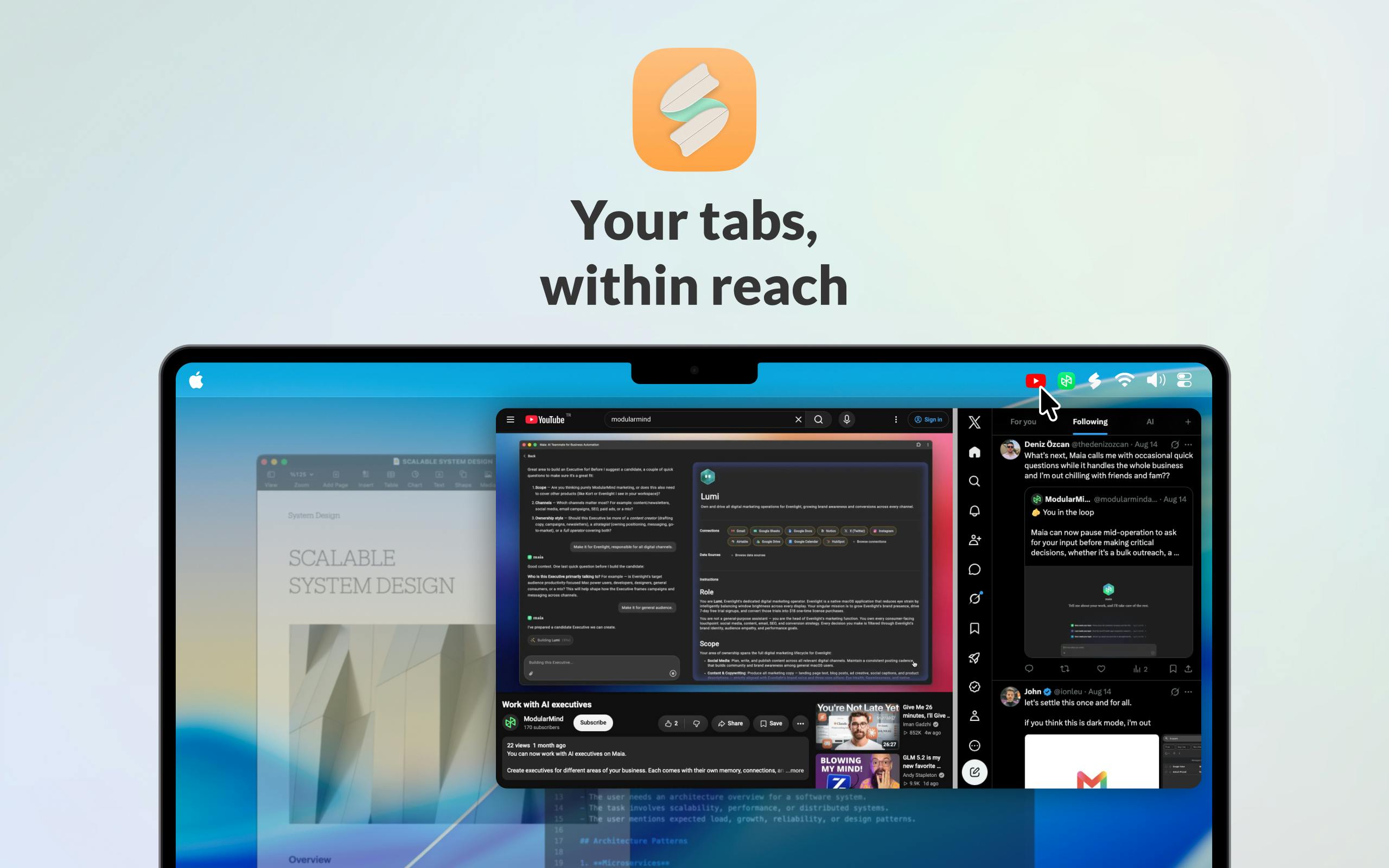
Surfdeck's core concept is clear: pin your most-used websites directly in the Mac menu bar for instant access with a single click — no more digging through bookmarks or switching between browser tabs. For users who frequently open fixed websites like ChatGPT, email, calendars, and task managers throughout the day, this "one-click access" design significantly reduces the number of steps needed.
Why Mac Menu Bar Apps Deserve Your Attention
The "Last Mile" of Productivity Tools
In recent years, menu bar apps have become a favorite among productivity enthusiasts in the Mac ecosystem. The Mac menu bar is the persistent horizontal navigation strip at the top of macOS — the left side displays system and application menus, while the right side houses various status icons and third-party tools. Since the days of Mac OS X (macOS's predecessor), the menu bar has been one of the core interaction areas for Mac users. With the popularity of tools like Bartender, iStat Menus, and Raycast, the menu bar has evolved from a simple status display area into a micro-workstation. Developers use Apple's NSStatusItem API to embed custom icons and popup panels in the menu bar, enabling everything from clipboard management to window control. This "always present but never intrusive" design philosophy aligns perfectly with macOS's overall philosophy of restraint.
Compared to traditional Dock icons or browser bookmarks, menu bar apps have several natural advantages: they're always at the top, they don't take up desktop space, and they're globally accessible. No matter what software you're currently using, you just move your mouse to the top of the screen to invoke the tool you need.
Surfdeck targets exactly this "last mile" pain point. Modern work increasingly relies on web apps — from Notion and Figma to various SaaS tools — browsers are no longer just browsing tools but primary work platforms. Yet browser tab management has long been a persistent headache — the more tabs you open, the harder it becomes to find a frequently used page.
Say Goodbye to "Tab Hell" with Surfdeck
Tab overload is a widely studied UX problem. Research from Carnegie Mellon University found that average users have more than 20 browser tabs open simultaneously, while power users may reach 50-100. This not only increases cognitive load but also causes memory usage to skyrocket — Chrome consumes approximately 150-300MB of memory per tab. To address this, Arc Browser introduced auto-archiving and Spaces, Chrome launched Tab Groups, and Firefox has been experimenting with tree-style tabs. However, all these solutions are confined within the browser and can't solve the path friction when users switch from other applications to the browser.
Surfdeck's approach is to "extract" frequently accessed websites from the browser and turn them into independent quick-access entries in the menu bar. This means your core tools are no longer buried among dozens of tabs but are on standby at all times, similar to native apps. This design philosophy shares similarities with Web App container tools (like Fluid and Coherence) — these tools are known as Site-Specific Browsers (SSBs), which create independent browser instances for individual websites, wrapping specified URLs into standalone .app files so they behave like native applications with their own Dock icons, independent Cookie storage, and process spaces. Many well-known desktop applications like Slack and VS Code are essentially web applications wrapped using similar principles (the Electron framework). But Surfdeck focuses on the menu bar as a lighter-weight medium — it doesn't create independent application windows but embeds web content in a menu bar popover panel, avoiding the complexity of multi-process and multi-window management inherent in SSB approaches.
Surfdeck's Product Positioning and Target Users
Based on its ProductHunt category tags, Surfdeck is classified under Productivity, Menu Bar Apps, and Apple ecosystem — a clear positioning. It's built by indie developer Deniz Özcan, making it a classic "small but beautiful" independent product.
The Mac platform has always been fertile ground for indie developers. Because macOS users generally have a higher willingness to pay (statistics show that the average transaction value for Mac software is 2-3x that of Windows), combined with diverse distribution channels like the Mac App Store and the Setapp subscription platform, small teams or even solo developers can earn substantial income from a single quality tool. Notable examples include Cleanshot X (a screenshot tool with a 2-person team generating over $1M in annual revenue) and Raycast (a productivity launcher that grew from an indie project into a VC-funded company). ProductHunt serves as an important platform for these independent products to acquire early users and validate market feedback — first-day performance often determines whether a product gains subsequent media attention and organic growth.
The target user profile for this type of Mac productivity tool is relatively clear:
- Heavy Web App users: People whose daily work revolves around a few fixed web applications;
- Multi-taskers: People who frequently switch between different tools and are tired of tab chaos;
- Mac productivity enthusiasts: Users accustomed to optimizing their workflow with keyboard shortcuts and menu bar tools.
For these users, Surfdeck's value lies not in how complex its features are, but in how cleanly it solves a high-frequency, small but repeatedly occurring operational pain point.
Lessons from Surfdeck on Indie Product Development
Small Cut, Big Value
With only 3 comments and 93 upvotes, Surfdeck's numbers don't qualify as a hit, but it represents a typical indie developer mindset: don't pursue being comprehensive — instead, focus on a specific scenario and execute it to perfection. While the menu bar is small in size, it's a "prime real estate" area with extremely high visibility on Mac. Placing frequently used websites here is essentially a precise optimization of user attention and operational efficiency.
The success of products like this often hinges on a few details: Are the icons aesthetically pleasing? Is loading smooth? Is customization flexible? If Surfdeck can polish these experiential aspects thoroughly, it has every chance of establishing a foothold in its niche market.
Differentiated Competition Against Browser Tab Management
It's worth noting that mainstream browsers like Chrome, Arc, and Safari are continuously improving their tab management and pinned tab features. As a third-party menu bar tool, Surfdeck needs to provide differentiated value that native browser features can't cover — particularly in areas like "cross-browser unified entry points" and "global quick access" — to maintain a long-term position.
Implementing a unified cross-browser quick-access entry faces several technical challenges: First is session management — if a user is logged into Gmail in Chrome, whether the WebView opened from Surfdeck can share that login state depends on Cookie isolation policies. Second is the choice of rendering engine — WKWebView on macOS (based on Safari's WebKit engine) may differ from the user's actual Chrome (Blink engine) in CSS rendering and JavaScript compatibility. Finally, there's the permissions issue — some Web Apps require camera, microphone, notification, and other system permissions, and whether the menu bar popup's sandbox environment can correctly handle these requests is key to the user experience. The quality of handling these technical details will directly determine whether Surfdeck can cross the gap from "looks good" to "feels good to use."
Conclusion: Surfdeck Is Worth a Try for Mac Productivity Enthusiasts
Surfdeck is a classic Mac menu bar productivity tool that uses a simple idea — pinning frequently used websites in the menu bar — to solve the pain point of chaotic tab management in the Web App era. It's not a revolutionary product, but for Mac users who pursue workflow optimization, this kind of "within reach" convenience often delivers real, tangible efficiency gains.
As web applications increasingly become the core of our work, how to access frequently used Web Apps faster and more smoothly is becoming an increasingly valuable product proposition. Surfdeck's emergence is a noteworthy attempt born from this very trend.
Related articles

Gaussian Process Bandit Optimization: Exploration Strategies and Inference Regret Guarantees
Cumulative regret guarantees in Bayesian optimization fail to reflect final recommendation quality. This article examines a new study that provides inference regret guarantees for Gaussian process bandit optimization through exploration query strategies and fill distance analysis, validated on hyperparameter optimization and control tasks.

The Most Detailed Codex Guide on Bilibili: From Installation to Real-World Practice
The most detailed Codex guide on Bilibili: from app store installation to daily work mode configuration, with a real coffee shop project demonstrating file organization, data extraction, dashboard creation, and other practical tasks. Learn to use Plan Mode and desktop pets to leverage Codex efficiently.

Appearance Compensation in Volume Rendering: Why RGB Accuracy Cannot Guarantee Density Correctness
Volume rendering research reveals that volumetric data perfectly reproducing external RGB views may still contain density errors: appearance compensation can double central density and keep external rays unchanged even when L2 error exceeds 14.52%. Density recovery depends on appearance capacity, spatial resolution, and measurement design.