Tailwind CSS Deep Dive: How Atomic CSS Is Reshaping Frontend Development

A comprehensive analysis of how Tailwind CSS's utility-first approach is transforming modern frontend development.
This article provides an in-depth exploration of Tailwind CSS, the utility-first CSS framework that has earned nearly 100K GitHub stars. It covers the atomic CSS philosophy, the shift from component-based to utility-based thinking, JIT compilation for minimal production bundles, the design token system that enforces consistency, common criticisms and their solutions, and the broader ecosystem including Headless UI, UnoCSS, and Windi CSS.
Introduction: A Framework That Changed How We Write Frontend Styles
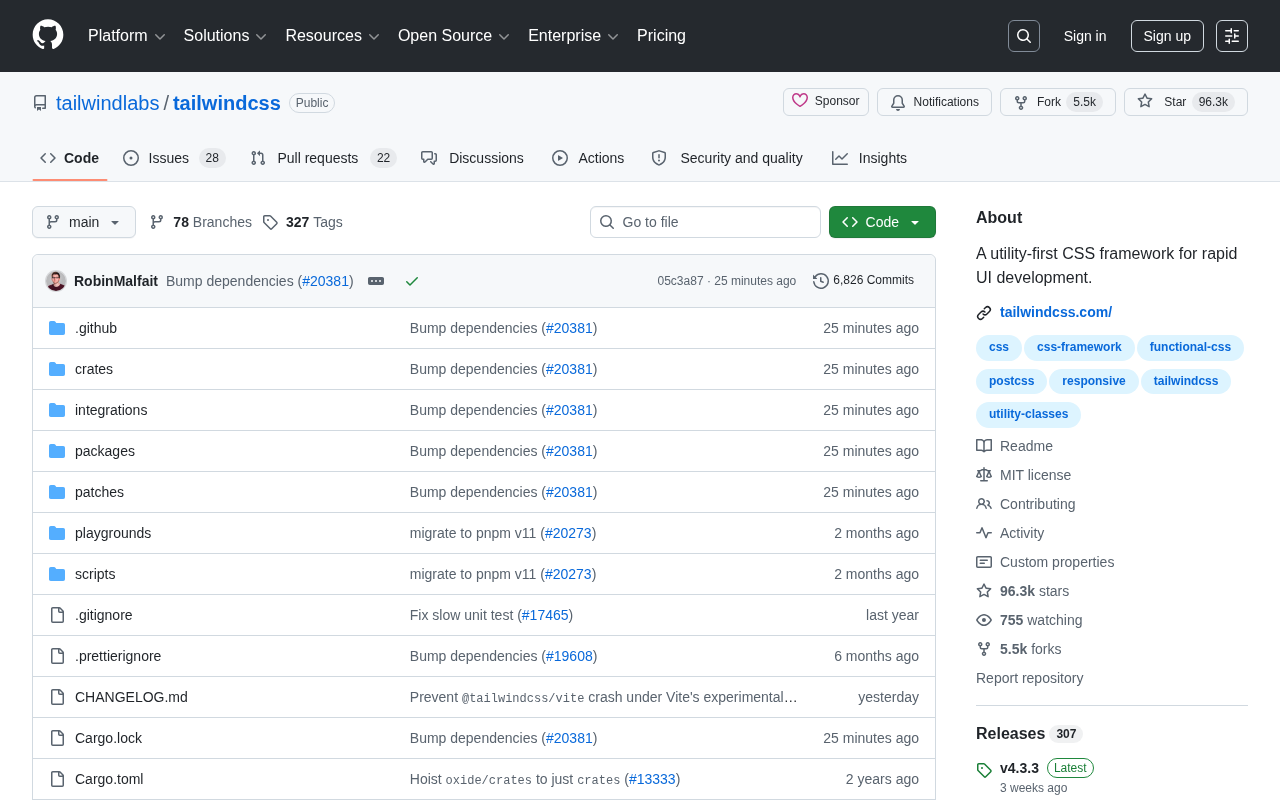
Tailwind CSS is one of the most influential CSS frameworks in today's frontend ecosystem. As of now, its GitHub repository has earned 96,245 stars, 5,522 forks, and maintains a steady growth rate of approximately 30 new stars per day. As an open-source project built with TypeScript and maintained by the Tailwind Labs team, its core philosophy can be summed up in one sentence: a utility-first CSS framework for rapidly building user interfaces.
Unlike traditional CSS frameworks (such as Bootstrap) that provide ready-made component sets, Tailwind CSS takes a fundamentally different approach: it offers a large collection of low-level, single-responsibility utility classes, allowing developers to build interfaces by composing these class names directly in HTML. This seemingly "counterintuitive" approach is precisely what has driven its dominance across the frontend community.
What Is the Utility-First CSS Development Model
The Shift from Component Thinking to Utility Thinking
In traditional CSS development, we're accustomed to writing semantic class names for each element—such as .card or .btn-primary—and then defining their styles in separate stylesheets. The problem with this pattern is that as projects grow, CSS files continuously accumulate, leading to naming conflicts, style overrides, and dead code that's difficult to clean up.
Tailwind's solution is to provide a vast set of atomic utility classes, where each class does exactly one thing. For example:
<div class="flex items-center justify-between p-4 bg-white rounded-lg shadow-md">
  <span class="text-lg font-semibold text-gray-800">标题</span>
  <button class="px-4 py-2 bg-blue-500 text-white rounded hover:bg-blue-600">
    按钮
  </button>
</div>
In the code above, flex, items-center, p-4, bg-white, and others are all utility classes provided by Tailwind. Developers don't need to switch back and forth between CSS files and HTML, nor do they need to agonize over "coming up with good class names."
The Historical Roots of Atomic CSS
The concept of Atomic CSS can be traced back to 2013, when Yahoo engineer Thierry Koblentz introduced the ACSS methodology. Its core idea is to break CSS properties down into the smallest granularity of classes, with each class containing only a single CSS declaration. Before Tailwind, Tachyons (2014) was an early practitioner of this philosophy, but its design system completeness and developer experience fell far short of what Tailwind would later achieve. When Adam Wathane created Tailwind CSS in 2017, he deeply integrated design system concepts (Design Tokens) with atomic principles, combined with modern build toolchains, finally bringing this development model into the mainstream.
Constraints as Freedom: The Power of Design Systems
The utility classes Tailwind provides aren't arbitrary values—they're based on a carefully crafted design system (design tokens). Spacing, colors, font sizes, border radii, and more all follow a unified scale system. This "constraint" actually brings consistency—interfaces built by team members naturally maintain visual uniformity, avoiding magic numbers like margin: 13px.
Design Tokens mentioned here are the smallest units of a design system—key-value pairs that store visual design properties (such as colors, spacing, and font sizes). For example, Tailwind's spacing scale uses 4px as its base unit: p-1 corresponds to 4px, p-2 to 8px, p-4 to 16px. This system of multiples of 4 originates from best practices in mature design specifications like Material Design, ensuring that element spacing maintains a harmonious visual rhythm. When an entire team works within this constraint system, design consistency becomes a natural outcome.
Core Advantages of Tailwind CSS
Significant Improvement in Development Efficiency
For rapid prototyping and iterative development scenarios, Tailwind's advantages are particularly pronounced. Developers can complete the vast majority of styling work without leaving HTML, and when paired with editor intelligence plugins (such as VS Code's Tailwind CSS IntelliSense), coding speed increases dramatically. This directly reflects the official positioning of "rapid UI development."
JIT Compilation for Smaller Production Bundles
A common criticism is: wouldn't so many utility classes make the CSS file bloated? The reality is quite the opposite. Through its JIT (Just-In-Time) compilation engine, Tailwind only generates the classes actually used in your project. During the build process, it scans all template files, and unused styles are automatically removed (Tree Shaking). The resulting CSS file is typically just a few KB to a few dozen KB—far smaller than the full stylesheets of traditional frameworks.
JIT compilation was a revolutionary feature introduced in Tailwind CSS 2.1 and became the default mode in version 3.0. Here's how it works: during development, Tailwind monitors file changes through a PostCSS plugin, uses regular expressions to scan class name strings in HTML, JSX, Vue templates, and other files, then instantly generates the corresponding CSS rules. This stands in stark contrast to the previous AOT (Ahead-Of-Time) mode—which required pre-generating a massive CSS file containing all possible combinations (potentially several MB), then using PurgeCSS to remove unused styles during production builds. JIT mode not only results in smaller production bundles but also supports arbitrary values (like w-[137px]) and variant stacking (like hover:dark:md:bg-red-500)—features that were difficult to achieve with AOT mode.
It's worth further explaining that Tailwind CSS is essentially a PostCSS plugin. PostCSS is a JavaScript-based tool platform for transforming CSS—it does nothing on its own but achieves various CSS processing capabilities through its plugin system (such as Autoprefixer for adding browser prefixes, and cssnano for code minification). As a PostCSS plugin, Tailwind replaces directives like @tailwind base, @tailwind components, and @tailwind utilities with actual CSS rules during the CSS compilation phase. This architectural design allows Tailwind to seamlessly integrate into any build pipeline that supports PostCSS, including modern bundlers like Vite, Webpack, and Parcel.
As for Tree Shaking mentioned here, it originally refers to a technique in JavaScript bundlers (such as Webpack and Rollup) that removes unreferenced code through static analysis. In the CSS domain, traditional Tree Shaking doesn't apply because stylesheets lack modular import/export mechanisms. Tailwind achieves a similar effect through Content Scanning: the configuration file specifies which file paths to scan, and during build time, only the CSS corresponding to class names that actually appear in those files is output. This approach is more efficient than post-processing tools like PurgeCSS because it only generates needed styles from the start, rather than generating everything first and then deleting.
Highly Customizable Configuration System
Tailwind is not a black box. Through the tailwind.config.js configuration file, developers can customize color palettes, spacing scales, breakpoints, fonts, and all other design variables, as well as extend or override the default theme. This makes Tailwind both ready to use out of the box and perfectly adaptable to enterprise-level design specifications.
Controversies Around Tailwind CSS and How to Address Them
The "Messy HTML" Criticism and Solutions
The most common criticism of Tailwind is that stacking numerous utility classes on HTML tags makes code verbose and difficult to read. The community offers several mature solutions for this:
- Abstract through components (encapsulating components in React/Vue) to reuse styles
- Use the
@applydirective to extract commonly used combinations into semantic classes - Leverage the Prettier Tailwind plugin to automatically sort class names
Learning Curve and Getting Started Tips
Although Tailwind's utility class naming follows intuitive patterns (e.g., mt for margin-top, px for horizontal padding), beginners still need time to memorize a large number of class names. However, once mastered, the efficiency gains quickly offset the initial learning cost. It's worth noting that Tailwind has industry-recognized excellent documentation, and the team maintains a comprehensive class name index and hands-on tutorials.
Tailwind CSS Ecosystem and Future Outlook
Tailwind CSS has developed a thriving ecosystem. The officially released Tailwind UI provides a wealth of beautifully designed paid component templates, while Headless UI offers unstyled accessible components—both integrating seamlessly with Tailwind. Additionally, Tailwind has excellent integration solutions with mainstream frameworks including React, Vue, Svelte, and Next.js.
Headless UI represents a design pattern that completely decouples a component's behavioral logic (keyboard navigation, focus management, ARIA attributes) from its visual styling. Traditional UI libraries (such as Ant Design, Element UI) bundle logic and styles together, making it difficult for developers to customize appearance without breaking functionality. Headless UI only provides interactive behavior conforming to WAI-ARIA specifications without any accompanying CSS, allowing developers to freely define styles with Tailwind or any other approach. This pattern is particularly suited for projects requiring highly customized designs and reflects the evolution of "separation of concerns" in modern frontend development—from the traditional HTML/CSS/JS separation toward functional dimension separation.
With nearly 100,000 stars and sustained growth, Tailwind CSS is no longer "just another option"—it's one of the mainstream paradigms in modern frontend development. It has pushed the entire industry to rethink how CSS is organized, and its atomic philosophy has influenced the design of subsequent emerging tools (such as UnoCSS and Windi CSS).
Successors and Ecosystem Evolution
Windi CSS was created by Anthony Fu in 2020, initially to solve Tailwind's slow build times in large projects, pioneering the on-demand JIT mode (before Tailwind's official JIT engine). UnoCSS, also developed by Anthony Fu, positions itself as an "instant atomic CSS engine"—it's not a framework but an engine that can simulate the class name styles of Tailwind, Windi CSS, or even Bootstrap through a Presets mechanism. UnoCSS's core advantage lies in its extreme performance (approximately 200 times faster than Tailwind JIT) and high extensibility. Notably, Windi CSS announced the end of maintenance in 2023, recommending users migrate to UnoCSS. The emergence of these tools proves that atomic CSS has become an irreversible industry trend.
Conclusion: Should You Choose Tailwind CSS?
The success of Tailwind CSS is fundamentally a fresh answer to the age-old question of "how should CSS be organized." It breaks through traditional semantic naming conventions with atomic utility classes, finding a new balance between development efficiency, style consistency, and bundle size. For modern web projects pursuing rapid iteration, Tailwind is undoubtedly worth considering in your technology selection. Of course, whether to adopt it should still be evaluated holistically based on team habits, project scale, and long-term maintenance costs.
Related articles

Random Pruning of the DPO Computation Graph: 1.4x Training Speedup and Lower Peak Memory
DPO training too slow and memory-hungry? This paper proposes a random pruning framework for the DPO computation graph, sampling independently across position, sequence, and branch dimensions; branch pruning achieves a 1.426x step-time speedup and cuts training time by about 30%, with in-depth attribution of memory and time gains.

Why Does JEPA Underperform MLM in Longitudinal EHR Representation Learning?
New study compares JEPA and MLM for longitudinal EHR representation learning on MIMIC-IV: three JEPA variants train stably without collapse but underperform MLM; target size, not heterogeneity, drives prediction error.

Transfer Learning + Visible Light Communication: A New Approach to Energy-Efficient Indoor Positioning
A study proposes a transfer learning-based visible light communication indoor positioning method, achieving 47% accuracy improvement on the BOSCH factory dataset, 67.5% model efficiency under high noise, and introducing the ME composite metric for energy-efficient positioning in energy-constrained industrial IoT scenarios.