Tencent Open-Sources BrowserSkill: Let AI Borrow Your Already-Logged-In Browser

BrowserSkill lets AI reuse your logged-in browser session without ever asking for your password.
Tencent's open-source BrowserSkill tackles the core pain point of AI browser automation: authentication. Instead of requiring users to hand over credentials, it uses a browser extension to let AI directly reuse an existing logged-in session, enabling access to authenticated pages and internal system forms. Architecturally, AI issues commands via a CLI, routed through a local daemon that logs all actions, while operating in a separate window without touching the user's current tabs. It pauses for human input on CAPTCHAs. Supporting Chrome/Edge across Windows, macOS, and Linux, it integrates with agents like Cursor and Claude Code — though limited to Chromium browsers with one extension per agent. Released under MIT, it gained nearly 6,000 GitHub stars in 30 days.
AI wants to browse the web on your behalf, but the first obstacle is rarely the task itself — it's authentication. The AI needs your credentials just to log in. Tencent's open-source project BrowserSkill takes a different approach: instead of asking for your password, it lets AI borrow your existing, already-authenticated browser session. The project has already earned over 7,000 stars on GitHub, with nearly 6,000 added in the last 30 days, and is released under the permissive MIT license.
What Problem Does It Solve
Traditional AI browser automation can't escape the identity verification hurdle. Either the AI re-performs the entire login flow, or you hand over your credentials — both options come with obvious security concerns and a fractured user experience.
BrowserSkill's approach is to let AI connect directly to your currently logged-in browser, reusing the existing session state. This means pages that are only visible after login, forms inside internal systems — the scenarios that have always been the hardest for automation tools — are now accessible to AI directly.

It gives AI two things: a command-line tool and a browser extension. As long as AI can issue commands, it can connect to the browser and perform actions. The whole mechanism places minimal demands on the model — it essentially translates "operate the browser" into instructions that a CLI can understand.
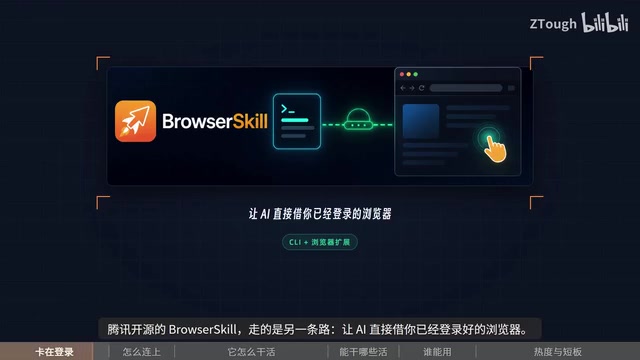
A Separate Window, with a Local Daemon in Between
One practical design detail that's easy to overlook: AI operates in a separate window, not in your current tabs. You keep browsing; it keeps working — no interference. For anyone who needs to work alongside a running AI task, this makes a significant difference in experience.

More importantly, there's a clear security boundary. AI never directly touches your browser — a local daemon sits in between. Every action passes through this layer, creating a traceable and auditable log of everything that happens. This design provides the essential trust foundation for handing browser control to an AI.
When the AI hits something it can't handle — like a CAPTCHA — it doesn't try to force through. Instead, it pauses and asks you to step in. The human-machine boundary is clearly drawn: the machine handles what can be automated; the human handles what the machine can't get past.
A daemon is a system-level process that runs continuously in the background, doesn't interact directly with the user, and is dedicated to handling specific services or forwarding requests. In BrowserSkill's architecture, the local daemon acts as a "middleman" between the AI agent and the browser: all instructions from the AI first reach the daemon, which validates and logs them before forwarding to the browser extension for execution. This "proxy layer" design offers a dual benefit — on one hand, AI cannot bypass the daemon to directly control the browser, reducing the risk of runaway behavior; on the other hand, all operations maintain a complete log for step-by-step retrospective analysis. Similar architectures are common in enterprise security products, and fundamentally represent a balance between automation capability and controllability.
What Can It Do
Based on what's been disclosed, BrowserSkill covers several practical scenarios:
- Scraping pages that require authentication
- Filling out and operating forms inside internal systems
- Full-page long screenshots
- Request debugging when something goes wrong in production
These are precisely the "stateful, identity-required" tasks that pure API or headless browser approaches struggle with — and that's where its differentiated value lies compared to traditional crawlers and automation frameworks.
A "headless browser" is a browser instance without a graphical interface, commonly used in automated testing and web scraping, with tools like Puppeteer and Playwright as typical examples. The fundamental limitation of these approaches is that they launch a brand-new, unauthenticated browser environment that cannot inherit the user's cookies, session state, or locally stored login credentials — they get stuck as soon as they hit a page requiring authentication. BrowserSkill's differentiation is precisely that it operates on the user's "actually running browser," allowing it to directly reuse all existing login states, session tokens, and even enterprise SSO (Single Sign-On) states. This is especially critical for internal system automation — many enterprise systems don't offer APIs at all and can only be operated through the browser interface.
Compatibility and Integration
On the browser side, both Chrome and Edge are supported. The OS coverage spans all three major platforms: Windows, macOS, and Linux.
For integration, any agent that "can issue commands" works directly — for example, coding agents like Cursor and Claude Code. This also defines its primary audience: developers and power users comfortable with command-line agents, rather than general consumers.
Limitations
The tool isn't without its boundaries. A few notable constraints worth knowing:
- Only supports Chromium-based browsers — Firefox, Safari, and others are not currently covered;
- The extension requires a one-time manual installation — it's not plug-and-play out of the box;
- One extension can only serve one agent — concurrent multi-agent scenarios are limited.
A Signal Worth Watching
Taken together, BrowserSkill represents a pragmatic direction for AI Agent deployment: rather than pushing AI to build everything from scratch, let it reuse the digital identities and session states that humans have already established. No passwords handed over, operations leave a paper trail, and clear human-machine division of labor — these engineering details often matter more than raw model capability in determining whether a tool actually gets used.
A growth rate of 6,000 stars in 30 days also signals that "letting AI safely use my browser" is a real, unmet need. For developers already using Cursor or Claude Code, this is an open-source option worth trying.
Related articles

Gaussian Process Bandit Optimization: Exploration Strategies and Inference Regret Guarantees
Cumulative regret guarantees in Bayesian optimization fail to reflect final recommendation quality. This article examines a new study that provides inference regret guarantees for Gaussian process bandit optimization through exploration query strategies and fill distance analysis, validated on hyperparameter optimization and control tasks.

The Most Detailed Codex Guide on Bilibili: From Installation to Real-World Practice
The most detailed Codex guide on Bilibili: from app store installation to daily work mode configuration, with a real coffee shop project demonstrating file organization, data extraction, dashboard creation, and other practical tasks. Learn to use Plan Mode and desktop pets to leverage Codex efficiently.

Appearance Compensation in Volume Rendering: Why RGB Accuracy Cannot Guarantee Density Correctness
Volume rendering research reveals that volumetric data perfectly reproducing external RGB views may still contain density errors: appearance compensation can double central density and keep external rays unchanged even when L2 error exceeds 14.52%. Density recovery depends on appearance capacity, spatial resolution, and measurement design.