Tencent WorkBuddy Step-by-Step Tutorial: From Installation to AI-Automated Office Work in Practice
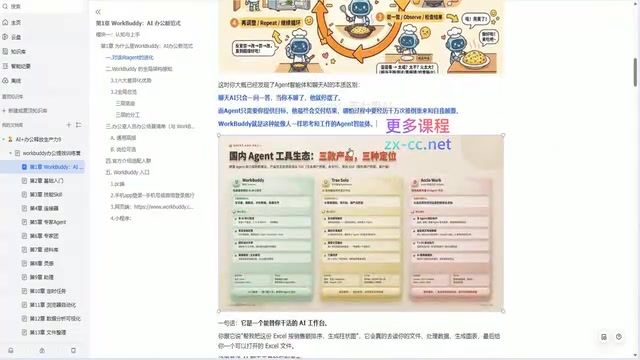
A breakdown of Tencent WorkBuddy agent platform's three-layer architecture, multi-model strategy, and office scenario implementation path.
The article systematically introduces Tencent WorkBuddy, an AI agent platform for office scenarios. Its core difference from ordinary chat AI is that it can directly execute tasks and deliver documents, PPTs, Excel results, and other outputs, following a "think—act—check—repeat" loop. Its advantages include human-AI collaborative writing, local file operations, multi-model openness, and ecosystem connectors, and it supports remote computer control via mobile phone. The foundation has three layers: agent brain, result output layer, and ecosystem extension layer, with the ecosystem extension layer as the key differentiator. It also covers high-frequency office scenarios and role matching, plus four entry points: PC, mobile, web, and mini program.
AI agents are moving from concept to real-world adoption, and Tencent WorkBuddy, as an agent platform for office scenarios, is changing the way office workers handle documents, data, and meetings. This article is based on a full tutorial series from a Bilibili creator, covering everything from installation and deployment to a breakdown of core skills, helping you understand WorkBuddy's underlying logic and practical workflow.
What Exactly Is WorkBuddy?
WorkBuddy is an AI agent system with a large language model as its brain. Its biggest difference from ordinary chat-based AI is this: ordinary AI can only converse, offer suggestions and text, while WorkBuddy can directly execute tasks and deliver results. Give it an instruction, and it can read local files, break down complex tasks step by step, and ultimately produce documents, PPTs, Excel processing results, and even code.
Its working mechanism can be compared to making egg fried rice: first think about what ingredients and recipe you need (understand the requirement), then start acting (execute operations), then check the heat and seasoning (evaluate results), and finally loop and adjust until satisfied. This four-step cycle of "think—act—check—repeat" is precisely the key to agents moving from concept to usability.
AI Agent refers to a software system that uses a large language model as its reasoning core and can autonomously plan steps and call external tools to complete tasks. Compared with traditional chatbots, the key difference of an agent lies in its "tool calling" capability: the model can generate structured instructions to read and write files, run code, and access network services, then decide the next action based on execution results. The industry commonly uses the ReAct (Reasoning + Acting) framework to describe this process, in which the model alternates between reasoning and acting and writes observations back into context. WorkBuddy's "think—act—check—repeat" loop is a productized implementation of the ReAct idea, while the sandbox environment is used to isolate code execution and ensure the safety of local operations.
Why Is WorkBuddy Popular Among Office Workers?
Core Advantages: From Human-AI Collaboration to Multi-Model Openness
The first advantage is human-AI collaborative writing. It does not require you to revise the document page by page; instead, it edits directly where you can see it, giving you a stronger sense of control. The second advantage is more proficient local file operations—it can directly read local files, rename them, and process reports and archives. The third advantage is Tencent's multi-model openness—it is not tied to a single model, and users can switch between different models according to work needs: simple tasks with simple models, complex tasks with complex models, which is also friendlier to credit consumption.
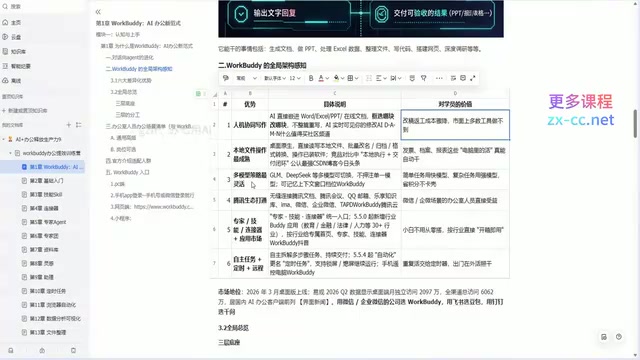
Multi-model openness means the platform abstracts a unified calling interface at the底层, treating models from different vendors and with different parameter scales as replaceable inference engines. Small models have low inference cost and fast response, suitable for deterministic tasks such as format conversion and information extraction; large models have strong reasoning ability but a high unit price, suitable for long-document understanding and complex planning. Routing to different models based on task difficulty is currently the mainstream approach to controlling agent usage costs. The "credit consumption" mentioned in the article corresponds to resource quotas billed by token.
Ecosystem and Remote Control
Its ecosystem connectors connect various services and expert skills, providing a unified entry point. Starting from version 5.5, thirty industry connectors in education, finance, law, and other fields have been added, ready to use out of the box without building from scratch. Another capability worth noting is remote computer control: combining scheduled tasks with autonomous tasks, a phone can remotely control a computer to execute tasks.
Connector is a standardized adaptation layer for agents to access external systems, usually based on protocols such as APIs or MCP (Model Context Protocol), encapsulating email, calendars, enterprise databases, and industry data sources into tools that models can directly call. Unlike "plugins," which focus more on function extension, connectors emphasize two-way connectivity of data and services. Out-of-the-box industry connectors lower the barrier to setup, but they also mean that permission scope and data compliance need to be confirmed in advance, especially in sensitive scenarios such as legal and finance.
Three-Layer Architecture Breakdown: The Core Thinks, the Tools Do
WorkBuddy's foundation is divided into three layers. The first layer is the agent brain, including models, context, sandbox settings, autonomous decision-making, and memory capabilities. The second layer is the result output layer, such as local file processing, the Office trio, data cleaning, and multimodal assets such as images and videos. The third layer is the ecosystem extension layer, including skills, plugins, connectors, experts, and expert teams, covering all industries and usable on demand.
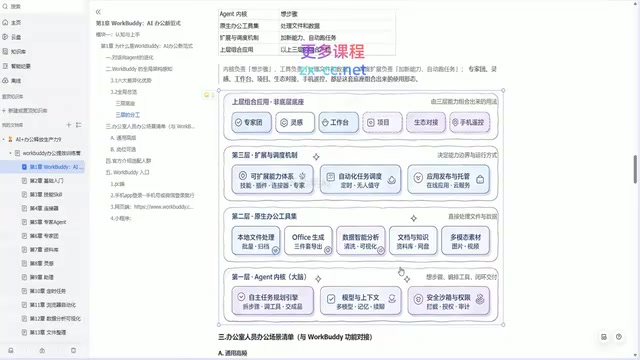
The third layer is the key to what distinguishes WorkBuddy from other products. It supports unattended automated tasks, such as batch image generation and copywriting; when the computer is not turned on, cloud services and online applications can also be used. In the creator's words, "barely usable and genuinely good are completely different"—the delivery quality gap between top experts and simple models is huge, and users should choose according to task complexity to avoid wasting credits on intermediate tiers.
Sandbox is an isolated runtime environment when an agent executes code or file operations. By restricting file system, network, and system permissions, it prevents model-generated instructions from mistakenly deleting data or accessing sensitive resources. Context refers to the information window visible to the model in a single task, including user instructions, content of files read, historical operation records, and so on; context management strategy determines whether an agent can maintain memory in long tasks and avoid information overflow. These two settings together form the controllability foundation of the agent's "brain layer."
How Office Scenarios Match WorkBuddy's Capabilities
High-frequency office scenarios include: writing official documents and weekly/monthly reports, connecting meeting processes, generating PPT frameworks, data cleaning and table visualization, batch organizing invoice files, research reports and in-depth research, and HR policy Q&A.
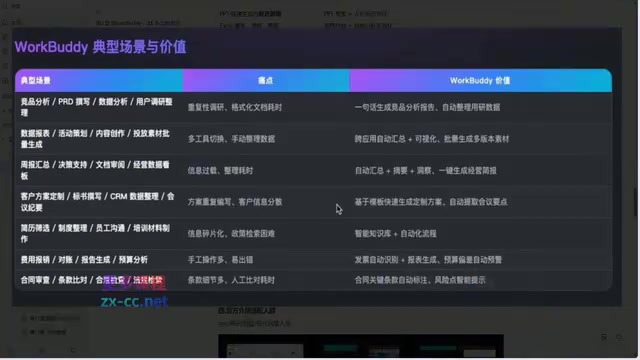
Broken down by role, competitive analysis and user research are suitable for data analysis tasks; content creation and event planning are suitable for batch generation with multiple tools plus summary verification; work that is "time-consuming and labor-intensive when done manually," such as weekly report aggregation, document review, and empirical data dashboards, is most suitable to hand over to agents. Legal and financial scenarios such as contract review, clause comparison, and budget analysis can also be covered. The official list of applicable users includes office staff, teams, coders, content creators, researchers, and operations staff, and the actual coverage is broader than the image.
Four Entry Points: PC, Mobile, Web, and Mini Program
The PC version supports Windows, Apple, and HarmonyOS versions. After downloading, installing, and authorizing login, it is the main entry point for getting work done. For mobile, search WorkBuddy in the app market, download, and log in; it is suitable for mobile scenarios. The web version provides cloud tasks and is suitable for temporary use. The mini program automatically pops up a page after searching, making it lightweight and convenient. The four entry points correspond to different ways of using the product, which can be expanded separately later according to the scenario.
Key Takeaways
- WorkBuddy's core value is upgrading from "conversational suggestions" to "task execution," capable of directly reading local files and delivering multimodal results.
- Among the three-layer architecture, the third layer—ecosystem extension (skills, plugins, connectors, expert teams)—is the key that distinguishes it from ordinary agents.
- Multi-model openness and tiered use of simple/complex models can effectively control credit consumption.
- High-frequency office scenarios are concentrated in document writing, data cleaning, PPT generation, research reports, and batch file organization.
- The four entry points cover PC, mobile, web, and mini program; choosing according to scenario can improve usage efficiency.
One-line Summary
A breakdown of Tencent WorkBuddy agent platform's three-layer architecture, multi-model strategy, and office scenario implementation path.
Paragraph Summary
The article systematically introduces Tencent WorkBuddy, an AI agent platform for office scenarios. Its core difference from ordinary chat AI is that it can directly execute tasks and deliver documents, PPTs, Excel results, and other outputs, with a working mechanism that follows the "think—act—check—repeat" loop. Its advantages include human-AI collaborative writing, local file operations, multi-model openness, and ecosystem connectors, and it supports remote computer control via mobile phone. The foundation is divided into three layers: the agent brain, the result output layer, and the ecosystem extension layer, among which the ecosystem extension layer is the key differentiator. The article also sorts out high-frequency office scenarios such as official document writing, data cleaning, PPT generation, and research reports and how they match roles, and introduces four entry points: PC, mobile, web, and mini program.
Related articles
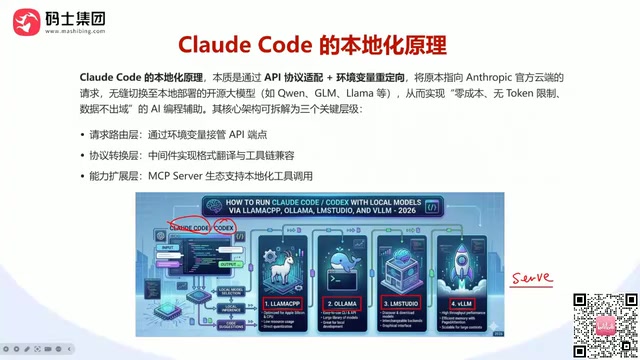
Connecting Claude Code to Local Models: A Four-Layer Architecture Breakdown and GPU Cloud Deployment Guide
Explaining Claude Code's four-layer architecture for connecting to local models: environment variable API endpoint redirection, inference engine service wrapping, protocol conversion, and the MCP tool ecosystem, plus GPU cloud deployment paths and Ollama selection considerations.
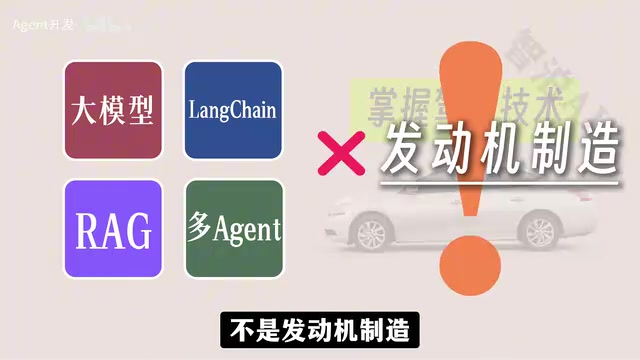
How to Learn AI Agents? A Roadmap That Cuts Your Learning Load in Half
Confused by the flood of Agent concepts? A Bilibili tutorial offers a three-step roadmap: build a knowledge map to cut learning load in half, drive learning with real projects, and calculate ROI—plus three questions to ask about any new concept, helping application developers escape tech anxiety.
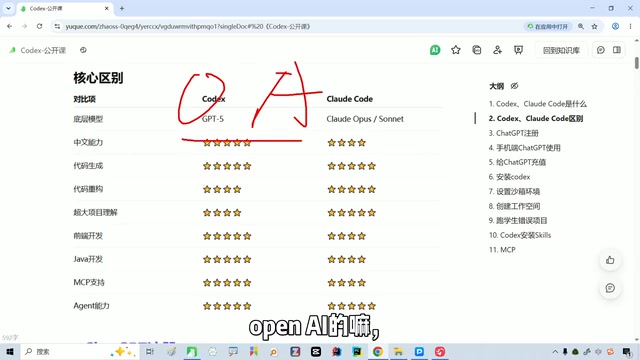
Codex Zero-Basics Hands-On: Local Sandbox and MCP Ecosystem Explained
Bilibili tutorial on zero-basics Codex AI programming: Codex vs Claude Code, ChatGPT registration and mobile setup, local sandbox, Spring MVC debugging, Skills for PPTs, and MCP with Amap—ideal for non-programmers.