TerminalWidget: Bring Script Output to Your macOS/iOS Desktop Widgets

TerminalWidget displays command-line script output directly in macOS/iOS desktop widgets.
TerminalWidget by Brett Terpstra brings command-line output to Apple's desktop and home screen widgets across macOS, iOS, and iPadOS. It supports multiple visualization formats including text output, progress bars, sparklines, and images, enabling developers to create lightweight dashboards for monitoring servers, CI/CD builds, and custom data. With a one-time purchase model and universal app design, it fills a gap in the programmable widget space.
When the Command Line Meets Widgets
For developers and power terminal users, a wealth of valuable information lives in command-line output—server load, build status, cryptocurrency prices, weather data, Git repository status… But checking any of it means opening a terminal, typing a command, and waiting for results. TerminalWidget aims to solve this pain point in a more elegant way: displaying script output directly in desktop or home screen widgets on macOS, iOS, and iPadOS.
Built by well-known developer Brett Terpstra, this app received 84 upvotes on Product Hunt, ranking 7th in the Productivity and Developer Tools categories for the day. It features a "universal app + one-time purchase" pricing model, which feels refreshingly user-friendly in an era dominated by subscriptions.
Brett Terpstra is a veteran independent developer and blogger in the macOS productivity tools space, renowned for building tools aimed at technical writers and developers. His most notable works include Marked (a Markdown preview tool), Bunch (a text-file-based automation tool), and numerous open-source command-line scripts and Alfred workflows. He has been a long-time active member of the Mac automation community, and his blog serves as an important source of productivity tool inspiration for many developers. This background gives TerminalWidget a distinctly "built for technical users" DNA from day one.
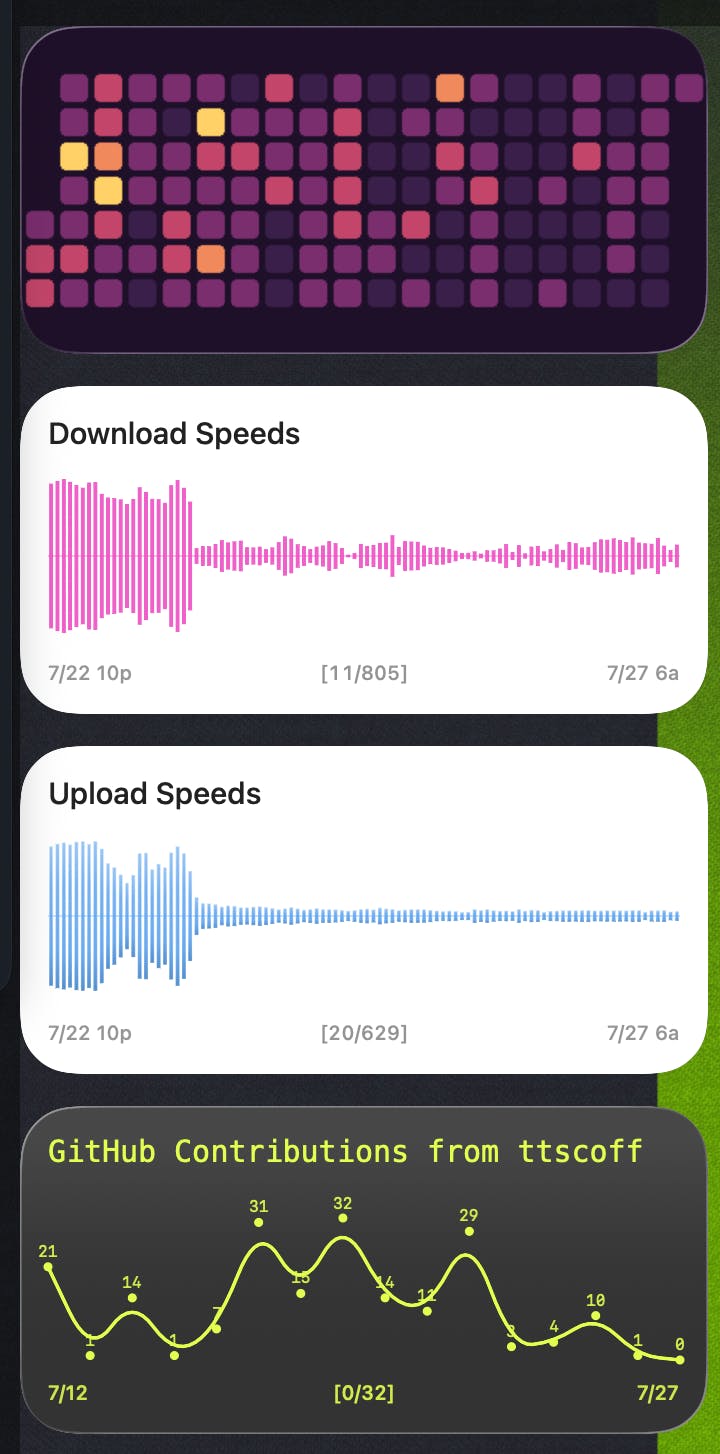
Core Features: More Than Just Text Output
Diverse Display Formats
One of TerminalWidget's most commendable aspects is that it doesn't limit itself to simply "showing a line of command output." It supports multiple data visualization formats:
- Command Output: Directly displays text results from scripts or commands;
- Progress: Converts numerical values into intuitive progress indicators, ideal for showing disk usage, task completion, etc.;
- Sparklines: Presents data trends within the limited widget space, perfect for monitoring CPU, memory, stock prices, and other time-series data;
- Images: Displays script-generated or fetched images directly in the widget.
The concept of Sparklines was systematically introduced by information design master Edward Tufte in his 2006 book Beautiful Evidence. It refers to minimalist line charts embedded in text or tables without axis labels, with the core purpose of conveying data trends rather than precise values within extremely small spaces. In the precious real estate of widget interfaces, Sparklines are the ideal format for displaying time-series data—users can immediately tell whether a trend is rising, falling, or experiencing unusual fluctuations without reading specific numbers.
This multi-format support elevates a small desktop widget from "static information display" to "lightweight dashboard."
Highly Customizable Script Widgets
TerminalWidget emphasizes widget customizability. Users can define script execution logic, refresh frequency, and display styles. This means virtually any data obtainable through the command line can be fed into a widget—from system monitoring to API calls, the possibilities are vast.
It's worth noting that TerminalWidget relies on Apple's WidgetKit framework, introduced with iOS 14 and macOS Big Sur. Unlike the previous Today Widget, WidgetKit widgets use SwiftUI declarative layouts and refresh data through a Timeline Provider mechanism on a scheduled basis rather than running in real-time. This means widgets are essentially "snapshots" rather than "live applications"—the system periodically updates content based on preset refresh policies. While this architecture ensures battery life, it also presents design challenges for tools like TerminalWidget: how to reflect script output changes as promptly as possible within the system-imposed refresh frequency constraints.
Cross-Platform Universal Experience: One Purchase, All Platforms
As a Universal App, TerminalWidget covers all three major platforms in the Apple ecosystem: macOS, iOS, and iPadOS. This delivers two layers of value:
First, one purchase grants access across all platforms. In today's app market where per-platform and monthly fees are commonplace, this one-time universal license shows genuine respect for users. Since Apple introduced auto-renewable subscriptions on the App Store in 2016, developers have shifted en masse from one-time purchases to subscriptions for sustained revenue streams. According to RevenueCat's 2024 report, over 90% of the top 200 non-gaming apps by App Store revenue use subscription models. For users, "subscription fatigue" has become a real pain point—an average user might simultaneously subscribe to a dozen or more app services. TerminalWidget's choice of a one-time purchase combined with Apple's Universal Purchase mechanism represents a differentiated positioning that effectively lowers the decision-making barrier for users.
Second, data continuity. You can configure a monitoring script widget on your Mac desktop, and the same information can appear on your iPhone home screen or iPad, creating a consistent cross-device experience.
Of course, due to sandbox restrictions on iOS/iPadOS, script execution capabilities differ from macOS—a natural constraint that tools like this must face on mobile. The iOS and iPadOS sandbox mechanism is the core of Apple's mobile security model—each app can only access files and resources within its own container and cannot freely invoke system commands or access the toolchain under /usr/bin like macOS can. On macOS, you can directly execute bash/zsh scripts and call tools like curl and python, but on iOS/iPadOS you need to rely on built-in script interpreters or remote execution solutions (such as SSH-ing to a server for execution and returning results). App Extensions (the runtime container for widgets) also have additional memory limits (typically around 30MB) and execution time limits, which further constrain script complexity on mobile.
Who Needs TerminalWidget
TerminalWidget's positioning is crystal clear—it targets technical users who manage their workflows with scripts. Typical use cases include:
- System Operations: Displaying real-time server status and CPU/memory usage trends on the desktop;
- Developers: Monitoring CI/CD build status, Git branch information, and to-do items;
- Data Enthusiasts: Showing cryptocurrency prices, stock trends, and metrics from custom API responses;
- Productivity Enthusiasts: "Pinning" frequently used command outputs within line of sight to reduce context switching.
Taking CI/CD monitoring as an example, Continuous Integration/Continuous Delivery is standard practice in modern software development. After every code commit, CI systems (such as GitHub Actions, Jenkins, CircleCI) automatically run test, build, and deployment pipelines. Build failures require immediate response; otherwise, they block the development progress of other team members. Traditionally, developers learn about build status through email notifications, Slack messages, or by specifically opening the CI platform's web interface. With TerminalWidget, a simple curl command calling the CI platform's API (such as the GitHub Actions REST API) can display the status of recent builds directly in a desktop widget, enabling zero-effort passive awareness.
Essentially, it transforms the action of "opening a terminal and typing a command" into "glancing up," reducing the friction cost of information retrieval.
Summary: Filling the Programmable Widget Gap
TerminalWidget isn't a disruptive product, but it addresses a real and long-standing need: presenting dynamic information from the terminal to users in a more passive, more immediate way. Apple has heavily promoted the widget ecosystem since iOS 14 and macOS Big Sur, yet tools that truly bring "programmable output" into widgets have been scarce—TerminalWidget fills precisely this gap.
Its business model also deserves praise—a universal app with a one-time purchase avoids subscription fatigue. Combined with Brett Terpstra's reputation in the developer tools space, this product holds considerable appeal for its target audience.
One caveat: the value of tools like this depends heavily on the user's own scripting abilities. For average users unfamiliar with the command line, the barrier to entry may be relatively high; but for technical users, it provides a highly programmable "personal information display" with ample room for imagination.
Key Takeaways
Related articles

The Fatal Flaw of Gaussian Splatting: Oxford's Survey-Grade Dataset Reveals the Truth About Off-Trajectory Collapse
Oxford Robotics Institute releases survey-grade Spires dataset, first to quantify 3D Gaussian Splatting's geometric collapse under off-trajectory views using Leica RTC360 millimeter-precision ground truth.

OpenCode Practical Guide: Installation, Configuration & Usage Tutorial for This Open-Source Claude Code Alternative
Complete guide to OpenCode, the open-source Claude Code alternative: covers desktop and WSL installation, model configuration, rule files, custom commands, and MCP service integration.

Scaling Laws for Pre-training and RL: Chess Experiments Reveal Post-Training Compute Allocation Principles
Chess experiments systematically study compute allocation across pre-training, SFT, and RL, revealing that pre-training sets the downstream ceiling and RL mainly boosts pass@1 reliability, not exploration breadth.