Testing "Luozi" — An Agent Skill Migration Tool from Million-Follower AI Blogger Qiuzhi2046

Luozi is an early-stage tool for packaging and migrating AI Agent skills across clients — promising concept, rough execution.
Luozi is a closed-beta product from AI blogger Qiuzhi2046, positioned as a skill-sharing and migration platform for the AI Agent era. Its core feature scans locally installed AI clients and syncs skills, MCP configs, plugins, and project data to the cloud for seamless cross-client migration. The community side includes a visual prompt marketplace (Square), a discussion board, and a crowdsourced model review zone. The Square's inline output previews stand out as the most immediately useful feature. Key issues include inaccurate local scanning (Doubao Workstation goes undetected), a broken publish workflow, and occasional broken skill links. A promising direction, but not yet ready for production reliance.
Million-follower AI blogger "Qiuzhi2046" recently launched a new product called Luozi (炉子, literally "The Furnace") into closed beta, drawing considerable attention from the AI enthusiast community. The product occupies an unusual niche — it's a capability network tool designed to package and transfer Agents and skills across platforms. As someone who secured a beta invite, this article breaks down its core features and current shortcomings from a hands-on perspective.
A quick disclaimer: this is not a sponsored post. The product is still in early beta with many features unfinished, so treat the following as a preliminary impression only.
What Exactly Is Luozi?
According to Qiuzhi2046's own definition, Luozi is "a capability network tool that allows Agents and skills to be packaged and transferred." Its core philosophy is to let "someone else's capabilities become your own" — essentially a skill-sharing and migration platform built for the AI Agent era.
In plain terms: when you switch between different AI clients, the skills, config files, projects, plugins, MCP settings, and other data you've built up tend to get lost or need reconfiguring from scratch. That's the exact pain point Luozi aims to solve — packaging those capabilities, storing them in the cloud, and migrating them so your work carries over to any client.
This positioning genuinely addresses a real need in today's landscape, where AI Agent tools are proliferating rapidly but remain deeply fragmented.
What is MCP? MCP (Model Context Protocol) is an open protocol introduced by Anthropic in late 2024, designed to standardize how AI models interact with external tools and data sources. Think of MCP as the USB port of the AI world — a universal connection standard that lets different AI clients (Claude, Cursor, Continue, etc.) call the same external tools or data services in a consistent way. Today's mainstream AI clients (Cursor, Windsurf, Claude Desktop, etc.) each maintain their own isolated configuration systems, and MCP server installation and config data is typically stored in a client-specific local path with no cross-client sharing. This is the structural problem Luozi is trying to solve: when a user migrates from one client to another, MCP configs, plugin lists, and project context all have to be rebuilt from zero — an enormous cost.
The Square: A Visual Skill and Prompt Marketplace
The Square (广场) is my personal favorite feature. It aggregates skills and image-generation prompts published by users, and its standout quality is this: every skill and prompt comes with real output examples.
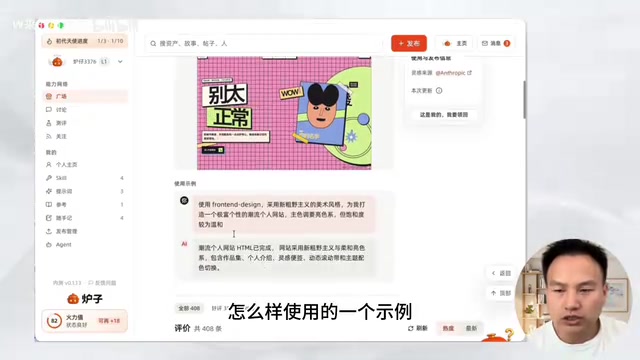
You can expand any entry to see what it actually produces — videos and images are both previewable inline. This eliminates the traditional friction of having to dig through README documentation just to understand what a skill does, making the whole experience far more intuitive.
That said, the content available on the Square is still fairly sparse, with most entries concentrated on prompts and a handful of common skills. Given that the product is in early beta, it's understandable that the content ecosystem needs time to grow.
The Discussion Board: A Playground for AI Geeks
The discussion board feels reminiscent of early Chinese internet forums like Tianya and Baidu Tieba — users can share things they've built, ask for help, and post tutorials. It's a key embodiment of Qiuzhi2046's vision of helping people "grow quickly and compound off each other's progress," and it functions as a genuine gathering place for AI enthusiasts.
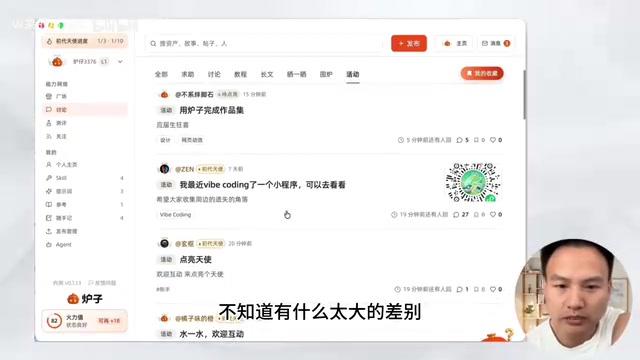
From a new-user perspective, however, the category structure feels over-segmented. The distinction between "Show Off" and "Discussion" isn't immediately clear, and sections like "Help Threads," "Fireside," and "Events" are sliced too thin, leaving new users unsure where to post. The differences between sections aren't strong enough to guide behavior intuitively. My suggestion would be to consolidate categories — fewer sections would make the experience smoother. That said, finer subdivisions may prove their worth once the community grows large enough to sustain the volume.
The Review Zone: More Entertainment Than Rigor
The Review Zone works like a crowdsourced benchmark: users pose test prompts, others respond, and anyone can rate the result as "Excellent / Average / Terrible" with optional commentary. Results are aggregated into leaderboards, currently covering text models, image models, and video models.
Despite being framed as a review section, the experience leans more toward entertainment than professional evaluation. It works fine as a lightweight gut-check on model reputation, but probably shouldn't be used as a serious basis for model selection.
The Core Feature: Agent Detection and Cloud Migration
If the community sections define Luozi's social layer, the Agent functionality is its true heart.
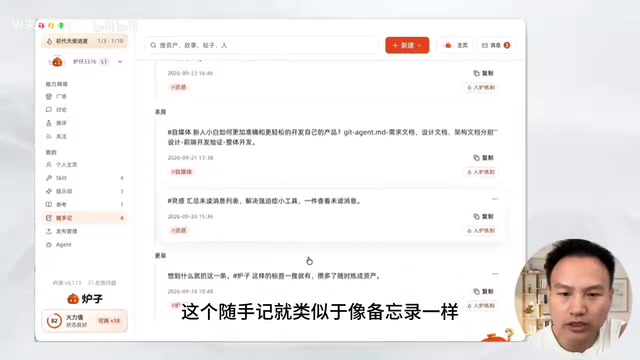
This feature scans your computer for all installed Agent clients, identifies which skills are installed, and surfaces associated config files, projects, plugins, MCP configurations, and more — all with one-click cloud storage for easy migration. There's also a "Context Relay" capability, which lets you carry your recent conversation history into a new session.
The biggest value here is straightforward: even when you switch clients, your data comes with you. For power users who regularly juggle multiple AI tools, this is a genuine productivity win.
Note: the "Install Luozi Skill" feature and some plugin functionality that Qiuzhi2046 demonstrated in promotional videos don't appear to be live yet — they'll presumably arrive in future updates.
A Note on Context Relay "Context Relay" touches on a fundamental concept in AI interaction: the context window. Every conversation with an AI model depends on the context window to maintain coherence, but when a session ends or you switch clients, that history is typically lost and the next conversation starts cold. Luozi's Context Relay essentially persists conversation history to the cloud and re-injects it when a new session begins, bypassing the local storage isolation that separates different clients. This is particularly valuable for complex, long-running projects — like code refactoring or long-form writing — where users would otherwise spend significant effort re-briefing the AI at the start of every session.
Current Problems
As an early beta product, Luozi has plenty of rough edges. Here's an honest rundown:
Interaction flow feels unpolished: Transitions between modules aren't smooth. For instance, the body text in discussion posts is noticeably smaller than the comment text, which looks visually inconsistent.
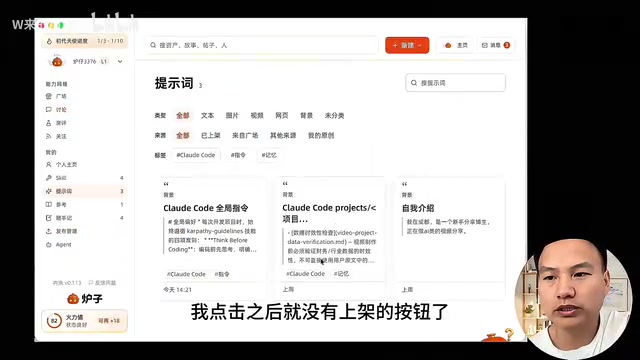
Broken publish workflow: In the "Publish Manager," when I tried to publish a locally discovered prompt, clicking through led to a dead end — there's no visible "Publish to Store" button. Local content can't be listed directly. The onboarding flow here is unclear, and a one-click publish option would be a significant improvement.
Broken skill installation links: Some skill install links return errors — likely a result of out-of-sync updates, and fixable over time.
Inaccurate local scanning (major issue): This is the most significant problem I encountered. Doubao Workstation (豆包工作台) — one of the officially listed supported clients — simply wasn't detected by the scanner, even after rescanning. Beyond that, I'd expect future versions to detect locally installed tools like DeepSeekAd and fully surface all local Agent content.
Conclusion
Luozi's product vision is clear and meaningful — in an era of fragmented AI Agent ecosystems, building a layer for capability packaging, sharing, and cross-client migration addresses a genuine pain point. The Square's visual skill previews and the Agent data migration functionality are the two standout highlights right now.
That said, the product is not yet mature. Inaccurate local scanning and a broken publish workflow are notable friction points. Fortunately, beta users are actively submitting feedback, and as an early-stage product with a well-defined direction, Luozi's growth trajectory is worth watching. AI geeks interested in the space should keep an eye on future iterations.
Related articles

When Did Paid Childcare Become the Norm? Working Mothers and the Evolution of Childcare
When did paid childcare become the norm? This article traces the evolution from the rise of childcare centers in the 1970s–80s and the 1990s linking of federal subsidies to work requirements, to declining stigma and rising costs, and explores advocates' 25-year effort to catch up with other countries on childcare and paid parental leave.

Red Flags for Product-Market Fit: A Practical Guide from Top VCs and the Superhuman Founder
Investors from Iconiq and Sapphire Ventures and Superhuman founder Rahul Vohra share PMF red flags and practical methods, including the 40% disappointment rule, retention curves, and acquisition costs.

What Task Should AI Agents Take Over Most? Heated Reddit Discussion
Reddit discussion: Which task do you most want AI agents to take over completely? Cross-app data migration, CRM updates, and report generation top the list, but insufficient reliability and the trust gap are the biggest obstacles to automation adoption.