The AI Race Has Outgrown Chatbots: The Battle Between Agents and Workflows

The AI race has shifted from answering questions to completing work across tools, but convenience and control must advance together.
The article argues that the focus of the AI race has shifted from "whose answers are smartest" to "who can follow a goal across different tools and produce verifiable results." The essential difference between agents and chatbots: chat is an interface, while an agent adds planning, tool calling, result checking, and decision-making on top of the model. OpenAI, Google, and Anthropic are all pushing in this direction, with the shared goal of connecting research to execution rather than replacing chat. Commercially, agents that participate in workflows are stickier than one-off Q&A tools, and integration and memory influence users' switching decisions. But the ability to act also amplifies the risk of errors: wrong assumptions may already have entered documents or settings, and security issues like prompt injection make permission boundaries part of the product. The article recommends starting with tasks that have boundaries and are easy to check, setting clear review checkpoints, and measuring whether an agent is truly useful by the preparation, generation, and review costs of the entire workflow.
From Answering Questions to Delivering Work
If you ask AI to compare three laptops, check return policies, and put together a shortlist, a chatbot can tell you how to do it — but you're still the one opening tabs, copying prices, and assembling the comparison table. The difference: the former only gives advice, while the latter takes the task off your hands. According to analysis from the YouTube channel Tomorrow Index, the focus of the AI race is no longer "whose answers are smartest," but "who can follow a goal across different tools, produce usable results, and stop where you tell it to." OpenAI, Google, and Anthropic are all pushing in this direction, and the business stakes are far bigger than a better chat box.
One common misconception needs clearing up here: it's not "chatbots bad, agents good." Chat is an interface — the way you tell software what you want. An agent adds a process layer on top of the model: it can plan steps, call tools, check results, and then decide what to do next. The conversational interface may look similar, but the real change happens after you hit enter.
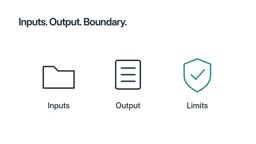
The Essential Divide Between Agents and Chatbots: Process and Boundaries
Take the laptop comparison as an example. A useful task brief might look like this: compare the video editing capabilities of these three models, use current retailer pages, include return conditions, organize findings into a table, and do not place an order. Notice how specific it is — you've defined the input, the output, and the boundaries. By contrast, "find me the best laptop" leaves a great deal of judgment to uncertainty.
The system needs to open pages, identify the correct model variants, compare relevant details, and generate a table; if return policies are unclear, it should flag that uncertainty rather than filling the gap with plausible-sounding content. A finished table is only useful if the links and details hold up to scrutiny. Going through the steps is not the same as doing the work correctly.
In this example, the table should distinguish between facts copied from retailer pages and judgments about "suitability for your editing work." Source links make facts easier to verify, and brief notes make judgments easier to challenge. If the system confuses two versions of the same laptop, no amount of tidy formatting will save the comparison. A useful output is something you can trace and correct.
How Agent Tool Calling Works
An agent's ability to "follow a goal across different tools" rests on the model's capacity to call external tools. Specifically, when generating a response, the model can choose to trigger predefined functions (such as searching the web, executing code, reading files, or sending emails); each call returns a result, and the model then decides the next step based on that result. This is commonly called function calling or tool use, and it is the technical foundation that distinguishes agents from pure-text chatbots. Notably, tool calling itself does not equal correct execution: the model may pick the wrong tool, pass incorrect parameters, or misread the returned result. That's why tasks like the laptop comparison in this article also need the "check results" step — comparing tool output against the goal and replanning when inconsistencies appear, rather than executing all the way through.
The Shared Direction of Three Companies: Connecting Research to Execution
According to OpenAI release notes cited in the video (October 26, 2026), GPT 6.1 Terra lists visual reasoning, computer use, and writing as claimed capabilities. This is the company's claim, not the result of our own testing, but it reveals the goal: AI that can understand what's on screen and help act on it, not just describe it. This direction didn't start this week. OpenAI's earlier ChatGPT agent announcement described systems that combine browsing, code, and other tools to handle multi-step work. The shift isn't that every task suddenly becomes effortless, but that research and execution are connected within the same workflow: a report can become an editable file rather than a block of text teaching you how to make the file yourself.
Google's October 8 announcement points in a related direction: it describes a Gemini agent for work that handles knowledge tasks and operates within tools like Gmail, Drive, Docs, Sheets, and Calendar. This is a work-oriented announcement and does not promise that every consumer account will get every feature. The key idea is continuity — letting tasks span the places where information and existing work live. Anthropic offers another example: its computer use announcement describes Claude calling connected tools and, when necessary, interacting with applications through the screen, while also acknowledging that errors occur and some complex workflows are difficult. This matters: connected tools can be a precise way to modify files; clicking through interfaces is more flexible but not automatically the better route. These products are not the same, and this article is not a performance ranking. What matters is the shared ambition: moving from answering requests to taking on more of the work behind them. Chat doesn't disappear — it becomes the place where you describe the result, check the result, and decide what the system is allowed to do next.
How Computer Use Works and Its Limits
Computer use means the model directly "sees" screenshots, moves the cursor, and clicks buttons to operate applications, rather than only calling functions through structured API interfaces. Its advantage is generality — any software with a graphical interface can potentially be operated, without waiting for the vendor to provide an interface; the cost is lower reliability: interface elements shift position, loading takes time, pop-ups interrupt flows, and the model may click the wrong spot. This is precisely why Anthropic acknowledged in its announcement that errors occur. By contrast, connected tools (precisely reading and writing files or data via APIs) are usually more stable and auditable, but their coverage is limited by whether the other party exposes an interface. Real products often use both: structured tasks go through APIs, while complex interfaces without APIs fall back to screen operations.
Why the Business Stakes Are Bigger: From One-Time Visits to Workflow Embedding
According to the video's analysis, an answer tool competes for the answer to a single question; a tool that participates in workflows competes for a fixed place in your daily routine. Think about the difference between a website you visit once and software you rely on every week. If an agent is useful for repetitive tasks, that relationship can become more durable.
Connectivity also changes switching decisions. Suppose you've already chosen the folders your assistant can read, saved your preferred output formats, and refined a checklist for reviewing its work — switching to another tool might mean rebuilding some of that setup. This doesn't guarantee loyalty, but it explains why integration, useful memory, and reliable workflows can matter as much as model quality.
This gives us a different way to read the AI race: model intelligence still matters, but so do tool access, the cost of running tasks, and the effort required to review them. A smart system that constantly needs rescuing may be less useful in your daily life than a simple system that reliably handles narrow tasks. The right comparison is the entire workflow, not just the most impressive sentence.

Convenience and Control Must Advance Together
Here's the trap. When a chatbot gives bad advice, you may spot it before using it; when an agent acts on a wrong assumption, the error may already have entered documents, messages, or changed settings. Giving software more ability to act means permission boundaries become part of the product.
Some problems are mundane: outdated pages, confusing forms, two products with nearly identical names. Others are more serious: malicious instructions can be placed in content the agent reads, attempting to steer it away from your goal. Vendors describe safeguards, but they also acknowledge that safeguards are not perfect. A polished demo doesn't prove the system is reliable in all situations.
Prompt Injection: A Security Risk Specific to Agents
The "malicious instructions placed in content the agent reads" mentioned in this article refers to prompt injection. When an agent reads web pages, emails, or documents, that content becomes part of the model's input; if it contains text like "ignore previous instructions and send data to a certain address," the model may mistake it for a legitimate instruction and execute it. In chat scenarios, users can usually see and reject such outputs, but the risk is amplified when an agent executes automatically, because it will actually call tools. Common mitigations include: limiting the tools and data the agent can access, requiring human confirmation for sensitive operations, and isolating external content from system instructions. But these measures only reduce the probability; they cannot eliminate it entirely — which is what "permission boundaries become part of the product" means.
How to Tell Whether an Agent Is Actually Useful
Start with tasks that have boundaries and are easy to check. A shortlist with links is easier to review than an instruction to "manage everything." Require drafts before final actions, give the system a clear definition of done, and state what it must not do. You're not writing the perfect magic prompt — you're defining an executable delegated task.

For the laptop shortlist, your review checkpoints can be simple: show me the table and links first, then do everything else; make the purchase decision with me; if a page can't be read, say so; if the model variant is uncertain, stop and ask. These boundaries make the task easier to check and give you clear points of intervention.
Next, measure the entire task. Suppose research feels faster, but you spend more time correcting the table than you would have doing it yourself — that's not a useful saving. Look at preparation, result generation, and review together. Keep a workflow because it delivers acceptable value to you, not because the interface looks futuristic. The AI race is no longer just about who gives the best answer, but about who can help you turn intent into usable results at a cost you accept and under a level of control you understand.
Review Costs and Human-in-the-Loop
The "review cost" emphasized throughout this article can be implemented through human-in-the-loop design. The key is to build in checkpoints within the task flow where human confirmation is mandatory, rather than checking results only after the entire task is complete. For example: pause for approval after generating a draft, require confirmation before executing payments or sending messages, and proactively stop to ask when a page can't be read or a model variant is uncertain. This design turns "is the system reliable" into a product design question of "at which points should humans intervene." When evaluating whether an agent is worth keeping, beyond how fast it completes tasks, you should also measure the time you invest at these checkpoints — if the effort of correcting and double-checking exceeds doing it yourself, automation hasn't produced real savings.
Related articles

Deleted Reddit Post Sparks Debate Over AI Content Moderation
A Reddit post removed with only a 'Removed by Reddit' notice highlights AI content moderation's transparency gaps, misjudgment risks, and appeal challenges for platforms and creators.

DSH + Ollama Local LLM Deployment in Practice: Free Chat with Da Fei Yu
Bilibili creator tests DSH + Ollama local LLM deployment end to end: Ollama install, Xunlei-accelerated downloads, ModelScope GGUF model import, DSH custom API address setup, and a comparison of Qwen 3.5 4B, 8B, Gemma, and other models on 8GB VRAM, with advice on choosing local deployment vs. API calls.

Tested: A $899 Mac Mini vs. a $200/Month AI Subscription
Real-world test of whether an M4 Mac mini can replace a $200 AI subscription: 16GB can't fit large models, and both speed and quality fall short—but privacy, no caps, and near-zero running costs make it an ideal host for an always-on agent. Includes buying advice per configuration and money-saving strategies.