The Complete Evolution of Codex: From Coding Tool to All-in-One AI Workstation

How OpenAI Codex evolved from a coding agent into a full-featured AI workstation in just over a year.
This article traces OpenAI Codex's rapid evolution from a specialized coding agent to an all-in-one AI workstation. It covers key capabilities including background computer use, visual annotation, persistent memory, CodexSites one-click deployment, and industry role plugins — showing how Codex has become a productivity platform for everyone, not just developers.
Introduction: Codex Is No Longer the Coding Tool You Once Knew
In April 2025, OpenAI released Codex — an AI coding agent designed specifically for software engineering. In just over a year, the product underwent a radical transformation. By June 2026, Codex had evolved from a simple code generation tool into a full-fledged AI workstation capable of controlling your computer, remembering user preferences, browsing the web, and even deploying complete applications with a single click.
Most people still think of Codex as "just a coding assistant," but the reality is that it has redefined the boundaries of AI-assisted work.
From Coding Assistant to All-in-One Platform: The Complete Evolution of Codex
The Starting Point: A Specialized Code Agent
Codex initially shipped with Codex One, built on the O3 reasoning model. O3 is a reasoning model series that OpenAI introduced between late 2024 and early 2025, representing an evolution of the Chain-of-Thought architecture. Unlike traditional GPT-series models, O3 was specifically optimized for complex tasks requiring multi-step logical reasoning, capable of performing internal "thinking" before generating answers — significantly improving accuracy in code generation, mathematical reasoning, and system design.
Codex One ran in a cloud-based sandbox environment — an isolated, virtualized execution environment that allows the AI to safely run code, install dependencies, and execute tests without affecting the user's local system. This architectural design ensured both the safety of AI operations and the ability to handle complete software engineering task chains. Within this environment, Codex could write code, fix bugs, answer codebase questions, and submit PRs (Pull Requests). PRs are a core collaboration mechanism in modern software development based on the Git version control system. When a developer completes a feature or fix, they create a PR requesting that the code changes be merged into the main branch — a process that typically includes code review, automated testing, and discussion feedback. Codex's ability to autonomously submit PRs meant it could not only write code but also follow a team's development standards, submitting changes in a standardized way to the version control system for human developers to review and approve.
It supported preloading user codebases and could autonomously handle multi-part tasks — which was already a remarkable breakthrough at the time.
Key Milestone: Explosive User Growth
By March 2026, Codex's weekly active users had surpassed 2 million. OpenAI adjusted its product positioning accordingly, no longer confining it to a coding tool but upgrading it to a broader, enterprise-grade agent platform capable of handling all kinds of tasks.

The MechOS Desktop App Launch
In early 2026, OpenAI released the MechOS version of the Codex desktop app. MechOS is the desktop operating environment OpenAI built for its AI agent product line, marking a paradigm shift from "conversational interaction" to "workstation-style interaction." Traditional AI tools mostly rely on web-based chat interfaces, which work fine for single conversations but fall short when you need to manage multiple parallel tasks or monitor long-running jobs simultaneously.
The MechOS desktop app provides a multi-panel interface similar to an IDE (Integrated Development Environment), allowing users to launch multiple agent instances simultaneously, each independently handling different tasks — for example, one refactoring backend code, another writing test cases, and a third updating documentation. This parallel processing capability dramatically improved development efficiency. On March 4th, the app officially launched on Windows, reaching a much broader user base.
"Full-Power Codex" Completely Changes the Game
OpenAI named this update "Full-Power Codex," and that was no accident. This wasn't a simple feature addition — it was a fundamental repositioning of the product.
Background Computer Use: AI That Truly "Sees" Your Screen
This is the most significant feature. Codex now supports operating various desktop applications — Figma, Xcode, Slack, and browsers. Figma is currently the most popular cloud-based UI/UX design tool, used by millions of designers worldwide for interface prototyping and design system management. Xcode is Apple's official IDE and the essential tool for developing iOS, macOS, and other Apple platform applications. Codex's ability to directly control these professional tools means its capabilities have broken beyond the boundaries of pure text-based code — it can adjust design files in Figma, configure project settings in Xcode, send message notifications in Slack, and participate in the complete software development lifecycle.
This feature is built on Computer Use Agent technology. At its core, it takes screenshots as visual input, uses multimodal large models to understand the semantics and spatial relationships of interface elements, and then generates precise mouse and keyboard operation commands. Unlike traditional RPA (Robotic Process Automation) that relies on fixed UI element positioning, vision-based agent technology has stronger generalization capabilities — even if the interface layout changes, the AI can still find the correct operation target through visual understanding.
Codex can recognize screen content, move the cursor, perform clicks, and support keyboard input. More importantly, it has an independent cursor that can operate simultaneously with the user, and multiple agents can run in parallel. The independent cursor design draws from the concept of remote collaboration tools, ensuring that AI operations don't interfere with the user's current work — achieving true human-machine parallel collaboration.
This means Codex is no longer a "you ask, it answers" dialog box, but a digital colleague that can actually do work on your computer.
Visual Annotation System: Say Goodbye to Lengthy Text Instructions
You no longer need to type text descriptions like "move the CTA button up" or "bold the heading." Now you can simply annotate directly on the screen — point to a button and say "move up," point to a heading and say "bold" — and Codex will recognize and execute the instruction.

The visual annotation system represents an important breakthrough in human-computer interaction. Traditional AI interaction relies on natural language descriptions, requiring users to "translate" visual information into text — a process that is not only inefficient but also prone to ambiguity. For example, "that button in the middle of the page" could refer to multiple elements in a complex interface. Visual annotation eliminates this ambiguity by allowing users to directly indicate target objects on the screen, combining spatial information with semantic instructions. The underlying technology relies on multimodal models' ability to precisely understand image regions, integrating multiple computer vision technologies including object detection, OCR text recognition, and UI element semantic parsing.
This dramatically lowers the barrier to entry, enabling non-technical users to precisely convey their intent to the AI.
Memory Feature: It Gets Smarter the More You Use It
Codex can now remember user preferences, common workflows, tech stacks, and repository conventions. This feature is essentially a persistent user context management system, involving multiple technologies including long-term memory storage, Retrieval-Augmented Generation (RAG), and user profile modeling. The system stores user preferences (such as code style and framework choices), project specifications (such as naming conventions and directory structures), and historical interaction patterns in a structured format, automatically retrieving relevant context and injecting it into prompts at the start of each new conversation.
This addresses a core pain point of large language models — the limited context window. Even if a single conversation's context window is limited, the memory system ensures the AI always "knows" the user's long-term preferences. Once enabled, it continuously learns your work habits and uses this background information to provide more personalized output, eliminating the hassle of repeating your requirements every time.
A Productivity Platform for Everyone
CodexSites: Deploy an App with a Single Sentence
OpenAI launched CodexSites — a "prompt-to-deploy" application building tool. This model represents the ultimate evolution of the low-code/no-code movement. Traditional low-code platforms (like Retool and Bubble) lowered the development barrier through visual drag-and-drop, but users still needed to understand concepts like data models, API integration, and deployment workflows. CodexSites takes the abstraction level even higher — users simply describe the internal app or tool they need in natural language, and Codex automatically handles the entire process: technology selection, front-end and back-end development, database design, and cloud deployment.
Note: this isn't just generating code — it's actually completing the entire process from development to going live. This has a disruptive impact on how enterprise internal tools are developed: internal dashboards or admin panels that previously took engineering teams weeks to build can now potentially be created by business users in minutes.
6 Industry Role Plugins
Also released alongside were 6 role-customized plugins covering analysts, marketing, sales, designers, and investors. This clearly signals OpenAI's strategic intent: Codex is no longer an exclusive tool for developers — it's a productivity platform for everyone on the team.
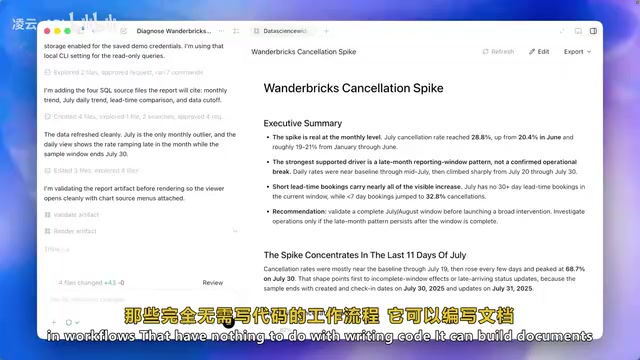
Whether or not you're a developer, Codex can work for you — writing documentation, conducting research, browsing the web, controlling desktop systems — all of these workflows require zero lines of code.
Practical Tip: Banked Rate Limit Resets
OpenAI introduced a feature that seems niche but is extremely practical — banked rate limit resets.
Rate limiting is a core mechanism in cloud services and the API economy, used to control a user's resource consumption within a specific time window. For AI services, each inference call consumes significant GPU compute resources, so providers must use rate limits to balance user experience and infrastructure costs.
Previously, hitting your usage cap meant passively waiting for a reset — especially painful during high-intensity development sprints. Now users can bank "sprint credits" and manually activate them before major migrations or intensive tasks. This "banked reset" is essentially an elastic quota mechanism, similar to the concept of "burstable performance instances" in cloud computing — users can accumulate credits during low-usage periods and release them in bulk during peak periods, perfectly suited to the "sprint-rest" work rhythm common in software development.

Recommended Usage Strategies:
- Save your reset credits for critical moments
- Allocate them strategically based on your weekly plan
- Use them during sprint weeks when you're going "full throttle"
- Plus or Pro users can earn extra credits through the referral program (up to 4 cumulative resets)
A Deeper Perspective: Why You Should Pay Attention to Codex Now
From April 2025 to June 2026, Codex's iteration speed has been nothing short of astonishing — multiple major releases, model upgrades, new interfaces, and feature integrations. This trend of accelerating evolution isn't going to stop.
The real competitive advantage isn't in the tool itself, but in who can integrate these tools into their actual workflows earliest. Those who start learning prompt engineering techniques, task architecture design, and deeply integrating Codex into their daily work now will occupy an entirely different competitive position as AI technology continues to evolve.
Codex's evolution sends us an important signal: AI tools are moving from "assisting with coding" to "assisting with everything." When AI can understand your screen, remember your habits, and control your desktop, the paradigm of human-machine collaboration has fundamentally shifted. The question is no longer "should I use it" but "how do I use it well."
Key Takeaways
Related articles

The Truth Behind Codex 'Build a Website in 5 Minutes': AI Isn't Creating Sites—It's Helping You Copy Them
Exposing the truth behind viral Codex 5-minute website videos: creators aren't building original sites with AI—they're copying shared prompts or scraping others' work. Learn AI coding tools' real limits.

Getting Started with AI Agent Development: A Complete Guide from Concept to Practice
A comprehensive guide to AI Agent architecture and development, covering automated marketing, intelligent customer service, and investment analysis scenarios with single and multi-agent collaboration.

The Truth Behind Codex 'Build a Website in 5 Minutes': AI Isn't Creating Sites — It's Helping You Copy Them
Exposing the truth behind viral Codex 5-minute website videos: creators aren't building original sites with AI — they're copying shared prompts or scraping others' work.