The Complete Guide to Claude Code: From Prompts to Subagents and Skills

From installation to MCP, subagents, and skills—a systematic walkthrough of Claude Code's advanced workflow.
Based on a complete video course by a Bilibili creator, this article lays out Claude Code's path from beginner to advanced. It covers its positioning as a terminal agent, installation methods, and Sonnet/Opus/Haiku model selection; login, mode switching, and the safety habit of confirming edits one by one; using /init to generate CLAUDE.md and Spec.md to lock down specs. It highlights a large-scale autonomous FSD refactoring under Plan Mode, then covers MCP connections, subagent parallel review, skills reuse, and a low-cost local-model practice plan with Ollama.
Claude Code is becoming an important standard in the AI programming space. It's not just another code completion tool, but an agentic programming environment that runs in the terminal. A Bilibili creator, through a complete video course, walks through everything from installation, basic interaction, and project refactoring all the way to MCP, subagents, and the skills system, demonstrating the practical workflow of this tool. This article is based on that course content, combined with a cross-referenced understanding of the official documentation, to lay out a path from beginner to advanced.
What Is Claude Code: A Programming Agent in the Terminal
Claude Code is essentially a command-line program that runs in the terminal and interacts directly with your project repository. You can think of it as a programming text editor that runs in the console—you ask it questions and give it instructions, and it reads files, modifies code, and executes commands.
There are multiple installation methods: via curl script, Homebrew, VS Code or Cursor extensions, JetBrains integration, and even a desktop app and web version. The creator demonstrated the installation process in the Mac terminal and emphasized that at the foundational level it uses Anthropic's Claude models.
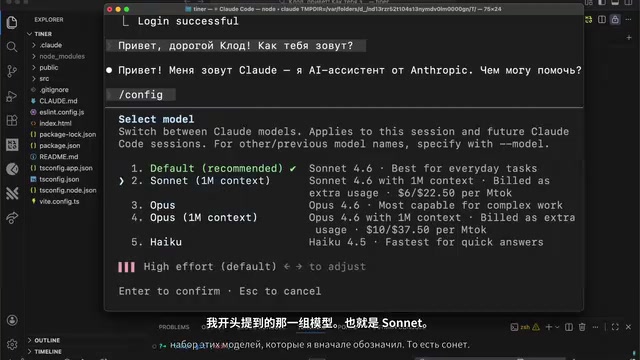
After launching, the interface displays the model currently in use. Under the default configuration there are three choices: Sonnet for most everyday tasks, Opus for more complex development projects, and Haiku as the cheapest, fastest but slightly less accurate option. The creator's rule of thumb: use Sonnet for everyday coding and refactoring, switch to Opus when handling high-level complex programming, with the goal always being to save tokens.
Basic Operations: Login, Mode Switching, and Your First Prompt
On first use, you need to complete login via a slash command, selecting an account with a subscription for authentication. After logging in, pressing Shift+Tab lets you switch between different agent modes, including a mode that directly edits files, Plan Mode for creating new projects, and a basic conversational interaction mode.
The creator demonstrated with a Tinder-like frontend project. The first prompt was: add a test feature to the project that pops up a match-success modal when the third swipe-like occurs. The model immediately began reading files, modifying code, and asking item by item whether to apply changes. There's a detail worth remembering here—the creator deliberately did not enable "allow all edits during this session," but instead confirmed each one individually. The reason is straightforward: AI can still make mistakes, and atomic-level confirmation is an important safeguard for project safety.
After the modifications are complete, switching to VS Code to view changes with Git version control is far more intuitive than tracking them in the terminal. Besides Git, Claude Code also provides the Rewind command, which can restore code or conversation to a previous state. The Sandbox command creates an isolated environment for safely testing changes.
CLAUDE.md and Spec: Giving the AI a Project Manual
Throwing the entire project at the model to index every time is both slow and expensive. The right approach is to use the /init command to have Claude Code analyze the project and generate a CLAUDE.md file. This file is project documentation specifically for Claude, describing the tech stack, architectural style, core functional components, and the conventions you want it to follow.
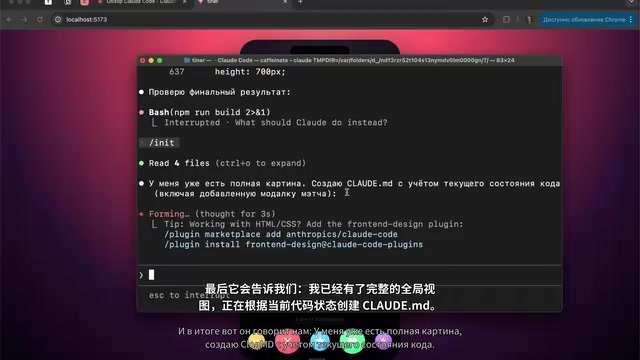
CLAUDE.md supports layering: you can put a global one in the root directory, or place more granular versions in specific subdirectories (such as assets or source), each responsible only for its own level's scope. The creator also suggested adding instructions like "use short answers, no extra code, always read Spec.md before refactoring" to the file, to save tokens and constrain behavior.
Going further, you can ask Claude to generate a Spec.md describing the technical specifications the project will rely on. This approach is especially effective when building complex projects involving frontend, backend, database, and authentication—write the spec first, then iterate in phases based on the spec.
Plan Mode and FSD Refactoring in Practice
The highlight of the demonstration was an architecture refactoring. After clearing the context, the creator entered Plan Mode and requested that the project be refactored into a Feature-Sliced Design architecture according to the specifications in Spec.md. The value of Plan Mode lies in this: the AI first gives a complete execution plan, you review, accept, or modify each item, and execution only begins after confirmation.
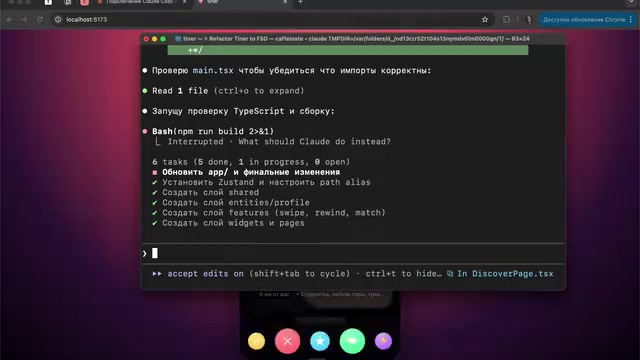
The plan was quite large—installing dependencies, configuring path aliases, creating components, splitting CSS files. The execution process lasted twelve to fifteen minutes, running autonomously the entire time, with the creator not manually changing a single line of code. The final project presented a complete FSD architecture, with entities clearly categorized and modules like the profile UI each in their proper place. The philosophy conveyed here is "deep coding" rather than "vibe coding": treating the neural network as an enhancement to thinking, not a delegation of tasks.
Feature-Sliced Design (FSD) is an architecture methodology for frontend applications, whose core idea is to organize code by "business responsibility" rather than "file type." It divides a project into several layers from bottom to top: shared (common utilities and UI primitives), entities (business entities such as User, Product), features (user-perceivable interactive functions), widgets (independent composite blocks), pages (routing pages), and app (global configuration and entry point). Each layer can only depend downward, with same-layer or reverse references prohibited, thereby ensuring module decoupling and testability. FSD has strict conventions for directory naming and public APIs, so migration often involves a large number of file moves and path alias configurations—which is precisely why the refactoring task in the article takes a long time and is particularly well-suited to being executed in batches by AI according to a plan.
MCP: A Tunnel to External APIs
MCP (Model Context Protocol) is the channel through which Claude Code connects to external APIs, used to extend the capabilities of the model and the program itself. The creator had already installed several MCPs from Claude itself and particularly recommended context7—which can read the latest technical API documentation.
Installation is simple, via the claude mcp add command. In actual use, you can tell Claude "implement the login feature with better-auth and use context7 to get the latest API," and it will complete the information retrieval on its own. Other MCPs worth noting include: Figma (for frontend developers), Playwright (browser testing), Notion, Jira and Confluence integrations, and Gamma for creating presentations. The MCP ecosystem exists independently of Claude Code; you only need to choose the connectors you actually need for your work.
Model Context Protocol (MCP) is an open protocol open-sourced by Anthropic in late 2024, used to establish standardized connections between LLM applications and external data sources and tools. It uses a client-server architecture: MCP servers expose three types of capabilities—resources (readable data), tools (callable functions), and prompts (reusable prompt templates)—while clients (such as Claude Code) are responsible for discovering and invoking them as needed. Compared with writing one-off integration code for each API, MCP lets the same set of servers be reused by any compatible client, so the ecosystem can evolve independently. Servers like context7 expose the latest documentation to the model in the form of tools through this protocol, alleviating the problem of lagging training data.
Subagents: Specialized Assistants That Work in Parallel
Subagents can be understood as junior employees or parallel workers—they are essentially independent contexts that run in the background with specific tasks and do not occupy the main context.
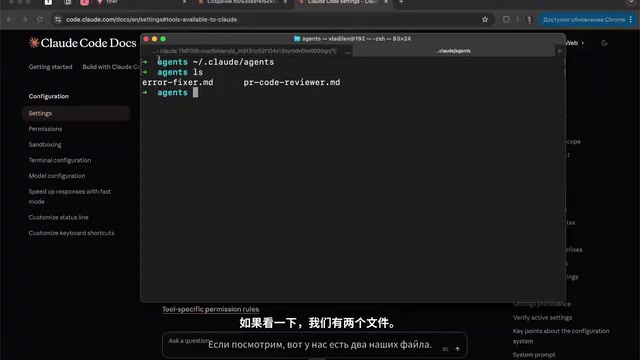
Through the /agents command you can create and manage subagents, choosing project-level or global-level (personal). In the demonstration, a "PR code review" agent was created, whose job is to analyze potential errors, check lint conventions, and identify dangerous points before submitting a pull request. During creation you can configure the tool permissions available to it—since this role is only responsible for review, the creator kept only read-only tools.
Each subagent is essentially a Markdown file, with a header containing the name, description, list of available tools, and model selection, followed by ordinary system prompts. The benefit of this design is that you can build large orchestration structures using natural language. At runtime the agent launches with an independent identity, reads information, and gives a review verdict—in the demonstration it did indeed find one serious error and several warnings.
The context window is the maximum number of tokens a large model can process in a single inference; all file contents, command outputs, and tool results in the main conversation accumulate and occupy it. When the context approaches its limit, the model's attention to earlier information declines, answer quality degrades accordingly, and you pay for the entire context on every request. The core value of subagents lies in context isolation: they complete work with a fresh context loaded only with task-relevant material, and only return a condensed conclusion to the main thread at the end. This is consistent with the "retrieval augmentation" approach—keeping long-tail information outside and only introducing summaries when needed, which both controls cost and reduces contamination of the main context.
Skills: Encapsulating Top Developers' Best Practices
Skills are preset templates for feature extensions, essentially solidifying other people's thinking patterns and algorithms for reuse. For example, the React best practices skill provided by Vercel can be brought in directly.
Installation only requires pasting the command into the console, after which it can be invoked in tasks. In the demonstration, Vercel's React skill was applied to a useMatch model file for refactoring; the originally redundant extra state was removed and the code was noticeably cleaner—and the user themselves did not need to master these best practices.
The structure of a skill is very regular: a folder with the same name as the skill, containing a required SKILL.md file with the name (which must match the folder name—this is the only hard requirement), function description, metadata, and core prompt. Specific rules and examples are placed in other files, and the system automatically decides which content to connect. This means you can look for ready-made resources in public skill libraries, or write your own.
Cost Control: Practice with Local Models
Claude Code performs excellently, but it consumes a lot. The creator offered a pragmatic solution: run local models through Ollama and use a custom provider within the Claude Code framework. After installing Ollama, pull compatible models (such as Qwen2-Coder, GLM-4.7, GPT-OSS, etc.), then launch Claude Code with a command specifying that model.
Local models naturally don't perform as well as Claude, but during the practice phase they can avoid consuming subscription quota. The key is to distinguish scenarios: which tasks can be handed to local models, and which must use top-tier models.
Ollama is a local large-model runtime responsible for downloading model weights, managing memory and GPU acceleration, and exposing an HTTP service compatible with the OpenAI interface on the local machine (default port 11434). Claude Code can point requests to this local endpoint through environment variables (such as ANTHROPIC_BASE_URL and ANTHROPIC_AUTH_TOKEN), thereby replacing the underlying model without changing the workflow. Note that local models are usually weaker than Claude at following tool use, and complex refactoring or long-chain tasks are prone to failure; they are more suitable for syntax practice, simple completion, and the process-familiarization phase. VRAM size directly determines the scale of models that can run, and quantized versions (such as Q4) can significantly lower the hardware threshold at the cost of a small amount of accuracy.
Summary
The main thread of this course is quite clear: first use /init to establish project documentation, use Spec to lock down technical specifications, review execution plans through Plan Mode, let subagents work in parallel on heavy tasks like refactoring, use skills to bring in external best practices, use MCP to open up external APIs, and finally use Rewind and Git to maintain control over changes. Claude Code's positioning is not to replace developers, but to free developers from execution details and keep their energy focused on judgment and decision-making.
One-line Summary
From installation to MCP, subagents, and skills—a systematic walkthrough of Claude Code's advanced workflow.
Paragraph Summary
Based on a complete video course by a Bilibili creator, this article lays out the path of using Claude Code from beginner to advanced. It first introduces its positioning as a terminal agent, its multiple installation methods, and the principles for choosing among the three model tiers Sonnet/Opus/Haiku; then explains login, mode switching, and the safety habit of confirming edits one by one, as well as the practice of using /init to generate CLAUDE.md and Spec.md to lock down technical specifications. It highlights a large-scale autonomous refactoring under Plan Mode following the FSD architecture, then introduces MCP external connections, subagent parallel review, and skills for reusing best practices, and finally offers a cost-control solution for low-cost practice using local models via Ollama.
Related articles

Why Does the Tesla Roadster Need to Fly? A Deep Dive into Musk's Wild Demo
Tesla's Roadster launch showed wall-climbing, upside-down driving, and flying stunts—but The Vergecast notes the demo car may lack a battery, the Rocket version is invite-only and not street-legal, and the website terms don't guarantee delivery. After nine years of delays, why does this car still need to exist?

AI Is Not a Replacement: Human-AI Collaboration Through the Lens of Factory Root Cause Analysis
Starting from factory root cause analysis, this article explains how AI accelerates evidence chain construction rather than replacing human experts, exploring the pragmatic implementation logic and business value of 'AI supporting people rather than replacing them.'

AI Agent Decision Auditing: Building an Evidence Chain in Regulated Workflows
Starting from a Reddit discussion, this article analyzes three core issues in AI agent decision auditing within regulated workflows: what fields audit records should contain, how to handle feedback latency for erroneous decisions, and how to continuously calibrate LLM judge consistency with human judgment.