The Data Trap in Screenshots: How OCR Turns Images Back Into Usable Data

Screenshots capture efficiently but trap data; an OCR workflow makes information usable again through format conversion.
The article notes that screenshots are nearly irreplaceable for saving information, yet the gap between bitmap storage and structured text turns that information into "dead data" upon reuse. It proposes a practical OCR workflow with five steps — a clear image, information extraction, format conversion, result validation, and application integration — stressing that success hinges not on recognition rate but on post-text format conversion, where header recognition, cell boundary detection, and type inference are the real challenges. It also offers a criterion: tidily structured table-type screenshots suit OCR, while scattered fields or freely formatted content may not be worth it.
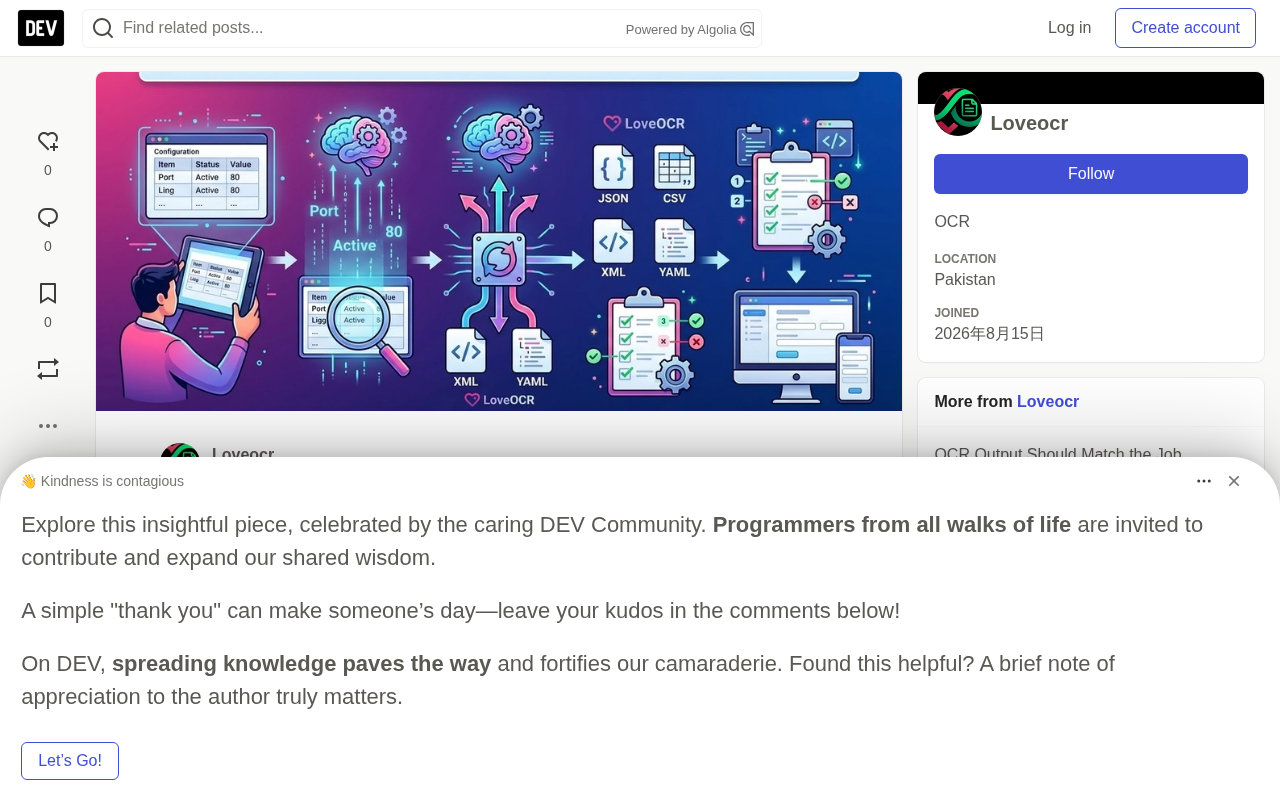
Screenshots are one of the fastest ways to save information. A config table, a report, a column of records — one hotkey and it's all captured. The problem is that when you actually want to use that information, it's "dead" — an image made of pixels, not fields a program can read.
The Efficiency of Screenshots Cuts Both Ways
Screenshots are nearly irreplaceable when it comes to capturing: what you see is what you get, no formatting required, no content-type restrictions, works across platforms. But that convenience only exists at the moment of saving.
Once you move into the using phase, the situation flips. Say you receive a screenshot containing a config table and need to move its parameters into your own application. Copy-paste won't work, because there's no selectable text layer in the image; retyping by hand is not only time-consuming but error-prone on long numbers or similar-looking fields. The tidier and denser the screenshot, the higher the cost of manual reconstruction.
The essence of this contradiction: between the storage format of a screenshot (a bitmap) and the usage format of data (structured text), there's a missing conversion bridge.
A Practical OCR Workflow
OCR (Optical Character Recognition) is precisely the tool that fills this gap. But "turning an image into text" is only the first step — making the result truly usable requires a complete processing chain:
Start with a clear image. Image quality sets the ceiling for recognition. Blurry, skewed, or over-compressed screenshots significantly drag down accuracy, and there's no shortcut here.
Extract the relevant information. The OCR engine recognizes the text content, but the raw output is often a jumble of text lines — you need to judge from the layout which are headers and which are data rows.
Convert to the right format. This is the critical step. Recognized text only has value once it lands in a structured container. Common choices include JSON, CSV, XML, or YAML, depending on what the downstream system consumes. JSON suits nested structures and API integration, CSV suits tabular data imports, and YAML is more readable in configuration scenarios.
Validate the extraction results. OCR isn't 100% accurate — numbers, symbols, and easily confused characters (like O vs. 0, l vs. 1) are frequent error points. Manual spot-checks or rule-based validation on key fields can prevent bad data from flowing into your application.
Connect to the application. Only after completing the previous steps are these data truly "liberated" from the screenshot.
The technical principles of OCR (Optical Character Recognition) can be roughly divided into two stages: text detection and text recognition. The detection stage locates text regions in the image, outputting individual bounding boxes; the recognition stage converts the pixels within each box into a character sequence. Early approaches relied on hand-designed features (such as stroke width or edge gradients) and were highly sensitive to font, skew, and background noise; modern approaches generally use deep learning, with detection commonly handled by networks like CTPN and DBNet, and recognition by CRNN or Transformer-class models, trained on large amounts of synthetic and annotated data with greatly improved robustness.
However, the output of a general-purpose OCR engine is usually just text fragments with coordinates — it doesn't understand layout semantics. To make the result truly usable, layout analysis is often needed to determine the hierarchical relationships between paragraphs, tables, and headings. This is why, on table-type screenshots, raw OCR output is still some distance from usable data — recognition is only the first half; structuring is the second.
Why Format Conversion Is the Core Challenge
Many people understand OCR as "image to text," but what really determines success is the processing after the text. Once a config table is recognized as plain text, the row-column relationships and field correspondences are all lost — using it directly is nearly impossible.
Mapping recognition results back into a structured format requires handling header recognition, cell boundary detection, empty-value filling, type inference (string or number), and a whole series of other problems. This is also where OCR tools differ — recognition rate is just the entry ticket; conversion quality determines practical usability.
To address this need, some tools offer conversion workflows targeting multiple formats. LoveOCR, for instance, covers conversion workflows for several of the formats mentioned above, so users don't have to build the entire pipeline from scratch.
To map OCR text into structured data, a common approach is to use text coordinates for row-column clustering: first group text fragments into rows by vertical position, then align them into columns by horizontal position, thereby inferring the row-column skeleton of the table. For tables with ruled lines, line detection can be used to first locate cell boundaries, then fill the text into the corresponding cells. Empty cells, merged cells spanning rows or columns, and "invisible tables" without explicit lines are all error-prone edge cases.
Type inference is equally important. Everything OCR outputs is essentially a string, and the program needs to determine whether a given column is a number, a date, or text. If handled as strings directly, fields like amounts, IDs, and version numbers will produce errors in subsequent calculations or sorting. Therefore, during the format conversion stage, field-level regex validation and type conversion rules are typically needed as well, so data can safely flow into downstream systems.
A Simple Criterion for Deciding Whether to Use OCR
Not every screenshot is worth running through OCR. If you're only occasionally extracting a field or two, manual entry may be faster; if the screenshot content needs to enter a system in bulk, repeatedly, or if there are many fields where manual errors are costly, then investing once in building an OCR workflow pays off.
Another dimension for judgment is data shape: structurally tidy table-type screenshots (config tables, reports, record lists) are best suited for an OCR workflow, because the layout is highly regular and conversion rules are easy to define; whereas freely formatted mixed text-and-image content sees extraction difficulty and validation costs rise significantly.
There's nothing wrong with screenshots themselves — the mistake is letting them stay in screenshot state forever.
One-line Summary
Screenshots capture efficiently but trap data; an OCR workflow makes information usable again through format conversion.
Paragraph Summary
The article points out that screenshots are nearly irreplaceable for saving information, but the gap between bitmap storage and structured text turns that information into "dead data" in subsequent use. The author proposes a practical OCR workflow with five steps: a clear image, information extraction, format conversion, result validation, and integration into an application, emphasizing that what really determines success isn't the recognition rate but the format conversion after the text — header recognition, cell boundary detection, and type inference are the real challenges. The article also offers a criterion: structurally tidy table-type screenshots are best suited for OCR, while scattered fields or freely formatted content may not be worth it.
Related articles

Chain of Thought Isn't Just for AI: How Humans Can Use CoT to Improve Thinking Quality
Chain of Thought isn't just a prompt trick for large models. Starting from a Hacker News discussion, this article analyzes why CoT works for human thinking too, breaks down actionable ways to transfer it, and highlights the key differences between human CoT and machine CoT.
Cloudflare Teams Up with OpenAI: Closi…
Cloudflare Teams Up with OpenAI: Closing the Loop from Vulnerability Discovery to Defense with AI
Cloudflare uses OpenAI Daybreak to investigate security vulnerabilities and generate reviewable remediation plans, while developers use Codex to boost coding efficiency and quality.

Orca Multi-Agent Orchestration in Practice: A Guide to Parallel Collaboration with Claude and Codex
Orca is Stable AI's free open-source agent workbench supporting 34 agents like Claude Code and Codex in parallel. Learn its Git worktree isolation, multi-model orchestration, and mobile management.