The Essential Difference Between Agent Skills and MCP: Process Layer vs. Capability Layer

Skill codifies workflows at the process layer; MCP connects external systems at the capability layer.
This article breaks down the fundamental difference between Skill and MCP in AI Agent development. Skills belong to the process layer, designed to codify repetitive workflows and save context overhead. MCP (Model Context Protocol) belongs to the capability layer, serving as a standardized interface for Agents to access external systems and data. Through concept definitions, configuration methods, and a real-world collaboration scenario, the article clarifies how both work together to build complete Agent architectures.
Introduction: Why Distinguish Between Skill and MCP?
In the world of AI Agent development, Skill and MCP are two frequently mentioned concepts. Many beginners loosely assume both are just configurations for expanding an Agent's capabilities, but this understanding is too superficial. In reality, Skill belongs to the process layer, while MCP belongs to the capability layer — they operate at fundamentally different levels.
An AI Agent is an AI system capable of autonomously perceiving its environment, making decisions, and executing actions. Unlike traditional conversational AI, Agents are goal-oriented, can use tools, and perform multi-step reasoning. In Agent architecture design, there are typically multiple layers: at the bottom is the foundational reasoning capability provided by large language models (LLMs), the middle layer handles capability extension (such as tool invocation and API integration), and the top layer manages process orchestration (such as task decomposition and step execution). Understanding this layered architecture is a prerequisite for correctly using Skill and MCP.
Grasping this distinction directly determines whether you can efficiently build a truly functional AI Agent system. This article will systematically clarify the positioning and usage of both concepts — from conceptual analysis and practical configuration to collaborative scenarios.
What Is a Skill: A Custom Operations Manual for Your Agent
Core Definition
A Skill can be understood as a custom operations manual tailored for your Agent. Its core value isn't about giving the Agent new external connectivity — it's about codifying your repetitive workflows while saving context overhead.
Here's an example: you frequently ask AI to write copy, and every time you have to repeatedly specify the structure, tone, prohibited words, and output format. Repeatedly pasting these instructions is both tedious and error-prone. Once you package the entire set of steps into a Skill, the Agent can automatically follow these specifications for similar tasks going forward.
This involves a key technical concept — context windows and token economics. A large language model's context window refers to the maximum text length the model can process in a single interaction, typically measured in token count. In each conversation, system prompts, message history, tool descriptions, and user input all consume context space. Tokens not only affect the model's comprehension (information beyond the window gets truncated) but also directly impact API call costs. Therefore, Skill's on-demand loading strategy is essentially fine-grained context management, avoiding the need to stuff lengthy rules into the limited context window every time.
Three Signals That You Need to Create a Skill

- You perform the same type of task repeatedly — indicating a reusable process exists
- You paste a large block of custom rules every time — indicating high rule complexity
- Task quality depends on a fixed process that prompts alone can't reliably deliver — indicating the need for structured constraints
Conversely, one-off requests or tasks that can be explained in a single sentence don't warrant building a dedicated Skill.
Skill Structure and Configuration
The simplest Skill structure is a folder plus a configuration file, supplemented with scripts, templates, and reference materials as needed. Platforms like Codex that support Skills first register the Skill as an Agent (including name, description, path, and loaded context), and only load the full rules when invoked — no need to cram lengthy constraints into every interaction.
Codex is OpenAI's cloud-based AI coding agent that can autonomously complete tasks like code writing, debugging, and testing in a sandboxed environment. It supports defining Agent behavior through configuration files and allows users to register custom Skills and MCP services to extend its capabilities. In the Agent development toolchain, similar platforms include frameworks like LangChain, AutoGen, and CrewAI, all of which support tool registration, process orchestration, and multi-Agent collaboration to varying degrees. Codex's distinguishing feature is its deep integration with code execution environments, making it particularly well-suited for Agent development in software engineering scenarios.
The storage path depends on the tool you're using. If you want both Codex and Codex Cloud to share the same set of Skills, it's recommended to create a separate source directory and sync it to both paths. Individual developers can use symbolic links for syncing, while teams should use sync scripts or maintain dual directories — always designating a source of truth to prevent inconsistencies between the two sides.
The configuration file's core elements are Name and Description, and the description should clearly state both applicable and non-applicable scenarios.
Common Misconceptions About Skill Configuration
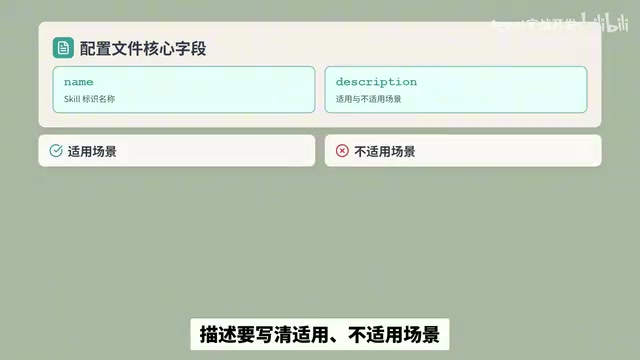
A Skill itself cannot grant an Agent external connectivity — no matter how detailed it is, it's only a set of execution step instructions. To access internal systems, business APIs, or real-time data, you must pair it with script plugins, MCP, or pre-authorized tools. Skills can only orchestrate the calling logic — they are not the external connectivity capability itself.
What Is MCP: A Standardized Interface for Agents to Connect with External Tools
Core Definition
MCP (Model Context Protocol) is a standardized universal interface for Agents to connect with external tools. By default, an Agent can only read the current conversation content. Project-internal data, orders, log platforms, and messaging tools all reside in external systems that the Agent cannot directly access. MCP serves as the bridge that connects these external systems within authorized boundaries.
Model Context Protocol was open-sourced by Anthropic in late 2024, aiming to solve the lack of a unified interaction standard between AI models and external data sources or tools. Before MCP, every AI application had to write custom integration code for different external systems, resulting in massive duplication of effort and compatibility issues. MCP borrows from the concept of USB ports unifying hardware connections, defining a standardized client-server architecture: an MCP Host (such as an AI application) connects to an MCP Server through an MCP Client, and the Server then interfaces with specific data sources or tools. This design allows the same MCP Server to be reused across different AI applications, significantly reducing integration costs. Currently, MCP has gained support from major AI vendors including OpenAI and Google, and is becoming the de facto industry standard.
MCP's Context Loading Logic
MCP's context logic differs from Skill's. It doesn't dump all external real data at once — it only initially loads the service and tool catalog, along with function and parameter descriptions. This metadata occupies context space, but actual data is only loaded after a tool is invoked.
This means: the more MCP services connected and the more tools available, the more bloated the metadata becomes. Overly broad query scopes and messy fields can also interfere with the Agent's judgment. Therefore, you should only enable necessary tools, connect only essential systems, filter fields on demand, and keep query content concise. This is another manifestation of token economics — within a limited context window, every piece of metadata description competes for space with actual task content, and excessive tool descriptions dilute the model's attention allocation to the core task.
Four Questions to Determine Whether You Need MCP
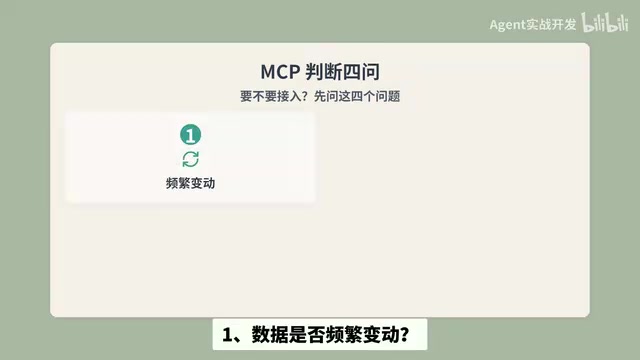
- Does the data change frequently? — Static data can simply be placed in files
- Is the data outside the current project? — Only external data needs MCP bridging
- Can query results be kept concise and controllable? — Managing context volume
- Does the tool have permission to modify external data? — Managing security risks
When the answers to the first two questions are mostly "yes," integrating MCP adds value. Typical scenarios include order queries, API logs, and message records. Beginners are advised to start with read-only MCP services to minimize security risks.
Regarding security, the risk difference between read-only and read-write permissions deserves special emphasis. In Agent systems, tool permission management is a core component of the security architecture. Read-only operations (such as querying order status or reading logs) won't cause data corruption or business disruption even if errors occur — the risk is manageable. However, write-enabled operations (such as modifying order status, initiating refunds, or deleting records) can cause irreversible business losses if mistakenly triggered or maliciously exploited. The industry typically follows the Principle of Least Privilege, granting the Agent only the minimum permissions needed to complete a task. Additionally, introducing a Human-in-the-Loop confirmation step is recommended as a safety valve for high-risk operations.
Configuring MCP in Codex
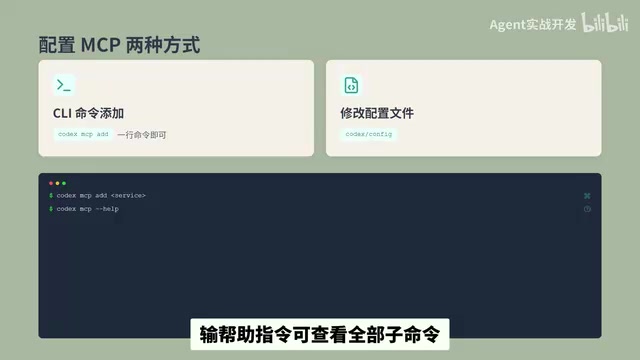
There are two ways to configure MCP in Codex:
- CLI command: A single command can add a new MCP service; entering the help command shows all available subcommands
- Configuration file: The default config path is Codex Config; trusted projects can also use the project-level Config path
You can view the status of enabled MCP services directly in the terminal, making debugging and management convenient.
Practical Scenario: How Skill and MCP Work Together
Let's use a real business scenario as an example: having an Agent investigate failed refund orders.
| Layer | Responsibility | Specific Role |
|---|---|---|
| Config File | Business Rules | Stores refund-related business rules |
| Skill | Execution Steps | Defines the investigation workflow: check order status → verify payment/refund records → compile findings and solutions |
| MCP | Real-time Data | Retrieves real-time data from order systems, payment systems, and log platforms |
The division of labor is crystal clear:
- Rules go in the config file — defining what's correct
- Execution steps go in the Skill — defining how to do it
- Connecting to systems for data relies on MCP — solving where the data comes from
Skills can orchestrate the calling sequence but cannot replace external connectivity. Only when both work together can you build a complete Agent workflow. This layered collaboration pattern is nothing new in software engineering — it essentially follows the Separation of Concerns design principle, where each layer handles only what it's best at, collaborating through clear interfaces to improve system maintainability and extensibility.
Summary: Skill vs. MCP Comparison and Usage Recommendations
| Dimension | Skill | MCP |
|---|---|---|
| Layer | Process Layer | Capability Layer |
| Core Function | Codify repetitive workflows | Connect to external system data |
| Context Strategy | Load rules on demand | Load metadata first, real data on invocation |
| Use Cases | Repetitive tasks, complex processes | External data access, system integration |
| Key Considerations | No external connectivity capability | Control the number of connections, mind security |
For those just getting started with Agent development, here's a recommended progressive path:
- Start with simple Skills — package your daily repetitive tasks
- Then integrate read-only MCP services to experience the power of external data connectivity
- Finally, combine both in real business scenarios to build complete Agent workflows
Remember the core principle: Skill manages the process, MCP manages the capability — their collaboration forms a complete Agent architecture.
Related articles

Salesforce Acquires Rune for $375M: AI Logistics Tech Bolsters Defense Business
Salesforce reportedly acquires defense tech startup Rune for $375M. Rune's AI logistics tech will strengthen Salesforce's Missionforce defense platform, continuing its M&A spree.

Why Fair Use Benefits Everyone in the AI Era
Starting from a Hacker News discussion, this article analyzes the legal logic and controversies of the fair use principle in AI training and content creation, and its dual impact on creators and the tech ecosystem.

Mistral Large 4 Open-Sources a Trillion Parameters, Microsoft Offers Voluntary Severance to 60,000 Employees
Mistral Large 4 open-sources a trillion-parameter multimodal model with a coding agent score of 48; SanDisk earnings show AI inference reshaping NAND demand; Google Gemini adds in-app file editing, OpenAI raises Codex quotas, and Microsoft offers voluntary severance to 60,000 employees.