The Local LLM Benchmark Scam: Four Real Metrics You Actually Need

Tokens-per-second benchmarks are nearly useless — here are the 4 metrics that actually matter for local LLMs.
A blogger built their own LLM testing framework, pointed it at a real hardware cluster, and found that the popular single tokens-per-second metric is deeply misleading. The post breaks down four metrics that actually matter — time-to-first-token, generation speed, prompt-eval rate, and context fill — and documents five surprising real-world findings: unexpected gateway routing, background load contaminating results, cold-load warmup spikes, a 600-second gap between client and server time, and a mid-run model reload that caused unexplained data jumps. The core prescription: log the serving host and two clocks on every row, break the Ollama prefix cache by modifying the prompt's first line, set per-host timeouts, and let your measurements drive routing decisions.
Why Almost Every Local LLM Benchmark You've Seen Is Useless
A blogger built their own LLM testing framework, pointed it at their real hardware cluster, and arrived at a sharp conclusion: nearly every local LLM benchmark you've ever seen is "real" — but almost none of it is relevant to you.
The reason isn't complicated. A tokens-per-second chart generated on a flagship GPU running a tuned server has zero reference value for the card sitting in your closet — especially when you're running Ollama with default settings on your own quantized model. The only numbers worth trusting are the ones you measure yourself, consistently, using the same methodology every time.
The blogger went ahead and built out the testing framework following an existing guide, pointed it at their own cluster, and hit nearly every trap the guide had warned about. This article breaks down each one.
Rule One: Tokens-per-Second Alone Hides the Problem
Fixating on a single "tokens per second" number is just burying the real issue. The blogger's position: record four numbers for every model, every host, and every run.
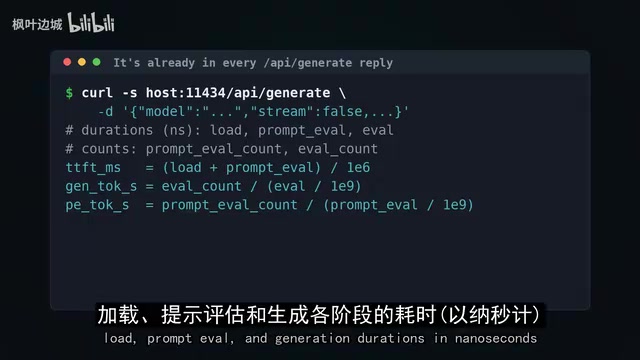
- Time-to-first-token: How long you wait from sending a request until the first word appears. This is mostly the time the model spends "reading" your prompt — and if the model isn't pre-loaded, add loading time on top.
- Generation speed: The steady output rate once the model starts writing.
- Prompt-eval rate: How fast the model reads your input — a completely different number from how fast it writes output.
- Context fill: Time-to-first-token measured across a range of prompt lengths, because some configurations degrade gracefully while others fall off a cliff.
Why These Numbers Must Be Tracked Separately
Reading a prompt can be batched and parallelized, but writing output must happen one token at a time. So a machine can easily read a long document quickly but write extremely slowly — or vice versa.
More critically, a single context length tells you almost nothing. A model that performs well at 2,000 tokens might become completely unusable at 8,000 — once the KV cache overflows GPU memory, performance collapses.
The good news: Ollama already measures all of this for you. Every non-streaming generate call returns load, prompt-eval, and generation durations in nanoseconds, along with token counts. Time-to-first-token = load + prompt-eval duration; each rate is just token count divided by the corresponding duration. All your framework needs to do is run the same scan every time and consistently do the arithmetic.
KV Cache explained: The KV (Key-Value) cache is central to understanding the "context cliff" phenomenon. When a Transformer generates each new token, it needs access to the attention key-value pairs from all prior tokens. To avoid recomputing these, they're cached in VRAM — that's the KV cache. Its size grows linearly with context length: for a 7B parameter model, an 8,000-token KV cache can occupy several gigabytes of VRAM. When the cache exceeds GPU memory capacity, the system is forced to offload it to system RAM or even disk, causing bandwidth to plummet from hundreds of GB/s to tens of GB/s, and generation speed to crater along with it. This explains why performance doesn't degrade gradually — VRAM is a hard boundary, and once crossed, the penalty is a step function. KV cache size also varies significantly between quantization formats (e.g., Q4_K_M vs. Q8_0), which is one reason why recording the exact quantization label matters so much.
One curl Command Is Enough for a Single Machine — A Cluster Needs a Real Framework
Testing one machine? A single curl command will do. Testing a whole cluster? You need a carefully designed framework. The blogger's design principles are worth copying directly:
- Run hosts in parallel, because each machine is just waiting on its own GPU;
- Run models and context lengths serially on the same host, because running two models simultaneously on one card contaminates both measurements;
- Send a warmup call first and discard its result;
- Log errors per row, so a downed host doesn't tank an entire test run;
- Record exact quantization labels;
- Write everything to the same CSV with a fixed schema, so this month's results can be compared against last month's.
The Hidden Trap in Prompt Construction
The prompts themselves require care. Use real text and record the actual token count the model reports — not what you assumed. The blogger targeted 8,000 tokens and got 8,575.
More insidiously: modify the first line of the prompt between runs. Ollama will reuse cached prompt prefixes — if the second run starts identically to the first, it skips most of the read and produces suspiciously fast fake data. Put the run number at the beginning of the prompt, not the end, and you'll break the cache.
Ollama's prefix caching: This is essentially a KV cache reuse optimization. If a new request starts with the same prefix as the previous one, Ollama skips recomputing that segment and reuses the existing KV cache entries. In real usage (e.g., a system prompt that stays constant across multi-turn conversations), this is a genuinely useful optimization. In benchmarking, it's a serious data contaminant. Putting the run number at the start of the prompt ensures each request has a unique prefix, forcing a full fresh computation. This detail is easy to miss: many homemade benchmark scripts append variables at the end, prefix cache hits are never busted, prompt-eval time comes back near zero, and "read speeds" can be inflated by several times over.
Testing a Real Cluster: Five Wake-Up-Call Findings
The blogger's setup was an Ollama gateway in front of several machines, routing by model name to determine which host serves each request. They scanned one 3B and one 7B model at prompt lengths of roughly 600, 2,000, and 8,500 tokens, ran each twice and discarded the warmup, across two Ollama versions, and queried the gateway after each warmup to find out which machine had actually loaded the model.

Surprise #1: The gateway sent both models to a 2015 quad-core laptop CPU, with zero GPU utilization. Nothing broke — this was just where the routing landed. If your framework doesn't record where each run happened, you have no idea what you're actually measuring.
The numbers looked exactly like CPU output: the 3B model took about 29 seconds to first token on a 600-token prompt, 95 seconds at 2,000 tokens; the 7B model crossed one minute to first token even at 600 tokens. The four-metric breakdown explained everything immediately — the 3B was reading at roughly 20 tokens/sec and writing at 2–3.5; the 7B was reading at just 9–10 and writing at about 2. At those read rates, 600 tokens means thirty seconds of silence before the first word appears. That's perfectly fine for overnight batch jobs and completely unusable for chat — and a single tokens-per-second number will never tell you which situation you're in.
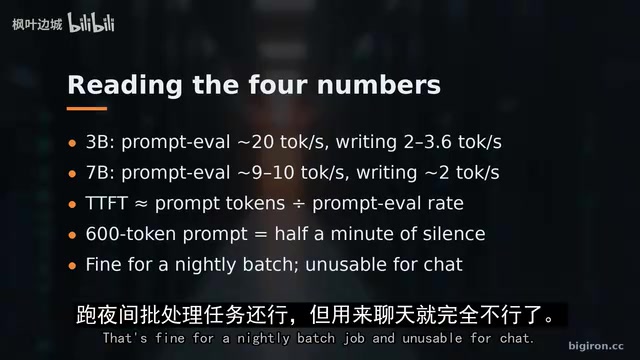
Surprise #2: Running the same 600-token prompt twice back-to-back, generation speed dropped from 3.6 to 2.0 tokens/sec. The reason: this laptop was simultaneously serving an embedding model for a note-taking system. Any other load on the machine will quietly pollute your measurements.
Surprise #3: The very first call (just "say hi") had a time-to-first-token of 10.2 seconds, of which 7.5 seconds was model loading. This is exactly why the warmup call exists — and must be discarded.
Surprise #4, which you absolutely cannot catch without two clocks: During an 8,000-token run, Ollama reported a duration of 125 seconds while the client waited 725 seconds — a full 10 minutes spent queuing in the gateway, completely invisible to all server-side metrics.
Surprise #5, still not fully explained: Midway through an 8,000-token run, the model reloaded, taking 31 seconds. After that, the prompt-eval rate jumped from roughly 22 to roughly 155 tokens/sec, while write speed stayed around 2.5. Because the blogger only recorded the serving host once after warmup rather than per-row, they couldn't prove what actually changed. The fix is cheap: record the serving host and VRAM size on every single row.
Quantization background: Quantization is foundational context for understanding this article's test design. A model's original weights are typically stored in float16 or bfloat16 format — a 7B parameter model needs roughly 14GB of VRAM. Quantization compresses model size by reducing weight precision: Q4 format packs each parameter into roughly 4 bits, cutting that same model down to about 4GB at the cost of some accuracy. Ollama uses llama.cpp's quantization implementation. Common labels like Q4_K_M, Q5_K_S, and Q8_0 break down as follows: the number is the bit width, K means k-quants grouped quantization, and M/S/L indicate intra-group precision levels. Different quantization formats don't just affect VRAM usage — they also affect computational efficiency on CPU/GPU and KV cache size. Performance can differ substantially between quantization variants of the same model, which is why recording exact quantization labels is essential for reproducible benchmarks.
How to Read a Run — and What to Watch For
First, be clear about what question you're asking. Measuring directly against each host gives you the hardware's raw numbers. Measuring through the gateway gives you the real user experience, including queuing and routing. Both are valid — but they measure different things. Mix them into the same table and a slow router will look like a slow GPU.
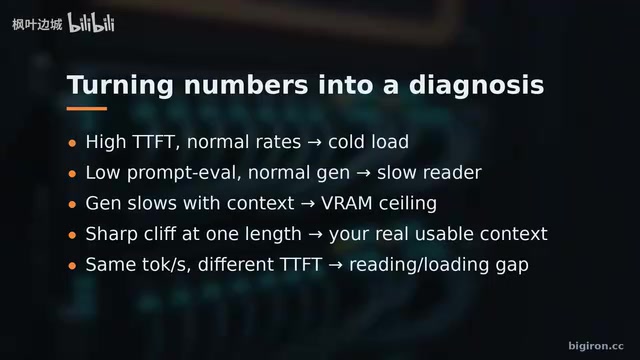
Common diagnostic patterns:
- High time-to-first-token, normal generation rate → A cold load slipped past the warmup; check
ollama ps; - Low prompt-eval, normal write rate → Compute-bound reads; typical on CPU and integrated GPU hosts; no config will fix this;
- Write speed slows as context grows → You're bumping against the VRAM ceiling; a sharp drop at some length is the hard limit — record it, because that's your actual usable context;
- Similar tokens-per-second but very different time-to-first-token → The gap is in reading or loading; this is the most painful scenario for chat.
One rule deserves special emphasis: the blogger's 7B model on the CPU host took nearly two minutes per run. A global timeout tuned for GPU hosts will misidentify slow hosts as dead ones. Set timeouts per host, not globally.
Other things to watch for: thermal throttling in the final rows of long scans; this test measures one request at a time, and concurrent load is a separate measurement; check for other processes on the GPU before trusting any row; and compare client time against server time on every call.
Keep the History — Make the Numbers Work for You
After every driver update, Ollama upgrade, or new host addition, rerun the same scan and keep every CSV. Performance regressions after an update are invisible without a "before" baseline to compare against.
The blogger also makes a public appeal: when you publish your numbers, include your exact hardware, Ollama version, and quantization label. One honest data row from someone's closet GPU is worth more to the next buyer than any vendor slide deck.
Finally, put the numbers to work. That CPU laptop is worthless for chat but perfectly adequate for overnight summarization jobs that nobody's watching. So route by measurement: send batch jobs to the slow, cheap machines; keep interactive traffic on the fast ones; and hardcode each host's "context cliff" into the router config instead of trusting the model's advertised maximum.
The bottom line: four numbers, one discarded warmup, serving host and two clocks logged on every row — then trust only what you've measured yourself. The complete guide and Python testing framework are at bigiron.cc.
Thermal throttling: This is an easy-to-overlook interference factor in extended stress tests. Both GPUs and CPUs have designed temperature limits. When a chip runs at sustained full load and approaches its thermal threshold, the hardware automatically reduces clock speed to control heat — this is thermal throttling. In this article's test scenarios, a single 8,000-token scan can run for several minutes. The first few measurements complete while the chip is still cool; subsequent measurements run in a throttled state, causing inconsistency within a single scan. The blogger's advice to pay special attention to "the last few rows of a long scan" is precisely for this reason. The problem is especially pronounced in small-form-factor hosts (NUCs, mini PCs) or consumer-grade GPUs deployed in closets with poor airflow. Logging a timestamp on every call helps with after-the-fact diagnosis: if rates systematically decline in the second half of a scan, thermal throttling is the prime suspect.
Related articles

Amphibious Transforming Drone: Beyond 100x Power Savings, What Are the Real Needs?
Is the amphibious transforming drone just a gimmick? Starting from the 100x power difference of the M4 Morphobot, explore real application scenarios and thesis topic ideas, analyzing boundary conditions where pure drones and pure ground robots both fail.

Warhound Raises $200 Million: Genetically Engineered "War Dogs" Paired with Anduril Gear
Warhound raises $200M, backed by Ben Lamm and Palmer Luckey, to genetically engineer dogs for military and law enforcement use and equip them with Anduril gear. This article analyzes its technology direction, funding logic, and ethical controversy.

Claude API Comes to Google Cloud: IAM Integration and SDK Access Guide
Anthropic hosts the full Claude API on Google Cloud with IAM-controlled permissions and unified billing. This guide covers the Vertex AI and Anthropic-hosted entry points, IAM role configuration, and SDK access.