The Third Path to AI-Automated Video: Not Generating Frames, But Operating a Computer

AI video's third path: an AI Agent operates a virtual computer while a camera records everything that happens.
Beyond text-to-video generation and automated editing, there's a third approach to AI video creation: letting an AI Agent operate a virtual desktop environment and recording everything that happens. This article breaks down the four-layer architecture — Agent commands, virtual desktop, independent camera process, and MP4 encoding — and reveals why the real engineering challenges hide beneath deceptively simple principles.
A Misunderstood Proposition
When people talk about "AI-automated video creation," two approaches typically come to mind: one is text-to-video, where you provide a prompt and a model outputs an animation; the other is automated editing, where you feed in a pile of assets and a script assembles them rhythmically. These two approaches sound very different, but according to this Bilibili creator's analysis, they actually share the same boundary — the visuals are either generated from scratch or sourced from an asset library.
The third path demonstrated in this video is fundamentally different. The visuals are neither generated nor sourced — they "happen." Every frame from beginning to end was recorded by a computer operating on its own, with all commands issued by AI, and no human ever touching the mouse or keyboard.
This distinction may seem subtle, but it completely redefines the nature of the problem. The original question was "how to make AI generate a video." Now it becomes "how to make AI actually work on a computer." The latter sounds harder, but it has one enormous advantage: it's an engineering problem, not a luck problem.
Why It Must "Happen" Rather Than Be "Generated"
Consider a concrete scenario: you need to create a video explaining how to use a piece of software, how to run a segment of code, or how to navigate a backend workflow. Text-to-video models simply cannot generate these visuals — not because the resolution isn't high enough, but because they have no idea what's written on the third line of that software window on your specific machine. You won't find it in any asset library either, because it's yours — it only exists on your machine.
Text-to-Video models like Sora, Runway Gen-3, and Kling fundamentally perform probabilistic sampling in pixel space — they "imagine" what frames should look like based on statistical patterns in their training data. This means they excel at generating content that follows general visual rules (people walking, landscapes changing), but cannot generate specific, precise, interface content that never appeared in their training set. The exact position of a button in a software tutorial, the specific content of a code snippet, the real-time data returned by an API — this information is unreachable for generative models because it exists in your local environment, not in the model's parameter space. The "happening" path bypasses this fundamental limitation: it doesn't need the model to "know" what the frame looks like. It just needs things to actually happen, then faithfully records them.
So there's only one path left: make it actually happen on a computer, then record that computer.
You might say, isn't this just screen recording? Yes, it is. But there's exactly one difference — no one is there when it's recording. It's precisely this "no one is there" that redefines both the difficulty and the significance of the entire proposition.
Four-Layer Architecture Breakdown
The creator breaks the entire system into four layers, with logic so clear you could almost repeat it verbatim to someone else.
Layer 1: An Agent That Only Issues Commands
The top layer is an AI Agent that does exactly one thing — writes what it wants to do as a command. In the demo, the creator typed just one line: "push in then pull back," and the character in the 3D room on the right automatically completed the entire process of retrieving and executing from 26 pre-stored motions.
AI Agents are one of the most active research areas in AI today. Unlike traditional conversational AI, Agents have closed-loop capabilities: perceiving the environment, formulating plans, executing actions, and adjusting strategies based on feedback. In this system, the Agent plays a role closer to a "director" — it doesn't render frames directly but drives the underlying system to complete specific operations through structured commands. This design philosophy aligns with projects like AutoGPT and OpenAI's Computer Use, but the key difference is: the Agent here operates not a real physical computer, but a carefully constructed virtual desktop, thereby gaining determinism and controllability.
Layer 2: A Computer That Doesn't Exist on Any Screen
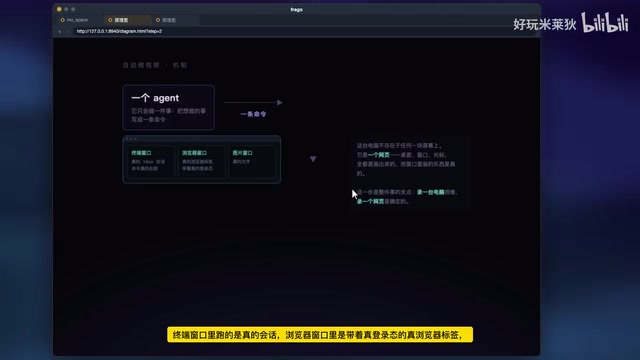
This is the fulcrum of the entire system. The terminal window runs real drawing programs, the browser window contains real browser tabs with actual login sessions, and the image window displays real files. But this computer doesn't exist on any physical screen — its desktop, windows, and cursor are all drawn by a webpage, while the things inside those windows are real.
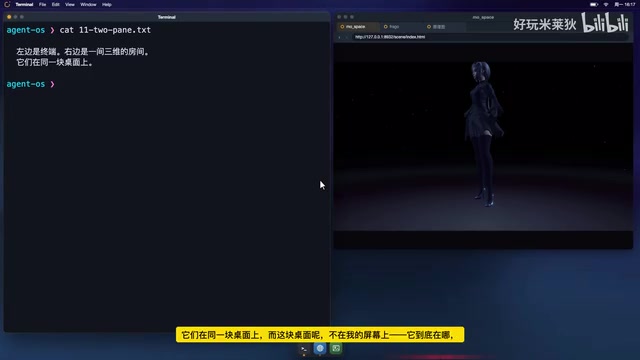
Why design it this way? The creator gives an extremely pragmatic reason: recording a real computer is too hard. Resolution, system scaling, notification pop-ups, cursor shapes — any of these could suddenly change mid-recording, and you often don't discover it until after the fact. Recording a webpage is "deterministic" — it's exactly as wide as you set it, it displays exactly what you tell it to, not one frame more or less.
Traditional screen recording faces numerous uncontrollable factors: OS DPI scaling may be inconsistent across different monitors; system notifications can pop up at any time and cover content; the mouse cursor changes shape between applications; actual window rendering positions may have sub-pixel offsets due to window manager animations. These problems can be solved through human observation and re-recording in manual screen capture, but in unattended automation scenarios, any random event means failure of the entire pipeline. Completely rebuilding the desktop environment with web technology — defining window layouts with HTML/CSS, rendering content with Canvas or DOM — essentially transforms a system engineering problem full of randomness into a completely deterministic frontend rendering problem. This approach has precedents in cloud desktops (like Apache Guacamole) and online IDEs (like GitHub Codespaces' web interface).
Layer 3: An Independent Camera
The third layer is a "camera" — itself a browser that does only one thing: captures frames from the Layer 2 webpage at thirty per second. The key point is that the camera and the computer being filmed are two separate processes. This isn't perfectionism: if they were the same process, the act of stopping the recording would take down the performing computer along with it.
At the operating system level, processes are the basic unit of resource isolation. When the recording program and the recorded program run in the same process, they share the same event loop and lifecycle. This means: if you want to stop recording, the termination signal sent will simultaneously interrupt the ongoing "performance"; if the recorded program crashes, recording immediately halts, and captured frame data may not have time to be written to disk. The dual-process architecture solves this through OS-level process isolation — the two processes communicate via inter-process communication (IPC) or shared memory to transfer frame data, but their lifecycles don't interfere with each other. This is similar to the principle in professional video production of "physically separating recording equipment from performance equipment." Additionally, an independent recording process can have its own frame buffer queue, smoothly handling potential frame rate fluctuations from the recorded process.
Layer 4: Output as MP4
The final layer encodes the collected frames into an MP4 video file. At this point, the proposition "have AI make a video" has been completely translated into "have AI work on a computer."
The Real Threshold Lies Beneath the Principles
The principle itself is simple enough to explain in one sentence, but the creator emphasizes: what's truly difficult is never the principle — it's making that sentence actually hold true.
He gave an example that happened that very day: the 3D room on the right requires GPU rendering, but the browser on the virtual desktop launches in "headless mode" by default, and headless means no GPU. The first thing the creator did was check — does it actually have WebGL? The answer was no: both contexts were empty.
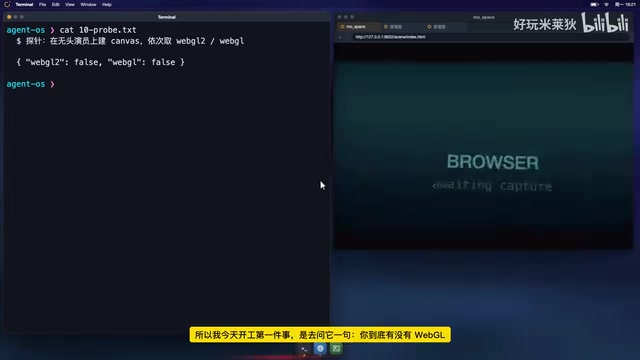
A headless browser is a browser instance without a graphical user interface, commonly used in automated testing and web scraping. Puppeteer and Playwright are the most common headless browser control frameworks. The core issue with headless mode is: since there's no real display output, the operating system typically doesn't allocate GPU resources to it. WebGL (Web Graphics Library) is the standard API for 3D rendering in browsers, and it depends on GPU acceleration. When a headless browser lacks a GPU context, all 3D scenes relying on WebGL will fail to render — but the browser itself won't throw an error. It just silently returns a blank canvas. This is the technical root of what the creator calls "no layer will report an error." Solutions typically include using virtual frame buffers (like Xvfb), enabling headful mode for the GPU process, or using software rasterizers (like SwiftShader) to simulate GPU rendering.
The most insidious part is: in this situation, no layer will report an error. Commands show green, status shows green — only the visuals are wrong: the right side would be pitch black. These kinds of hidden failures are where the true "mass" of this system lies.
The creator listed the hidden complexity behind each layer:
- A browser that AI can operate needs to handle login sessions, deal with anti-scraping measures, manage tab groups, and make tradeoffs between headless and headful modes;
- A virtual desktop needs to calculate window geometry, compute terminal grids, manage frame rates, and answer one tricky question — is the frame you're seeing right now actually current?
- A recording mechanism needs to guard the gate on when recording starts, ensure that neither process can kill the other, and catch the encoding work at the precise moment recording stops.
None of these things are written in the phrase "automated video creation." But remove any single one, and those five words fall apart.
Conclusion: The Threshold Lives Where No One Wants to Write
The most brilliant insight of this video isn't the conclusion that "AI can make videos too." It's the revelation of a universal truth: many seemingly magical AI capabilities have their real threshold not at the algorithmic principle level — principles can often be given away for free — but in the engineering details beneath those principles that no one wants to write, and that no one praises once written.
The creator ends by pointing out: every frame you've seen from beginning to end, including the architecture diagram, was recorded by that virtual desktop on its own. He gave the AI only a topic; everything else was completed by the AI itself.
This is precisely the essential divide between "happening-based" AI creation and "generative" AI creation — the former doesn't ask the model to imagine from nothing, but gives it a real, operable computer, then faithfully records the entire process of it working.
Related articles

Chain of Thought Isn't Just for AI: How Humans Can Use CoT to Improve Thinking Quality
Chain of Thought isn't just a prompt trick for large models. Starting from a Hacker News discussion, this article analyzes why CoT works for human thinking too, breaks down actionable ways to transfer it, and highlights the key differences between human CoT and machine CoT.
Cloudflare Teams Up with OpenAI: Closi…
Cloudflare Teams Up with OpenAI: Closing the Loop from Vulnerability Discovery to Defense with AI
Cloudflare uses OpenAI Daybreak to investigate security vulnerabilities and generate reviewable remediation plans, while developers use Codex to boost coding efficiency and quality.

Orca Multi-Agent Orchestration in Practice: A Guide to Parallel Collaboration with Claude and Codex
Orca is Stable AI's free open-source agent workbench supporting 34 agents like Claude Code and Codex in parallel. Learn its Git worktree isolation, multi-model orchestration, and mobile management.