The Truth About AI Agents: The Model Is Only 20% — The Other 80% Is What Really Matters

The model is only 20% of an AI agent — Harness, MCP, skills, sandbox, and production layer are what really matter.
This article systematically deconstructs the five core components of AI agents, debunking the common misconception that an agent is just a more powerful ChatGPT. The model is merely a text-in/text-out function; what truly gives agents their capability is the surrounding engineering infrastructure: the Harness drives the perception-decision-execution loop, MCP provides a USB-like universal tool interface, skills define task-specific instructions, sandboxes isolate code execution, and the production layer adds sub-agent parallelism, human approval gates, and observability logging. A live demo using the open-source TrueForge framework shows the qualitative leap that occurs when all components are enabled.
Everyone is talking about AI agents, but very few people can clearly explain what they actually are. Ask someone to describe the difference between an agent and ChatGPT, and you'll likely get a vague, hand-wavy answer. The real insight is this: the model — the AI itself — probably accounts for only about 20% of a complete agent system. The other 80%, the part nobody talks about, is what actually determines the agent's capabilities.
This article breaks down every component of a real AI agent in plain terms, drawing on a hands-on technical walkthrough, and uses a from-scratch open-source example to show how these concepts actually work in practice.
The Model Isn't the Agent — It's Just a Function
The first step to understanding agents is letting go of the model mystique. A model is fundamentally just a function: text goes in, text comes out, that's it. It can't search the web, read your files, run code, or even remember what you said in your last message.
When ChatGPT feels far more capable than that, it's because there's a lot of surrounding software doing the heavy lifting. An agent is what you get when you place a model inside a loop: the model looks at a goal, picks an action, an external program actually executes that action, the result is fed back to the model, and the cycle repeats until the task is done.
The model is the brain — but a brain sitting in a jar can't do anything. What's truly interesting, and rarely explained well, is all the infrastructure surrounding that brain. There are five main components to cover here.
Harness: The Runtime That Ties Everything Together
The first component is the Harness — the runtime framework. It's the loop described above. It's not some magical AI; it's real software written in code.
The Harness handles the core orchestration work: sending prompts to the model, executing the actions the model requests, managing the context window so the model doesn't drown in its own history, and maintaining state so tasks can resume after a restart. If you've used Claude Code, ChatGPT, or Cursor, you've already been using a Harness — you just didn't know it by that name. It's arguably the most important piece of an agent, and it connects all the other components below.
MCP: The Universal Interface for Agent Tools
The second component is MCP (Model Context Protocol), a standard way for AI agents to access tools.
The problem it solves is very practical: say you want your agent to search the web, check a calendar, or query a database. Before MCP, every one of those integrations required custom code that you had to write and maintain yourself. MCP turns each capability into a server that speaks a common language. The agent connects to it, asks what tools are available, and can immediately start using them.
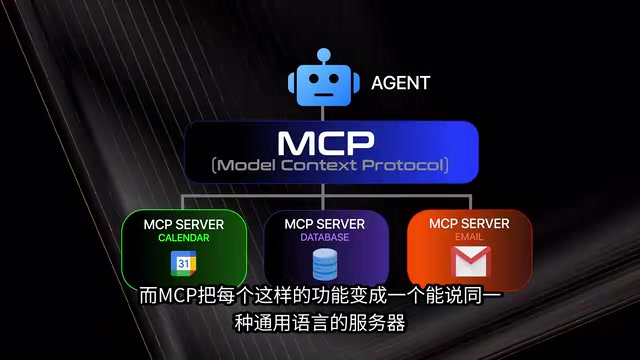
Think of it like USB: you don't need to write a custom driver for every device — you just plug it in. Any MCP server works with any agent, as long as the Harness supports it and handles the bridge between the model and the tool. In the example build, an MCP server for web search (Exa) was connected, giving the model its first real ability to see the outside world.
MCP was open-sourced by Anthropic in November 2024 and has since gained adoption from OpenAI, Google DeepMind, Microsoft, and other major AI vendors, quickly becoming the de facto industry standard. Architecturally, MCP uses a client-server model: the agent (client) communicates with tool servers via JSON-RPC. Servers declare the Tools, Resources, and Prompt Templates they offer. Once a client discovers available tools, the model can decide at inference time which tool to call and with what parameters. The server executes the request and returns structured results, which the Harness injects into the model's context. Hundreds of community-built MCP servers already exist, covering GitHub, Google Drive, Slack, Postgres, and more — developers can reuse them directly without writing any integration code.
Skills and Sandboxes: "How to Do It" and "How to Do It Safely"
If MCP defines what an agent can do, then Skills define how it does things well.
A skill is essentially a Markdown file containing instructions for a specific type of task — like a standard operating procedure handed to a new employee: what format to use for reports, which steps to follow, which tools to use, and what pitfalls to avoid. The key design principle is on-demand loading: the agent knows which skills are available but only loads a skill's full contents when it decides it needs them, avoiding unnecessary consumption of the precious context window.
The fourth component is the Sandbox, and it's one that most people never seriously consider. Real tasks often require executing code — analyzing data, processing files, generating reports. But do you really want an AI running arbitrary code on your actual computer? One wrong command could touch all your files and credentials, especially with root access.
The sandbox solution is to give the agent a "disposable computer": an isolated environment that spins up on demand, lets the agent run code with limited permissions, and gets thrown away when done. Even if something goes wrong, it doesn't matter — none of it was on your real machine. When building production-grade agents, the sandbox is essential for zero-risk code execution.
In AI agent contexts, sandboxes are typically implemented using containers (Docker/OCI) or micro-VMs (such as AWS Firecracker or gVisor). Containers start quickly with low resource overhead, but shared kernel access introduces some escape risk; micro-VMs offer near-VM-level isolation with millisecond startup times, making them better suited for running untrusted code. Permission controls typically restrict outbound network rules (allowing only specific domains), filesystem mount scope, and system call whitelists (seccomp), ensuring that even if the model generates a malicious command, its impact is strictly contained within the isolation boundary. In multi-tenant commercial deployments, each user session typically gets its own sandbox instance that is destroyed immediately after the task completes, fundamentally eliminating any possibility of data leakage between users.
The Production Layer: What Separates a Demo from Something That Actually Works
The fifth component is the production layer — the dividing line between a demo and a genuinely deployable product. It actually consists of three distinct things:
- Sub-agents: Distributing a large task across multiple parallel workers, rather than cramming everything into a single context window. This enables parallel acceleration and allows the model to run multiple times without depending on a single instance.
- Approval: Forcing the agent to pause and request human sign-off before executing sensitive actions — a safety guardrail.
- Observability: A complete record of every step, every tool call, and every result. When something goes wrong, you can actually see what the agent did rather than guessing. This is especially important for tracing outcomes and debugging failed tool calls.
Observability in AI agent systems differs from traditional software monitoring. Because an agent's execution path is dynamically decided by the model, the same input can produce completely different tool-call chains across different runs — traditional log instrumentation can't cover all branches. The industry typically uses the OpenTelemetry standard or dedicated LLM observability platforms (such as LangSmith, Langfuse, or Arize Phoenix) to track each model inference's inputs and outputs, token consumption, latency, and tool call details. This data isn't just for debugging; it's the key to understanding which reasoning step went wrong — in complex multi-step tasks, errors often don't appear in the final output but are hidden in how parameters were assembled for some intermediate tool call. Sub-agent architectures also introduce additional concurrency coordination challenges: multiple sub-tasks may compete for the same resource or produce conflicting results, requiring the orchestration layer to handle merging, deduplication, and conflict resolution.
Hands-On: Building a Research Agent with an Open-Source Framework
To prove this structure isn't just theory, the author launched the open-source framework TrueForge with a single command: npx truefoundry/trueforge (on Windows, run this inside WSL with Node.js already installed). Once started, the framework serves a local port; opening it in a browser brings up a graphical interface.
Because it's an open-source framework, you can connect any model — OpenAI, Anthropic, Gemini, or a custom provider. The author even connected locally running Qwen3 series models on their own DGX Spark, achieving fully local operation — something closed tools like Claude Code can't offer.
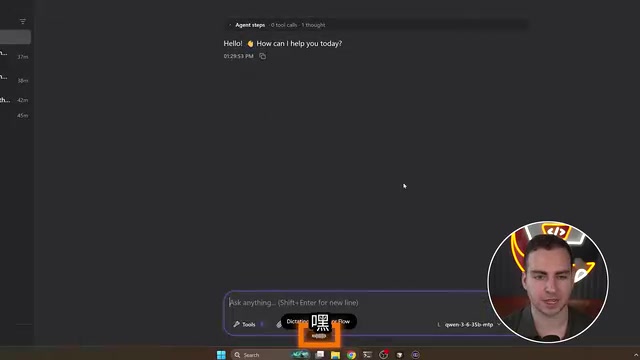
The author ran a comparison test. Without any tools connected, the model was asked to act as a research agent and investigate the best current local AI models. All the results came from training data — the model still believed it was sometime around early 2025, because it had no access to the internet.
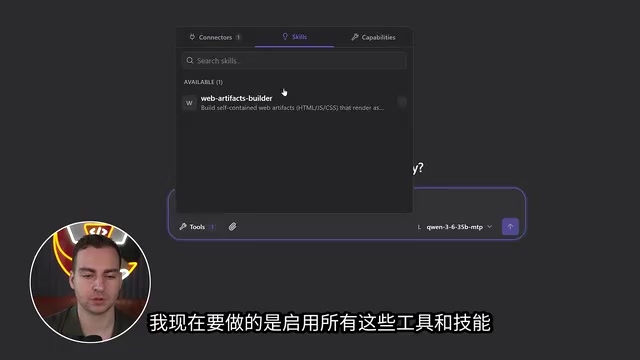
Next, three things were configured: a connector (an MCP server for web search via Exa), a skill (enabling a web artifact builder for generating interactive dashboards), and a sandbox (TrueForge can create its own isolated shell in Linux/WSL; for large-scale runs, remote sandboxes like Daytona can be connected instead).
Running the same prompt again produced dramatically different results: the agent listed available tools, spun up multiple sub-agents, and through real web searches delivered a research summary featuring the latest models including DeepSeekAd R1, MiniMax, GLM, and Mistral — while using a skill to build an interactive web dashboard in real time. Every step of the process was traceable in the observability logs.
Finally, the author saved this configuration as a reusable "Researcher" agent that can be invoked directly from the web UI, triggered programmatically via the TrueForge SDK, or deployed to a team using Docker Compose and Kubernetes with Okta SSO.
Final Thoughts
This breakdown brings an over-mythologized concept back down to engineering reality: Agent = Model + Harness + MCP + Skills + Sandbox + Production Layer. The model provides the intelligence, but what makes an agent useful, reliable, and controllable is the 80% of infrastructure surrounding it. The next time someone conflates agents with ChatGPT, you'll know exactly where the difference lies.
Related articles

Workbuddy for Absolute Beginners: How a Desktop AI Agent Fits Into Real Workflows
A beginner's guide to the Workbuddy desktop AI agent: installation, claiming credits, file management, and building automated workflows—compared with CodeX for fit and cost, helping professionals shift from AI question-askers to AI managers.

OpenAI's New Agent Stack: Computer Use, Decisions API, and Ultra-Fast Workflows
OpenAI Dev Day unveiled a new agent stack: Computer Use outperforms humans, Decisions API delivers ultra-low-latency classification via Luna, Agents API opens the same Computer Use capabilities, and GPT-6.1 Sol costs only one-seventh of Astra. Core updates, benchmark data, and developer insights.

Liang Wenfeng Open-Sources DeepInfo Inference Framework, Takes On U.S. Ban
DeepSeek open-sources its DeepInfo inference framework after its models, featuring GPU/CPU cross-pipelining, small-model prediction with large-model verification, and full Huawei Ascend and NVIDIA chip support—facing the U.S. federal ban head-on. This article analyzes its significance for AI deployment and open-source strategy.