The Ultimate Claude Code Guide: Installation, Hands-On Practice, and a Full Breakdown of Skills/MCP

Claude Code is a plugin-based AI coding assistant whose core value lies in model capability and extension mechanisms like MCP and Skills.
The article clarifies the difference between Claude Code and the Claude model, pointing out that the former is a plugin-based AI coding tool that can call different underlying models, making it essentially a "shell" whose capability ceiling depends on the model it's hooked up to. After comparing tools like Cursor and Trae, the author recommends domestic users prioritize the free Trae, while those with an overseas environment can try Claude Code paired with the Opus model for higher-quality code. Installation and IDE integration take about ten minutes. For core features, the article covers built-in commands, automatic memory and CLAUDE.md, three permission modes (full-auto/confirmation/planning), integrating custom tools through the MCP protocol (stdio and Streamable SSE communication modes), and customizing and importing external Skills—overall a gentle learning curve with considerable depth.
What Is Claude Code? First, Let's Clarify How It Differs from Claude
Many people new to AI coding tools tend to conflate Claude and Claude Code, but in reality they operate on two different levels. Claude is a large language model developed by Anthropic—it's the underlying capability. Claude Code, on the other hand, is an AI-assisted programming tool that can be understood as a coding assistant. It can help you generate code logic, assist with large-scale project development, and even build a feature module from scratch.
By default, Claude Code calls on the Claude series of models under the hood, but its model selection isn't limited to these—some domestic (Chinese) models can also be integrated. This means it's essentially a "shell," and the true ceiling of its capabilities depends on which model you've hooked up behind it.
According to analysis from a Bilibili creator, Claude Code is developing extremely fast, and its performance ranks among the best in its category. But good performance comes at a cost—the stronger the underlying model, the more tokens it consumes, and Claude Code doesn't offer any free quota; it requires payment. This is one of its current real-world barriers to entry.
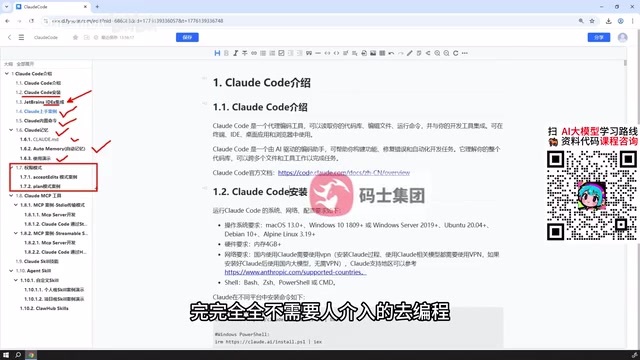
The token mechanism is the core unit of measurement for the cost of using large language models. When a model processes text, it first splits the content into tokens—in English, one token roughly corresponds to 3-4 characters or about 0.75 words, while in Chinese, one character or word typically maps to 1-2 tokens. With each conversation, both the input historical context and the model's generated output are counted toward token consumption. Tools like Claude Code consume large amounts of tokens because they frequently need to read project files, maintain long-context memory, and a single task can involve tens of thousands to hundreds of thousands of tokens in round trips. Anthropic uses a token-based API pricing model, where stronger models (like the Opus series) carry higher unit prices. Understanding the token mechanism helps explain why the cost of AI coding tools rises quickly with task complexity, and it also explains why domestic model integration can serve as an alternative for reducing expenses.
AI Coding Tools Compared: Cursor, Trae, and Claude Code
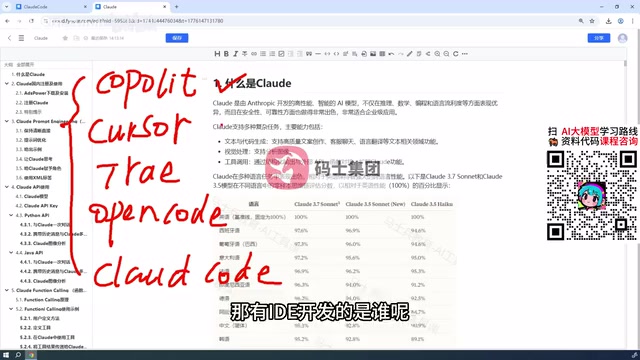
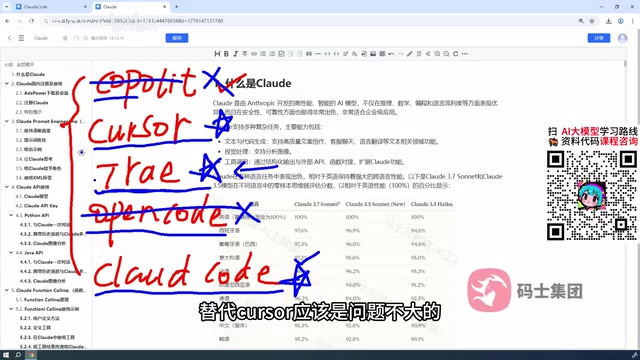
There's no shortage of AI coding tools on the market. Earlier there was Copilot, then Cursor, Trae, and Open Code made their debuts, and now we have Claude Code. In terms of form factor, both Copilot and Claude Code are plugins that need to be integrated into an IDE, while Cursor and Trae come with their own IDE development environments.
The creator's personal recommendation is: if you're in China, prioritize Trae. The reason is that Trae's support for Chinese-language conversations better matches the coding habits of domestic users. Communicating with it in Chinese and iterating through debugging yields quite good results—and it's free: conversations don't consume tokens, though you sometimes have to wait in a queue.
Claude Code's core advantage lies in its extremely powerful underlying model. The Opus series models released by Anthropic perform outstandingly in coding scenarios, producing more polished code style with higher standards. If you have an overseas environment, Claude Code is worth trying.
From actual hands-on experience, Cursor, Trae, and Claude Code are highly similar in functionality—all can modify code, run code, and configure development environments. The creator believes Trae can fully replace Cursor without much issue. Where Claude Code pulls ahead mainly comes down to the code quality improvement brought by its model capabilities.
Installation and IDE Integration: Get Started in Ten Minutes
Installing Claude Code is very straightforward, and the creator demonstrated using the Windows system as an example. Installation for Mac OS and Linux users is equally easy—no need to worry about platform differences.
After installation, you can use Claude Code directly in PowerShell or CMD, but the creator finds the command-line approach not friendly enough. The more recommended approach is to integrate it into an IDE—the tutorial uses PyCharm as an example, but IntelliJ IDEA, VS Code, and other editors work just as well, with basically identical plugin installation steps.
This plugin-based integration approach lets Claude Code blend into your existing development workflow without needing to switch tools. For developers already accustomed to a particular IDE, the learning cost is very low.
Breaking Down Core Features: Commands, Memory, and Permission Modes
Built-in Commands and Memory Mechanism
Claude Code provides a series of built-in commands to assist development. More noteworthy is its memory system: it includes automatic memory and the CLAUDE.md file. The creator will demonstrate through accompanying case studies how to leverage these memory mechanisms to keep Claude Code understanding project context across multiple interactions.
Three Permission Modes
Permission modes are a particularly distinctive design in Claude Code. The creator introduced three modes:
The first is full-auto mode, where Claude Code can program from zero to one completely without human intervention; the second is confirmation mode, where during programming the user needs to confirm certain things, such as whether to modify a file or install a plugin; the third is planning mode, where Claude Code only provides a plan without actually modifying any files, and doesn't require user confirmation.
These three modes correspond to different use cases, ranging from completely hands-off to fully controllable. Developers can flexibly switch based on the risk level of the task.
The CLAUDE.md file is one of the core carriers of Claude Code's memory mechanism. It's a Markdown file placed in the project root directory, and Claude Code automatically reads its contents at startup as project-level context. Developers can write in it the project structure, tech stack conventions, code style guidelines, commonly used commands, and so on, so that every conversation doesn't require repeated explanations. It's similar to preparing a "project manual" for the AI assistant. Working in tandem with it is the automatic memory mechanism, where Claude Code proactively records user preferences and important decisions during interactions, forming persistent memory across sessions. Combined, the two keep Claude Code contextually consistent across multi-turn, multi-day development tasks, reducing repetitive communication overhead. This is also one of the key capabilities that distinguishes it from ordinary code completion tools.
MCP Tool Integration: From Built-in to Custom
Claude Code has some basic built-in tools, such as manipulating files, viewing files, and writing code. In most cases, these are sufficient. But if you need personalized tools—such as code linting, GitHub commits and pulls, data statistics, etc.—you'll need to extend through MCP.
MCP (Model Context Protocol) is the external tool integration protocol supported by Claude Code, and configuration is very convenient. In the tutorial, the creator will demonstrate two ways to customize an MCP server: one using the stdio communication mode, and the other using the HTTP Streamable SSE mode. Both approaches are completely step-by-step, teaching you how to create a tool from scratch and get it running for Claude Code to call.
MCP (Model Context Protocol) is an open standard launched by Anthropic at the end of 2024, used to allow AI models to connect with external tools and data sources in a standardized way. You can think of it as the AI world's "USB-C port": as long as a tool implements a server following the MCP protocol, any AI client that supports the protocol can call it directly, without needing separate adaptation for each tool. MCP servers typically expose three types of capabilities—Tools (executable operations, such as committing code), Resources (readable data, such as file contents), and Prompts (preset prompt templates). The stdio mode mentioned in the article refers to the server acting as a local subprocess, communicating with Claude Code through standard input/output, suitable for local tools; the HTTP Streamable SSE mode transmits event streams through HTTP long connections, suitable for remote or cloud services. The choice between the two modes mainly depends on the tool's deployment location and network environment.
Skill System: Customization and External Import
Claude Skill is another important extension capability in Claude Code. You can configure existing skills available on the internet, or develop your own skills for Claude Code to use. Theoretically, any skill you can find online can be used by Claude Code.
The tutorial will explain how to define and write custom Skills, as well as how to import external Skills from the web into your own project. This part isn't very difficult, but it can significantly expand the boundaries of Claude Code's capabilities.
Final Thoughts
Claude Code's positioning is very clear: it's not an IDE, but a plugin-based AI programming assistant, with its core value lying in the underlying model's code generation capability. Its learning curve is gentle—installation and IDE integration can be done in about ten minutes. The real depth lies in the flexible use of the memory mechanism, permission modes, MCP tools, and the Skill system. For domestic (Chinese) developers, Trae is the more pragmatic choice; if you have an overseas environment and budget, Claude Code paired with the Opus model can deliver higher code quality.
Related articles

How Big Can Stars Really Get? The Physical Limits of the Largest Stars
Red supergiants are the largest stars by volume, with radii up to 2,000 times the Sun, engulfing the inner solar system. But there is no precise upper limit on stellar size—models predict up to 15,000 solar radii. The most massive blue stars are far smaller than red supergiants—biggest and heaviest are two different things.

Apple HomeView Smart Display Full Feature Breakdown: Wall-Mount or Desktop, $299
Apple launches HomeView, a $299 smart display with wall-mount and desktop options, 12MP camera for facial recognition, smart home control, music playback, and recipe step-by-step cooking. Full breakdown of watch faces, apps, privacy, and cooking integration.

Where Did the Promised New Studio Go? Craft Computing Answers After Five Years
Craft Computing's host responds to viewer questions: the new studio promised five years ago was shelved as construction costs soared from $30,000 to $75,000, and was replaced by a 168-square-foot garage conversion.