The Ultimate Codex App Guide: From Installation to Hands-On Practice, Let AI Operate Your Computer

The Codex App can directly operate your computer to organize files, create reports, build sites, and more; this tutorial covers everything from installation to advanced usage.
Based on a Bilibili Codex tutorial viewers call the "most detailed nanny-level guide," this article walks through the entire workflow of this AI tool from installation to complex tasks. Codex's biggest difference from chat assistants like Doubao and DeepSeek is that it can directly operate a local computer: reading files, organizing data, generating reports, making PPTs, controlling a browser, and even building software. The article covers switching to "Daily Work" mode after installation, creating project folders by matter, using real café data to organize files and flag anomalies, and enabling Plan Mode to build a visual dashboard, distilling four practical tips. The author also notes that Codex excels at execution and organization, but business judgment still requires professionals.
In an era where AI assistants are everywhere, most products are still stuck at the "you ask, I answer" chat stage. The Codex App we're introducing today takes interaction to the level of "getting hands dirty"—it can not only read files on your computer, organize data, and generate reports, but also control a browser, build complete software, and even execute tasks automatically while you sleep. A Codex tutorial on Bilibili that viewers call the "most detailed nanny-level guide" used real café data to demonstrate the entire workflow from installation to complex tasks. Based on that tutorial and combined with actual operating logic, this article lays out a directly actionable Codex usage guide.
1. What Is Codex: A Leap from Chatting to Operating Your Computer
According to the Bilibili creator's demonstration, Codex offers a conversational interface like AI assistants such as Doubao and DeepSeekAd, but the core difference is that it can directly operate your computer. Doubao can only chat, whereas Codex can organize files, create reports, read your work content to write weekly reports, make PPTs, control a browser to build complex software, and even set up scheduled tasks to run automatically while you sleep.
This capability means users don't need programming knowledge—they simply describe their needs in natural language, and Codex executes operations on the local file system. The creator emphasized in the video: "Almost anything you can think of, it can do." This positioning makes Codex closer to a digital employee that can execute tasks rather than a simple Q&A bot.
The "operating your computer" capability mentioned here typically relies on an AI Agent architecture in technical implementation. Unlike traditional chatbots that only generate text, an Agent uses a Tool Calling mechanism to translate natural language instructions into actual operations on external environments such as the local file system, browser, and command line. When Codex runs locally, it usually obtains file read/write permissions within the scope authorized by the user, and uses sandboxing or permission control mechanisms to isolate sensitive operations, thereby balancing "can get work done" with "safe and controllable." Understanding this helps users see why they need to specify a project folder on first use—it serves as both a context boundary and a permission boundary.
2. Installation and Initial Setup: Done in Two Minutes
Codex is already available in the Microsoft and Apple app stores—just search for "Codex" to install it directly. Once opened, the interface resembles the web version of Doubao: an input box in the center and a sidebar on the left, but the sidebar includes features Doubao doesn't have, such as plugins, automation, and workflows.
The creator recommends changing one setting on first launch—the work mode. Switch the mode to "Daily Work" in settings, so Codex remains powerful but won't display a lot of technical details, making the experience cleaner. "Honestly, Codex doesn't require you to study a bunch of related technical stuff—a few simple sentences can produce really cool things."
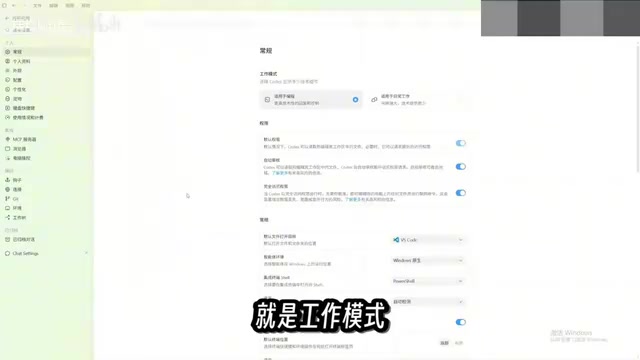
3. Project Folders: Letting Codex Know Where to Work
Codex needs to work within local folders, which are called "projects" in the sidebar. The creator recommends categorizing different matters into different folders so you can find the corresponding content at a glance. Below the input box, you can select the project for the current conversation, and Codex can then directly read all files in that folder to complete tasks.

4. Hands-On Starter: Testing with Real Café Data
The creator prepared a folder called "Computer Story Café" containing a mix of sales records, invoices, and inventory lists in formats including spreadsheets, PDFs, and images. The task he sent was: organize these messy files and extract the information and data into a single Excel file.
This seemingly basic task actually involves multiple operations such as analyzing files, moving files, modifying content, and creating new files. A few minutes later, Codex finished organizing: it categorized files by purpose, generated detailed data tables, organized sales data and product rankings into separate categories, and even read PDF invoices to extract line items. More importantly, the creator had deliberately planted some "traps"—missing transaction records and two anomalous invoices—and Codex flagged them all.
This type of task covers everyday scenarios like organizing reports and writing daily summaries. Whenever you need to read computer files and summarize and organize them, Codex is up to the job.

5. Advanced Play: Plan Mode and Visual Dashboards
To test a more complex task, the creator asked Codex to build a visual dashboard based on the summary table for viewing business conditions such as sales, expenses, costs, and inventory, and to analyze items that need attention. Because the task was complex, he enabled "Plan Mode"—Codex doesn't execute directly but first plans a detailed execution checklist and proceeds only after confirming the details.
The creator also demonstrated an interesting feature: typing a slash in the input box reveals a "pet" option. Clicking it makes a little pet appear on the desktop showing all tasks currently being executed. In Plan Mode, Codex asked the creator several questions about the dashboard task and continued only after confirmation.

The final dashboard included all the requested content and listed business recommendations and key items. The creator then asked to switch to a "more modern, more intuitive, Apple-like" theme, and Codex completed the modification smoothly.
Plan Mode is a common interaction strategy in AI Agent products: before actually executing, the model first outputs a structured execution plan (such as a step checklist, required files, and expected outputs) and waits for user confirmation or additional information. Its value lies in reducing rework on complex tasks—once an Agent starts batch-moving files or modifying data, rollback costs are high. Plan Mode acts as a manual review checkpoint before "getting to work," giving users a chance to correct misunderstandings of requirements. For tasks involving multiple files, multiple steps, or irreversible operations, it's recommended to enable this mode by default; for simple, quickly verifiable tasks, you can execute directly to improve efficiency.
6. Usage Tips and Applicable Boundaries
Several practical tips can be distilled from this tutorial: First, create project folders categorized by matter so Codex has clear context; second, execute simple tasks directly and enable Plan Mode for complex tasks to avoid rework; third, choose "Daily Work" as the work mode to reduce technical detail interference; fourth, deliberately plant anomalies in data to test Codex's error-correction ability.
One note: the creator also admitted that he is not a sales professional and cannot judge the actual business value of the dashboard. This reminds us: Codex excels at execution and organization, but business judgment still requires professionals. For scenarios that require reading local files, processing data across formats, and generating visual results, Codex offers a low-barrier entry point to automation—well worth trying.
Related articles

Chain of Thought Isn't Just for AI: How Humans Can Use CoT to Improve Thinking Quality
Chain of Thought isn't just a prompt trick for large models. Starting from a Hacker News discussion, this article analyzes why CoT works for human thinking too, breaks down actionable ways to transfer it, and highlights the key differences between human CoT and machine CoT.
Cloudflare Teams Up with OpenAI: Closi…
Cloudflare Teams Up with OpenAI: Closing the Loop from Vulnerability Discovery to Defense with AI
Cloudflare uses OpenAI Daybreak to investigate security vulnerabilities and generate reviewable remediation plans, while developers use Codex to boost coding efficiency and quality.

Orca Multi-Agent Orchestration in Practice: A Guide to Parallel Collaboration with Claude and Codex
Orca is Stable AI's free open-source agent workbench supporting 34 agents like Claude Code and Codex in parallel. Learn its Git worktree isolation, multi-model orchestration, and mobile management.