TIA Portal Stacker Crane Start/Stop and E-Stop Reset Programming in Practice: Building Control Logic from Scratch
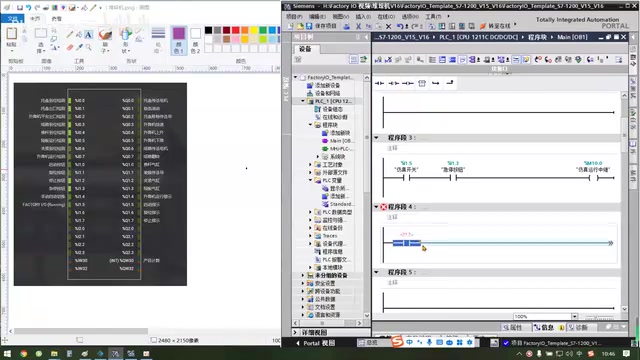
A TIA Portal and FactoryIO stacker crane start/stop tutorial focusing on reverse logic for E-stop and stop buttons and variable initialization.
This article breaks down the implementation of a stacker crane PLC start/stop control project. The tutorial builds a simulation panel in TIA Portal and constructs a basic start/stop framework through variable mapping of the simulation switch, emergency stop, and start/stop buttons. The core difficulty is that the emergency stop and stop buttons use normally closed contacts externally, so the program must use reverse logic (swapping normally open/normally closed) to avoid start failure. The article also emphasizes the importance of variable planning and initialization, and previews subsequent expansion of the automatic flow, including manual/automatic switching and product counting, providing beginners with practical guidance on the correspondence between hardware wiring and program logic.
In industrial automation, start/stop control of stacker cranes is a classic beginner PLC programming project. Based on a Bilibili creator's hands-on tutorial using TIA Portal and FactoryIO, this article breaks down how to write the start/stop, emergency stop, and reset logic for a stacker crane from scratch, and analyzes the reverse-logic design pitfalls that are easy to run into.
1. Building the Basic Start/Stop Control Framework
The tutorial begins with the simulation panel, creating variable mappings in TIA Portal for the simulation switch, emergency stop, and start/stop buttons. According to the creator's demonstration, the simulation switch is connected to I1.5, the emergency stop uses the normally open contact of I1.3, and an M10.0 is connected in series as the simulation-running relay.
The core logic of the program segment is: when the simulation switch is closed and the emergency stop is not triggered, the M10.0 coil is energized. Here the creator specifically points out that the emergency stop is usually a normally closed contact in external hardware, so using a normally open contact in the program actually ensures default conduction—this is the common "reverse logic" handling in PLC programming.
The tutorial then adds the start button I1.0 and stop button I1.2, and lights up the start indicator Q1.5 through a self-latching circuit. The reset button I1.1 is used to release the stopped state and light up the reset indicator Q1.6. At this point, a complete start/stop control framework is taking shape.
Normally open and normally closed contacts in PLCs: In PLC ladder diagram programming, a normally open contact (NO) conducts when the variable is 1, and a normally closed contact (NC) conducts when the variable is 0. In hardware wiring, emergency stop buttons usually use normally closed contacts, meaning the circuit conducts when not pressed and opens when pressed. Therefore, if a normally open contact is used in the program for the emergency stop variable, the program conducts when the emergency stop is not pressed (variable is 1), which matches safety logic; if a normally closed contact is used, the program instead opens when the emergency stop is not pressed, preventing the equipment from starting. This correspondence between hardware normally closed and program normally open is called "reverse logic" and is a common practice for handling safety signals in PLC programming.
Self-latching circuit (start-hold-stop circuit): The self-latching circuit is the basic unit of PLC start/stop control, consisting of a start button, a stop button, and an output coil. When the start button is pressed, the coil is energized, and its normally open contact is connected in parallel across the start button to achieve the "hold" function; the stop button is connected in series in the circuit and opens when pressed, de-energizing the coil. This circuit ensures that after starting, the output remains on even when the button is released, until a stop signal is triggered. The self-latching circuit is the foundation for understanding more complex logic (such as sequential control and interlocking).
2. The Reverse-Logic Trap of Emergency Stop and Stop
After initially downloading the program, the creator found a conflict between the emergency stop and stop button logic: since both the emergency stop and stop are normally closed contacts externally, if normally open contacts are used for both in the program, the default state will not conduct, and the start button will not take effect.
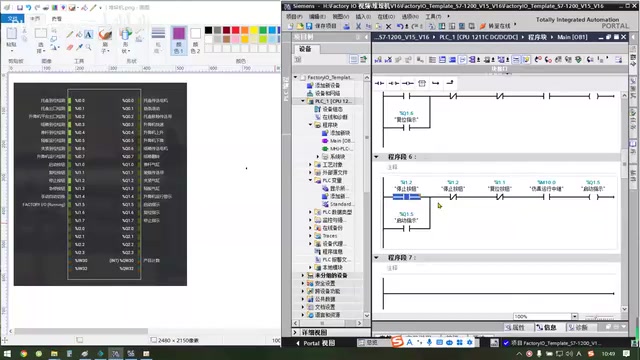
The solution is to change the stop button to a normally closed contact and change the program segment corresponding to the emergency stop to a normally open contact, making the two act in opposite ways. The creator emphasizes that this "reverse logic" design needs to be adjusted flexibly according to the hardware wiring; otherwise, after pressing the emergency stop, the simulation-running relay will drop out but the stop button cannot be reset.
After modification and re-downloading and monitoring, the start, stop, and reset functions all respond normally, and the indicator lights on the operation panel also correctly reflect the status.
3. Variable Planning and Initialization Preparation
After completing the basic start/stop, the creator points out that the current program only implements the initial start operation and has no specific action sequence yet. Next, variables need to be added and an initialization program written to prepare for the subsequent automatic flow.
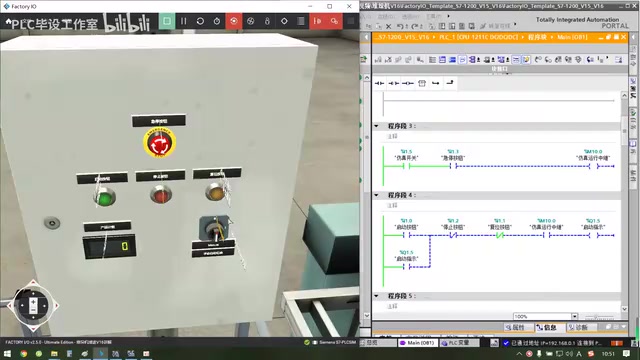
"Variables represent the basic thinking of programming." The creator suggests clarifying which flag bits, timer, or counter variables are needed before writing the action sequence. If flag bits or counts are already used in the program, initialization logic must be written at the beginning of the program to clear them; if there are no variables yet, initialization can be deferred.
PLC variables and flag bits: In PLC programs, variables are used to store intermediate states, count values, or timer values. Flag bits (M area) are internal memory, often used to record equipment states (such as running, fault, automatic mode, etc.). The initialization program usually runs once when the PLC starts, clearing the necessary flag bits, counters, and timers or setting them to default values, to avoid logic errors caused by residual data. Good variable planning improves program readability and maintainability and is an important step in automation project design.
4. The Next Step Toward the Automatic Flow
At the end of the tutorial, the creator shows the normal operating state of the operation panel and previews that the next step will be writing the complete automatic flow. Functions such as manual/automatic mode switching and product counting will be gradually added in subsequent lessons.
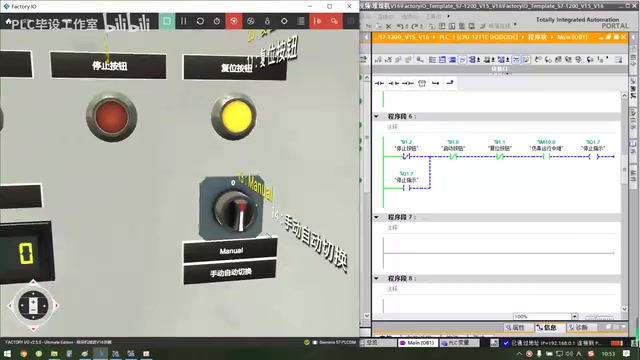
For beginners, the value of this case lies in understanding the correspondence between hardware wiring and program logic in PLC programming, especially the flexible use of normally open/normally closed contacts. As core equipment in warehousing and logistics, the start/stop control logic of a stacker crane is the foundation for building more complex automation systems. After mastering these basic techniques, gradually expanding variables and sequences will enable you to build stable and reliable control programs.
Related articles
DeepSeek Open-Sources DeepInfer: What Is an Inference Framework Actually For?
DeepSeek open-sources its inference framework DeepInfer under Apache 2.0, supporting DeepSeek V4.1 Flash offline inference. This article explains its request scheduling, FlashMLA/DeepGEMM compute optimization, DSPark speculative verification acceleration, and what it means for developers and ordinary users.
Open-Source AI Learning Agent: A Full Workflow Experience from Topology Graphs to Exam Generation
Explore an open-source AI learning agent: built on DeepSeek API, it constructs knowledge systems via topology graphs, with automatic document generation, notes, super documents, and exams. Learn about its Agent workflow and design highlights.

DeepSeek Whale Girl Open-Source MV Meme: AI Industry Coded Slang About Pivoting to Closed Source
Bilibili's DeepSeek Whale Girl rap MV uses fictional memes to tease the AI open-source vs. closed-source debate, with lyrics full of industry slang. This article explains the meme culture, the Whale Girl symbol, and the open/closed tension.