Trusty CSV: Edit CSV Files Like Code

Trusty CSV lets users edit CSVs like code, with an undo stack and Diff view.
Trusty CSV is a data tool launched on Product Hunt whose core idea is to "edit CSVs like code," working directly on files without project structures, workflows, or scripts. It offers clustering of similar values, pivoting, joining, filtering, and cell editing to cover high-frequency data preparation needs. Its key differentiators are operation reversibility and change transparency: every step can be undone with Ctrl+Z, and the Diff on save shows only actual changes, providing Git-like visibility for data auditing and version control. Positioned between spreadsheets and programming scripts, it aims to attract analysts and data scientists who frequently work with CSVs through a differentiated "file-centric + code-like operations" experience. It currently has 74 upvotes and 3 comments on Product Hunt, ranking 13th for the day, indicating early-stage attention.
Trusty CSV: Ditch the Spreadsheet Shackles and Edit CSVs with a Coder's Mindset
For data workers, CSV files are both an old friend and an old headache. They're simple and universal, yet they often trap you in a loop of "open spreadsheet software—adjust manually—save—discover the formatting is broken." A tool called Trusty CSV, which appeared on Product Hunt, tries to solve this problem with a completely different approach: edit CSVs like code, not like a spreadsheet.
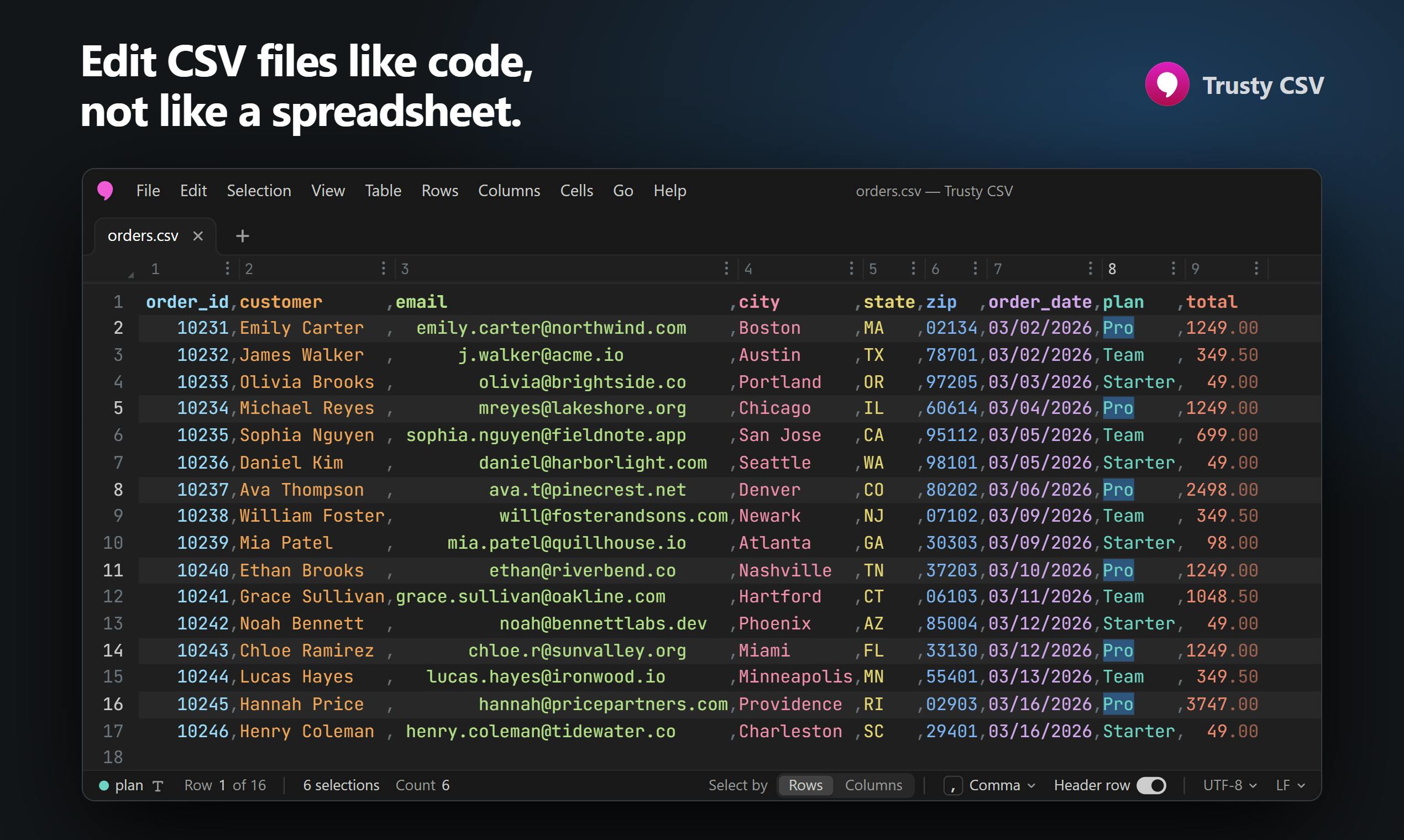
Core Philosophy: Work Directly on the File
Trusty CSV's starting point is clear—data preparation doesn't need complex project structures, doesn't need workflow setup, and doesn't need scripts. You just open a CSV file and operate directly on the file itself.
This "file-as-interface" approach stands in sharp contrast to traditional spreadsheet software or Python script processing. It tries to find a balance between ease of use and precision: retaining the intuitive feel of working directly with data while introducing the rigor of code editing.
Feature Highlights: Clustering, Pivoting, Joining, and Editing
According to the product description, Trusty CSV offers a set of features frequently used in data processing:
- Cluster similar values: Quickly identify and merge similar but inconsistent entries in data—especially useful when cleaning dirty data.
- Pivot and join: Perform data pivoting and table joins without leaving the file, reducing the cost of switching between multiple tools.
- Filtering and cell editing: Supports structured filtering and also allows manual cell edits just like a spreadsheet.
These features cover most typical needs in the data preparation stage, and all operations revolve around "the currently open file" with no extra abstraction layer.
Clustering similar values (akin to fuzzy matching and merging) is a common need in data cleaning. Real-world CSV data often contains "one entity, many spellings" due to entry errors, inconsistent formatting, or aliases—for example, "Beijing" and "Beijing City," or "IBM" and "International Business Machines." Trusty CSV's built-in clustering can automatically identify these similar but inconsistent entries and help users merge them into a unified value, reducing manual find-and-replace work. In traditional spreadsheets, this often requires helper columns, formulas, or plugins, whereas Trusty CSV integrates it as a native capability within the file editing flow, further reinforcing its positioning of "complete data preparation without leaving the file."
Key Differentiators: Every Step Is Undoable, and the Diff Shows Only Changes
The two most notable design choices in Trusty CSV are how it handles operation reversibility and change transparency:
- Every operation is a Ctrl+Z: This means all processing actions (including clustering, pivoting, filtering, etc.) are recorded as undoable steps, so users don't have to worry about accidental operations corrupting data.
- The Diff when saving the file shows only what you changed: When you save the file, the system generates a diff that displays only the parts that actually changed. For data workflows that require auditing or version control, this feature provides Git-like visibility.
These two points make Trusty CSV feel closer to a code editor—operations have history, and changes are traceable.
Positioning and Reflections: A Middle Path for Lightweight Data Preparation
Trusty CSV sits between spreadsheet software and programming scripts. For users who need to process CSVs quickly but don't want to write code, it offers a more structured way to operate; for developers used to code editors, its interaction logic (undo stack, Diff view) feels familiar.
However, this "middle path" also faces challenges: spreadsheet software is deeply entrenched in terms of flexibility and ubiquity, while script-based solutions are stronger in automation and complex processing. Whether Trusty CSV can win users with its differentiated experience of "file-centric + code-like operations" remains to be seen.
The product received 74 upvotes and 3 comments on Product Hunt, ranking 13th for the day—showing some attention, though still early-stage.
Summary
Trusty CSV proposes an interesting data-processing paradigm: treat CSVs as code files to edit. By building in clustering, pivoting, joining, and other operations, and by introducing an undo stack and Diff view, it tries to make data preparation lighter and more traceable. For analysts and data scientists who frequently work with CSVs, this may be a new option worth trying.
Background Note
Diff (difference comparison) is a concept originating from version control systems (such as Git), used to precisely show content changes between two versions of a file. In text editing, the Diff view typically works at the line or character level, using colors to mark additions, deletions, and modifications. Trusty CSV brings this mechanism into the CSV file saving step, meaning users see a "changeset" every time they save, rather than facing a new file that has been overwritten wholesale. This is very valuable for data auditing, multi-person collaboration, and troubleshooting—you can clearly know which row and column were changed without comparing line by line against the original file. This design gives CSV editing a transparency similar to code commits and reduces the risk of damaging data integrity through accidental operations.
Related articles

GLM-5.4 vs. Opus and Neon: How Far From the Top?
No official benchmarks for GLM-5.4. Based on a YouTube deep test and developer trials, we analyze its gap vs. Claude Opus 5.5 and Gemini Neon, the speed bottleneck from marathon-style thinking, and its real position in enterprise agent scenarios.

From Gobbler to Sloppy Joe: The Hit-Making Playbook of a New Jersey Deli Institution
NYT Cooking visits Milburn Deli in New Jersey to break down the hit logic behind the Gobbler turkey sandwich and the local Sloppy Joe: bread sliced to order, house-made sauces, a group shout culture, and customer co-creation behind six locations.
In the Age of AI Programming, When Do You Still Need to Write Code by Hand?
Is handwritten code still valuable once AI programming agents are widespread? This article outlines three scenarios where handwriting is essential—learning, style development, and prototype validation—and provides a division-of-labor framework between AI and humans to help developers balance efficiency and skill growth.