Tucky: An In-Depth Look at the macOS AI Note-Taking App Hidden at the Edge of Your Screen
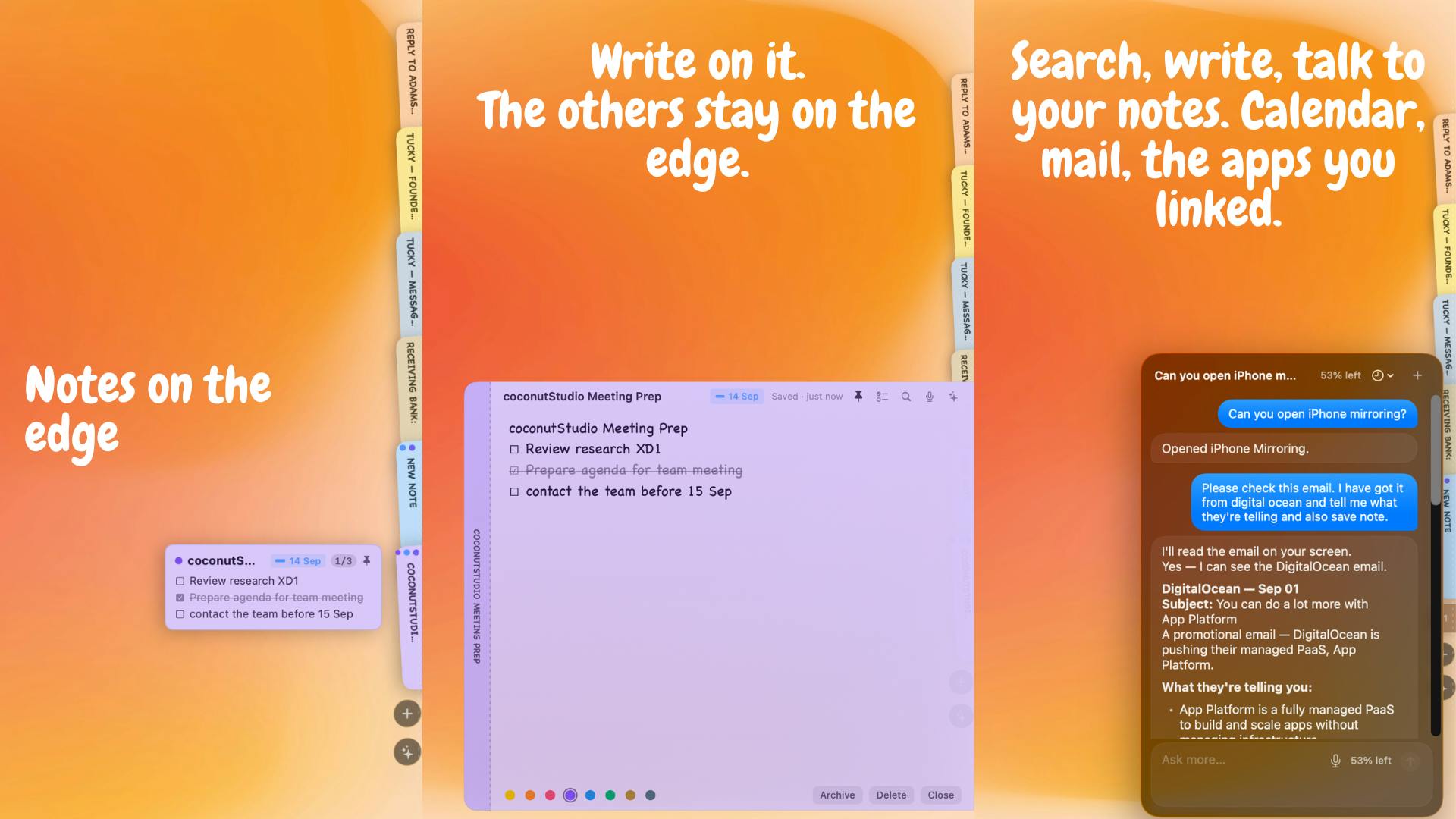
Tucky is a macOS AI note app that hides at your screen edge and expands instantly when needed.
Tucky is a native macOS note-taking app that docks as a thin stripe at the screen edge, expanding on demand for frictionless note capture. It features local encrypted storage for privacy, a built-in AI Agent with voice input and LLM integration, and a $4/month Plus plan. It hit #2 on Product Hunt's daily chart, standing out in the crowded AI notes space with its unique interaction design.
A Note-Taking Tool That "Hides" at the Edge of Your Screen
In an era of highly homogenized productivity tools, Tucky stands out with a clever interaction design. After launching on Product Hunt, this native macOS note-taking app quickly climbed to #2 on the daily chart, earning 136 upvotes and 12 comments.
Background on Product Hunt Product Hunt is one of the world's most influential product discovery platforms, founded in 2013. Each day, it showcases new products, apps, and services from around the globe, and users can upvote and comment to express their support. Daily rankings are determined by an algorithm that factors in vote count, comment quality, launch timing, and more — landing near the top typically means a product has genuinely struck a nerve with users in terms of design philosophy or functional innovation. For startups, Product Hunt is not only a critical channel for acquiring early users but also a litmus test for validating Product-Market Fit. Many well-known products like Notion and Figma gained their first wave of attention and feedback through Product Hunt.
Tucky's core value proposition is simple and direct: a note-taking app that "sleeps" at the edge of your screen, ready to be summoned at any moment, with a built-in AI Agent.
Unlike traditional note-taking software that occupies a standalone window, Tucky rests as a thin stripe along the edge of your screen in its default state, barely interfering with your main workspace. When you need to jot down an idea or review notes, it expands instantly; when you're done, it shrinks back to the edge and returns to its silent state.
The Design Principles Behind Edge UI Edge UI interaction has become an important trend in operating system and application design in recent years. Its theoretical foundation is Fitts's Law: the closer and larger a target is, the faster and more accurately users can reach it. Screen edges have an "infinite width" property — the mouse cursor is physically blocked by the screen boundary, requiring no precise positioning, making edges the easiest locations to reach. macOS's Dock, Windows' taskbar, and various sidebar apps all leverage this principle. For a note-taking app, this design addresses the "context-switching cost" problem: the traditional approach requires Cmd+Tab to switch apps or open a new window, disrupting your current workflow; edge-based activation requires only a slight mouse movement, and you can collapse the app once you're done, minimizing cognitive load. This also aligns with the "Ambient Computing" philosophy — tools should appear when needed and disappear when not, rather than continuously competing for the user's attention. The challenge lies in coexisting harmoniously with native system edge gestures (such as macOS's multi-desktop switching and Notification Center).
This design philosophy is essentially a response to a long-standing pain point: the act of taking notes is often interrupted or abandoned due to the friction of "opening an app."
Tucky's Privacy Strategy: Local Storage and Data Encryption
At a time when AI applications widely rely on cloud-based processing, Tucky emphasizes two key terms: Local and Encrypted. User note data is stored locally on the device and encrypted by default, rather than being uploaded to remote servers.
The Technical Implementation of Local Encryption Local encrypted storage typically uses the industry-standard AES-256 encryption algorithm, encrypting data before writing it to disk and decrypting it upon reading. Key management is the critical component: the most secure approach uses the operating system's Keychain (macOS Keychain) or a similar mechanism to store the master key, which is bound to the user's system login credentials — meaning even if data files are copied to another device, they cannot be decrypted. The core advantage of this approach is that data sovereignty belongs entirely to the user — no intermediary servers, no database breach risks, no third-party access. However, it also presents challenges: cross-device syncing requires reliance on third-party services like iCloud (though encrypted data remains secure in transit), and if a user forgets their password, their data is permanently lost. For a note-taking app, this design is particularly well-suited for storing sensitive content such as project plans, financial information, and personal journals, and is also an effective response to increasingly strict data protection regulations like GDPR.
This is especially important for privacy-conscious users. Notes often contain personal thoughts, work secrets, and even sensitive information. A local encryption strategy effectively reduces the risk of data leaks and makes the "built-in AI" aspect much easier to accept — after all, many people's biggest concern with AI applications is exactly how their data is being used.
As a native macOS application, Tucky can also better leverage system-level capabilities, offering advantages in performance, power efficiency, and interaction smoothness compared to Electron-based cross-platform alternatives.
Native Apps vs. Cross-Platform Solutions Native macOS applications use Apple's official development frameworks (such as Swift + SwiftUI or Objective-C + AppKit) to directly call system APIs, with compiled code running directly on the hardware. In contrast, Electron is a cross-platform framework based on Chromium and Node.js that essentially runs a web application inside a full browser environment. This leads to significant performance differences: native apps typically launch 3–5x faster, use 60–80% less memory, and are more battery-efficient. More importantly, native apps can seamlessly use macOS system-level features like Handoff, Spotlight integration, and Touch Bar support. Electron's advantage, however, lies in higher development efficiency and rapid cross-platform deployment, which is why apps like Slack and VS Code chose that route. Tucky's choice of native development signals the team's willingness to invest more development effort in exchange for a better user experience.
Built-in AI Agent: More Than Simple AI Note Features
What truly sets Tucky apart from ordinary note-taking apps is its built-in AI Agent. Unlike simple "AI summary" or "AI text continuation" features, an Agent implies a degree of proactivity and task execution capability — it can understand user intent, invoke tools, and complete multi-step operations.
The Technical Nature of AI Agents Traditional AI note features are typically "reactive": the user provides input, the AI performs a single processing task (such as text summarization or grammar correction), and returns the result — the entire process is linear and passive. An AI Agent, on the other hand, represents a "proactive" intelligent system with three core capabilities: 1) Intent understanding — extracting the user's true needs from natural language; 2) Task planning — breaking complex requirements into multiple executable steps; 3) Tool invocation — autonomously selecting and combining different tools (such as search, computation, data read/write) to complete tasks. For example, when you say "organize last week's meeting notes and send them to the team," traditional AI might only handle the text formatting, while an Agent understands this involves multiple steps: "find last week's notes" → "extract meeting content" → "format" → "invoke email API to send." This capability evolves AI from a "tool" into an "assistant" and is the core battleground for AI application competition today.
Based on official information, advanced AI capabilities are included in the paid Plus subscription at $4/month, which includes three core features:
- Voice: Support for voice note-taking, making input more natural and efficient;
- Connectors: Integration with other tools or services, expanding the use cases for your notes;
- Best LLM Models: Access to more powerful large language models for higher-quality AI processing.
This "free basic features + monthly AI subscription" model has become the mainstream pricing strategy for AI productivity tools.
The Business Logic Behind Subscription Pricing The "free basic + premium subscription" pricing strategy for AI tools stems from the mature evolution of SaaS (Software as a Service) business models. This Freemium model was first validated by companies like Dropbox and Spotify. The core logic is to lower the barrier to trying a product through a free version, build usage habits, and then convert a portion of users to paying for more powerful features. For AI applications, this model is particularly sensible: AI model calls (especially top-tier models like GPT-4 and Claude) incur real costs (up to several dollars per million tokens), so placing them in a paid tier both covers costs and filters for truly engaged users. The $4/month price point sits at the low-to-mid range of the market (ChatGPT Plus is $20/month), reflecting a startup's strategy of competing on price to rapidly acquire users. This pricing also aligns with the "coffee price theory" — users more readily accept subscription services that cost no more than a cup of coffee.
At $4/month, the price is relatively affordable, lowering the barrier for users to try an AI-enhanced note-taking experience.
Tucky's Product Positioning: A Differentiated Path for Lightweight AI Notes
Tucky is categorized under Productivity, Notes, and Artificial Intelligence, with a clear positioning. It doesn't aspire to be an "all-in-one workspace" like Notion; instead, it focuses on the specific scenario of lowering the barrier to recording.
From a product strategy perspective, Tucky capitalizes on a repeatedly validated user psychology: the "lighter" and more readily accessible a tool is, the more frequently it gets used. The edge-docking interaction design essentially transforms a note-taking app from something you "need to deliberately open" into something that's "always at hand" — a trend consistent with recent developments in sidebar assistants, floating action buttons, and similar interaction patterns.
Of course, tools like this face real-world challenges. Will persistent edge docking conflict with other apps (such as macOS's Notification Center or other sidebar tools)? What are the actual capability boundaries of the AI Agent? How does the app balance privacy with functionality when bridging local encryption and cloud-based LLM calls? These questions will need to be answered through actual use over time.
Conclusion: Is Tucky Worth Trying?
For macOS users who value efficient note-taking, care about data privacy, and want to experience AI enhancement, Tucky offers a fresh and inventive option. It reinterprets the somewhat crowded "AI notes" space through a clever edge-of-screen interaction paradigm and a clear privacy commitment.
Whether it can truly establish a lasting foothold among the many AI note-taking apps ultimately depends on the practicality and long-term iteration of its AI Agent. But at the very least, on Product Hunt, it has already won the community's first wave of recognition with a sufficiently differentiated product concept.
Key Takeaways
Related articles

LLM Application Development: A High-Paying Career Guide for Ordinary People
LLM application development offers fresh graduates up to 35K/month, with SP offers reaching 600K. This article explains the core skills, how to break in, and how ordinary people can seize AI opportunities through learning by doing.

Say Goodbye to AI Influencer Faces: A Complete Guide to Creating Visual Assets for AI Comic Dramas from Scratch
Bilibili creator shares a full workflow for zero-basics AI comic drama visual assets: use Doubao Work skills with script-first, visual references, and real-person texture to escape AI influencer faces, then lock character and scene consistency with asset sheet layouts, weapon detail images, scene nine-grids, and cinematic color palettes.

The AI Production Pipeline Behind Great Videos: From Research to Agent Validation
AI video production isn't just a model race. This article breaks down a transferable four-step pipeline: researching professional workflows, organizing a skill checklist, configuring agents, and experimental validation—and explains how general-purpose LLMs like DeepSeek can replace paid tools to run the entire process.