Tutorial: Configuring Claude Code Desktop to Use Third-Party API Proxy Services
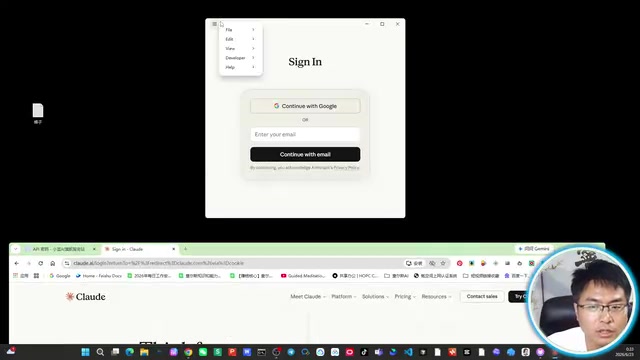
Configure Claude Code desktop to use third-party API proxies for flexible, cost-effective access to Claude models.
This tutorial walks developers through configuring Claude Code's desktop client to connect with third-party API proxy services instead of official subscriptions. It covers enabling Developer Mode, obtaining API credentials from proxy platforms, completing Gateway configuration, and provides practical cost control strategies including model selection and spending limits.
Introduction
Claude Code, the AI programming tool launched by Anthropic, is gaining increasing attention from developers. Anthropic is an AI safety company co-founded in 2021 by former OpenAI Research VP Dario Amodei and Daniela Amodei, with the core philosophy of building "reliable, interpretable, and controllable" AI systems. The Claude model series is Anthropic's flagship product, and Claude Code is their professional coding assistant tool for developers, competing directly with GitHub Copilot, Cursor, Windsurf, and similar products. Claude Code's unique advantages lie in its ultra-long context window (supporting up to 200K tokens) and excellent code comprehension and generation capabilities, particularly excelling in complex project code refactoring and debugging analysis scenarios.
However, the official subscription plans have a relatively high barrier for some users — Claude Pro costs $20/month, while the Max plan for heavy developers runs $100-200/month. Fortunately, Claude Code supports connecting to third-party API proxy services, allowing us to use this tool in a more flexible way.
This article will walk you through step-by-step how to configure the Claude Code desktop client to use Claude's various models through third-party API endpoints, along with practical tips for cost control.
Download and Install Claude Code Desktop
First, visit Claude's official website. On the page, you'll see a Download button at the bottom. The website will automatically detect your operating system (Windows / macOS) — click to download the corresponding installer.
Once downloaded, double-click the installer to begin installation. The process is straightforward — just confirm each step.
Important Note: If you plan to use a third-party API endpoint, do not rush to log in with your email after installation. This is because once you log into an official account, Claude Code will default to the official API channel, which may cause configuration conflicts or authentication priority issues when you later try to switch to a third-party endpoint. Skip the login step and proceed directly to the Developer Mode configuration below.
Enable Developer Mode
This is the most critical step in the entire configuration process. Claude Code doesn't display third-party endpoint configuration options by default — you need to manually enable Developer Mode.
In software engineering, "Developer Mode" is a common design pattern — products hide advanced or experimental features beneath the regular user interface, making them accessible only to technically proficient users. Claude Code hides the third-party endpoint configuration by default partly for product simplicity (avoiding overwhelming regular users with complex options) and partly as a business strategy (Anthropic naturally prefers users to use their own subscription services). However, Anthropic has preserved this open interface, reflecting their developer-friendly ecosystem approach.
Steps
- Open the Claude Code desktop client
- Find the Help option in the menu bar
- Under the Help menu, find the Troubleshooting submenu
- Click Enable Developer Mode
Once enabled successfully, a new Developer tab will appear in the interface. In Developer Mode, you'll see the entry for Configure Third Party Inference. "Inference" here is a professional AI term referring to the process of applying a trained model to new data to generate predictions or outputs — when you ask Claude a question, the process of the model generating a response based on your input is one "inference" operation.
After clicking in, you'll see a Gateway configuration interface containing fields like API URL, API Key, and other settings.

Obtain a Third-Party API Key
Before configuring Claude Code, you need to obtain the necessary credentials from a third-party API proxy service.
An API proxy (also commonly called an API Proxy or API Gateway service) is essentially a reverse proxy service. Here's how it works: the proxy operator purchases API access from large model providers in bulk or through enterprise channels, then offers services externally through their own interface. User requests are first sent to the proxy server, which forwards them to the actual model provider (such as Anthropic), and finally returns the model's response to the user. The advantages of this model include: users don't need to contract directly with overseas service providers, don't need to handle international payment issues, and proxy services typically support APIs from multiple model providers through a unified calling interface.
Below is the general workflow.
Create an API Key
- Log into your chosen API proxy platform
- Go to the API management page and click Create New Key
- Name the key (e.g., "Claude Code") for easier management later
- Select a group/plan — this step directly affects your usage costs
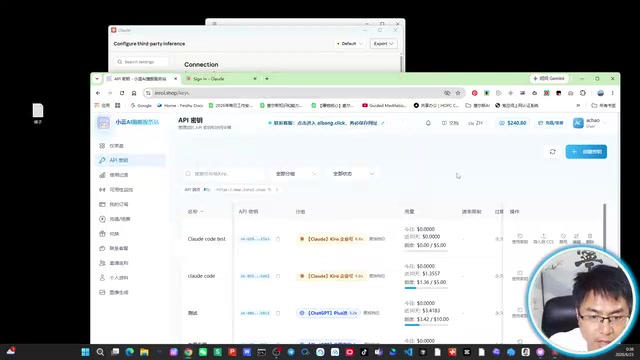
An API Key (Application Programming Interface Key) is a unique string identifier used to verify the caller's identity and track usage. It functions like a "digital key" — only requests carrying the correct Key will be accepted and processed by the server. In terms of security, API Keys should be safeguarded like passwords. Never expose them in public code repositories, social media, or insecure communication channels, as they could be stolen and used by others, draining your account balance.
About Groups and Rate Multipliers
Different groups correspond to different rate multipliers — the higher the multiplier, the higher the cost per API call. To understand the multiplier mechanism, you first need to understand the basic billing model for large language models.
LLM API calls are billed by Token. A Token is the smallest unit of text the model processes — it's neither exactly equivalent to a character nor a word. In English, one Token corresponds to approximately 4 characters or 0.75 words; in Chinese, one character is typically encoded as 1-2 Tokens. Each API call generates two types of Token consumption: input Tokens (the content you send to the model, i.e., the Prompt) and output Tokens (the response generated by the model). Using Anthropic's official pricing as an example, Claude Opus 4 costs $15 per million input Tokens and $75 per million output Tokens, while Claude Sonnet 4 costs $3 per million input Tokens and $15 per million output Tokens — Opus is 5x the price of Sonnet.
The proxy's "rate multiplier" is a markup coefficient on top of the official pricing. Here's a real example:
- Enterprise Edition: 8.8x multiplier
- Premium Edition: 21x multiplier
This means if the official price is $1, calling through the 8.8x multiplier group would cost $8.8. The multiplier level typically reflects the proxy's service quality, connection stability, and response speed — higher multiplier groups often provide more stable connections, lower latency, and higher concurrency limits.
Beginners are advised to choose lower multiplier groups to control costs. You can also set a spending limit for your key (e.g., $5) to prevent overspending from accidental misuse or high-frequency calls. If you're a long-term personal user who trusts your own usage control, you can also leave it unlimited.
Once created, you'll receive two key pieces of information:
- API Key (the key string)
- API URL (the endpoint address, typically in the format
https://domain/v1)
Make sure to save both of these securely.
Complete the Gateway Configuration in Claude Code
Return to the Gateway configuration interface in the Claude Code desktop client. Gateway is a core concept in computer networking and microservices architecture — it acts as an intermediary layer between the client and backend services, handling request routing, authentication, traffic control, and other functions. In the context of Claude Code, the Gateway configuration essentially tells the client: "Don't send API requests to Anthropic's official servers — send them to my specified third-party proxy address instead." Once configured, every model call request from Claude Code will be routed through this custom Gateway address.
Specific steps:
- Paste the API Key copied from the proxy into the corresponding input field
- Paste the API URL into the URL address bar
- Click Apply
- The application will automatically restart to load the new configuration
After restarting, the configuration takes effect. You can now see the available model list in the model selection dropdown, commonly including:
- Claude Opus 4: Anthropic's most powerful flagship model, excelling at complex reasoning, advanced code generation, and long-document analysis, but with the highest calling cost
- Claude Sonnet 4: The best balance of performance and cost, suitable for the vast majority of daily programming tasks, with faster response times
- Claude Sonnet 3.5: The previous generation's high-value model — while not the latest version, it still performs excellently on many tasks at a more affordable price
- And other versions
Claude's model naming follows a musical terminology system: Haiku (a short poem) for lightweight fast models, Sonnet (a fourteen-line poem) for mid-tier balanced models, and Opus (a major musical composition) for top-tier flagship models. This naming convention reflects both the hierarchical progression of model capabilities and the product positioning from "small and refined" to "grand and complex."
Test and Verify the Configuration
After completing the configuration, be sure to run a simple test to confirm everything is working:
- Select a model (e.g., Claude Opus 4)
- Select Accept/Edit (edit mode)
- Create or select a test folder
- Enter a simple prompt, such as "Who are you?"
- Wait for the model's response
If you receive a normal reply, the configuration is successful. If you encounter errors, common troubleshooting directions include: checking whether the API URL has an extra trailing slash, whether the API Key was copied completely (watch for leading/trailing spaces), whether the proxy account has sufficient balance, and whether the network connection is working properly.

You can also return to the proxy platform to check usage records, confirming that calls are being recorded correctly and fees match expectations. Usage records typically display the model name, input/output Token counts, billing amount, and call time for each request — this information is very valuable for subsequent cost optimization.
Cost Control Tips for Claude Code API Proxy Usage
When using third-party API proxy services, cost is a serious consideration. Based on real testing data, a simple conversation (like asking "Who are you?") on the Opus 4 model with an 8.8x multiplier cost approximately $2.5 — not cheap at all. The reason this seemingly simple conversation is so expensive is that Claude Code sends not just your typed text with each interaction, but also a large amount of system prompts, context information, and project file content. These "hidden" Token consumptions often far exceed the visible conversation text.
Here are some recommendations:
- Prioritize Sonnet series models: Compared to Opus, Sonnet has much lower calling costs (official pricing is only 1/5 of Opus), and performance is sufficient for most programming tasks. In practice, for common development scenarios like code completion, bug fixing, and unit test generation, the gap between Sonnet 4 and Opus 4 isn't significant — Opus's advantages only become apparent for complex architectural design, multi-file refactoring, and other high-difficulty tasks
- Choose rate multipliers wisely: When your needs are met, prioritize lower multiplier groups
- Set spending limits: Configure daily or total spending limits for your API Key to avoid unexpected overspending
- Evaluate your use case: For high-frequency usage scenarios, compare the total costs of official subscriptions versus API proxy services and choose the more economical option. A simple calculation method: estimate your monthly Token consumption, calculate total costs using both official subscription pricing and proxy pricing, and when proxy monthly costs approach or exceed the official Max subscription (~$100-200/month), subscribing directly to the official service may be more economical
- Consider alternatives: If you don't have a strong dependency on the Claude brand, other models (such as GPT-4o, DeepSeek, etc.) may have lower proxy multipliers, and some domestic models even offer highly competitive official pricing
Summary
Using Claude Code through a third-party API proxy can be summarized in four core steps: Install the desktop client → Enable Developer Mode → Obtain proxy API credentials → Configure Gateway and test. The entire process isn't complicated, but cost control requires careful attention.
For occasional users or those who want to first experience Claude Code's capabilities, API proxy services are a flexible, low-barrier option. For heavy users, it's recommended to carefully compare the cost-effectiveness of various plans before making a decision. Regardless of which approach you choose, Claude Code's capabilities in code comprehension, generation, and refactoring are well worth exploring in depth.
Key Takeaways
Related articles

Databricks Genie: The AI Analytics Assistant That Tripled a Marketing Team's Data Usage
Databricks' AI analytics assistant Genie tripled marketing team data usage. Discover how this conversational NL2SQL tool lowers the data access barrier and what it means for enterprise AI adoption.

How The Oregon Trail Became a Cultural Icon for Generations
How The Oregon Trail grew from educational software into a multigenerational cultural icon — through classrooms, "You have died of dysentery," and shared childhood memories.

Health Benefits Platform Thatch Hits $1B Valuation as Healthcare Costs Surge
Thatch raises $108M and hits a $1B valuation, backed by a16z, Index Ventures, and General Catalyst, as surging U.S. healthcare costs drive demand for flexible benefits platforms.