Understanding CI/CD from Scratch: Core Principles and Practical Introduction to Automated Deployment
A beginner-friendly breakdown of CI/CD principles, history, and a practical Jenkins + RuoYi deployment roadmap.
This article traces the evolution from Waterfall to Agile to DevOps to explain why CI/CD emerged and what problems it solves. It contrasts the pain of manual deployment with the efficiency of automated pipelines, and outlines a complete 10-lesson Jenkins + RuoYi hands-on course designed for beginners and those transitioning into DevOps/operations roles.
In the world of software development and operations, CI/CD (Continuous Integration/Continuous Deployment) has long become a standard practice for modern teams. But for beginners or those transitioning into DevOps/operations roles, this automated pipeline can feel abstract and hard to grasp. A cloud-native hands-on course by Bilibili creator "Yi Ge" traces the historical evolution of software development to explain, in plain language, why CI/CD emerged and what problems it solves. This article, based on the first lesson of that course, outlines the core value of CI/CD and the practical path to mastering it.
From Waterfall to DevOps: The Evolution of Software Delivery
To understand why CI/CD exists, you need to look back at how software delivery has evolved. This history isn't just dry background — it's the key to understanding the value of automation.
The Waterfall Era: One Way Only, No Going Back
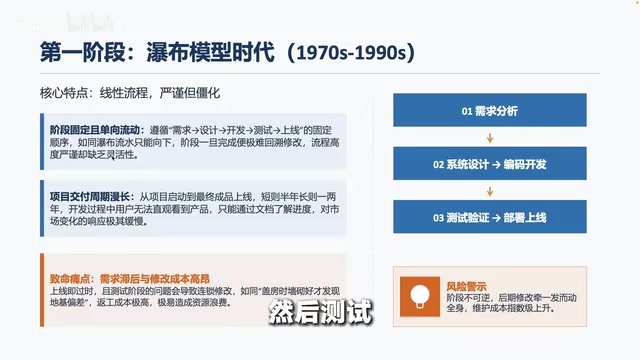
Early software development followed the Waterfall model, where a project was divided into sequential phases — requirements analysis, system design, coding, testing, and deployment — flowing strictly from top to bottom like a waterfall, with no way to go back. Each phase had to be fully completed before the next could begin.
The Waterfall model was formally described by Winston W. Royce in a 1970 paper. Its design philosophy was borrowed from manufacturing and construction engineering — industries where rework is extremely costly, making strict phase-based control perfectly reasonable. But software is fundamentally different from physical products: code is highly modifiable, and requirements themselves continue to evolve throughout development. The root flaw of the Waterfall model is its assumption that requirements can be completely and accurately defined at the start of a project — which is nearly impossible in practice. Statistics show that over 70% of large IT projects using the Waterfall model suffer from serious requirements-change problems, leading directly to a flood of "feature-complete but unused" software systems.
The problems with this approach are obvious: a project might take anywhere from six months to a year or two. By the time the software finally ships, user needs may have changed entirely. Even more painful is when bugs discovered during testing require going back to fix code — often forcing updates to design documents and requirements documents along the way. It's like building a house, discovering the foundation is flawed, and having to tear down the walls to start over.

The Agile Era: Small Steps, Rapid Iteration
Around the year 2000, the Waterfall model's sluggishness could no longer keep pace with market change, and the concept of Agile development emerged. In 2001, seventeen software development pioneers gathered at the Snowbird ski resort in Utah and co-authored the Agile Manifesto, establishing core values such as "Individuals and interactions over processes and tools," "Working software over comprehensive documentation," and "Responding to change over following a plan." Agile methodology gave rise to various practical frameworks including Scrum, Kanban, and Extreme Programming (XP), with Scrum being the most popular — it fixes development cycles (Sprints) at one to four weeks, and each Sprint must end with a demonstrable software increment.
The core idea of Agile is to break large projects into smaller pieces, delivering a usable version every two to four weeks — a process called "iteration." Take an e-commerce website as an example: the Waterfall model would build all features before launching, while Agile would ship core features like product listing and order placement after two weeks, then iteratively add shopping cart, payment, and other modules. Users get to use the product sooner, and the team can adjust direction based on feedback — shifting from "find out if it's right after delivery" to "continuously deliver and continuously validate."
But Agile introduced a new problem: shorter iteration cycles meant significantly higher deployment frequency. What used to be a deployment every six months became deployments every two weeks or even multiple times per day. If teams still relied on manual operations, operations engineers simply couldn't keep up.

The DevOps Era: Automation Takes Center Stage
From around 2010 onward, the DevOps concept gradually gained traction. The rise of DevOps is typically traced back to Patrick Debois's 2008 "Agile Infrastructure" talk in Belgium, and John Allspaw and Paul Hammond's famous 2009 Velocity Conference talk, 10+ Deploys Per Day: Dev and Ops Cooperation at Flickr. DevOps is fundamentally a cultural movement, not merely a collection of tools — it targets the long-standing "wall" within software organizations: development teams pursue change and speed, while operations teams pursue stability and risk control, with naturally opposing goals. DevOps breaks down this wall through shared responsibility, transparent culture, and automation tooling.
Research by DORA (DevOps Research and Assessment) shows that high-performing DevOps teams deploy 973 times more frequently than low-performing teams and recover from failures 6,570 times faster — figures that provide powerful quantitative evidence for the business value of CI/CD. And CI/CD is the most central tool in DevOps practice, enabling the rapid iteration of Agile development to actually be realized at scale.
The table below clearly contrasts the three eras:
| Era | Development Model | Deployment Frequency | Primary Pain Points |
|---|---|---|---|
| Waterfall | One-time delivery | Every 6–12 months | Difficult to accommodate changes; long cycles |
| Agile | 2–4 week iterations | Every few weeks | Frequent deployments; manual operations exhausting |
| DevOps | Continuous delivery | Multiple times per day | Requires automation tooling |
The Real Pain of Manual Deployment: What Life Without CI/CD Looks Like
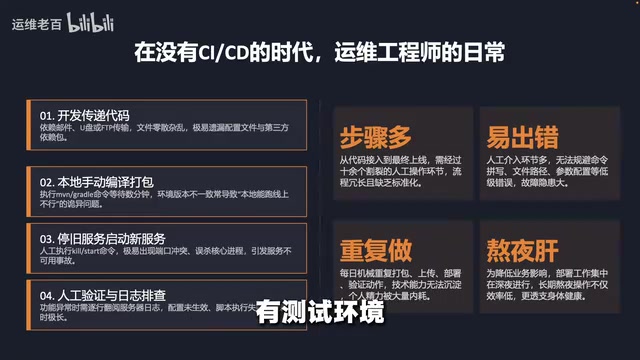
To appreciate the value of automation, the course deliberately recreates the day-to-day reality of traditional manual deployment. Imagine you're an operations engineer at a company using Agile development, where new features need to go live every two weeks or even daily.
First comes the code handoff step: developers send code via email, zip files, USB drives, or FTP to the server. With many files, it's easy to miss some; network interruptions mean starting over. Next is the build step: a Java project requires Maven to download dependencies, compile, and package everything into a jar file — a few minutes for small projects, potentially tens of minutes for large ones, with dependency download failures requiring network troubleshooting.
Then comes the service restart step: stop the old service, start the new one. If startup fails, you're diagnosing port conflicts, process clashes, and similar issues. Finally, the verification step: open a browser to check functionality. When something's wrong, dig through logs to investigate — maybe a config wasn't updated, maybe a database script wasn't run, maybe there's a bug in the code itself.
Worse still, companies typically have development, staging, pre-production, and production environments. Every environment requires repeating all of the above. Change code ten times a day, repeat the process ten times. When a bug hits production at 2 AM, the on-call engineer climbs out of bed to go through every step manually. Many steps, high error risk, repetitive labor, late-night emergencies — these are the core pain points of traditional manual operations.
CI/CD Core Principles: You Write the Code, Machines Handle the Rest
CI/CD can be summarized in one sentence: you only need to focus on writing code — the rest is handled by machines. It consists of two parts.
CI — Continuous Integration: Your Automated Quality Inspector
CI (Continuous Integration) means developers frequently merge their code into the main branch, with every merge automatically triggering a build and test run. Think of it as an automated quality inspector: every time code is committed, it's pulled down, compiled, and tested. Any issues surface immediately and can be fixed right away — rather than waiting a week until everyone's code is merged together, only to discover a pile of conflicts.
CI's core mechanism relies on integration between a version control system (typically Git) and a build server. When a developer runs git push, the code repository (such as GitHub, GitLab, or Gitee) sends an HTTP POST request to the CI server via a Webhook, triggering a predefined build pipeline. This pipeline typically includes steps like code checkout, dependency installation, static code analysis (e.g., SonarQube scans for security vulnerabilities and code smells), unit tests, integration tests, and code coverage reporting. The CI tooling ecosystem is rich: Jenkins is the most established open-source option with high extensibility; GitLab CI/CD seamlessly integrates version control with CI; GitHub Actions has rapidly risen in popularity in recent years due to its clean YAML configuration and deep integration with the GitHub ecosystem; cloud-native options like CircleCI and Travis CI are also widely used.
The core problems CI addresses include: frequent merges mean conflicts are caught and resolved early; automated builds ensure efficiency; test coverage ensures code quality.
CD — Continuous Delivery and Continuous Deployment: Always Ready to Ship
CD takes CI a step further — code isn't just built and packaged, it's automatically deployed to servers.
- Continuous Delivery: The code is always ready to ship, but the decision of when to ship remains with a human. Think of it like a cannon already loaded and aimed — ready to fire at any moment, but someone still has to press the button.
- Continuous Deployment: More aggressive — code that passes all tests is automatically deployed with zero human intervention. Think of it like a vending machine: insert coin, get product.
The problems CD addresses include: automated deployment compresses time to minutes; every deployment follows an identical process, eliminating human error; when problems occur, a single command rolls back to the previous version.

Jenkins in Practice: A Complete 10-Lesson Learning Path
The goal of this course is to achieve full continuous deployment — after modifying code in the RuoYi backend management system and pushing it to the repository, Jenkins automatically builds and deploys it. Refresh your browser and the changes are live, with no need to manually log into a server and run commands.
Jenkins was born in 2004 as the Hudson project at Sun Microsystems, and forked into Jenkins in 2011 following a copyright dispute with Oracle. Over two decades of development, Jenkins has accumulated over 1,800 plugins and can integrate with nearly any development tool or platform, making it one of the most widely used open-source CI/CD tools in the world. Jenkins's core concepts include: Job (a task defining build steps), Pipeline (a full CI/CD workflow described in Groovy DSL or declarative syntax), Agent (the node executing the build — could be a physical machine, VM, or Docker container), and Webhook (the trigger mechanism). Jenkins Pipeline supports two syntaxes — Declarative and Scripted. Declarative has a clear structure suited for beginners; Scripted is more flexible and suited for complex scenarios.
RuoYi is an extremely popular open-source Java backend management framework in China, built on Spring Boot + Spring Security + MyBatis + Thymeleaf. It provides out-of-the-box modules for permission management, code generation, system monitoring, and more. The course chose RuoYi over a self-built demo project precisely to expose learners to real-world complexity — including multi-module project builds, database script management, and multi-environment configuration switching.
The course spans ten lessons, moving from concepts to practice, from manual to automated:
- Understanding the core value of CI/CD (this lesson)
- Introduction to the RuoYi project and environment setup (installing Java, Maven, Git, and MariaDB on Rocky Linux 9)
- Manually deploying the RuoYi project to experience how tedious the process is
- Installing Jenkins, creating your first job
- Hands-on Webhook automation — making a code push automatically trigger a build
- Writing manual deployment steps as code using Pipeline
- Automated deployment and deployment script optimization
- A complete pipeline with health checks and WeCom (Enterprise WeChat) notifications 9–10. Advanced topics including artifact management and version control
Worth noting: the course pays special attention to beginners and those transitioning into operations roles, emphasizing that the goal is not to become a Java developer, but to help operations engineers understand what each tool does and why it needs to be installed — explaining everyday interactions in the simplest possible way.
Conclusion: How CI/CD Reshapes the Value of Operations
CI/CD doesn't replace developers — it automates the "last mile" of delivery between development and users. For operations engineers, it's a powerful ally: the manual work that used to consume your time gets handed off to machines, shifting your focus from repetitive labor to "maintaining the pipeline" — raising both the technical depth and the value of the role.
The thought-provoking question left at the end of the course is worth sitting with: in your day-to-day work, what repetitive manual operations could be optimized with CI/CD? That may well be a question every person in tech should seriously examine.
Key Takeaways
Related articles

Firebase AI Logic + Gemini Nano 4: A Practical Guide to Android AI Development
How Firebase AI Logic and Gemini Nano 4 help Android developers ship generative AI: App Check and prompt templates ensure security, hybrid routing cuts latency and cost, Spend Caps control budgets, and AI monitoring provides observability.

Microsoft AI Agent Breakthroughs: More Efficient, Better at Code and Weather Forecasting
Microsoft Research Focus Issue 97: ForkPilot cuts agent inference costs, Cabra reveals coding agents' code-understanding gap, Teletune learns workflows from logs, PBC improves extended forecasts, BioEMU-2 opens preview.

Prime Intellect Releases Prime Mega MoE: Trainable Fused MoE Kernel with 3.11x Forward Speedup
Prime Intellect releases Prime Mega MoE, adding backpropagation to DeepSeek's fused Mega MoE kernel for trainability. Up to 3.11x forward speedup and 34% faster Qwen3 MoE training steps in prime-rl.