Unlock All Claude Models for Free? Developer Mode + Gateway Configuration Tutorial
The so-called "free use of all Claude models" tutorial describes a technically real path, but the free access is unsustainable and fraught with risks.
The article breaks down a YouTube tutorial that claims to enable free access to all Claude models by enabling developer mode in the Claude desktop client and replacing the official service with a third-party gateway, Radox AI. The author points out that gateway mode is a legitimate official enterprise feature and the configuration is technically feasible, but the "free" logic does not hold: third-party free quotas have limits, and pricing far below official rates suggests bulk purchasing, model downgrading, or shared accounts. More critically, model names like "Opus 5.5" and "Sonnet 5" are not officially released, and a model's self-proclaimed identity cannot prove authenticity. The article also warns of account bans, data privacy leakage, and service interruption, concluding that the tutorial suits tech enthusiasts learning about the call chain but not as a productivity tool.
Recently, a YouTube video tutorial claimed that by enabling developer mode in the Claude desktop client and configuring a third-party gateway, users could bypass the paywall and access all Claude models—including "Opus 5.5"—for free. It sounds like a tempting loophole, but the technical principles behind the operation, the potential risks, and the authenticity of the model names deserve careful scrutiny from every AI professional.
The "Free" Path Claimed by the Tutorial: Breaking Down the Steps
The process shown in the video is not complicated. Its core is to use hidden developer options in the Claude desktop client to replace the official service with a third-party API gateway.
Step 1: Enable Developer Mode
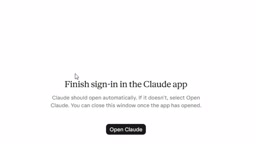
First, download the Claude for Windows desktop client from the official website and log in to the free tier with a Google account. Then, from the top-left menu, go to Help → Troubleshooting and find "Enable developer mode" to turn it on. According to the video, Claude will automatically restart after enabling it, opening the door for subsequent third-party configuration.
This step itself is an official feature provided for developers to debug, not a security vulnerability, but ordinary users rarely touch it. Its existence provides a technical channel for external API access.
Step 2: Obtain a Third-Party Gateway and API Key
The tutorial directs users to a platform called "Radox AI," where they register a free account and create an API Key. The video mentions that the platform offers a paid option of 1 million tokens for just $4.5, but the demonstration uses the free quota. Users need to note the gateway's base URL and the generated API Key for later use.
Step 3: Configure the Gateway Connection
Back in the Claude desktop client, enter the "Configure third party" settings page through developer mode. Key settings include: selecting "gateway" as the connection type, "static API key" as the credential type, entering the gateway URL (remove the trailing /v1), pasting the API Key, and selecting "bearer" as the authentication scheme. After clicking "Test connection," if the configuration is correct, the status will turn green and available models will be automatically discovered.
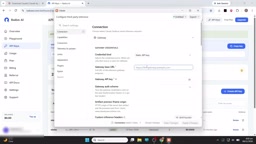
In the video demonstration, after a successful connection test, 9 models were discovered. Click "Apply changes" and restart the client, and the newly added options will appear in the model list.
Bearer Authentication and Static API Key
Selecting "bearer" as the authentication scheme on the configuration page refers to the HTTP Bearer Token authentication mechanism: the client carries Authorization: Bearer <API Key> in the request header, and the server identifies the caller based on it. This is a stateless authentication method that requires no session and is widely used in various AI APIs.
"static API key" emphasizes that the credential is a long-lived fixed string, rather than a short-term token dynamically obtained through OAuth or similar flows. The convenience of a static key is simple configuration; the risk is that once leaked, it can be abused for a long time and is usually difficult to revoke with fine granularity. The tutorial requires removing the trailing /v1 from the URL because the client will append the version path itself—this is a compatibility detail, not a security setting.
Step 4: Verify "Free" Usage
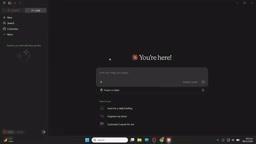
In the default model area, the tutorial author selected "Opus 5.5" and adjusted the effort level. After sending a question, the model replied that it was Claude Opus 5.5 and confirmed that it could be used for free.
Technical Plausibility Analysis: Gateway Mode Does Exist, but the "Free" Logic Is Questionable
From a technical perspective, the Claude desktop client supports connecting to external APIs through a gateway. This is itself a legitimate enterprise feature used to let organizations centrally manage model access and billing. The configuration method in the tutorial is technically feasible—it essentially makes the Claude client connect to a third-party relay service instead of Anthropic's official servers.
The problem lies in the sustainability of "free." Free quotas provided by third-party gateway platforms usually have strict rate limits, token caps, or time limits. The price shown in the video—1 million tokens for $4.5—works out to a cost per million tokens far below official API pricing. This price difference suggests that the gateway may operate through bulk purchasing, model downgrading, or shared accounts. Once the free quota is exhausted, users must either pay or face service interruption.
More critically, the authenticity of the model names is questionable. The video repeatedly mentions models such as "Opus 5.5," "Sonnet 5," and "Fable," but Anthropic has never released these versions. The current Claude model line is mainly the Claude 3 series. The names in the video are either custom labels from the gateway platform or fictitious names invented by the author to attract clicks. A model replying that it is "Opus 5.5" does not prove its true identity—a third-party gateway can return any preset text.
The Difference Between an API Gateway and an API Relay
Architecturally, a gateway is a unified entry layer between clients and backend services, responsible for routing, authentication, rate limiting, billing, and auditing. The "gateway" connection mode supported by the Claude desktop client is intended to let enterprises point clients to a self-built unified proxy layer, thereby centrally managing employee access to models and settling usage in one place.
The "third-party API gateway" used in the tutorial is more accurately an API relay service: it holds upstream API keys in its own name, issues its own keys to downstream users, and resells model calls at its own pricing. The key difference between the two lies in the trust boundary—an enterprise gateway is controlled by the organization itself, and data and billing do not flow outside; a third-party relay means all requests and responses pass through a stranger's servers. Understanding this is necessary to see that "free" actually means a transfer of trust, not the disappearance of cost.
Hidden Risks: Account Security and Compliance Issues
Using a third-party gateway to connect to the Claude client carries at least three layers of risk.
Account Ban Risk: Anthropic's terms of service generally prohibit using the official client for non-official API relay. Although developer mode is an official feature, using it to bypass subscription payments may trigger risk-control mechanisms, leading to restrictions or bans on the Claude account.
Data Privacy Risk: All conversation content passes through third-party gateway servers. This means your prompts, uploaded files, and model responses may all be recorded and analyzed by the gateway operator. For users handling sensitive information, this is an unacceptable data leakage path.
Service Stability Risk: The availability of a third-party gateway depends entirely on the operator and may stop at any time due to cost pressure, legal disputes, or technical failures. At that point, users can neither continue using the service nor obtain any refund or data migration support.
Terms of Service and Risk-Control Mechanisms
The terms of service of vendors such as Anthropic generally limit the official client to use with official subscriptions or official APIs and explicitly prohibit pointing it to unauthorized third-party endpoints. Such restrictions are not only commercial terms but also part of the risk-control system: the platform identifies abnormal access through signals such as request origin, authentication method, and usage patterns.
Converting a subscription client into an entry point for third-party relay is viewed by the platform as an attempt to circumvent billing and may trigger rate limiting, feature restrictions, or even account bans. Because account bans usually do not provide an appeal or refund channel, users lose not only the current subscription fee but also historical conversations and project data. For users who rely on the account for their work, the cost of this risk is often deliberately downplayed by such tutorials.
A Rational View of "Free" Tutorials: Who They Suit and Who They Don't
Such tutorials are not entirely worthless. For tech enthusiasts who want to experience the Claude desktop client's developer mode and learn about API gateway configuration, it can serve as a low-cost experimental sandbox. Through hands-on practice, they can intuitively understand the call chain between client, gateway, and model.
However, it is not suitable as a productivity tool. Relying on unofficial channels for model access means building workflows on uncertain infrastructure. For scenarios requiring stable output, data confidentiality, or long-term use, official subscriptions or legitimate API access remain the only reliable choice.
There is another detail worth noting in the video: the configuration page shows an obvious repeating loop at the "credential kind" option. This is likely a glitch during video editing or recording, which also indirectly shows that the tutorial was not rigorously produced. Viewers following the steps need to judge the actual meaning of each step themselves rather than copying mechanically.
Conclusion
The "free use of all Claude models" tutorial taps into users' sensitivity to high AI subscription costs, using the combination of developer mode and third-party gateway to create an illusion of a "crack." Technically, the gateway configuration path does exist; commercially, the free quota is unsustainable; legally, account risks are real. The fictitious model names add a marketing flavor to the tutorial. For AI professionals, understanding the principles is more meaningful than imitating the operation—in the field of AI infrastructure, a truly free lunch hardly exists.
One-line Summary
The so-called "free use of all Claude models" tutorial describes a technically real path, but the free access is unsustainable and fraught with risks.
Paragraph Summary
The article breaks down a YouTube tutorial that claims to enable free access to all Claude models. Its core is to enable developer mode in the Claude desktop client and replace the official service with a third-party gateway, Radox AI, thereby accessing an external model list in the client. The author points out that gateway mode itself is a legitimate official enterprise feature and the configuration method is technically feasible, but the "free" logic does not hold: third-party free quotas have rate and usage limits, and pricing significantly below official rates suggests operation through bulk purchasing, model downgrading, or shared accounts. More critically, model names such as "Opus 5.5" and "Sonnet 5" in the tutorial are not officially released, and a model's self-proclaimed identity cannot prove authenticity. The article also warns of three risks: account bans, data privacy leakage, and service interruption. It concludes that the tutorial is suitable for tech enthusiasts to understand the call chain but not as a productivity tool.
Related articles
Robinhood's Hybrid AI Reviewer: 60% of Data PRs Auto-Merge
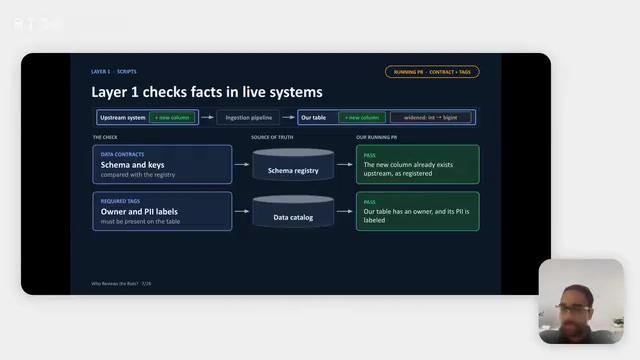
Robinhood's data platform team shares a hybrid AI PR reviewer: deterministic scripts verify facts, AI Agents judge contextual risk, and humans keep key decisions. About 60% of data pipeline PRs merge without human review, cutting review workload ~75%, saving ~132 engineering hours monthly, and reducing related incidents ~30%.

Making Marketing Videos with Claude Code Is More Efficient Than AI Video Generation
Generate marketing videos programmatically with Claude Code—more flexible and cheaper than AI video generators. Reference a style, generate a storyboard, output content as code, and make edits instantly.
Open-Weight Models Are Falling Behind: Three Structural Reasons
A veteran developer uses his platform's usage data and public benchmark experiments to argue why open-weight models are falling behind closed-source frontier models.