Use Three Prompts to Let Claude Auto-Generate n8n Workflows
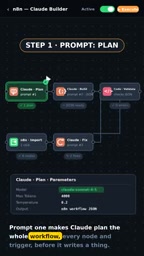
A three-prompt method lets Claude auto-build n8n workflows with validation, cutting costs by 99%.
This article introduces a "three-prompt method" for rapidly generating n8n automation workflows using Claude: first have the AI plan all nodes and triggers, then generate a complete n8n JSON config, then use a Code node to automatically validate and feed errors back to Claude for fixes — forming a fully automated "generate → validate → repair" loop. The method's strength lies in using programmatic validation to constrain AI output uncertainty. In practice, workflow build time drops from 4 hours to 15 minutes, and cost falls from ~$300 to ~$0.04 — a ~99% reduction. It works best for fixed-pattern, repetitive automation scenarios; complex business logic may still require manual adjustment.
Manually building n8n automation workflows is a time-consuming grind: dragging nodes one by one, configuring parameters, debugging connections — it can easily eat up an entire weekend. With Claude and a structured prompt workflow, the whole process can be compressed to just a few minutes. This article breaks down a "three-prompt workflow" method shared by a YouTube creator, and how it turns the pain of manual setup into a one-click import.
The Core Idea: Make Claude Plan Before It Builds
The key to this approach is splitting workflow generation into three clear steps, rather than asking the AI to dump everything out at once.
The job of the first prompt (Prompt 1) is to have Claude plan the entire workflow — thinking through every node and trigger before writing a single line of code. This step is essentially asking the AI to do architectural design: clarifying what stages the workflow has, where it triggers, and what each node is responsible for. Planning before executing significantly reduces the chance of rework later.
This "think before you act" approach aligns well with how large language models work. Asking a model to directly generate complex structured configurations is error-prone. Having it first produce a complete node list and logical plan gives subsequent code generation a clear blueprint to work from.
n8n is an open-source workflow automation platform that lets users connect different apps and services through a visual interface to automate tasks. Its underlying data structure is a standard JSON configuration file that describes each node's type, parameters, and connections within a workflow. Because the entire workflow can be serialized into JSON, any correctly formatted JSON file can fully "describe" and import a runnable workflow — and that's the technical foundation for the method described here. n8n supports hundreds of built-in integration nodes, covering everything from Webhook triggers and database operations to sending emails and calling HTTP APIs. The varying complexity of node configurations is also why manual setup is so error-prone and time-consuming.
Generation and Validation: The JSON Must Pass Inspection
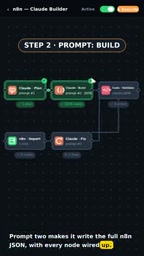
The second prompt (Prompt 2) has Claude generate a complete n8n JSON based on the plan, with every node correctly wired up. An n8n workflow is essentially a JSON config file — as long as the format is correct and the node connections are valid, the platform can recognize it.
What really demonstrates the rigor of this approach is the validation step. The generated JSON is run through a Code node to verify that problematic workflows don't slip through. This step acts like a quality control checkpoint for the AI's output — AI-generated content isn't always reliable, but programmatic validation can catch anything substandard before it causes problems.
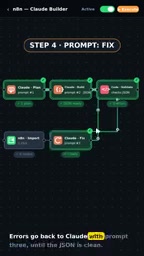
If validation finds errors, those error messages are fed back to Claude alongside the third prompt (Prompt 3), asking it to make corrections — and this loop continues until the JSON is completely clean. This "generate → validate → fix" cycle is the core of the entire method, replacing manual trial-and-error debugging with an automated feedback loop.
Once the clean JSON passes validation, it can be imported into n8n and run immediately. No need to manually check node connections — the machine handles all the error correction itself.
The "generate → validate → fix" loop is an engineering example of classic automated feedback control. Compared to manual debugging, its advantage is that error messages are precise, machine-readable text rather than vague subjective judgments. They can be fed directly back to Claude as new context, enabling the model to fix specific fields or connections rather than regenerating from scratch. This pattern is well established in code generation — for example, compiler error-driven Automated Program Repair (APR). Applying it to configuration file generation essentially replaces "compile/runtime errors" with "JSON Schema or business rule validation errors," allowing the entire repair process to converge without human intervention. The more comprehensive the validation logic, the more stable the final output quality — which is where the most effort should go when designing the Code node.
Efficiency and Cost: From Hundreds of Dollars to a Few Cents
The most compelling part of this approach is the quantified comparison. According to the creator, delivering a workflow to a client now takes minutes, not an entire weekend.
Here's the math: building a workflow manually takes about 4 hours. At $75 per hour, that's roughly $300 in labor per workflow. With Claude, it takes 15 minutes at a cost of about $0.04 — roughly 99% cheaper.
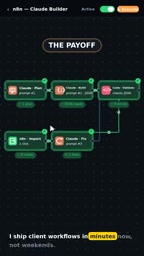
This order-of-magnitude cost reduction is hugely significant for teams or freelancers who need to deliver automation solutions at scale. It's not just about saving money — it compresses delivery time from days to minutes, freeing up human effort from repetitive configuration work so people can focus on higher-value activities like requirements analysis and architectural design.
Method Summary and Use Cases
At its core, this three-prompt process transforms "manual building" into a pipeline of "AI generation + programmatic validation + AI repair." Its elegance lies not in relying purely on Claude's capabilities, but in using deterministic validation to constrain the inherent uncertainty of AI outputs.
It's worth noting that the effectiveness of this method still depends on a few prerequisites: whether the planning prompt is precise enough, whether the validation logic covers common error types, and whether the final workflow actually meets real business requirements. For workflows with simple logic and fixed patterns, this method is extremely efficient. For scenarios involving complex business logic or unusual node configurations, some manual fine-tuning may still be needed.
For developers who frequently use n8n for automation, this is a workflow acceleration approach worth trying. Rather than dragging nodes one by one, let AI plan first, then generate, then auto-validate — freeing people entirely from the tedium of manual setup.
Related articles

@ai-sdk/workflow-harness 1.0.146 Release Notes
@ai-sdk/workflow-harness 1.0.146 is a patch-level update that syncs the @ai-sdk/harness dependency to 1.0.146. Auto-published via GitHub Actions with a verified signature.

Googlebook In-Depth Review: Can Google's New Laptop Replace the Chromebook?
In-depth Googlebook review: Google Book OS on Android 17, Pixel ecosystem integration, Gemini semantic search, and how it stacks up against Chromebook and MacBook Air on price and apps.

Python in Practice: Build an MCP Server from Scratch to Give LLMs Real-Time Web Data
Step-by-step guide to building an MCP server with Python and FastMCP, connecting it to Claude Code and Claude Desktop, and enabling LLMs to answer questions with live web data.