Using Codex to Automate the Full AI Research Pipeline: From Finding Code to Writing Papers

Use Codex to automate research end-to-end: from source code to experiments to writing — human commands, AI executes.
This article presents a research efficiency methodology centered on OpenAI Codex, delegating the five most time-consuming stages of academic writing — finding source code, setting up environments, running experiments, writing the paper, and creating figures — entirely to AI through conversation. The core logic: start from a reproducible baseline before innovating; drive experiments through chat without writing code; generate a structured report post-experiment to provide reliable context for writing; feed sample papers to guide writing style; and let AI handle all figures. The human remains the decision-maker throughout.
For research newcomers, writing a paper often gets stuck in several time-consuming stages: finding reproducible source code, setting up the environment, running experiments for comparison, writing the paper, and creating figures. These tasks demand both programming skills and a lot of repetitive effort. A Bilibili content creator focused on research tools proposed a workflow — hand off all five of these most time-consuming tasks to Codex, while the human acts purely as the "commander" without writing a single line of code.
This article breaks down the core logic of this workflow to help graduate students looking to boost their research efficiency understand how to use AI tools to connect every step from topic selection to final draft.
Step 1: Let Codex Find Reproducible Source Code for You
Many people assume the first step in writing a paper is reading literature — but this creator offers a different perspective: find a working baseline model codebase first, then think about improvements and optimizations. The reason is practical: without an executable baseline to start from, there's no foundation for innovation or comparative experiments.
The key insight is that searching for source code is itself a task you can delegate to Codex. Instead of manually sifting through GitHub, you can leverage Codex's retrieval capabilities to find a suitable diffusion model as a starting point. This way, even beginners who are unfamiliar with a codebase ecosystem can quickly locate a usable project.
Diffusion Models are among the most popular generative models in deep learning in recent years. The core idea simulates the physical process of diffusion: progressively add noise to data (the forward process), then train a neural network to learn how to gradually remove that noise and recover the original data (the reverse process). Well-known models such as DDPM, Stable Diffusion, and DALL·E 2 are all built on this framework. Because of their strong performance in image, video, and audio generation tasks, the number of related papers exploded after 2022, making diffusion models a popular thesis topic in computer vision. As a result, a large number of open-source implementations already exist on GitHub, making baseline code relatively accessible — which makes them an ideal starting point for the strategy of "start from existing code, then improve."
Step 2: Environment Setup and Experiments — All Done Through Conversation
For research beginners, the biggest barrier is often not the ideas themselves, but rather: "I can't set up the environment, I can't write the code, and I don't know what to change in the model." The central claim of this workflow is: hand all of this to Codex — you don't even need to open PyCharm or VS Code. Everything happens in the chat window.
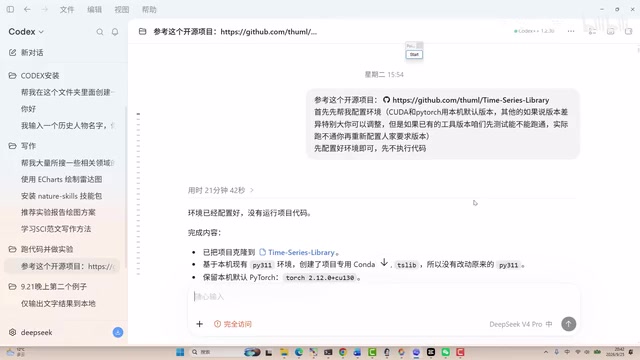
Once the environment is set up, the truly lengthy part is running experiments. The creator emphasizes this isn't something that wraps up in one or two rounds of conversation — it requires many rounds of back-and-forth interaction. The focus at this stage is on learning how to use Codex to accomplish several things:
- Introduce innovations: Propose improvement directions on top of the baseline model
- Add or swap modules: Modify the network architecture to explore different approaches
- Run comparative experiments: Validate whether the improvements are genuinely effective
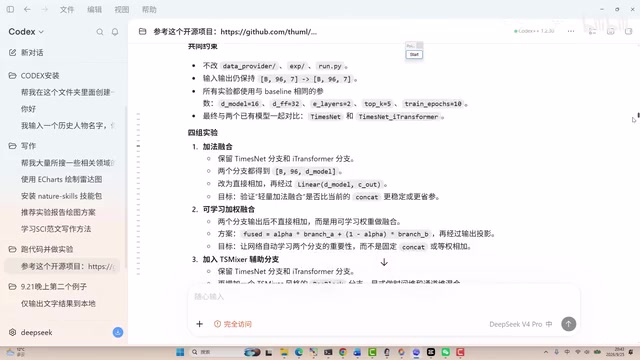
This process generates a large number of code files. If written from scratch by a human, the time cost would be enormous. But by continuously conversing with Codex — "I want to optimize this, I want to improve that" — and letting it generate and debug code iteratively, this portion of the work can be dramatically compressed.
Why You Must Generate an Experiment Report
After running experiments, the creator places special emphasis on having Codex produce a complete experiment report — covering what changes were made, what was optimized, and what results were obtained.
This step may seem redundant, but it's actually the critical bridge between stages. The ultimate goal of running experiments is to write a paper, and writing a paper requires having "something to write about." Since Codex will be helping to write the paper later, you first need to produce a structured report so the model clearly "knows" what the experiments achieved. In essence, this is about providing the AI with high-quality context to prevent it from fabricating experimental data out of thin air.

OpenAI Codex is a code generation model released by OpenAI, built on the GPT architecture and specifically trained on code data. It can understand natural language instructions and generate corresponding code in Python, Shell, and many other languages. It is the underlying technology behind GitHub Copilot. In research settings, typical tasks Codex can handle include: generating dependency installation scripts (such as pip install or conda commands) from descriptions, modifying model configuration files, inserting new modules into existing network architectures, and writing training loops and evaluation code. It's worth noting that Codex itself cannot directly "execute" code — the code it generates still needs to run in a local or cloud environment (such as Google Colab or GPU platforms like AutoDL). "Everything done in the chat window" refers to the fact that code generation and debugging are conversation-driven, not that a runtime environment is somehow bypassed.
This touches on a core concept in using large language models — the Context Window and Prompt Engineering. A large model can only "see" a limited amount of context in any given conversation. If experimental data and improvement details aren't explicitly organized into the prompt, the model lacks a factual basis when writing and is prone to hallucination — fabricating experimental data or conclusions that don't exist. A structured experiment report essentially compresses the key information scattered across many rounds of conversation into a high-density factual summary, which is then injected into the prompt as a "trusted source" during the writing stage. This constrains the model's output and reduces the risk of content distortion — a concrete example of the best practice in AI-assisted writing: "organize the facts first, then generate the text."
Step 3: Use Sample Papers to Guide the Writing Process
The methodology for the writing stage is: different fields and different domains have their own writing conventions, but you can standardize these by "feeding" the AI sample papers.
The specific approach is to find a few high-quality sample papers, teach Codex their structure and style, then have it complete each section — abstract, introduction, and so on — step by step. The cleverness of this approach lies in the fact that rather than vaguely asking an AI to "write a paper," giving it a clear model to imitate and a writing framework results in noticeably more controllable output quality.
Step 4: Use Skill Packages to Complete Experiment Figures and Architecture Diagrams
The final piece of the paper puzzle is the figures. The creator mentions using certain "skill packages" to assist with visualization, primarily covering two types of figures:
- Experiment result figures: Visualizing the data results from the experiments
- Network architecture diagrams: Illustrating the overall structure of the model

A human could draw these manually, but the time cost is high. Having Codex handle the figures independently frees researchers from tedious drawing work. Network architecture diagrams in particular often require repeated adjustments to alignment and color schemes — handing this off to AI is far more efficient.
The Core of the Entire Workflow: Human Domain Understanding + AI Execution Power
Looking at this workflow as a whole, its essence is not "AI does your research for you" — it's using the human's understanding of the research process to drive the AI's execution capabilities. What the creator repeatedly emphasizes is their own experience of "how to complete a paper" — what needs to be done at each step, in what order — and then delegating the specific operations at each stage to Codex.
From finding source code, setting up the environment, running experiments, and doing comparisons, to writing and creating figures, Codex plays the role of a tireless executor, while the human remains the decision-maker and commander throughout.
To be objective: this workflow is one creator's sharing based on personal experience, and actual results depend heavily on the complexity of the task, model capabilities, and the user's skill at giving instructions. The video mentions that "running experiments is very time-consuming" and "requires many rounds" — which shows this is no magic one-click solution, but an iterative process that requires continuous human intervention and judgment. For graduate students hoping to use AI to improve research efficiency, understanding this "human leads, AI executes" division of labor may be more valuable than the tools themselves.
Related articles

Gaussian Process Bandit Optimization: Exploration Strategies and Inference Regret Guarantees
Cumulative regret guarantees in Bayesian optimization fail to reflect final recommendation quality. This article examines a new study that provides inference regret guarantees for Gaussian process bandit optimization through exploration query strategies and fill distance analysis, validated on hyperparameter optimization and control tasks.

The Most Detailed Codex Guide on Bilibili: From Installation to Real-World Practice
The most detailed Codex guide on Bilibili: from app store installation to daily work mode configuration, with a real coffee shop project demonstrating file organization, data extraction, dashboard creation, and other practical tasks. Learn to use Plan Mode and desktop pets to leverage Codex efficiently.

Appearance Compensation in Volume Rendering: Why RGB Accuracy Cannot Guarantee Density Correctness
Volume rendering research reveals that volumetric data perfectly reproducing external RGB views may still contain density errors: appearance compensation can double central density and keep external rays unchanged even when L2 error exceeds 14.52%. Density recovery depends on appearance capacity, spatial resolution, and measurement design.