Vercel Agent Upgrade: Alerts Verified by AI Before Triggering Pages
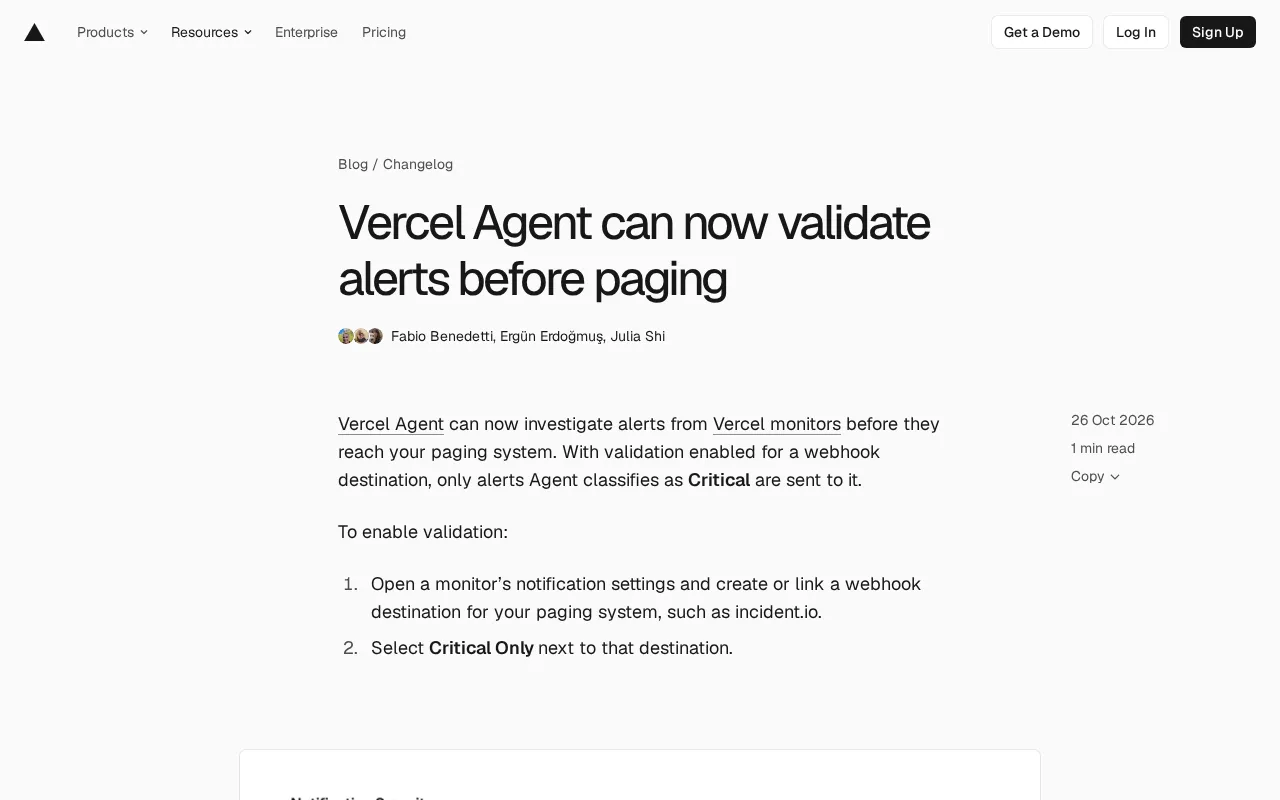
Vercel Agent investigates logs and metrics before alerts reach paging systems, releasing only Critical alerts to reduce noise.
Vercel Agent introduces alert verification: before alerts reach paging systems like PagerDuty or incident.io, it checks logs and metrics to assess impact scope and sends only those judged as Critical to paging. Enabled at the webhook destination level via the Critical Only option, it supports adding context to guide investigations. Available to Pro and Enterprise plans with Observability Plus, including 10 Agent investigations per billing cycle and custom monitoring at $0.0035 per GB. The article sees it as effective at reducing false-alarm paging, but better as a filtering layer than a decision layer—teams must still define Critical standards and consider investigation latency.
Vercel Agent can now investigate alerts before they reach the paging system, sending only those judged as Critical to paging services. This capability targets a long-standing pain point for operations teams: alert noise.
From "Ring on Receipt" to "Investigate First, Then Decide"
The traditional monitoring pipeline is linear: a monitor crosses a threshold, the alert is pushed via webhook directly to paging services like PagerDuty or incident.io, and the on-call engineer is woken up. The problem is that thresholds don't understand business semantics—a failed health check doesn't necessarily affect customers, and a brief 5xx could just be a momentary blip.
Vercel Agent's intervention changes this pipeline. Once verification is enabled, the Agent first checks logs and metrics to assess impact scope, then decides whether to release the alert. The two examples given in the original article illustrate the design intent well: it can identify health check errors that don't affect customers, and it can confirm persistent 5xx errors that genuinely affect checkout requests. The former is blocked, the latter is released—this is the difference between "alerts with judgment" and "forwarding-style alerts."
Webhook destination is a key configuration unit in the alert pipeline. It is essentially an HTTP callback address; when an alert triggers, the monitoring system sends a structured JSON payload to that address, and the receiver (such as PagerDuty or incident.io) parses it and performs actions like paging or ticket creation. Binding the verification action to a webhook destination rather than a global toggle means the same monitor can be configured with multiple destinations in parallel: a paging channel with Critical Only filtering, and an archival channel that receives all alerts. This "routing by destination" pattern is common in alert engineering—it pushes filtering strategy down from the monitor level to the notification outlet level, thereby avoiding sacrificing the integrity of raw data just to reduce noise.
How to Enable Alert Verification
The configuration path itself is not complicated; the core is binding the verification action to a webhook target rather than a global toggle:
- Open a monitor's notification settings and create or associate a webhook destination for the paging system, such as incident.io;
- Select Critical Only next to that destination;
- After that, only alerts the Agent judges as Critical will be sent to this destination.
The advantage of this design is controllable granularity. Teams can enable strict filtering on the most sensitive paging channels while keeping other webhooks receiving all alerts for archival or secondary analysis. The original article also mentions that context can be added to each monitor to guide the Agent's investigation direction—this is equivalent to explicitly writing into the configuration the "which metric matters more" knowledge that lives in the on-call engineer's head.
Billing and Eligible Plans
Alert verification is not universally available. It is aimed at users on Pro and Enterprise plans who have enabled Observability Plus. Observability Plus includes 10 Agent investigations per billing cycle, with overages billed separately. Custom monitors are priced by data scanned at $0.0035 per GB of data; built-in alerts remain included in Observability Plus.
The pricing structure reveals Vercel's intent: built-in alerts are not charged extra, lowering the barrier to enablement; custom monitoring and additional investigations are billed by usage, tying cost to depth of use. For teams with high alert volume, it's worth estimating the frequency of Agent investigation calls before enabling.
Observability Plus is Vercel's premium subscription tier for observability data, offering longer data retention, higher query quotas, and value-added capabilities such as Agent investigations on top of basic logs and metrics. Making it a prerequisite for alert verification means the feature is not sold standalone but bundled onto an existing observability package. For teams already using Observability Plus, the marginal cost of enabling verification is mainly the investigation fees beyond the 10 free credits; for teams not yet subscribed, they first need to assess whether their observability data usage itself justifies an upgrade. This "feature attached to a package" pricing approach also means cost estimates must start from the overall bill rather than a single feature.
Practical Impact on Operations Workflows
Alert verification is essentially inserting a lightweight classifier into the middle of the alert pipeline. It does not replace monitoring and paging systems; instead, it acts as "the on-call engineer's first pre-filter."
This brings several foreseeable changes: first, paging volume decreases, especially false alarms caused by non-customer-impacting errors; second, investment in monitor context becomes more worthwhile, because configuration quality directly affects the accuracy of the Agent's judgment; third, teams need to re-examine "what counts as Critical"—previously this word was defined by thresholds, but now it is partly delegated to the Agent to judge using logs and metrics, so consistency and explainability of standards will become new concerns.
The original article does not disclose latency data for Agent investigations, which is crucial in alerting scenarios: if investigation takes too long, even more accurate filtering could delay response to genuinely urgent incidents. Teams should evaluate this against their own sensitivity to response latency when enabling the feature.
Alert fatigue is a classic problem in operations: when on-call engineers frequently receive low-value alerts, they become desensitized to alerts, causing genuinely urgent incidents to be delayed or even ignored. The industry typically mitigates this with alert severity tiers, deduplication, aggregation, and suppression rules, but most of these approaches rely on static thresholds and label matching, making it hard to understand business semantics like "does this 5xx affect checkout?" Vercel Agent's verification mechanism is equivalent to layering dynamic judgment based on logs and metrics on top of static rules. Its value lies not in replacing severity rules but in handling edge cases those rules struggle to cover. However, introducing model judgment also means alert behavior is no longer fully predictable, and teams need to retain auditing and fallback mechanisms.
Conclusion
Vercel Agent's alert verification moves AI investigation ahead of paging, using the Critical Only toggle to partially delegate judgment to the model. For teams plagued by alert fatigue, this is a direction worth experimenting with; but it is better suited as a filtering layer than a decision layer—teams still need to clearly define their own incident severity logic.
One-line Summary
Vercel Agent investigates logs and metrics before alerts reach the paging system, releasing only Critical alerts to reduce noise.
Paragraph Summary
Vercel Agent introduces alert verification: before alerts reach paging systems like PagerDuty or incident.io, it checks logs and metrics to assess impact scope and sends only those judged as Critical to the paging system. The feature is enabled at the webhook destination level, bound to specific monitors via the Critical Only option, and supports adding context to monitors to guide investigation direction. It is aimed at Pro and Enterprise plans with Observability Plus enabled, including 10 Agent investigations per billing cycle, with custom monitoring priced at $0.0035 per GB. The article argues this can effectively reduce false-alarm paging volume, but it is better suited as a filtering layer than a decision layer; teams still need to define Critical standards themselves and pay attention to how investigation latency affects urgent response.
Related articles
Three New Metapunk Skills: Building a Closed Loop for AI Software Development
Metapunk's new version adds Implement Spec, PR, and Retro skills to complete the AI software development loop. This article analyzes each skill's features and workflow to help improve AI Agent development efficiency and code quality.

6 Dark Tales of Terror: TED-Ed Uses Animation to Illustrate Fables of Human Nature
TED-Ed's six horror stories collection includes The Monkey's Paw, the Japanese tale of Oiwa, Death's Godfather, Beowulf, Poe's The Masque of the Red Death, and Hoichi the Earless. This article analyzes how these animated shorts use cross-cultural fables to explore desire, betrayal, and the price of death—and why they suit classroom discussion.
A Practical Guide to Calling Lightweight Ollama Models from Python
A complete hands-on guide to installing Ollama, pulling a 0.8B lightweight model, and calling it from Python—covering service startup, model name matching, first-load delays, and other pitfalls, with a measured 0.23s per call.