Vercel Project Configuration Adds vercel.toml Support

Vercel adds the vercel.toml configuration format, supporting comments and matching vercel.json properties.
Vercel now allows projects to be configured with a vercel.toml file as an alternative to vercel.json. TOML supports comments and a flatter structure, is friendlier for human reading and version maintenance, and supports the same properties as vercel.json with low migration cost. However, each project can use only one of vercel.toml, vercel.json, or vercel.ts, and the old file must be removed when switching. The official Services example shows TOML table and array-of-tables syntax. Teams with complex configurations that need to explain intent to new members may consider switching, while projects relying on type checking or dynamic logic should still use vercel.ts; migration requires verifying nested objects and arrays item by item.
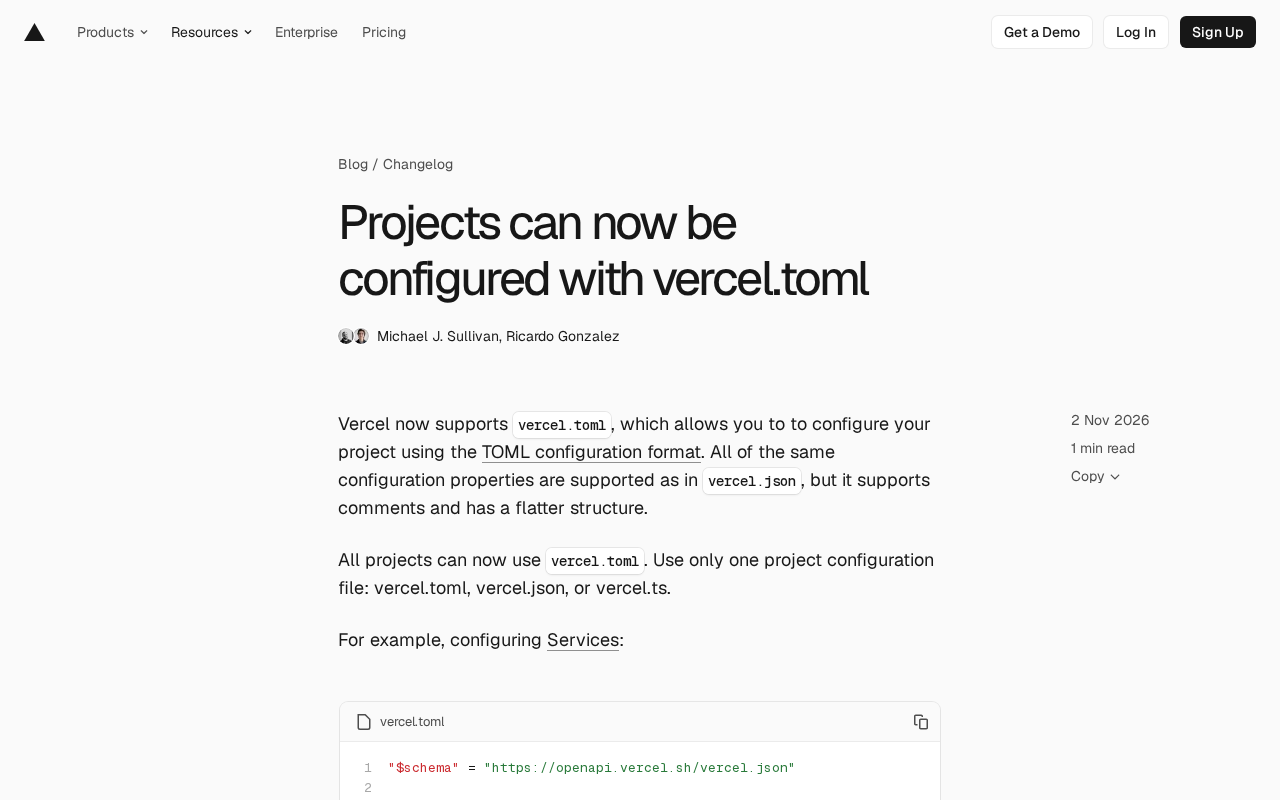
Vercel announced that its projects can now be configured using a vercel.toml file. This change gives developers an alternative configuration option to vercel.json, with the key highlights being the introduction of comment support and a flatter structure in the TOML format.
Why TOML Is Worth Paying Attention To
TOML is a configuration file format designed to express semantics clearly. Compared to JSON, it allows comments, has a flatter structure, and is friendlier for human reading and version maintenance. Vercel's official documentation states that vercel.toml supports exactly the same configuration properties as vercel.json, so the migration cost is low—developers can rewrite their existing JSON configurations using TOML syntax while gaining comment support.
For teams that have long been frustrated by the inability to write comments in vercel.json, this has real value. Configuration files often carry deployment logic, routing rules, and team conventions; without comments, context can only exist in documentation or word of mouth. The introduction of TOML allows this information to be written right next to the configuration.
TOML (Tom's Obvious Minimal Language) was proposed by Tom Preston-Werner in 2013. It is currently community-maintained and has released a stable 1.0.0 specification. Its design goal is to write configuration in an "obvious" form: key-value pairs have clear semantics, date and time have native types, strings can span lines without escaping, and comments are natively supported. Compared to YAML, TOML does not use indentation to express hierarchy, reducing ambiguity caused by whitespace characters; compared to JSON, it allows comments and does not require excessive quotes and commas. For these reasons, TOML has been chosen as the default configuration format by tools such as Cargo (Rust), pyproject.toml (Python packaging), and Hugo. Its three structures—table, inline table, and array of tables—are sufficient to express the nesting and repeated entries required by the vast majority of deployment configurations.
Only One Project Configuration File Can Be Used
Vercel explicitly requires that each project can use only one configuration file: vercel.toml, vercel.json, or vercel.ts. This means vercel.toml is not an additive option but a replacement option. Existing projects that decide to switch need to remove the other configuration files to avoid behavioral conflicts.
This constraint also shows that Vercel is offering multiple formats at the configuration layer to accommodate different preferences: JSON wins on universality, TypeScript wins on typing and logic capabilities, and TOML wins on readability and comments. The fact that all three coexist as options but cannot coexist within the same project is the boundary that requires the most attention in this update.
Using Services as an Example to See Actual Syntax
The official example demonstrates how to configure Services using vercel.toml. The example defines a Next.js frontend service and a FastAPI backend service, and configures rewrite rules:
"$schema" = "https://openapi.vercel.sh/vercel.json"


The `$schema` key in the example points to a JSON Schema address, which is a common convention for editors to enable autocompletion and validation. Vercel's schema is published based on vercel.json, so the TOML file reuses the same address. Note that not all editors can directly map a JSON Schema onto a TOML document: VS Code's TOML extensions (such as Even Better TOML) support associating a schema via the `#:schema` comment directive, while writing the `"$schema"` key directly may be treated merely as an ordinary configuration item in some tools. Therefore, before enabling validation, you should first confirm whether your editor recognizes this syntax; otherwise you may encounter a situation where "the configuration is correct but there are no hints."
# NextJS frontend
[services.frontend]
root = "frontend/"

# FastAPI backend
[services.backend]
root = "backend/"
entrypoint = "main:app"

[[rewrites]]
source = "/api/(.*)"
destination = { service = "backend" }

[[rewrites]]
source = "/(.*)"
destination = { service = "frontend" }
This configuration illustrates two features of TOML. First, comments are written directly above the service definitions, making the responsibilities of the frontend and backend clear at a glance. Second, table structures like services.frontend and services.backend group service parameters under their respective namespaces, while rewrites uses an array of tables ([[rewrites]]) to express repeated entries, resulting in a flatter overall hierarchy than the equivalent JSON.
It is worth noting that the $schema in the example still points to the vercel.json schema address. This expresses the fact that the configuration properties are consistent with the JSON version, but if you use an editor that supports schema validation, the actual experience may differ from expectations, so refer to the official documentation.
How to Decide Whether to Switch
If your team already maintains a significant amount of routing, rewrite, or service configuration in vercel.json and frequently needs to explain the intent of these configurations to new members, the comment support in vercel.toml will directly reduce communication costs. Conversely, if the project relies on type checking or dynamic logic in TypeScript configuration, vercel.ts remains the more suitable choice, as TOML cannot replace code-level capabilities.
For new projects, which format to choose depends more on team habits. TOML has clear advantages in readability, but ecosystem tooling generally supports JSON more universally. By keeping all three formats, Vercel essentially leaves the choice to the project itself.
Considerations When Migrating
When migrating from vercel.json to vercel.toml, first make sure to delete the old configuration file, because only one configuration entry is allowed per project. Second, nested objects in JSON need to be rewritten as tables or inline tables in TOML, and array structures need to be rewritten as arrays of tables. Be sure to verify each item against the official documentation. Finally, as long as the configuration properties themselves have not been renamed, behavior should remain consistent, but it is recommended to check after switching that routing and service resolution in the deployment logs match expectations.
In its announcement, Vercel only provided the Services example; the TOML syntax for other configuration items needs to be confirmed by consulting the documentation. For projects with many configuration items, it is recommended to validate in a test project before migrating the production environment.
There are several fixed mapping rules for rewriting JSON to TOML: a JSON object corresponds to a table ([section]) or an inline table ({ key = value }) in TOML; if the elements of a JSON array are homogeneous objects, it is usually rewritten as an array of tables ([[items]]), while if the elements are scalars it remains a regular array; JSON's null has no corresponding value in TOML, so the key needs to be omitted or expressed differently; booleans, numbers, and strings are written basically the same way, but TOML strings do not escape backslashes by default, so when special characters are present, use literal strings (single quotes) or basic strings (double quotes) to distinguish them. For deeply nested configurations, it is recommended to first generate a draft using a script or online conversion tool, then manually proofread key names and hierarchy to avoid parse errors caused by mixing arrays of tables with regular tables.
One-line Summary
Vercel adds the vercel.toml configuration format, supporting comments and consistent with vercel.json properties.
Paragraph Summary
Vercel announced that projects can be configured using a vercel.toml file as an alternative to vercel.json. The TOML format supports comments and has a flatter structure, making it friendlier for human reading and version maintenance. It supports exactly the same configuration properties as vercel.json, so migration costs are low. However, each project can choose only one of vercel.toml, vercel.json, and vercel.ts, and the old configuration file must be deleted when switching. The official example uses Services configuration to demonstrate TOML's table structure and array-of-tables syntax. The article suggests that teams with complex configurations who need to explain intent to new members consider switching, while projects relying on type checking or dynamic logic should still use vercel.ts. During migration, nested objects and arrays need to be verified item by item.
Related articles

Glasshand: Giving AI Agents a Real iPhone and Mac
Glasshand lets AI agents rent real iPhones and Macs, supporting Claude Code, Codex, and more to post, book services, and test iOS apps on real devices. This article explains how it works, its use cases, and potential boundaries.

ChatGPT Images 2.6 Released: GIF Generation, Reference Image Reuse, and 50% Speed Boost
ChatGPT Images 2.6 released: prompt-to-GIF animation with frame-by-frame editing, reusable reference images for yourself, pets, or characters, 50% faster generation, plus Flare and Sunburst API model variants and SVG export for developers.

Rerun: Turn Your AI Subscription into an AI Coworker Team
Rerun, #3 on Product Hunt, turns your ChatGPT or Claude subscription into a team of AI coworkers that run on schedules or triggers, each with tools, a computer, and a shared workspace. It asks before risky actions, is open source (AGPL v3), and supports self-hosting.