Vibe Coding Beginner's Guide: Six Steps to Building Products with AI from Scratch

A six-step beginner's guide to building real products with AI coding tools — no programming background required.
This guide breaks down Vibe Coding into six progressive steps for complete beginners: mastering AI coding tools (Claude Code, Cursor, Codex), writing effective prompts, hands-on practice with small projects, exploring advanced techniques like SDD and Agents, tackling large projects, and consolidating lessons learned. It also addresses the three common pitfalls newcomers face and explains why multi-tool synergy is becoming essential for AI-powered development.
What is Vibe Coding?
In the past two years, "Vibe Coding" has rapidly gained popularity in the AI community. The term was first coined by Andrej Karpathy (former Tesla AI Director and OpenAI co-founder) in a tweet in February 2025. He described an entirely new way of programming: fully immersing yourself in the "vibe," embracing exponential growth, forgetting that code even exists, and simply generating code through conversation with AI. The concept quickly sparked heated discussion across Silicon Valley and the global tech community because it fundamentally challenges the underlying assumption of traditional programming education — that you must first learn a programming language before you can build software products.
The core idea isn't about becoming a programmer. Instead, it's about leveraging AI tools — such as Claude Code, Cursor, Codex, and others — to rapidly transform ideas in your head into working products.
In other words, Vibe Coding isn't about "learning an AI coding tool." It's about truly learning to build products and get work done with AI. This is a complete capability from idea to execution, not just tool operation.

This concept sounds simple, but people who actually try it often hit a wall: they don't know how to use the tools, AI-generated code quality is poor, or AI completely messes up their development environment. Many give up before they even get started.
Three Common Roadblocks for Vibe Coding Beginners
Based on real-world observations, first-time AI coders commonly encounter three types of problems:
Not Knowing How to Use AI Coding Tools
Claude Code, Cursor, and Codex each have their own interaction logic and use cases. Specifically, Claude Code is Anthropic's command-line AI coding assistant, excelling at complex code generation, refactoring, and debugging in terminal environments — ideal for users with some technical background doing deep development work. Cursor is an AI-native IDE built on top of VS Code, offering an immersive coding experience through built-in AI chat and code completion features, particularly suited for scenarios requiring frequent AI interaction and iteration. Codex (from OpenAI) functions more like an asynchronous AI software engineer that can independently complete coding tasks in a cloud sandbox and submit PRs. These three represent three distinct interaction paradigms: CLI (command line), IDE (integrated development environment), and async Agent.
Without understanding their positioning and boundaries, you'll easily fall into a "when all you have is a hammer, everything looks like a nail" situation, wasting effort.
Poor Quality AI-Generated Code
The quality of AI output is highly dependent on prompt quality. This involves Prompt Engineering — a core discipline in current large language model applications. The underlying principle is that large language models predict the next token through conditional probability. The more precise your input prompt, the more concentrated the model's output distribution becomes around your desired result. If your instructions are vague, the AI can only guess, and results will naturally be unsatisfactory. Research shows that structured prompts can improve code generation accuracy by 30-50% compared to free-form text descriptions.

Development Environment Getting Messed Up
Without basic understanding of project structure and workflows, AI automation can actually make your local environment chaotic, creating problems that are difficult to troubleshoot. From a technical perspective, AI coding tools are actually operating on your local file system when generating and modifying code. When AI lacks understanding of the overall project structure, it may: overwrite existing code, introduce dependency packages with version conflicts, create files in wrong directories, or modify configuration files that shouldn't be touched. This is technically called a side effect of "context window limitations" — the AI can only "see" limited information in a single interaction and cannot maintain global awareness of an entire project like a human developer. Solutions typically include: using Git for version control (committing before each AI operation), setting up clear project specification files (like CLAUDE.md), and restricting the AI's scope of operations.
Together, these obstacles form the beginner's "valley of death" — the barrier appears low, but hidden pitfalls lurk beneath.
Six-Step Vibe Coding Learning Method from Zero to One
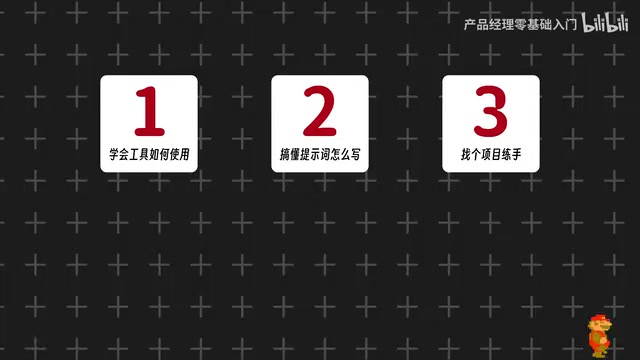
To help complete beginners get started quickly, the Vibe Coding learning path can be broken down into six progressive steps. This framework splits a vague "code with AI" goal into concrete, actionable stages.
Step 1: Learn Basic Usage of AI Coding Tools
Start by understanding the basic operations and applicable scenarios of mainstream tools like Claude Code, Cursor, and Codex. This is the foundation for everything that follows. Each tool has its own area of strength, and understanding these differences enables you to make informed choices. The recommended entry path is: start with Cursor (user-friendly interface, low barrier to entry), then transition to Claude Code (command-line interaction, suited for complex projects), and finally learn about Codex's asynchronous work mode. The key is understanding each tool's "mental model" — how it understands your project, executes modifications, and handles errors.
Step 2: Master Prompt Writing Techniques
Prompts are the core interface between humans and AI. Writing good prompts directly determines the quality of AI output. This step is the critical leap from "being able to use it" to "using it well." In AI coding scenarios, effective prompts typically contain several key elements: explicit tech stack constraints (e.g., "use React + TypeScript"), expected output format (e.g., "generate a complete component file"), specific functional requirements, and relevant context information (e.g., existing code structure, data models, etc.). Clear, specific instructions with context are far more effective than vague descriptions. A practical technique is the three-part structure: "describe the background first, then state the requirements, and finally give constraints."
Step 3: Pick a Small Project and Practice Hands-On
You can't learn just by watching. Pick a small but complete project to work on hands-on, truly internalizing the knowledge from the first two steps. Start with a tool or small application you actually need — like a personal to-do list, a simple data dashboard, or an automation script. Project selection criteria: small enough (MVP completable in one day), with clear completion standards (you know what "done" looks like), and practically useful to you (so you stay motivated).
Step 4: Explore Advanced AI Coding Techniques
After mastering the basics, explore advanced techniques like SDD (Specification-Driven Development), Agents, Coze, and other more complex approaches to expand the boundaries of AI coding capabilities.
SDD (Specification-Driven Development) is a development methodology emerging in the AI coding field. Its core idea is: before letting AI write code, first compose a detailed product specification document (Spec) in natural language, including functional requirements, technical architecture, data models, API interface definitions, etc. The AI then generates code step by step based on this specification, essentially front-loading and documenting the requirements analysis and architecture design phases of traditional software engineering. The advantage of this approach is that AI has a clear "reference point," significantly improving code consistency and quality.
In the AI coding context, an Agent refers to an AI system with autonomous planning, tool-calling, and feedback loop capabilities. Unlike traditional "question and answer" AI interaction, Agents can autonomously decompose complex tasks, invoke multiple tools (such as file systems, terminal commands, browsers, APIs, etc.), and dynamically adjust strategies based on execution results. Coze is ByteDance's AI Agent building platform that allows users to create intelligent agent applications with multiple capabilities through a visual interface.
Step 5: Take On a Large Complete Project
Use a complete large-scale project to comprehensively apply all skills, simulating the full workflow of real product development. The purpose of this step is to develop project management and multi-module coordination abilities. Large projects mean you'll need to handle frontend-backend separation, database design, user authentication, deployment, and many other dimensions. At this stage, the value of SDD becomes fully apparent — without clear specification documents, AI easily gets "lost" in large projects, producing contradictory code. It's recommended to introduce version control best practices at this step, committing and testing after completing each functional module.
Step 6: Consolidate Practical Experience and Lessons Learned
Finally, there's the battle-tested wisdom — the exclusive insights that emerge after stepping on every landmine, which are often more valuable than tutorials themselves. These experiences typically include: what types of tasks AI handles well, which ones require human intervention, how to design project structures that AI can easily understand, and how to quickly rollback and fix things when AI makes mistakes. It's recommended to build your own "Vibe Coding knowledge base," recording effective prompt templates, solutions to common problems, and performance comparisons of different tools across different scenarios.
Why This Vibe Coding Learning Method Deserves Attention
The value of this six-step method lies in its departure from the single-point thinking of "teaching you to use a specific AI tool." Instead, it builds a complete chain from tool awareness to product delivery.
For complete beginners, its significance lies in lowering the psychological barrier: you don't need to become a programmer first; you just need to follow the process step by step. For developers who already have some foundation, the advanced sections on SDD, Agents, and Coze also offer ideas for expanding their workflows.
You might not have noticed that the Claude Code, Cursor, and Codex tool combination happens to represent the mainstream camps of today's AI coding landscape — products from Anthropic, Cursor Inc., and OpenAI respectively. They each specialize in deep reasoning capability, editor experience, and asynchronous execution. Mastering their collaborative use is itself a scarce practical skill. For example, you can use Cursor for daily interactive development, switch to Claude Code for in-depth analysis when encountering complex architectural problems, and delegate time-consuming batch tasks to Codex for background async processing. This "multi-tool synergy" workflow is becoming the standard configuration for efficient AI developers.
Summary
The essence of Vibe Coding is enabling ordinary people to turn ideas into products with AI. The key isn't how powerful the tools are, but whether you've mastered the right methodology: first understand the tools, then refine your prompts, and then continuously iterate through practice.
It's worth noting that Vibe Coding isn't meant to replace traditional programming education. Rather, it opens an entirely new product-building path for people who "have ideas but lack programming backgrounds." As AI model capabilities continue to improve (from GPT-4 to Claude 3.5 to newer models), the barrier to Vibe Coding will only get lower, and the project complexity achievable will only get higher. Now is the optimal learning window.
For those looking to get started, perhaps the most important piece of advice is: Before having AI write code, think through the complete learning path first. Avoid the three common beginner traps, and you'll already be ahead of most people who give up halfway.
Related articles

Training AI Models on Google Colab: Capability Boundaries & Practical Guide
An in-depth analysis of Google Colab's real capabilities for AI model training, covering free vs Pro GPU differences, model size limits, LoRA fine-tuning, and local+cloud workflow best practices.

DeepSeek Harness rc.8 Released: Major Upgrades to Multimodal Image Understanding and Sub-Agent System
DeepSeek Harness rc.8 brings multimodal image processing, on-demand sub-agents, Windows terminal persistence, and SQLite optimization. The open-source Agent framework with 170K+ GitHub stars iterates at remarkable speed.

The Quake Shareware CD: Bit-Level Space Art Filled to Overflowing
Deep analysis of how the 1996 Quake shareware CD-ROM was filled to its absolute capacity limit. Fabien Sanglard's technical archaeology reveals id Software's engineering trade-offs under disc space constraints.