video-subtitle-remover: Local AI Tool for Removing Hard-coded Subtitles and Watermarks from Videos
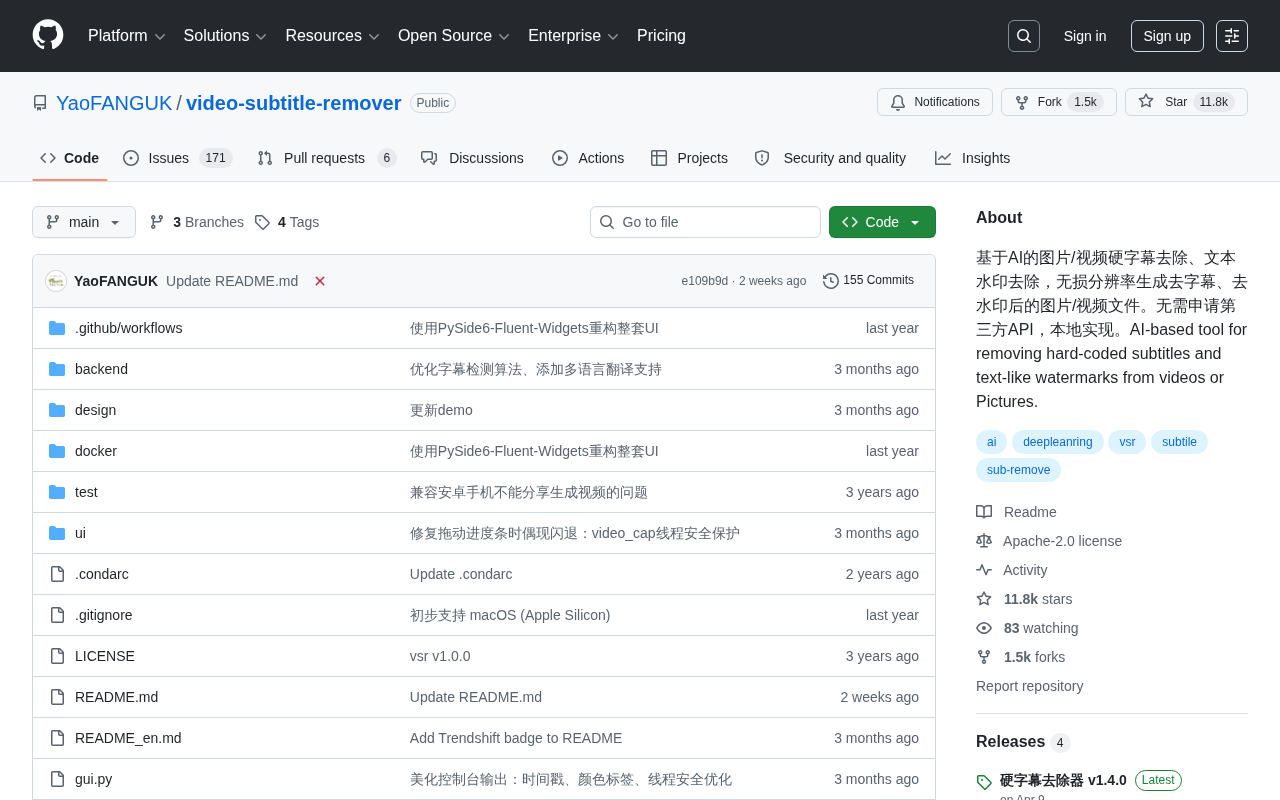
Open-source VSR uses AI inpainting to remove hard-coded subtitles and watermarks from videos locally.
video-subtitle-remover (VSR) is an open-source Python project focused on removing hard-coded subtitles and text watermarks from videos and images. Unlike commercial cloud tools, VSR runs entirely locally with no third-party API, preserving original resolution. Its core pipeline uses deep learning-based image inpainting to detect subtitle regions and reconstruct the background. It suits content repurposing and multilingual subtitle workflows, though results degrade on complex backgrounds and fast motion, and frame-by-frame AI inference requires capable GPU hardware. Copyright compliance is also essential. The project has over 10,700 GitHub Stars.
When dealing with videos that contain hard-coded subtitles (subtitles burned directly into the frame) or text watermarks, traditional approaches typically resort to covering, cropping, or pixelating the affected area — at the cost of visual integrity. The open-source project video-subtitle-remover (VSR) offers an alternative: using AI-based inpainting algorithms to erase hard-coded subtitles and text watermarks locally without any resolution loss, while intelligently reconstructing the covered regions. The project has accumulated over 10,700 Stars and 1,369 Forks on GitHub, making it one of the most widely followed tools in its category.
Project Overview and Core Capabilities
video-subtitle-remover is maintained by developer YaoFANGUK and written in Python. Its core goal is sharply focused: removing hard-coded subtitles and text-like watermarks from images and videos.
Unlike commercial tools that rely on cloud services, VSR emphasizes fully local execution with no third-party API required. This means the video footage being processed never needs to be uploaded to an external server — a practical advantage for users handling privacy-sensitive or copyright-sensitive content.
The project's emphasis on "lossless resolution" is also worth noting: the output files generated after subtitle removal retain the original resolution, rather than downsampling or cropping around the subtitle regions.
How It Works: From Subtitle Detection to Image Inpainting
Removing hard-coded subtitles is fundamentally a two-stage problem: detection + inpainting. The first step involves locating the pixel regions occupied by subtitles or watermarks in the frame. The second step fills in those regions (inpainting) so that the erased areas blend naturally with the surrounding image.
VSR is built around this pipeline: it identifies the subtitle/watermark regions, then calls an image inpainting model to reconstruct the background. For video, this process must be applied frame by frame while also accounting for temporal consistency — preventing inpainted areas from flickering across frames.
Compared to simply covering subtitles with a solid block or Gaussian blur, AI-based inpainting attempts to recover the original texture hidden beneath the subtitles. This is the fundamental distinction between this type of tool and traditional masking methods.
Background: Image Inpainting and Deep Learning
Image inpainting is a classic problem in computer vision: given the known regions of an image, intelligently infer and fill in the missing or occluded areas. Early methods relied on diffusion equations or texture synthesis and could only handle simple backgrounds. More recent deep learning-based inpainting models — such as NVIDIA's Partial Convolution and the subsequent LaMa (Large Mask inpainting) — leverage global semantic information to generate visually coherent fills, making it possible to handle complex textured backgrounds. VSR uses such pretrained inpainting models to hand off the subtitle mask regions for background reconstruction, rather than relying on simple interpolation or pixel cloning. For video, temporal consistency adds an extra challenge: independently inpainting each frame can cause color or texture flickering in adjacent frames (temporal flickering). More robust solutions require optical flow or cross-frame constraints to maintain coherence.
Use Cases and Practical Value
Typical use cases for this type of tool include:
- Content repurposing and asset cleanup: Processing video footage that carries platform watermarks or burned-in subtitles for downstream editing.
- Multilingual content workflows: Removing existing hard-coded subtitles to replace them with subtitles in a target language.
- Image watermark removal: The project also supports removing text watermarks from static images.
It's important to note that removing subtitles and watermarks raises questions around content copyright and usage rights. The tool itself is neutral, but users should ensure they have legitimate rights to process the material and avoid using it to infringe on copyright or circumvent proper attribution.
Limitations Worth Understanding
From a technical standpoint, the quality of AI inpainting is highly dependent on the complexity of the background behind the subtitles. When subtitles appear against solid colors or simple backgrounds, results are generally quite good. However, when subtitles overlay faces, complex textures, or fast-moving scenes, the difficulty increases significantly — blurring, ghosting, or unnatural fill artifacts may appear.
Additionally, frame-by-frame AI processing places real demands on hardware, particularly the GPU. For long videos, both processing time and VRAM consumption are non-trivial. This is the inherent trade-off of a local solution compared to a cloud-based service: local compute in exchange for privacy and autonomy.
Hardware Expectations
There is a direct relationship between GPU VRAM and processing speed. Using a typical consumer-grade GPU as a reference (e.g., an RTX 3070 with 8GB VRAM), AI inpainting inference on 1080p video runs well below real-time — one minute of video may take several minutes or more to process. On CPU alone, the speed gap can be an order of magnitude larger. Before deploying VSR, it's worth evaluating your local hardware configuration against the length and resolution of the footage you intend to process. For users without a dedicated GPU, running VSR on a cloud GPU instance (such as Google Colab or Autodl) is a viable option that preserves the open-source, self-hosted nature of the tool while providing sufficient compute.
Closing Thoughts
video-subtitle-remover represents a pragmatic approach to open-source tooling — packaging mature image inpainting technology into an application tailored to a specific need, with a consistent emphasis on local execution and lossless resolution. For creators who regularly need to handle hard-coded subtitles and watermarks, it offers a free, privacy-respecting option. In practice, understanding its technical boundaries, setting realistic expectations for complex or fast-moving scenes, and respecting copyright norms are all prerequisites for getting real value out of this kind of tool.
Related articles

LLM Application Development: A High-Paying Career Guide for Ordinary People
LLM application development offers fresh graduates up to 35K/month, with SP offers reaching 600K. This article explains the core skills, how to break in, and how ordinary people can seize AI opportunities through learning by doing.

Say Goodbye to AI Influencer Faces: A Complete Guide to Creating Visual Assets for AI Comic Dramas from Scratch
Bilibili creator shares a full workflow for zero-basics AI comic drama visual assets: use Doubao Work skills with script-first, visual references, and real-person texture to escape AI influencer faces, then lock character and scene consistency with asset sheet layouts, weapon detail images, scene nine-grids, and cinematic color palettes.

The AI Production Pipeline Behind Great Videos: From Research to Agent Validation
AI video production isn't just a model race. This article breaks down a transferable four-step pipeline: researching professional workflows, organizing a skill checklist, configuring agents, and experimental validation—and explains how general-purpose LLMs like DeepSeek can replace paid tools to run the entire process.