Viktor: The AI Employee Living Inside Slack — How to Build a True Company-Wide AI Colleague

How Viktor evolved from a browser agent into a Slack-native AI employee for entire companies.
Viktor is an AI employee that lives natively in Slack, integrating with 3,000+ tools and sharing permissions across entire teams. Co-founder Frederik traces its two-year evolution from a browser-based DOM agent to a full company-level AI colleague, covering core challenges like memory management, permission isolation, latency perception, and why model personality — specifically Claude Opus's opinionated tone — turned out to matter more than anyone expected.
From Browser Agent to AI Employee: A Two-Year Journey
At the AI Engineer Summit, Viktor co-founder Frederik shared the complete story behind building an "AI employee." The product launched in February of this year as a low-expectation experiment — yet it found immediate product-market fit and quickly gained adoption worldwide.
The key distinction here is between an "AI employee" and a "personal assistant." Frederik emphasizes that you should think of Viktor as a real human colleague — one that lives where you work (Slack), has no standalone web app, and requires no platform-switching to invoke. It participates in team decisions, discussions, channel conversations, and message threads, with access to the same tools you use.
Viktor currently integrates with roughly 3,000 tools, and when a native integration doesn't exist, it can build the connection itself. This means Viktor can work with virtually any tool in your company's stack, giving it a broad, horizontal context spanning the entire organization — precisely what sets it apart from any individual human employee.
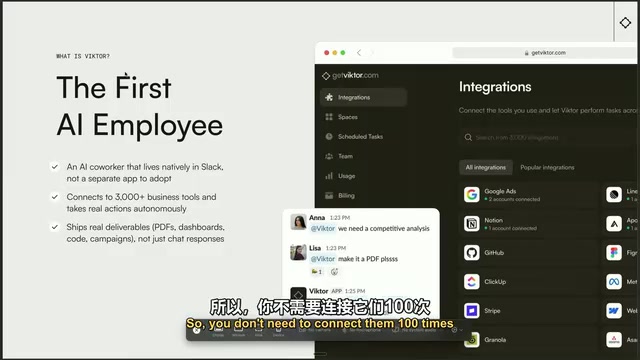
Technical Evolution: From Browser Agent to Company-Level AI
The Early Browser Agent: JCE
The Viktor team set their sights on building an AI employee right after ChatGPT launched. But in an era without mature tool-calling capabilities or strong code generation models, they concluded the only viable path was through the browser.
Their original product, JCE, worked by taking lossless compressed snapshots of the DOM and using that alongside a goal to determine the next action — whether to type into a Google search box or click a login button. The DOM (Document Object Model) is the standard interface browsers use to parse HTML pages into a programmable tree structure. A typical webpage DOM contains tens of thousands of nodes — far too many to feed directly into a language model without hitting context window limits. JCE's "lossless compression" technique was essentially a semantic extraction and structural simplification of the DOM tree, retaining the position and semantic meaning of interactive elements (buttons, inputs, links) while discarding purely decorative nodes, compressing page state into a compact representation the model could understand. This approach was conceptually similar to the Computer Use capabilities that major AI labs would later release.
JCE was briefly the most advanced web agent on the WebArena benchmark — but constrained by the models of the time, it could only reliably handle 3 to 5 steps.
"Reliably" here meant about 60% accuracy per step, with errors compounding at each stage. This is known as error compounding: at 60% accuracy per step, five consecutive steps yields an overall success rate of just ~7.8%. Frederik was candid: even though this was state-of-the-art at the time, the reliability and speed issues made it hard to ship a genuinely useful product — you'd often wait a full minute only to find out it had failed.
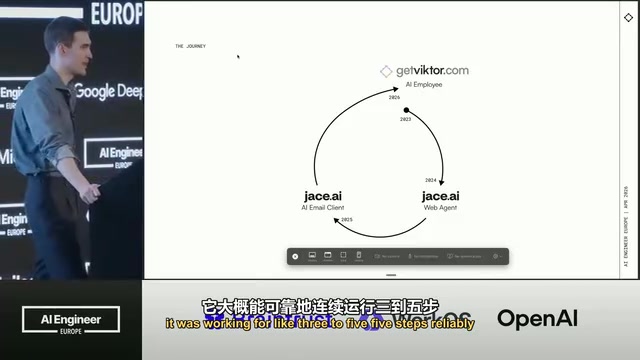
The Email Agent JACE: The First Real Agentic Loop
With the arrival of Sonnet 3.5, the team built their first agentic loop and evolved the product into an email agent called JACE. An agentic loop is the core architectural pattern of modern AI agents: perceive input → plan action → call tools → observe results → iterate, until the task is complete or a termination condition is triggered. This paradigm became widely viable alongside the maturation of Anthropic Claude 3.5 Sonnet's tool-use capabilities — while the ReAct paper laid the theoretical groundwork, reliable multi-step agents only became practical once models reached sufficient levels of instruction-following, context retention, and structured output.
JACE's core philosophy: rather than having users navigate to a web app to initiate requests, the agent proactively holds context and surfaces task suggestions. Email was a strategically smart entry point — it's inherently event-driven and asynchronous, with each email forming a relatively self-contained task boundary, reducing the complexity of cross-session state management. It was an ideal sandbox for validating the agentic loop.
JACE works like this: every time an email arrives, it triggers an agentic loop, connects to tools, and can not only draft replies but execute tool calls. For example, when a customer requests a refund, the agent can process it automatically (with configurable approval thresholds). This product also found strong market traction and is still in operation today.
The Unique Challenges of a Company-Level Agent
In February of this year, the team officially launched Viktor — the "company agent" they had always envisioned. Personal agents and company agents are fundamentally different, and these differences define Viktor's core engineering challenges.
Connect Once, Share Across the Team
With personal agents, every employee has to individually connect their own integrations and run their own instances. Viktor works differently: once a single person at the company connects an integration, Viktor inherits those permissions and the entire team can use it — no repeated configuration required. These integrations are typically built through iPaaS platforms like Pipedream, relying on OAuth 2.0 proxies for secure credential storage, with the agent invoking third-party APIs on behalf of users in a controlled manner. When no existing integration is available, Viktor's ability to "build its own connection" essentially means the LLM dynamically generates invocation code from the target API's documentation and executes it — representing an important evolution from "calling fixed tools" to "dynamically expanding capability boundaries."
Frederik's example: if your growth team has 20 people, having each person individually connect their Meta Ads account is a significant hassle. Shared context reduces setup overhead and avoids the confusion that arises when someone connects the wrong integration.
Memory Management and Permission Isolation
Shifting from a personal agent to a team agent, one of the biggest challenges is memory. In a single-user scenario, you're already worried about memory filling up over time. With 100 users, memory can be consumed 100x faster.
Enterprise multi-user AI agent memory management is a frontier problem in AI engineering, spanning at least three dimensions: inter-user memory isolation (preventing User A's information from contaminating User B's context), unified maintenance of shared organizational knowledge, and role-based access control (RBAC) implemented at the vector retrieval layer. Common approaches include maintaining separate vector store namespaces per user/channel, injecting permission-filtering metadata at retrieval time, and using hierarchical memory structures (episodic memory for conversation history, semantic memory for the knowledge base, procedural memory for workflows).
The other major challenge is permission isolation. Slack has different channels; companies have hierarchies. The same Viktor might simultaneously exist in a growth channel, an executive channel, an engineering channel, and direct messages — with teams frequently issuing conflicting instructions. The system must ensure that context from the executive channel never leaks into engineering or customer service channels. This is fundamentally about implementing row-level access control within a RAG (Retrieval-Augmented Generation) pipeline — requiring the memory storage system to record source permission metadata at indexing time and validate it on every retrieval. If you DM Viktor, it also shouldn't reach into channels you don't have access to.
Why Slack as the Interface
Frederik gave two key reasons for choosing Slack:
First, making Viktor feel like a real human colleague. In day-to-day work, you don't collaborate with teammates in a standalone web app — you're in Slack. Putting an AI employee in Slack makes the interaction feel much more like working with an actual coworker.
Second, reshaping users' psychological expectations around latency. A powerful AI agent handling complex tasks often takes ten minutes, not a few seconds. Waiting ten minutes in a web app is frustrating — ChatGPT has conditioned people to expect instant responses. But in Slack, getting a response from a colleague ten minutes after pinging them is completely normal. It makes the latency feel "extremely low."
Of course, Slack also introduces new engineering challenges. Slack's event system covers dozens of event types — DMs, channel messages, emoji reactions, message edits, message deletions — each requiring different handling logic. Web apps are single-threaded, but Slack has multiple interaction modes: DMs, public channel threads, emoji reactions, message edits... All of these are inputs to the agent, yet they need to be unified into a linear context. Reconstructing these discrete asynchronous event streams into coherent conversation history while maintaining cross-thread continuity of user intent is a non-trivial engineering problem. For example, if a user deletes a message, the agent should stop the task; if they edit it, the agent should respond to the edit. When a user forgets an old thread and opens a new DM, Viktor must surface the prior conversation and incorporate it into the current session. Additionally, gaining read access to all channel messages requires passing Slack's stringent app security review — this is the substance of what Frederik refers to as the "tedious Slack approval process."
Personality, Proactivity, and the "Hiring" Mindset
Model Personality Matters More Than Expected
One surprising finding: the model's tone and personality matter far more than anticipated. Viktor's primary model is currently Claude Opus. The team tried A/B testing with GPT — which is equally strong on tool-calling and code generation — but users pushed back hard. They simply preferred Opus's personality, even appreciating its occasionally opinionated edge.
This phenomenon touches on a core question in human-computer interaction research: the profound impact of paralinguistic features (like tone and emotional consistency) on trust-building. Social psychology research shows that humans automatically activate social brain circuits when interacting with human-like entities, placing extremely high weight on personality consistency — this is known as the Computers Are Social Actors (CASA) effect. Claude models, shaped through Constitutional AI, exhibit a more opinionated and stylistically distinctive voice; GPT models, tuned more toward neutrality in the RLHF stage, tend to be more reserved. For an AI product positioned as a "colleague," these personality differences have an outsized commercial impact — users have emotional investment in colleagues, whereas they evaluate tools primarily on functional metrics. This hard-to-quantify quality became one of the key reasons the team didn't switch models.
Proactivity Is a Double-Edged Sword
One of Viktor's key capabilities is proactively suggesting workflows that could be automated. For example, when a growth team is discussing an A/B test, Viktor can access analytics tools like PostHog and proactively verify conclusions. On several occasions it pointed out that "the data holds up, but it's not statistically significant," and ran the calculations to back it up.
But if Viktor starts DMing everyone and joining every thread on day one, the security team will immediately raise concerns. Frederik's advice: first "earn trust" with a small group of users, then expand more broadly.
Treat It Like an Employee, Not a Tool
Frederik shared a real-world example: the admin at a large U.S. e-commerce brand connected their personal Gmail as their first integration — and the entire team started seeing this admin's private emails. The lesson: "If you hire a new employee, would you give them access to your personal inbox? Probably not." This led the team to add integration scoping controls, so personal integrations can be restricted to DMs or specific contexts.
Three Pillars of a Great AI Colleague
Frederik distilled the key ingredients of building an AI colleague into three principles:
- Get the work done — Current model capabilities are sufficient; integrations can be connected through iPaaS platforms like Pipedream. Pipedream offers 2,000+ pre-built app connectors and lets developers write custom integration logic, with each integration running as a Webhook-triggered stateless function — balancing flexibility with security.
- Know the company — Acquire context from Slack and use it well (which requires navigating the tedious Slack approval process).
- Be likable — Tone and personality make a real difference. You want the team to like Viktor, and you want Viktor to "like" the team.
He closed with a quote from Leibniz, the inventor of calculus: "It is unworthy of excellent men to lose hours like slaves in the labour of calculation which could safely be relegated to anyone else if machines were used." Frederik believes we are at a historical inflection point where nearly all cognitive tasks can be automated — and that "every company having AI employees" is an inevitable future.
Key Takeaways
Related articles

ChatGPT Space Launches: Team Collaboration and New Pages Features Explained
ChatGPT Space is OpenAI's new team collaboration feature with Pages, real-time collaboration, and Slack/Google Drive sync. We break down its privacy design, multi-platform integration, and the full workflow from conversation to document.

Migrating Apache Spark UDFs to GPU Acceleration with AI Agents
NVIDIA developer blog explains how AI Agents rewrite Apache Spark UDFs for GPU acceleration, covering migration criteria, agent rewriting and verification workflows, plus pitfalls like result consistency and CPU-GPU transfer overhead.

Zed Editor v0.40.4-rc2 Released: Usage Credits Now Available Without Upgrading
Zed editor releases v0.40.4-rc2, allowing users to use usage credits for AI features without upgrading to a paid plan, lowering the trial barrier.