Watchflows: The Visual AI Automation Powerhouse for Mac
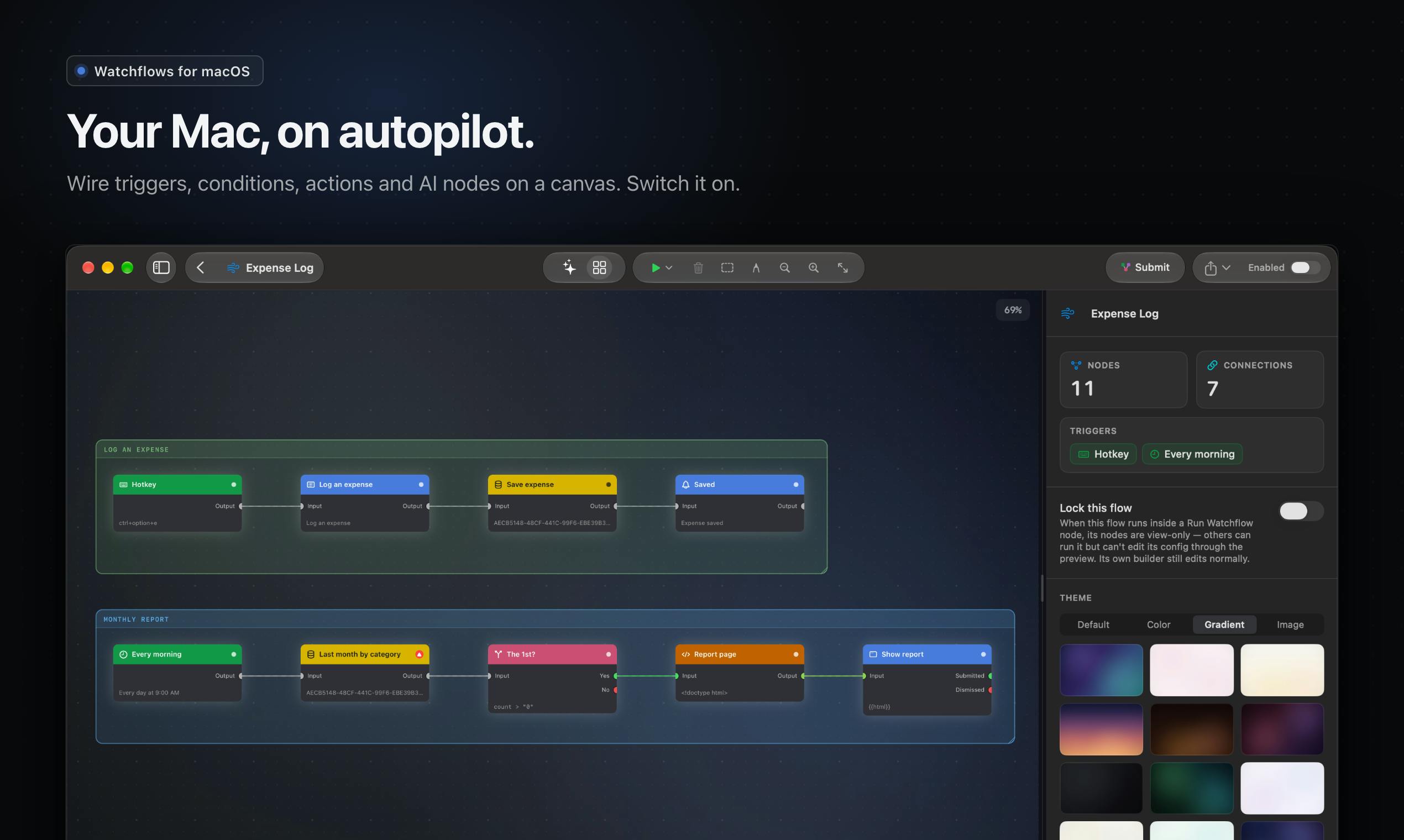
Watchflows builds local-first AI automation flows on Mac using a visual canvas and natural language.
Watchflows is a Mac automation tool debuting on Product Hunt, featuring visual orchestration and built-in AI. Users can connect triggers, conditions, actions, and AI nodes on a canvas, or describe needs in natural language for the Flow Builder to generate flows. AI is deeply integrated, reading content, renaming files, and making judgments, with backends including Watchflows AI, Apple on-device models, Ollama, or custom API keys. It's local-first, requires no account, and costs a one-time $49 after a 14-day trial, also available via Setapp.
Say Goodbye to Manual Repetition and Let Your Mac Do the Work
Doing the same things on your Mac every day? Your Downloads folder is cluttered with files that need organizing manually, or you have some task that needs to run on a schedule? Watchflows aims to free you from all that busywork. This tool, which debuted on Product Hunt, focuses on visual automation and built-in AI, letting you combine triggers and actions like building blocks — or even just describe what you need in natural language and have it generate the flow for you.
According to its Product Hunt page, Watchflows' core logic is "when something happens, immediately do the follow-up actions" — a file lands in Downloads, you press a hotkey, a Webhook arrives, or it's 8:30 AM on a weekday. Any of these can be the starting point of a flow.
Visual Canvas + Natural Language: Two Ways to Build Automations
Watchflows offers two ways to create flows, balancing flexibility and ease of use.
Drag-and-Drop Canvas
You can freely connect Triggers, Conditions, Actions, and AI nodes on the canvas. This visual approach makes complex logic intuitive — every step is clearly visible, making debugging and adjustment easy.
Triggers, Conditions, and Actions are the three basic building blocks of an automation flow, and understanding them helps you read the connection logic on the canvas. A trigger is the starting point of the flow, representing "what event causes the flow to start running" — for example, a file landing in the Downloads folder, a hotkey press, an incoming Webhook request, or a set time arriving. Conditions are used to make judgments midway through the flow, and subsequent branches only execute if the condition is met — for example, "the filename contains 'invoice'" or "the file size exceeds 10MB." Actions are the operations the flow actually performs — for example, moving a file, renaming it, sending a notification, or calling a script. Combining these three with AI nodes lets you express the complete logic of "when something happens, under certain conditions, perform certain operations, possibly with AI making the judgment."
Generate Flows in Plain Language
If you don't want to drag and drop by hand, Watchflows' Flow Builder supports describing your needs in natural language, and the AI automatically assembles the corresponding flow. This greatly lowers the barrier to automation, especially for ordinary users who aren't familiar with programming.
Webhook is a mechanism where an external event proactively notifies your machine: when a specific event occurs, a service (such as a cloud drive, form, or code hosting platform) sends an HTTP request to a preset URL, and Watchflows can trigger a flow upon receiving that request. Compared to polling, Webhooks only communicate when an event occurs, making responses more timely and resource-efficient. In Watchflows, using a Webhook as a trigger means you can let events from other apps or online services start automations on your local Mac — for example, automatically organizing related files when a new order arrives, a form is submitted, or code is pushed — thereby connecting local automation with external workflows.
AI Is More Than Decoration — It Can "Make Decisions" Within Flows
Another highlight of Watchflows is that AI isn't just bolted on — it's deeply integrated into flows. During flow execution, AI can read content, rename files, and even make judgments. For example, after a file is downloaded, AI can analyze its content and automatically categorize it, or decide the next step based on the contents of an email.
More importantly, users can choose the AI's "brain." According to the official description, Watchflows supports Watchflows AI, Apple's on-device models, Ollama, or your own API key. This openness lets users choose flexibly based on privacy needs, performance preferences, or cost considerations.
Ollama is an open-source tool for running local large models that lets users download and run a variety of open-source language models directly on their personal computers without sending data to cloud APIs. For Watchflows, choosing Ollama as the AI backend means content analysis, file renaming, and decision-making within flows can all be done locally — ideal for privacy-sensitive users or those who want to avoid paying per API call. Apple's on-device models refer to model capabilities running locally on Apple devices, similarly emphasizing that data never leaves the device. Together with Watchflows AI and custom API keys, these form a spectrum of AI backends ranging from fully local to cloud-based, letting users choose based on their trade-offs between privacy, performance, and cost.
Local-First, No Account Required, One-Time Purchase
In an era of growing privacy concerns, Watchflows emphasizes being local-first and requiring no account creation. All automation flows and data processing happen locally, avoiding the upload of sensitive information to the cloud.
As for pricing, Watchflows offers a 14-day free trial, after which you can buy it outright with a one-time payment of $49. It's also available through the Setapp subscription service.
Local-first is a software design philosophy: the app's core data and primary computation stay on the user's device by default rather than relying on remote servers. For automation tools, this typically means flow configurations, trigger events, and file processing all happen on the local machine; a network connection isn't a prerequisite for operation, and sensitive file contents aren't uploaded to the cloud. The opposite is cloud-first tools, which often require account login and sync data to servers. Watchflows emphasizes being local-first and requiring no account precisely to highlight privacy and offline usability; note, however, that if users choose cloud AI or a custom API key, the relevant requests will still leave the local machine — local-first describes the overall architectural orientation, not absolute isolation.
Who Is Watchflows For?
Judging from its positioning, Watchflows targets ordinary users and professionals who want to boost their Mac efficiency. Whether it's organizing files, automatically processing downloads, running scheduled tasks, or handling complex decision flows that need AI assistance, Watchflows offers a low-barrier solution.
Compared to traditional automation tools like Automator or Hazel, Watchflows' advantages lie in its deep AI integration and natural-language flow generation, which set it apart from the crowd of Mac productivity tools.
Summary
Watchflows combines visual orchestration, AI decision-making, and a local-first philosophy to offer Mac users a new approach to automation. Although its upvote count on Product Hunt isn't particularly high at the moment (68 votes), its design philosophy is worth paying attention to. If you're tired of manual repetitive work, give this tool a try — it might save you a lot of time.
One-line Summary
Watchflows builds local-first AI automation flows on Mac using a visual canvas and natural language.
Paragraph Summary
Watchflows is a Mac automation tool that debuted on Product Hunt, featuring visual orchestration and built-in AI. Users can connect triggers, conditions, actions, and AI nodes on a canvas, or describe their needs in natural language and have the Flow Builder automatically generate flows. AI is deeply integrated into flow execution, able to read content, rename files, and make judgments, and supports multiple backends including Watchflows AI, Apple's on-device models, Ollama, or custom API keys. The product emphasizes being local-first with no account required, offers a 14-day free trial followed by a one-time $49 purchase, and is also available via Setapp subscription. It targets scenarios like file organization, scheduled tasks, and Webhook triggers, standing out from traditional tools like Automator and Hazel through its low barrier to entry and AI integration.
Related articles

Claude Code Reportedly Leaks Secrets to GitHub, Sounding the Alarm for AI Coding Security
Claude Code reportedly exposed passwords and API keys to GitHub, per Ars Technica. We recap the incident alongside Claude Fable 5.2's 20% price cut and Meta Muse Ember, urging developers to check commit settings before granting permissions.

Getting Started with LangChain: Core Concepts of the Agent Development Framework
Starting from the three major limitations of LLMs, this article explains LangChain's positioning and value as an Agent development framework: limited knowledge, external system interaction, and state retention, along with its official documentation system and learning path.

Ring Launches $999 Autonomous Patrol Robot RoverCam
Ring launches RoverCam, an autonomous mobile security camera with a 4K periscope camera, two-way talk, and built-in siren. Priced at $999.99, it targets commercial use and is seen as a de-personified rebirth of the Astro robot.