WebBrain: A Free, Open-Source Local AI Browser Sidebar Assistant

WebBrain is a free, open-source browser sidebar AI that runs models locally via llama.cpp.
WebBrain is an open-source browser AI sidebar assistant that prioritizes local-first, privacy-first design. It runs large language models on-device via llama.cpp for zero-cost, zero-data-leak AI assistance. Users can also bring their own API keys (BYOK) to access OpenAI, Claude, and 100+ cloud providers. Supporting Chromium and Firefox browsers, it offers page understanding, data extraction, and automated task execution — all under the permissive MIT license.
An Open-Source Tool That Puts AI in Your Browser Sidebar
In an era where AI browser assistants are popping up everywhere, most products require users to send their browsing data to cloud servers for processing — raising both privacy concerns and ongoing subscription costs. WebBrain, an open-source project recently launched on Product Hunt, takes a different approach: running the AI assistant entirely locally, so your data never leaves your device.
The tool's tagline says it all — "The sidebar agent for the rest of us." It positions itself as a free, open-source browser AI agent that supports Chromium-based browsers (including Chrome, Edge, Brave, Arc, and more) as well as Firefox. It has currently received 88 upvotes on Product Hunt, ranking 13th, and is released under the MIT open-source license.
Core Highlight: Local-First, Privacy-First
WebBrain's biggest differentiator is its "local-first" design philosophy. Users can run large language models locally via llama.cpp, which means:
- Zero-cost queries: Most tasks don't require paid API calls — local inference is completely free;
- Data stays on your device: All page content and query history remain on the user's machine, fundamentally eliminating the risk of data leaks.
About llama.cpp: This is an open-source project initiated by developer Georgi Gerganov that implements a large language model inference engine in pure C/C++. Its standout feature is the ability to run large models on regular CPUs without requiring a dedicated GPU — through quantization techniques (such as 4-bit and 5-bit quantization in GGUF format), models that would normally require tens of gigabytes of VRAM can be compressed to just a few GB, enabling consumer-grade hardware to run models with 7B or even 13B parameters. llama.cpp has become one of the de facto standards for local model deployment, spawning an entire ecosystem of derivative tools like Ollama and LM Studio.
For developers who prioritize data sovereignty, internal enterprise users, and individual users who are sensitive to subscription costs, this is a compelling proposition. The product page states its value proposition plainly: "Your browser, your models, your data."
Flexible Cloud Options
Of course, local model performance is constrained by device hardware and may fall short when handling complex tasks. WebBrain addresses this by retaining cloud-based flexibility — users can bring their own API keys (BYOK, Bring Your Own Key) to connect with OpenAI, Claude, OpenRouter, and over 100 providers compatible with the OpenAI API.
BYOK is an increasingly popular product design strategy: the application itself doesn't proxy API call costs, but instead lets users directly use their own API keys registered on various platforms, paying only for actual usage and avoiding middleman markups. The term "OpenAI-compatible API" refers to the fact that many third-party model providers (such as Together AI, Groq, DeepseekAd, etc.) have adopted the same RESTful API specification as OpenAI. Developers only need to change the API endpoint URL and key to seamlessly switch between different model providers — this de facto standard significantly reduces integration costs caused by ecosystem fragmentation.
This hybrid architecture of "local by default, cloud when needed" lets users freely switch based on task complexity and budget, preserving privacy advantages without sacrificing capability in high-performance scenarios.
Key Features: From Page Reading to Task Automation
As a persistent sidebar assistant in the browser, WebBrain offers three core capabilities:
Page Understanding and Data Extraction
It can read the content of the current webpage, helping users quickly understand page information and extract structured data. This is especially useful for research and work scenarios that require organizing materials from web pages or batch-extracting information.
Automated Task Execution
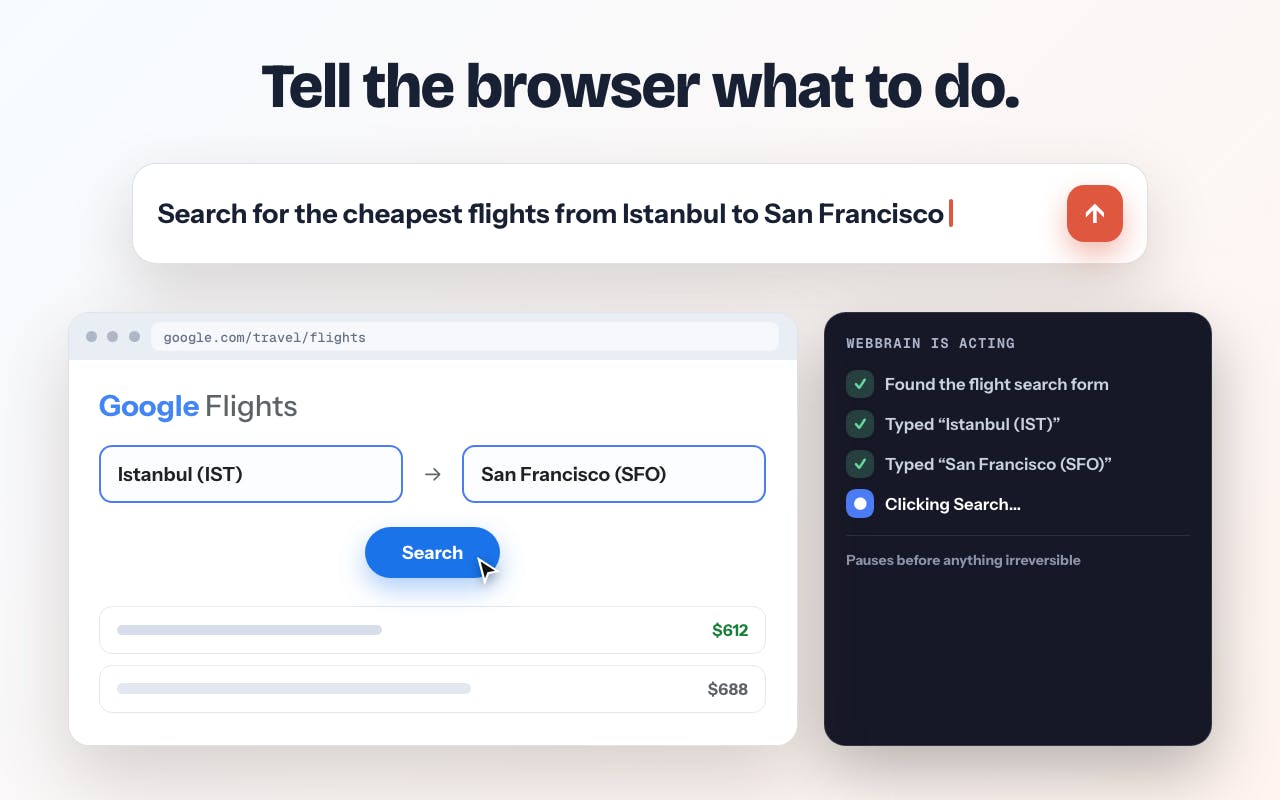
Users can issue commands directly in the sidebar to have the AI agent automatically execute web-based tasks. This is the core meaning of the word "agent" — it's not just about Q&A, but about performing a series of in-browser actions on the user's behalf.
From a technical implementation perspective, browser AI agents typically inject into pages via the extension's Content Script, capture page DOM element information and pass it to the large language model for understanding and decision-making, then complete tasks by simulating clicks, inputs, scrolling, and other interactions. Technical challenges in this field include: how to compress complex webpage structures into context the model can understand, how to handle dynamically rendered Single Page Application (SPA) pages, and how to maintain state consistency across multi-step tasks.
Polished Experience Details
On a more granular level, WebBrain has put considerable thought into its engineering details:
- Multi-language UI: The interface supports multiple languages, lowering the barrier for non-English-speaking users;
- Token-friendly screenshot handling: Screenshots are token-optimized before being sent to the model, reducing unnecessary overhead — this is particularly important for cloud calls that charge per token.
The token cost of screenshots deserves further explanation: in multimodal large models (such as GPT-4o and Claude 3.5 Sonnet), image inputs are converted into tokens for billing, and a standard webpage screenshot can consume hundreds to thousands of tokens. "Token-friendly" processing typically involves reducing image resolution, cropping irrelevant areas, splitting screenshots into smaller tiles and only transmitting relevant portions, or first extracting text via OCR and passing it as plain text. In frequent-use scenarios, these optimizations can reduce API call costs by several times.
The Battle of Browser AI Assistants in the Open-Source Ecosystem
WebBrain's emergence reflects a clear divergence in the browser AI assistant space into two distinct paths. One, represented by Arc, Perplexity, and others, pursues an "integrated cloud" experience with a focus on out-of-the-box smoothness. The other, represented by WebBrain, follows an "open-source + local" path that returns control and data sovereignty to users.
Adopting the MIT license means developers can freely view, modify, and redistribute the code. MIT is one of the most permissive open-source licenses — compared to the "copyleft" requirements of GPL-family licenses (which mandate that derivative works must also be open-sourced), MIT is completely friendly to commercial use. Companies can build closed-source products on top of the code, with the only requirement being to retain the original copyright notice. For a tool that handles browsing page data, code transparency itself is key to building trust — security researchers and users can inspect the code line by line to verify that data is genuinely not being secretly uploaded to any remote server.
In terms of product maturity, WebBrain currently feels more like an early-stage project aimed at tech enthusiasts and developers. Running local models with llama.cpp requires a certain level of technical proficiency (including steps like model downloading, format conversion, and parameter configuration) and also has hardware requirements — typically at least 16GB of RAM is needed to smoothly run a quantized 7B-parameter model, with larger models requiring even more resources. By comparison, average users will likely still prefer the BYOK cloud mode for more immediate response times and stronger reasoning capabilities.
Conclusion: An Alternative Solution for Privacy and Cost
As AI features increasingly become standard in browsers, WebBrain offers a pragmatic choice: you don't have to pay ongoing fees for AI capabilities, nor do you have to hand your browsing data over to third parties. It puts the decisions of "which model to use" and "where data is stored" entirely in the user's hands.
For users who care about privacy, want to control costs, or enjoy tinkering with open-source tools, WebBrain is worth trying. Whether it can overcome the technical barriers of local deployment and reach a broader audience of "the rest of us" will be the key factor to watch in this project's future development.
Related articles

Amphibious Transforming Drone: Beyond 100x Power Savings, What Are the Real Needs?
Is the amphibious transforming drone just a gimmick? Starting from the 100x power difference of the M4 Morphobot, explore real application scenarios and thesis topic ideas, analyzing boundary conditions where pure drones and pure ground robots both fail.

Warhound Raises $200 Million: Genetically Engineered "War Dogs" Paired with Anduril Gear
Warhound raises $200M, backed by Ben Lamm and Palmer Luckey, to genetically engineer dogs for military and law enforcement use and equip them with Anduril gear. This article analyzes its technology direction, funding logic, and ethical controversy.

Claude API Comes to Google Cloud: IAM Integration and SDK Access Guide
Anthropic hosts the full Claude API on Google Cloud with IAM-controlled permissions and unified billing. This guide covers the Vertex AI and Anthropic-hosted entry points, IAM role configuration, and SDK access.