WebMCP in Practice: Getting Your Website Ready for AI Agents

WebMCP lets websites expose structured tools to AI agents, making the Agentic Web a natural evolution of the existing Web.
As AI agents take over web tasks on behalf of users, developers need to rethink site design. Agents perceive pages via screenshots, DOM trees, and accessibility trees, meaning semantic HTML and good accessibility serve both humans and agents. For complex tasks, multi-signal context inflates compute costs and reduces reliability — WebMCP addresses this by letting sites expose structured tools directly to agents via a JavaScript imperative API or HTML declarative API. Chrome DevTools and a new Lighthouse agentic browsing audit support debugging and evaluation. The recommended action plan: build accessible foundations, try WebMCP, run Lighthouse audits, and join the Origin Trial.
AI agents are changing the way users interact with the web. More and more users are delegating tasks like clicking, filling out forms, and navigating pages to AI agents instead of doing them manually. This raises a critical question: is your website ready to be used by AI agents? At a hands-on workshop during Google I/O Connect, two speakers — Kasper and Andrei — systematically walked through the concept of the "Agentic Web" and a new proposed standard called WebMCP. This article summarizes the core ideas and actionable steps you can take today.
What Is the Agentic Web
In computer science, an agent is an autonomous entity that observes its environment, gathers information, processes it, takes action toward a specific goal, and repeats this cycle. The real shift in recent years has been connecting agents to large language models (LLMs) as a reasoning engine, unlocking entirely new capabilities.
Speaker Andrei emphasized that the Agentic Web is not a separate network apart from the existing internet — it's a natural evolution of the Web we already know. The Web was originally built for humans to create, share, and consume content and shop online. Those use cases aren't going away; what's changing is that users increasingly rely on AI agents to carry out these tasks on their behalf.
Agents themselves come in many forms: on-site agents integrated directly into a website as part of its experience; browser agents that are either native to the browser (like Gemini in Chrome) or delivered via browser extensions; and even agents outside the browser that communicate with the browser through protocols like CDP, such as CLI applications.
How AI Agents "See" a Web Page
As a developer, understanding how an agent perceives a page is essential to helping users succeed when they interact with your site through an AI agent. The speakers broke this down into three main approaches.
The first is looking at the page directly. The agent takes a screenshot of the rendered page and uses a vision model to interpret it — very similar to how a human observes a page. The second is reading the rendered DOM and analyzing its text structure. The nesting of elements — a button inside a div, for example — tells the model about hierarchy, while the text inside a button label directly communicates the button's function. The DOM tree fundamentally reinforces relationships between page elements.
The third is the accessibility tree. This is a native browser API that distills the DOM down to the most important information: the roles, names, and state of interactive elements, giving the agent a semantic summary of the page. Interestingly, this is the same technology used by screen readers.
The takeaway is simple but important: making your website friendly for humans tends to make it friendly for AI agents too. High-quality visual presentation, semantic HTML, clear hierarchy, and good accessibility practices all help agents use your site more effectively.
The accessibility tree is automatically built by the browser from the DOM and ARIA attributes, and is exposed to assistive technologies as a tree structure. Each node carries three key properties: role indicates the element's semantic type (e.g., button, heading, checkbox); name is the human-readable label for the element, typically derived from aria-label, alt text, or element content; and state describes dynamic properties like whether the element is enabled or selected. Compared to the full DOM tree, the accessibility tree strips away purely decorative nodes, retaining only elements meaningful for interaction and content understanding. This smaller, more semantically focused representation is exactly why AI agents prefer it. Developers can inspect the accessibility tree for any page in real time via the Accessibility sub-panel in Chrome DevTools' Elements panel.
The Challenges of Complex Tasks
Just "seeing" and "reading" isn't enough. The speakers used hotel booking as an example: when a human visits an unfamiliar hotel website, they can quickly spot the search bar, date picker, and buttons based on prior experience, transferring knowledge from other sites. But for an agent, as the user journey grows more complex — searching, filtering, setting preferences, requesting late checkout — it needs to synthesize signals from screenshots, the DOM, and the accessibility tree simultaneously to understand the current state.
The more the context inflates, the more compute is required, responses slow down, and the probability of the model misreading a signal and going off course increases. This surfaces a core tension: how do you make the interaction between a website and an agent both faster and more reliable?
WebMCP: Exposing Structured Tools to Agents
The answer is WebMCP. This is a proposed web standard whose goal is to expose structured tools to AI agents directly on existing websites.
Here's why it matters: when a user wants to add a pizza to their cart on your pizza website, the agent can — beyond analyzing visuals, reading the DOM, and parsing the accessibility tree — directly invoke a tool provided by the website. If there's a tool that supports the user's intent, the whole process simplifies dramatically: the tool is right there, and the agent doesn't have to work hard to infer what to do.
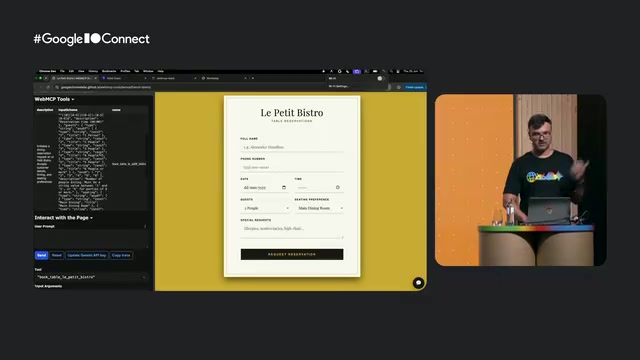
The speakers demonstrated this with a restaurant booking demo called EPTBistro: a debugging agent on the left lists the tools the site provides (such as book and table) along with their names and descriptions. When given the input "I want to celebrate the workshop's success with Kasper — book a table for 7 PM under Andrey's name," the agent automatically fills in the name, date, time, party size, and even special notes. A maze game demo went even further: given a high-level instruction like "keep moving until you reach the exit, pick up items along the way, and use them to clear a path," the agent autonomously combined tools like move, look, pick up, and use to solve the puzzle — demonstrating that users may use tools creatively in ways developers never anticipated.
WebMCP (Web Model Context Protocol) shares a naming connection with Anthropic's MCP (Model Context Protocol) — a general-purpose protocol for connecting LLM applications to external data sources and tools that has been widely adopted by many AI frameworks. WebMCP can be thought of as a web-native implementation of MCP for the browser environment: rather than requiring a separate MCP server or backend, it lets web pages expose tools directly to AI agents running in the same context via browser APIs, lowering the barrier to adoption. The proposal is currently led by Google and is in the Origin Trial phase, meaning developers can apply to test it in real user environments — but the spec itself may still change based on community feedback and has not yet become a formal W3C standard.
Two Ways to Define Tools
WebMCP provides both an imperative and a declarative API.
Imperative API
The imperative API uses standard JavaScript. You register a tool by calling document.modelContext.registerTool, and a tool requires: a name, a description, an input schema, and an execute block.
- The input schema uses JSON Schema format to define the parameters the model passes when invoking the tool.
- The execute block is the logic that runs when the tool is actually called. It can be any existing JavaScript function on your site, or a newly written one.
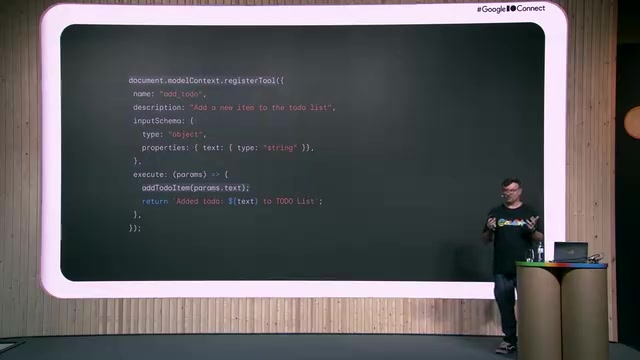
One important detail: the return value of the execute block is sent back to the agent (and may be passed back to the model). This means you can communicate through the return value when parameters are wrong, when you want to report success, or when you want to suggest a next step — this message is not for the user, but for the agent itself. To unregister a tool, you can pass in an AbortController when registering and call abort when needed. For Angular developers, you can even tie the tool's lifecycle to a component's onDestroy hook.
Declarative API
If you already have an HTML form, the declarative API only requires adding two mandatory attributes: toolname and tooldescription. Once added, the browser will recognize the form as a WebMCP tool. The optional toolparamdescription provides the agent with usage context for a specific input field.
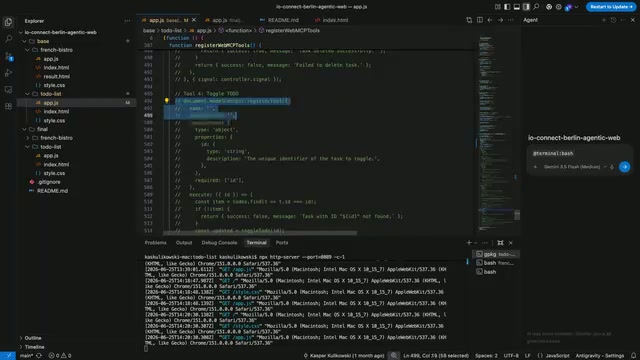
The speakers made an important point: tool names, descriptions, and parameter descriptions are not just documentation — they are critical context that the agent uses to decide when to invoke a tool. Think of it as a specialized form of prompt engineering. The declarative API requires the user to manually click the submit button by default; the agent only fills in the fields. If you want the form to auto-submit once filled, you can use the autosubmit attribute. Additionally, the form's submit event now includes an agentInvoked member that is true when the submission was triggered by an agent, allowing developers to perform validation and return detailed feedback via respondWith — enabling the agent to learn from errors and retry.
Debugging and Auditing: DevTools and Lighthouse
WebMCP tools are fundamentally either JavaScript-based or HTML form-based, so you can debug them with all the JS tooling you're already familiar with. In Chrome DevTools, you can see which tools were called, what parameters were passed in, and what was returned. You can also select a tool to jump directly to where it's registered in the code and set breakpoints to diagnose issues.
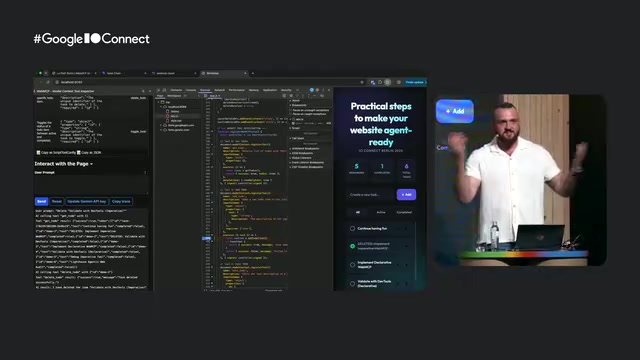
On evaluation, the speakers' advice was: test deterministic tools deterministically, then use an LLM to evaluate the agent touchpoints — for example, given a list of tools, can the agent select the right one? Can it select the right parameters? Can it use the output of one tool as input for another?
Starting from Chrome Milestone 150, LighthouseAd added an "agentic browsing" audit category. It checks several metrics critical to agents: accessibility, content layout shifts, and whether WebMCP tool schemas are valid. When the speakers ran the audit live on Google's Advanced Search page, they received feedback that the accessibility tree was well-structured and the WebMCP schema was valid — but that layout shifts still needed fixing and some forms lacked annotations. Note that this audit is still experimental.
Content Layout Shift (CLS) is one of the Core Web Vitals metrics, measuring the degree to which visual elements shift unexpectedly during page load. For human users, high CLS means accidentally clicking the wrong thing. For AI agents, the impact is even more direct: an agent determines the coordinates of an interactive element from a screenshot or accessibility tree, but if the layout shifts before the action is taken, the agent may end up clicking on a completely different element, causing the task to fail or triggering unintended actions. This is exactly why Lighthouse includes CLS as an important check in its agentic browsing audit. Common techniques for optimizing CLS include reserving fixed dimensions for images and ad slots, and avoiding dynamically inserting content above the fold.
Practical Steps to Get Your Website Agent-Ready
The workshop concluded with a clear action checklist:
- Build a solid foundation: Agent usability starts with principles we've long understood — build your site well and make it accessible. High-quality visuals, semantic HTML, and solid accessibility are the prerequisites.
- Try WebMCP: Experiment with both the imperative and declarative APIs, and expose structured tools for your core features.
- Audit with Lighthouse: Use the new agentic browsing audit to check your site's agent-readiness.
- Join the Origin Trial: WebMCP is still a proposed standard — now is the ideal time to provide feedback and help shape the API.
For developers, the Agentic Web isn't a distant future — it's a reality that requires action today. Build your site well, expose clear tools, and continuously audit and provide feedback. This combination serves your current human users while paving the way for the wave of AI agents soon to arrive.
Related articles

Chain of Thought Isn't Just for AI: How Humans Can Use CoT to Improve Thinking Quality
Chain of Thought isn't just a prompt trick for large models. Starting from a Hacker News discussion, this article analyzes why CoT works for human thinking too, breaks down actionable ways to transfer it, and highlights the key differences between human CoT and machine CoT.
Cloudflare Teams Up with OpenAI: Closi…
Cloudflare Teams Up with OpenAI: Closing the Loop from Vulnerability Discovery to Defense with AI
Cloudflare uses OpenAI Daybreak to investigate security vulnerabilities and generate reviewable remediation plans, while developers use Codex to boost coding efficiency and quality.

Orca Multi-Agent Orchestration in Practice: A Guide to Parallel Collaboration with Claude and Codex
Orca is Stable AI's free open-source agent workbench supporting 34 agents like Claude Code and Codex in parallel. Learn its Git worktree isolation, multi-model orchestration, and mobile management.