What Exactly Is an MCP Server? A Complete Guide from Fundamentals to Production

MCP is a standard protocol for AI tools — the real challenge is authentication when you go remote.
MCP (Model Context Protocol) is fundamentally simple: a standard protocol that lets AI models discover and call external tool functions — like USB-C for AI tools. Models never execute tools directly; they output intent and the host runs the actual code. MCP servers run locally via stdio or remotely over HTTP, with remote being essential for production. Security audits show roughly a quarter of public MCP servers have no authentication at all, and most others rely on risky static API keys. The spec recommends OAuth 2.1 with PKCE for proper multi-user access control. Using fastmcp and an identity service like Descope, developers can build a fully authenticated MCP server with just decorator-based tool definitions and a few lines of auth config.
MCP (Model Context Protocol) has become one of the hottest buzzwords in the AI world. Claude uses it, Cursor uses it, and ChatGPT is on board too. But as one technical blogger put it, most people make it sound far more complicated than it actually is. Strip away all the layers, and an MCP server is remarkably simple: it's a program that hands an AI model a list of functions it's allowed to call. That's it.
This article is based on that blogger's deep-dive breakdown — starting from first principles, walking through a Python implementation, and covering the critical piece almost every tutorial skips: how to actually deploy your server and set up proper authentication and authorization.
Why Language Models Need Tools
A language model on its own can't do much of anything. It can't read your files, check your calendar, or query a database. The only thing it can do is take text in and produce text out.
If you want a model to actually do things, you need to give it tools. A tool is essentially a function — it has a name, a description, input parameters, and an output. The model reads this list of tools and decides, "I need to call tool X."
Here's a key point that's often misunderstood: the model never calls a tool directly. When a model wants to invoke a tool, it simply outputs text describing which tool it wants to call. Your code then executes that tool and returns the result as text for the model to process. Throughout the entire interaction, the model is always just working with text.
What Problem MCP Solves: The USB-C of AI Tools
Before MCP, there was an obvious pain point: every application had to build its own "tool pipeline," and had to rewrite it for each model and each tool. If you built a GitHub integration for Claude, it wouldn't work in Cursor or ChatGPT. As agents proliferated, everyone was reinventing the same wheel.
MCP was created to end this chaos — it's a standard protocol. You write your tools once, package them as an MCP server, and any application that "speaks MCP" can use those tools directly, whether that's Claude, Cursor, VS Code, or ChatGPT.
The blogger used an apt analogy: MCP is like USB-C for AI tools — one connector that works with almost everything.
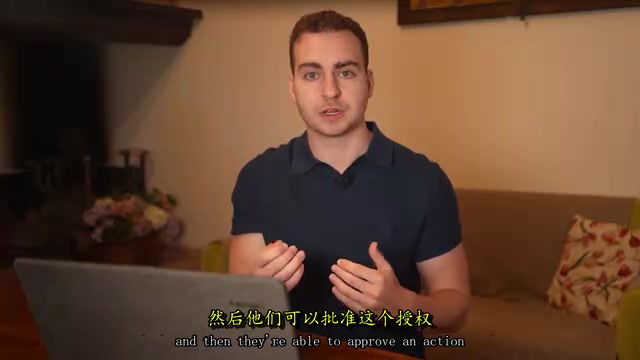
There are two roles to understand:
- MCP Server: your code, responsible for exposing tools;
- MCP Client: the application where the model lives, such as Claude Desktop or Cursor.
When the client starts up, it asks the server: "What tools do you have?" The server returns a list with names and descriptions, which gets handed to the model. When the model wants to call a tool, the client sends a request to the server, the server runs the function and returns the result — all communication happens via JSON passed back and forth.
Local vs. Remote
MCP servers can run in two ways.
Running Locally
The client starts your server as a subprocess, running on your own machine, communicating directly through standard input/output (stdio). For example, Claude Desktop will literally run python my_server.py and pipe JSON into it.
About 90% of tutorials demonstrate this approach. It's fine for personal tinkering, but it breaks down the moment someone else needs to access the server.
Running Remotely
The server runs somewhere on the internet, has a URL, and clients connect over HTTP. Almost every real product works this way — GitHub's MCP server, Notion, Stripe — they're all essentially just URLs. If you want others to use it, or if you want to access your tools from multiple devices (phone, laptop, work computer), remote is the way to go, and it's the path to production.
stdio (standard input/output) is the most fundamental form of inter-process communication that operating systems provide: a parent process exchanges data with a child process via stdin and stdout streams. In local mode, the MCP client (like Claude Desktop) directly forks the server process, writes JSON-formatted requests to its stdin, and reads responses from stdout — all communication happens in local memory, with no network stack involved. This approach has extremely low latency and zero configuration cost, but it inherently only supports access from a single machine and can't be shared across devices or multiple users. SSE (Server-Sent Events) and streamable HTTP are the transport layers commonly used in remote mode, allowing the server to push messages to the client proactively — ideal for tools that take longer to execute and need to stream progress updates.
Once You Go Remote, Security Becomes Non-Negotiable
Remote MCP servers introduce a problem that local versions never face: access control.
The moment your server is on the public internet, anyone with the URL can call your tools. And those tools can read data, write data, and even delete data. So every request must answer three questions: Who is calling? What are they allowed to do? Who are they acting on behalf of?
The blogger shared some alarming statistics: this year's security audits found that roughly one in four public MCP servers had absolutely no authentication; and among those that did, most only used static API keys — a long-lived key stored in a config file and shared by everyone. Only a tiny fraction used a proper authentication scheme like OAuth.
Why are static API keys dangerous? Imagine five different agents all using the same key to access your server — you have no way to tell who's who, no way to trace which user had which agent do what. If one gets compromised, your only option is to invalidate the key and simultaneously break all your agents. That might be acceptable for a short-term project, but it's a disaster for any real production system.
OAuth: The Official MCP Authentication Solution
The answer in the official MCP specification is the same solution that mature applications have used for years: OAuth, specifically OAuth 2.1 with PKCE.
That sounds intimidating, but you almost never need to implement it from scratch. You just need to understand the flow:
- Your MCP server itself never logs anything in. When a client (like Claude) arrives without a valid token, the server returns
401 Unauthorizedalong with a URL where the user can log in — this points to what's called an authorization server. - The client redirects there, and the user sees a normal login screen (Google, email, etc.) and a consent page.
- When the user clicks "Allow," the authorization server issues a token to the client.
- From then on, the client includes this token with every request. The server verifies the token's signature, confirms it's addressed to this server, checks the embedded permissions (scopes), and then runs the tool.
The permissions embedded in the token are called scopes — things like notes:read or notes:write. Tools can declare "I require a certain scope to run." This lets you not only authenticate users but also granularly control what they can do. Tokens also embed information like user IDs, allowing the server to act on behalf of specific users and scale to multiple users.
There's also something called Dynamic Client Registration (DCR) — clients need to register with the authorization server before logging in, and the spec provides an automated mechanism for this so you don't need to configure it manually.
PKCE (Proof Key for Code Exchange) is a security extension in OAuth 2.1 designed specifically for public clients (like desktop apps and mobile apps). A vulnerability in the traditional OAuth authorization code flow is that a malicious program could intercept the authorization code and misuse it. PKCE's solution: before initiating the authorization request, the client randomly generates a "code verifier" and submits its hash (the "code challenge") along with the request; when exchanging for a token, the client must include the original verifier, and the authorization server only proceeds after comparing the hash. Since hashing is one-way, even if the authorization code is intercepted, it can't be exchanged for a token. MCP's use of OAuth 2.1 + PKCE is precisely because MCP clients (like Claude Desktop) are typical public clients that can't safely store the client secrets that traditional OAuth relies on.
Python in Practice: Building an MCP Server from Scratch
The blogger emphasized that you absolutely don't need to implement the protocol layer yourself. All the details about message formats and request/response structures can be found at modelcontextprotocol.io, but the framework handles all of that for you. What developers are actually responsible for is just authorization configuration and tool definitions.
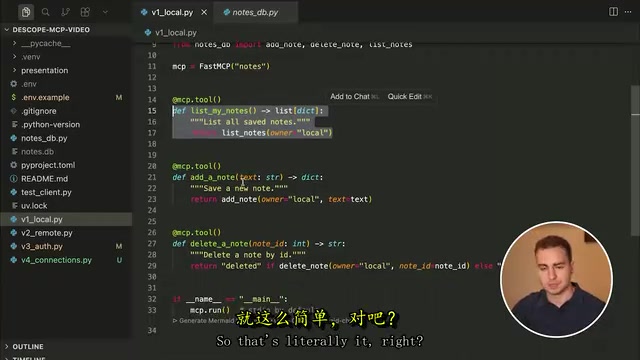
Defining Tools
Using the fastmcp framework (pip install fastmcp), the process is surprisingly simple: write regular Python functions, decorate them with @mcp.tool, and the framework automatically adds those functions to the available tools list and announces them to clients when they connect.
The blogger highlighted two tricks for better quality:
- Write good docstrings: by default, the framework uses your function's docstring as the tool description — what tells the model what this tool does;
- Add type hints: annotating parameters and return values with Python type annotations helps the model understand what to pass and what it'll get back, leading to higher-quality calls.
Connecting to Cursor (Local Mode)
In Cursor, go to Settings → Tools and MCP → Add Custom MCP to add the configuration. Since local mode uses stdio, you need to tell Cursor how to run the server as a subprocess. The config includes the server name, execution command (uv for Python, node for JavaScript), and arguments (working directory and file).
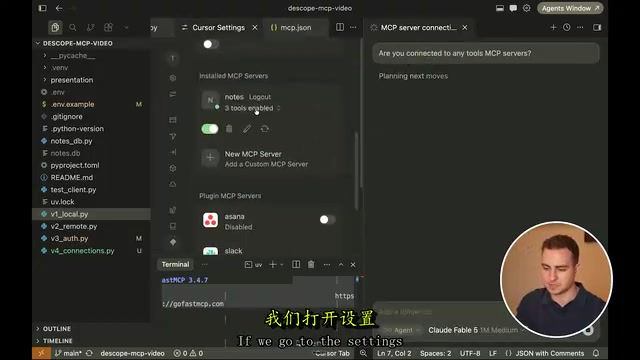
Once connected, three tools appear in Cursor: list notes, add note, delete note. You can tell the agent in conversation "create a note for me" and the model will call the appropriate tool to get it done.
Switching to Remote Mode
Going from local to remote requires changing just one line: the default mcp.run() uses stdio; specify a transport, host, and port, and it runs as streamable HTTP. This lets the server receive requests directly via URL. Deploy it to a VPS or cloud server, share the URL, and others can connect.
Adding it in Cursor just requires a name and URL (note that the URL must end with /MCP). But the blogger emphasizes again: at this point there's still no access control whatsoever — anyone with the URL can add or delete notes, and the notes don't belong to any specific user.
Adding Authentication: Making the Server Ready for Multiple Users
To add a real identity and permissions system to the remote server, the blogger used the sponsor Descope's Agentic Identity Hub. It plays the role of the "authorization server" described earlier — handling the login screen, consent page, dynamic client registration, and all the other tedious components, so developers don't have to build any of it themselves.
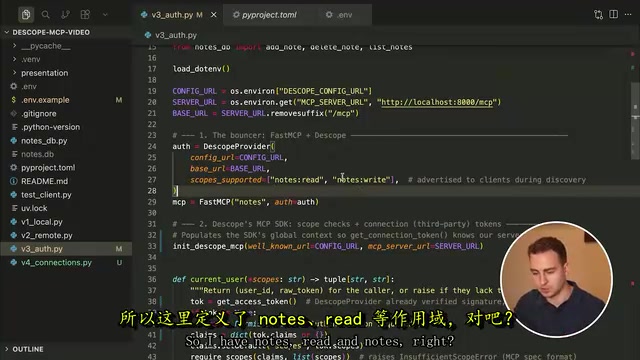
The configuration process looks roughly like this:
- Create an MCP server in the console, entering the server URL (with
/MCPat the end); - Define custom scopes, such as
notes:read(allows reading notes) andnotes:write(allows modifying and creating notes); - Get a well-known URL — the authorization server address — and store it as an environment variable.
On the code side, use the descope-mcp SDK to create an auth provider, pass in the config URL, base URL, and supported scopes, then attach it to the fastmcp instance. The tool functions are nearly identical to before, with the only difference being that each operation reads the currently logged-in user, verifies they have the appropriate scope, and binds note ownership to the user ID — no more the shared static local ID from before.
In practice: Cursor gets a 401 when accessing without authentication, along with the authorization URL; clicking connect opens a browser with a login and consent page where users can grant or deny individual scopes. After authorization, different accounts see their own separate notes with no cross-visibility. The Descope console lets you manage users, disable, or delete accounts.
Going further, Descope's Connections feature can store users' third-party tokens for GitHub, Slack, Notion, and more, letting agents call those services on the user's behalf — without developers ever having to hold onto any long-lived keys themselves.
Dynamic Client Registration (DCR) solves a chicken-and-egg problem: OAuth requires clients to pre-register with the authorization server and obtain a client_id, but MCP clients (like an AI assistant a user just installed) have no way of knowing at deployment time which MCP servers they'll eventually connect to. DCR allows clients to automatically complete registration through a standard API on first connection, without operators manually approving or pre-configuring anything. The server's .well-known/oauth-authorization-server metadata endpoint declares whether it supports DCR; compatible clients that see this can automatically walk through the registration process, obtain a temporary client_id, and then proceed with the normal OAuth flow. This is one of the key mechanisms that allows the MCP spec to work smoothly in an "any client to any server" scenario.
Summary
This breakdown brings MCP from "sounds sophisticated" back to "actually pretty straightforward": it's just a standardized tool-list protocol that lets AI models invoke external capabilities in a uniform way. The real challenge isn't the protocol itself — it's making sure that when you push your server to the public internet and face real users, you've handled identity and access control properly.
For developers, there are three key takeaways: use a framework (like fastmcp) to avoid the grunt work of the protocol layer; default to remote deployment and be wary of the risks of static keys; and use OAuth (or a mature identity service) to answer the three core questions — who is calling, what can they do, and who are they acting on behalf of.
Related articles

Amphibious Transforming Drone: Beyond 100x Power Savings, What Are the Real Needs?
Is the amphibious transforming drone just a gimmick? Starting from the 100x power difference of the M4 Morphobot, explore real application scenarios and thesis topic ideas, analyzing boundary conditions where pure drones and pure ground robots both fail.

Warhound Raises $200 Million: Genetically Engineered "War Dogs" Paired with Anduril Gear
Warhound raises $200M, backed by Ben Lamm and Palmer Luckey, to genetically engineer dogs for military and law enforcement use and equip them with Anduril gear. This article analyzes its technology direction, funding logic, and ethical controversy.

Claude API Comes to Google Cloud: IAM Integration and SDK Access Guide
Anthropic hosts the full Claude API on Google Cloud with IAM-controlled permissions and unified billing. This guide covers the Vertex AI and Anthropic-hosted entry points, IAM role configuration, and SDK access.