What Hardware Do You Need to Run AI Models Locally? VRAM and Bandwidth Are Everything

Two numbers — memory capacity and bandwidth — determine everything about running AI models locally.
This article provides a quantifiable framework for the Mac-vs-PC debate in local AI. The logic comes down to two parameters: memory capacity determines whether a model fits, and bandwidth determines how fast it runs, with a simple formula (bandwidth ÷ model size) to estimate speed before buying. Real benchmarks show discrete NVIDIA GPUs lead on token speed and prompt processing but are capped at 24 GB VRAM; unified memory devices like Mac and DGX Spark handle much larger models. Two major trends — the rise of MoE architectures and soaring memory prices — are shifting the advantage further toward large unified memory devices. The buying advice: reverse-engineer from your target models and use case, with a used RTX 3090 as the top value pick.
Want to run large language models on your own machine — should you go with a Mac or a PC? It's one of the most hotly debated topics in the local AI community. A creator who owns an RTX 4090, an M5 Max MacBook Pro, and an NVIDIA DGX Spark has put together a quantifiable framework backed by real benchmark data. The core conclusion is surprisingly simple: stop fixating on price and brand. Start by understanding two parameters — memory capacity and memory bandwidth.
An AI Model Is Just a Pile of Numbers — The Question Is Whether They Fit in Fast Memory
An AI model is fundamentally billions of numbers. When a model is labeled "8B," that refers to 8 billion parameters, not 8 gigabytes. Stored at full precision (16 bits per parameter), 8 billion parameters take up roughly 16 GB; quantized down to 4 bits, that shrinks to around 4 GB, plus a bit of overhead for runtime and conversation context.
Take Qwen 3 (approximately 27 billion parameters), one of the best local models available right now. Its 4-bit version must fit entirely in "fast memory" to be genuinely usable. The key point: a model can't live on an SSD or a hard drive, and it can't even sit in regular system RAM — it has to reside in memory that the GPU can access directly.
On Windows machines, that means VRAM on a discrete GPU. On a Mac or a device like the DGX Spark, it means the unified memory shared between the CPU and GPU. This capacity directly determines whether you can run a given model at all. If your GPU only has 16 GB of VRAM, a 17 GB model simply won't fit. It either loads or it doesn't — there's no middle ground.

Quantization is a foundational concept for understanding local AI. Neural network parameters are originally stored as 32-bit or 16-bit floating-point numbers, but inference doesn't require that level of precision. Quantization reduces the number of bits per parameter (e.g., from 16-bit down to 4-bit or even 2-bit), shrinking the model to a quarter of its original size or smaller, at the cost of a negligible drop in accuracy. The most common local inference format today is GGUF (driven by llama.cpp), which supports quantization levels like Q4_K_M, Q5_K_M, and Q8_0 — higher numbers mean better precision but larger file sizes. Qwen3 30B, for instance, is about 17 GB at Q4 and around 30 GB at Q8. Choosing a quantization level is fundamentally a trade-off between "does it fit in memory" and "how good are the answers." For most everyday tasks, Q4 precision is more than sufficient.
A Formula to Predict Model Speed: Bandwidth Divided by Model Size
The second key parameter is bandwidth, which determines how fast a model runs. Here's a fact that rarely gets mentioned: every time the model generates a token, it has to read the entire model from memory from start to finish. That means every single word Qwen 3 outputs requires re-reading all 17 GB of data.
This gives us a handy formula: Speed ceiling = Memory bandwidth ÷ Model size.
The M5 Max, for example, has a memory bandwidth of around 614 GB/s. Running a 17 GB model, the theoretical ceiling is about 36 tokens/s — and the author's real-world result was approximately 31 tokens/s, which is remarkably close. The rumored Mac Studio M5 Ultra (roughly 1.2 TB/s of bandwidth) would theoretically hit 71 tokens/s, and on a smaller Qwen model, potentially 182 tokens/s. The formula isn't perfectly precise, but it lets you estimate performance before you spend any money.
This also explains the real nature of the Mac vs. PC debate: fast but small vs. large but slower. The RTX 4090 reads VRAM at over 1 TB/s, but it only has 24 GB. Unified memory pools are larger and cheaper per gigabyte, but slightly slower than dedicated VRAM on a discrete GPU.
Real Benchmarks: The Same Model, Wildly Different Results Across Hardware
The author cites the Context Studio hardware guide to show token decode speeds for various hardware running Qwen 3 (27B) — all unoptimized baselines:
- RTX 5090 (32 GB): ~75 tokens/s
- RTX 4090: ~46 tokens/s
- RTX 3090: ~40 tokens/s
- M5 Max: 31.4 tokens/s
- DGX Spark: 12–17 tokens/s
- Ryzen AI Max: 11.5 tokens/s
From the author's experience, 50–60 tokens/s and above feels very fast; 35–40 is perfectly usable. But there's a critical gotcha: the moment a model doesn't fully fit in VRAM — even if just a small portion spills into system RAM — speed can be cut in half or worse. One study ran the same small model inside an RTX 5090's VRAM at 151 tokens/s, then moved it to system RAM, where it dropped to just 8 tokens/s — a nearly 95% performance collapse. Always make sure the model fits entirely in VRAM or unified memory.
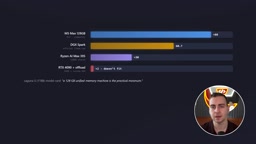
The picture flips when models get larger. Take GPT-OSS 120B (~60 GB): the M5 Max (128 GB) achieves 60–70 tokens/s in real-world tests (with some reports of 88), the DGX Spark manages around 50, and the Ryzen AI Max around 30. Meanwhile, the RTX 4090 and 5090 can't load the model at all and crawl along at just 1–2 tokens/s. When chasing the highest intelligence from larger models, high-capacity devices decisively outperform high-speed small GPUs.
Don't Overlook Prompt Processing Speed — NVIDIA's Real Advantage
Token decode speed is only half the story. Prompt processing matters just as much — it determines how long the machine takes to read through the document you've fed it before it starts responding. In the same Qwen benchmarks, the RTX 4090 processes input at roughly 3,000 tokens/s, while the M5 Max manages around 800 tokens/s. If you're feeding in an entire codebase or very long documents, NVIDIA's lead here is substantial.
The root cause of this gap lies in the parallel compute architectures of each platform. NVIDIA GPUs have large numbers of CUDA cores optimized for matrix multiplication, plus Tensor Cores for acceleration, enabling highly parallel processing of long input sequences with extremely high prefill throughput. Apple Silicon's GPU is designed more for efficient unified memory access than massive parallel matrix computation. It performs well in the decode phase (generating tokens one by one) thanks to its bandwidth advantage, but falls noticeably behind when digesting large amounts of input in a single pass. This difference has a real impact on workflows: if you're mainly having conversations with short prompts, the gap is negligible. But for RAG (Retrieval-Augmented Generation), codebase analysis, or feeding an entire book into the context window, NVIDIA solutions will start responding much sooner than a Mac.
Two Shifts Rewriting the Local AI Landscape
First: the rise of Mixture of Experts (MoE) models. Nearly every major recent model uses a sparse architecture: DeepSeekAd V4 Flash has 284 billion parameters but only activates 13 billion per token; Qwen3 Coder Next has 80 billion parameters but activates only 3 billion. Using our earlier formula, these models only read the activated experts per token — meaning they need enormous memory to hold all parameters, but only moderate bandwidth to run quickly. That's precisely the strength of high-capacity unified memory devices like Mac and the DGX Spark, not discrete gaming GPUs. One model card even explicitly states that "128 GB of unified memory is the practical minimum for running it." Model developers are designing for unified memory, not discrete GPUs.

Second: the "memory crisis." AI data centers are consuming global memory supply, driving up GPU prices — even the DGX Spark jumped from $3,900 to $4,699. Memory is both the thing AI needs most and the most expensive thing in the equation.
Apple also patched a major weakness with its M5 chips: neural acceleration units added inside each GPU core have boosted prompt processing speed by three to four times compared to M4. NVIDIA's previous ~10:1 lead has now narrowed to roughly 2–3:1. The Mac still trails, but it's no longer "disqualified" on speed grounds.
Mixture of Experts (MoE) architecture is worth unpacking further. Traditional dense Transformer models activate all parameters for every token. MoE models divide parameters into several "expert" modules, with a router network selecting a small subset of experts for each computation pass. This means all experts must be loaded into memory (so they're available on demand), but actual compute only involves the activated fraction. The hardware implications: memory capacity requirements scale with total parameter count, while the speed bottleneck primarily depends on the bandwidth consumed by the activated parameters. DeepSeek V4 Flash, with 284 billion total parameters but only 13 billion activated per token, has an effective bandwidth demand far lower than a dense model of equivalent size — making high-capacity, lower-bandwidth unified memory devices an extremely cost-effective platform for running it.
A Hardware Buying Ladder from $300 to Tens of Thousands
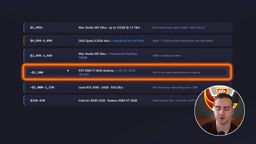
The author lays out a tiered hardware guide across different budgets (prices fluctuate by week, region, and configuration — treat as approximate):
- Top tier: Mac Studio M5 Ultra — 1.2 TB/s bandwidth, up to 512 GB unified memory. The ultimate local AI machine, but extraordinarily expensive.
- ~$5,000 tier: DGX Spark (better suited for fine-tuning and headless server environments) or MacBook Pro M5 Max (faster memory but significantly more expensive per GB — the 128 GB version can push toward $10,000).
- Mid-range: Mac Studio M5 Max desktop, Framework Desktop (128 GB unified memory), RTX 5060 Ti (16 GB, complete system from ~$1,500), M5 Air (32 GB, slower bandwidth but decent capacity).
- Best value: Used RTX 3090 — 24 GB VRAM, 936 GB/s bandwidth. The author says outright: "If I were buying one machine just for local AI, I'd pick this."
- Entry level: Intel Arc B580, RX 9060 XT, and similar 16 GB cards — they work, but model selection is limited and performance is modest.
The Creator's Personal Trade-offs
Owning all three — a 4090, an M5 Max (64 GB), and a DGX Spark — the author admits all are capable local AI machines. If forced to keep just one, he'd lean toward the DGX Spark: 128 GB of memory, adequate speed, always-on background operation, cheaper than his 64 GB Mac, and actually better for local AI (because the Mac is held back by that missing 128 GB).
The final buying logic is reverse engineering: first decide exactly which models you want to run and for what purpose, then find hardware that meets those requirements.
- Want to run large models, pursue maximum intelligence, and leave room for even bigger future models: go with Mac, DGX Spark, or Ryzen AI Max — large unified memory devices.
- Care about raw token speed and prompt processing speed, or want to do fine-tuning, training, and image/video generation: go with a discrete NVIDIA GPU (32 GB variants of the 5090/4090, or the incredible value of a used 3090).
There's no universal right answer. The key is to look at specific benchmarks, check real-world speed reports from others, assess optimization potential, and only buy once you've confirmed it meets your needs.
Related articles

Amphibious Transforming Drone: Beyond 100x Power Savings, What Are the Real Needs?
Is the amphibious transforming drone just a gimmick? Starting from the 100x power difference of the M4 Morphobot, explore real application scenarios and thesis topic ideas, analyzing boundary conditions where pure drones and pure ground robots both fail.

Warhound Raises $200 Million: Genetically Engineered "War Dogs" Paired with Anduril Gear
Warhound raises $200M, backed by Ben Lamm and Palmer Luckey, to genetically engineer dogs for military and law enforcement use and equip them with Anduril gear. This article analyzes its technology direction, funding logic, and ethical controversy.

Claude API Comes to Google Cloud: IAM Integration and SDK Access Guide
Anthropic hosts the full Claude API on Google Cloud with IAM-controlled permissions and unified billing. This guide covers the Vertex AI and Anthropic-hosted entry points, IAM role configuration, and SDK access.