What Is an AI Code Editor? Understanding Cursor's Three Core Features in 40 Seconds
An AI code editor collaborates with developers rather than replacing them; Cursor builds a trust ladder through Tab, Chat, and Agent.
Using Cursor as an example, the article explains that an AI code editor is a tool with a built-in AI assistant that writes code together with developers, not fully automated programming. Cursor is built on VS Code, lowering the learning curve. Its three core features form a progressive trust ladder: Tab completion offers lightweight suggestions, Chat supports code understanding and debugging, and Agent can make batch changes across files but requires developers to review the diff and confirm. The article stresses that AI can accelerate development, but the responsibility for understanding and testing code correctness remains with developers, and knowing when to accept or reject suggestions is the core skill.
AI code editors are changing the way developers work, but many people still understand them only at the level of "autocomplete." The YouTube channel "Freshers' Corner" offers a concise definition in a 40-second short video: An AI code editor is a code editor with a built-in AI assistant that writes code with you, not for you. This sentence is worth pondering—it draws the boundary between AI-assisted programming and fully automated programming.
What Is Cursor: An AI Editor Built on Familiarity
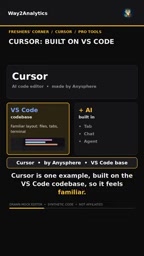
The video uses Cursor as a typical example. Cursor is built on the VS Code codebase, which means its interface, keyboard shortcuts, and plugin ecosystem come with almost zero learning curve for most developers. This "familiarity" is no accident—it's a key strategy for AI programming tools to lower the barrier to adoption: developers can gain AI capabilities without having to adapt to a new interaction logic.
According to the video, Cursor's core capabilities can be broken down into three levels, each corresponding to a different granularity of interaction.
VS Code is an open-source code editor developed by Microsoft, with a vast extension marketplace and an active community ecosystem, making it one of the most mainstream developer tools today. Cursor is built on VS Code's open-source codebase (Code-OSS) with secondary development, so it naturally inherits its interface layout, keyboard shortcut system, settings panel, and the vast majority of extensions. This approach is quite common among AI programming tools—it lets developers gain AI capabilities without changing their existing workflows, significantly lowering the barrier to adoption. However, this also means Cursor needs to follow upstream updates to stay in sync, and balance differentiated features against compatibility.
Feature 1: Tab Completion—The Lightest AI Intervention
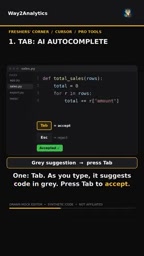
The first feature is Tab. As you type code in the editor, Cursor offers suggestions in gray text, and pressing Tab accepts them.
This is the form with the lowest degree of AI intervention and the easiest to accept. It doesn't interrupt your train of thought—it simply offers an "optional next step" between your keystrokes. The visual design of gray text itself conveys a product philosophy: suggestions are transparent and ignorable, and the decision always rests with the developer. For users who have just migrated from traditional editors, Tab completion is often the first entry point for building trust.
Feature 2: Chat—Turning the Editor into a Partner You Can Question
The second feature is Chat. You can ask what a certain function does, or ask the AI to help fix a bug.
Unlike Tab completion's "implicit suggestions," Chat is an explicit, conversational interaction. Its value lies in freeing developers from the fragmented process of "digging through docs and searching Stack Overflow"—especially when facing an unfamiliar codebase, directly asking "what does this function do" is far more efficient than reading line by line. This also means the capability boundary of AI editors extends from "writing" to "understanding."
Feature 3: Agent—Batch Changes Across Files
The third feature is Agent, which has the greatest authority of the three and requires the most caution. You describe a task, and the Agent proposes changes across multiple files.
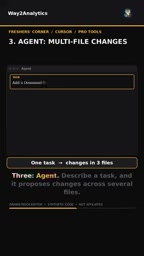
The key lies in the subsequent process: you need to read the diff—green represents additions, red represents deletions—and then choose to accept or reject.
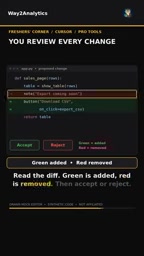
This "propose—review—confirm" design effectively moves the code review mindset forward into the AI generation stage. The Agent can handle cross-file tasks, and the efficiency gain is orders of magnitude—but the risks are amplified too: a single erroneous cross-file change could introduce cascading problems. Therefore, diff review is not optional; it's the prerequisite for using this feature safely.
Diff (difference comparison) is a format used to show changes before and after file modifications, typically marking additions, deletions, and modifications on a line-by-line basis. In version control tools like Git, diff is the most core review method; developers read the diff to judge whether changes meet expectations. In AI code editors, the diff view visualizes the AI's suggested changes, with green highlighting for added lines, red highlighting for deleted lines, and sometimes other colors to mark modified lines. This design lets developers review AI changes line by line and avoid blind acceptance. Understanding how to read a diff is the foundation for safely using the Agent feature, and a key step in integrating code review into AI-assisted programming.
The Balance Between Efficiency and Understanding
The video ends with a pragmatic reminder: AI can accelerate you, but you still need to understand and test the code. This sentence highlights the common limitation of current AI programming tools—they are good at generating plausible-looking code, but the responsibility for verifying correctness still rests with the developer.
From a product design perspective, Cursor's three features form a progressive trust ladder: Tab gets you used to the presence of AI, Chat makes you rely on AI's understanding, and Agent lets you delegate tasks to AI. Each step expands AI's authority and also requires developers to retain corresponding judgment. For developers new to AI programming, understanding this ladder is more important than memorizing shortcuts—knowing when to accept a suggestion and when to hit reject is the core skill for making good use of an AI code editor.
One-line Summary
An AI code editor is an assistant that collaborates with developers rather than replacing them, and Cursor builds a trust ladder through Tab, Chat, and Agent.
Paragraph Summary
Using Cursor as an example, the article explains that an AI code editor is a tool with a built-in AI assistant that writes code together with developers, rather than fully automated programming. Cursor is built on VS Code, reducing the learning curve. Its three core features form a progressive trust ladder: Tab completion offers lightweight suggestions, Chat supports code understanding and debugging, and Agent can make batch changes across files, but requires developers to review the diff and confirm. The article emphasizes that AI can accelerate development, but the responsibility for understanding and testing code correctness still lies with the developer, and learning when to accept or reject suggestions is the core skill.
Related articles

A 19-Year-Old's Rental Horror Story: Ceiling Collapse, Bug Infestation, and the Lessons It Taught Me
At 19, my first off-campus rental brought bug infestations, no heat, a collapsed ceiling, and a ruined laptop with no renter's insurance. Here are the hard-won lessons for first-time student renters.

Veda Nurse's Cranial Nerve Exam: Why ASMR Role-Play Is Going Viral
Bilibili creator Veda's cranial nerve exam ASMR video goes viral, blending humor and sensory triggers through nurse role-play. This article analyzes its unique appeal and the audience psychology behind ASMR role-play.

LG Cinebeam AI Review: 120-Inch Giant Screen + 3000 Lumens, a New Choice for the Living Room Theater
LG Cinebeam AI projector review: 3000 ANSI lumens, 4K, 100 inches from about 8 cm and 120 inches from about 18 cm. Built-in webOS, AI Concierge voice recommendations, AI Sound Pro 11.1.2 virtual surround, and Game Optimizer—positioned for fixed living room installation, complementing the portable Cinebeam S.