What Is WorkBuddy? A Beginner's Practical Guide to China's AI Agent

WorkBuddy is a Chinese AI agent that goes beyond chat — it actually operates your computer to handle real office tasks.
This article introduces WorkBuddy, a domestic AI agent positioned as a Chinese alternative to OpenAI-style Agent products. Unlike Q&A-based LLMs like Doubao, WorkBuddy can directly operate a user's computer to complete tasks such as batch file conversion and message replies. Its key advantages include zero-friction installation, built-in connectors for WeCom and other domestic office tools, a generous free credit system, and one-click skill deployment. Through its connectors + experts + skills architecture, WorkBuddy dramatically lowers the barrier to AI adoption — no coding required. Note that the article is primarily based on a single creator's promotional tutorial; readers should verify real-world performance against their own needs.
If you're only going to seriously learn one AI tool this year, WorkBuddy might be worth checking out first. Described by one content creator as a "domestic alternative to Codex," this product shares a similar interface layout and operational logic with overseas AI agents — but is clearly more tailored to Chinese users. No need to deal with VPN headaches, no high hardware requirements, and plenty of features available for free. Its biggest value is transforming AI from a "conversational advisor" into a "digital employee" that can actually operate your computer.
From "Q&A AI" to "Give Orders, Get Things Done"
Many people who open an AI tool still end up using it as a basic chat app, wasting the true potential of a powerful agent. One content creator demonstrated this with a common office scenario: batch-converting all PowerPoint files in a folder to PDF and organizing them.
First, they tried Douyin's AI assistant Doubao — pasting the request as a prompt and sending it. The result was predictable: it couldn't do it. Large language models like Doubao are fundamentally "one question, one answer" tools. At best, they'll tell you how to do something, but they can't remotely operate your computer — you still have to do the actual work yourself.
Switching to WorkBuddyAd, they pasted the same prompt and hit run. The task completed quickly. Opening the folder revealed that all four PPT files had been converted to PDFs. As the creator put it, "it was done in the time it took to make a cup of coffee and take a bathroom break" — the task was handled from start to finish.
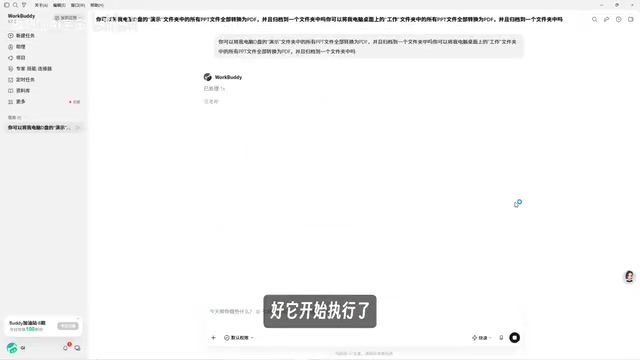
This is the fundamental difference between traditional AI chat assistants and WorkBuddy: the former can only exchange messages with you and can't even handle file operations; the latter can actually operate your computer — like hiring an employee who just gets the job done. Software that can understand instructions, operate computers, and do work on your behalf is collectively known as an AI Agent.
The core capability of an AI Agent lies in perceiving the environment, forming a plan, calling tools, and executing actions — a closed loop. The most essential difference from a large language model (LLM) is this: an LLM only "generates text," while an Agent can actually carry out the generated plan — opening software, reading and writing files, clicking buttons, sending messages. This relies on two key technologies: Function Calling / Tool Use, which allows the model to invoke external APIs or local programs; and Computer Use, which allows the model to recognize screen content through screenshots and simulate keyboard/mouse operations just like a human. Most mainstream desktop-level agents (such as Anthropic's Computer Use, OpenAI's Operator, and WorkBuddy) follow the latter approach, which places certain demands on network latency and screenshot response speed — which explains why "runs locally, works on low-end hardware" is such an important selling point for domestic products.
WorkBuddy's Four Differentiating Advantages
Why start with WorkBuddy instead of jumping straight to Codex? The creator put together a comparison chart and walked through each advantage.
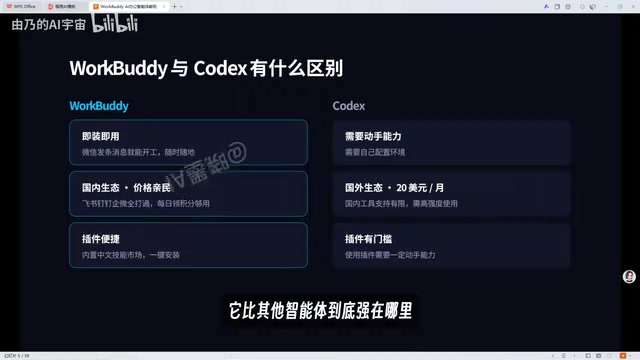
First, install and use immediately. Just search for WorkBuddy in your browser, click download, and it installs with one click — the whole process is effortless. By contrast, using Codex requires dealing with network setups, a certain level of technical ability, and manual environment configuration. The barrier to entry is real.
Second, a mature domestic ecosystem. This is what the creator called WorkBuddy's "biggest edge that other agents simply can't match." It has built-in "connectors" — essentially authorizing WorkBuddy to use various office software. Connect it to WeCom (企业微信), for example, and it can reply to messages on your behalf, or even compile your weekly work summary and client chat history into a weekly report. Codex, being built around a foreign ecosystem, has very limited support for domestic tools.
Third, budget-friendly pricing. You get 2,000 credits upon registration, plus 100 credits every day after that — more than enough for light to moderate use. Codex costs $20 per month and only makes sense if you're a heavy user.
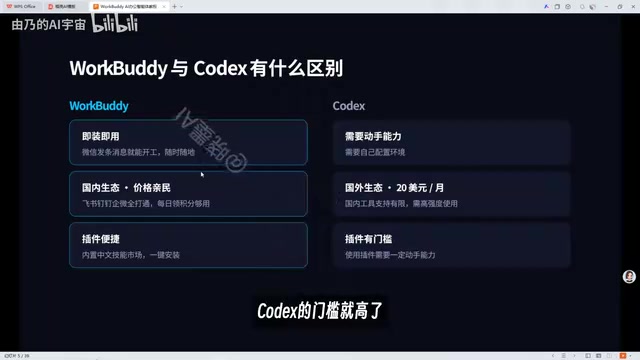
Fourth, easy plugin and skill installation. One-click deployment to your computer, plus a built-in Chinese-language skills marketplace where everything is similarly one-click to install.
Codex is a code generation model released by OpenAI in 2021 and the underlying engine behind GitHub Copilot. In Chinese-language contexts, "Codex" is sometimes used loosely to refer to OpenAI's programming agents or Agent products more broadly. When the creator refers to WorkBuddy as a "domestic alternative to Codex," they're pointing more to its functional similarity with OpenAI's autonomously executing Agent products (like Operator) — not a pure code generation model. The key thing both have in common is: they accept natural language instructions and complete multi-step tasks on a computer, rather than just outputting a text-based recommendation. Understanding this context helps accurately gauge where WorkBuddy excels — its strengths lie in desktop automation and integration with domestic SaaS tools, not complex software engineering tasks.
Experts and Skills: Hiring Talent with a Single Click
Another core concept in WorkBuddy is "Experts" and "Skills." An "Expert" is essentially like summoning a specialist on demand — if you need a Xiaohongshu content strategist, for example, you don't need to hire one; just click and call one up.
"Skills" are a wide variety of tools, available in large numbers and almost all installable with one click. This combination of connectors + experts + skills forms the foundation of WorkBuddy's fit for domestic office environments.
For comparison, Codex is an agent backed by an open-source ecosystem — highly flexible, but "open source" also means a steeper learning curve, especially for those without coding experience. This is precisely why the creator recommends beginners start with WorkBuddy: you can "hire" an AI employee at very low cost, and its simple onboarding experience plus strong compatibility with domestic office software upgrades your AI usage pattern from "ask questions" to "give orders and manage output."
WorkBuddy's "connectors" are essentially an OAuth authorization + API encapsulation mechanism: once a user grants permission, WorkBuddy gains access to platform APIs for tools like WeCom or DingTalk, allowing it to send messages, read calendars, or retrieve chat history on the user's behalf. This differs from RPA (Robotic Process Automation) tools — RPA typically controls software interfaces by simulating mouse clicks, while connectors go directly through official APIs, offering greater stability and immunity to UI changes. "Skills" are closer to pre-packaged workflow templates that bundle prompts, calling logic, and required tools for common tasks (such as generating weekly reports or batch renaming files), so users can run them directly without writing prompts from scratch. This layered architecture — connectors for data pipelines, skills for execution logic, experts for intent understanding — reflects the mainstream design philosophy behind enterprise-grade Agent products today.
A Practical Roadmap for Beginners
The creator mentioned spending roughly three months developing this beginner-focused WorkBuddy course, organized into four modules: fundamentals, case studies, advanced workflows, and industry applications — covering 28 knowledge points, from basic operations to real-world scenario breakdowns to building advanced workflows. The course emphasizes that "no programming knowledge is required" and focuses on hands-on practice, gradually offloading repetitive and tedious work to AI.
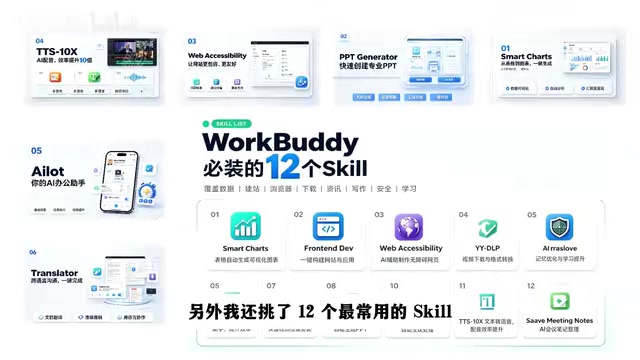
A companion "blue book" is also available, covering installation and deployment, case breakdowns, Skill customization, and industry-specific applications, along with 12 commonly used Skills and hands-on materials. The creator's parting advice: "Make sure you practice as you go — don't let WorkBuddy just collect dust in your bookmarks."
Closing Thoughts: The Dividing Line in AI Capability Is Whether You Actually Use It
This demonstration makes it clear: among AI tools, the ability to "operate your computer and do the work for you" is the fundamental dividing line between an agent and a traditional chat assistant. For users in China, WorkBuddy lowers the barrier to entry through its free credit system, zero-hassle installation, and strong compatibility with domestic office software.
That said, it's worth noting that the content in this article is primarily drawn from a single creator's tutorial, and is promotional in nature. Actual performance, stability, and applicable use cases should be validated by readers based on their own needs. The real key isn't how many tools you've bookmarked — it's whether you actually roll up your sleeves and start using them.
Related articles

Workbuddy for Absolute Beginners: How a Desktop AI Agent Fits Into Real Workflows
A beginner's guide to the Workbuddy desktop AI agent: installation, claiming credits, file management, and building automated workflows—compared with CodeX for fit and cost, helping professionals shift from AI question-askers to AI managers.

OpenAI's New Agent Stack: Computer Use, Decisions API, and Ultra-Fast Workflows
OpenAI Dev Day unveiled a new agent stack: Computer Use outperforms humans, Decisions API delivers ultra-low-latency classification via Luna, Agents API opens the same Computer Use capabilities, and GPT-6.1 Sol costs only one-seventh of Astra. Core updates, benchmark data, and developer insights.

Liang Wenfeng Open-Sources DeepInfo Inference Framework, Takes On U.S. Ban
DeepSeek open-sources its DeepInfo inference framework after its models, featuring GPU/CPU cross-pipelining, small-model prediction with large-model verification, and full Huawei Ascend and NVIDIA chip support—facing the U.S. federal ban head-on. This article analyzes its significance for AI deployment and open-source strategy.