Which Laptop Should an AI/ML PhD Student Choose? A Practical Breakdown of Three Models

For AI/ML PhD students relying on remote clusters, portability beats local GPU power every time.
A prospective PhD student focused on Vision-Language Models must choose between three university-provided laptops: the lightweight Dell 14 Pro (no discrete GPU), the powerful but heavy ThinkPad P16v (RTX + CUDA), and the M5 MacBook (exceptional battery, but macOS ecosystem friction). Since his compute-heavy work runs on remote clusters and he relies heavily on Linux, the analysis concludes that portability and system continuity matter more than local GPU power. The Dell 14 Pro emerges as the most practical choice for the "code locally, compute in the cloud" paradigm that defines modern ML research.
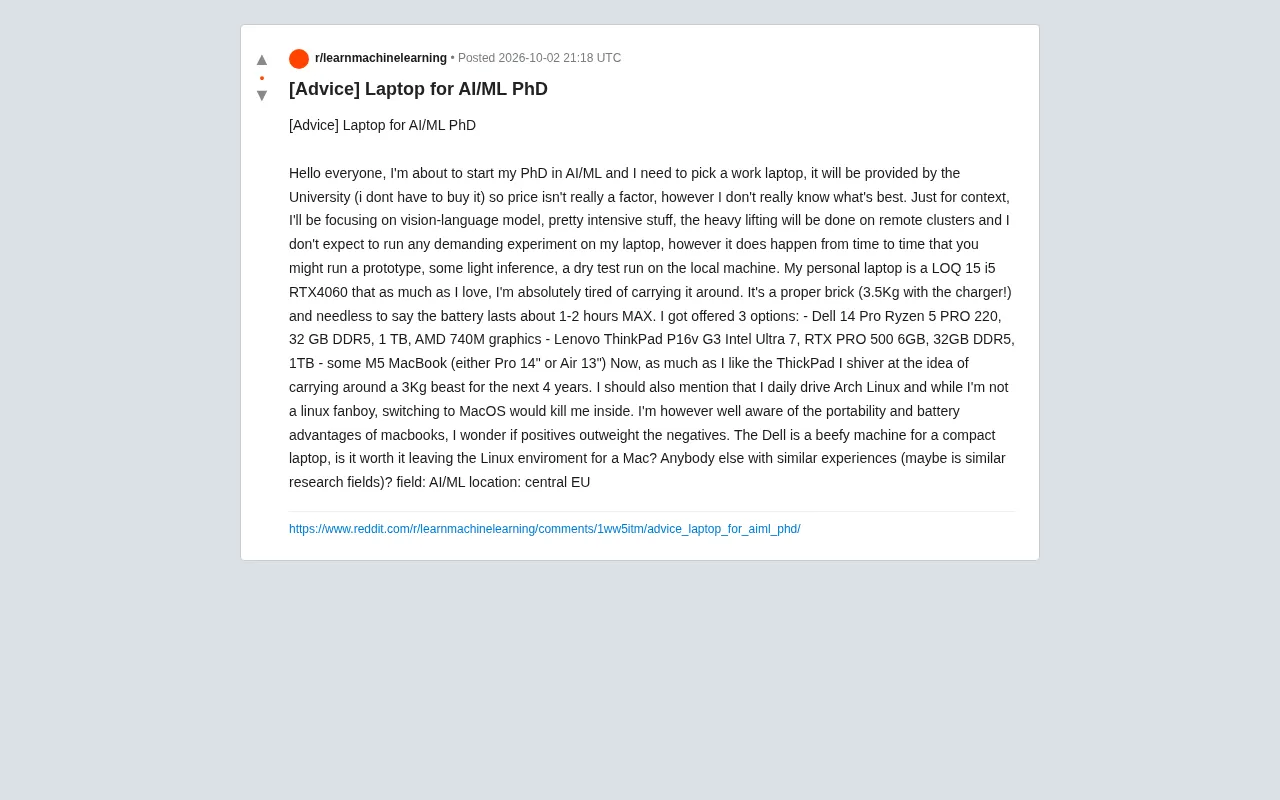
For researchers about to embark on an AI/ML PhD, choosing the right laptop is no small matter. A prospective doctoral student from Central Europe posted on Reddit asking for advice: his university was offering a laptop for free, so cost wasn't the issue — but faced with three very different machines, he couldn't make up his mind. His research focus is Vision-Language Models (VLMs), with all compute-intensive tasks offloaded to a remote cluster. The local machine only needs to handle occasional prototyping, lightweight inference, and test runs.
This seemingly simple question actually reflects a classic trade-off that researchers face between mobility, system ecosystem, and local compute power.
Breaking Down the Requirements: What Does a Research Laptop Actually Need?
The poster's situation is quite relatable. He's currently using a Lenovo LOQ 15 (i5 + RTX 4060) — decent performance, but it weighs 3.5 kg with the charger and gets only 1–2 hours of battery life. For a PhD student who needs to move frequently between the lab, office, conferences, and home, lugging around a "brick" like that is a real burden.
The key detail here is: all the heavy lifting happens on a remote cluster. This significantly reduces the importance of a local GPU. The high-frequency day-to-day tasks are writing code, reading papers, debugging scripts, running small-scale prototypes, and occasionally doing lightweight local inference. In this kind of workflow, portability, battery life, and system stability often take priority over raw local compute.
Another constraint worth noting: he uses Arch Linux daily and is resistant to switching to macOS. The continuity of a development environment can have a more practical impact on research productivity than hardware specs.
Comparing the Three Candidates
The three options offered by the university each have a distinct identity, covering three typical categories of research laptops.
Dell 14 Pro: The Lightweight, Balanced Option
Specs: Ryzen 5 PRO 220, 32GB DDR5, 1TB storage, AMD 740M integrated graphics. This is a compact business laptop with no dedicated GPU. Its strengths are portability, solid battery life, and full Linux compatibility. For someone who doesn't run heavy workloads locally, integrated graphics are perfectly sufficient for daily development and lightweight inference. The 32GB of RAM also leaves plenty of headroom to run an IDE, browser, containers, and virtual environments simultaneously.
The downsides are equally clear — no dedicated GPU means struggling with even mid-sized model inference locally, and CUDA is completely out of the picture (AMD integrated graphics don't support CUDA). If those occasional "local test runs" involve GPU acceleration, this machine will fall short.
ThinkPad P16v G3: The Performance Powerhouse
Specs: Intel Ultra 7, RTX PRO 500 (6GB VRAM), 32GB DDR5, 1TB. This is the only one of the three with a dedicated GPU — a real NVIDIA card with CUDA support capable of running meaningful local prototype experiments.
The trade-off is weight — nearly 3 kg. The poster explicitly said he "shudders at the thought of hauling this beast around for four years." For someone who's already burned out on carrying a heavy machine, the P16v essentially trades portability for local compute he doesn't urgently need. The 6GB VRAM is also quite limited for VLMs, which are memory-hungry by nature, and can't realistically replace a remote cluster.
M5 MacBook: The Benchmark for Battery Life and Portability
Whether it's the 14-inch Pro or 13-inch Air, MacBook leads the three in portability, battery life, and display quality. Apple Silicon's efficiency ratio makes all-day work genuinely feasible, and the Unified Memory Architecture offers unique advantages for running small-to-medium models locally.
The biggest obstacle is the ecosystem. The poster openly admits that "switching to macOS would break me mentally." While macOS is Unix-based and offers a solid terminal experience — and many toolchains now support Apple Silicon natively — migrating from the highly customizable Arch Linux environment comes with real learning and adaptation costs. On top of that, CUDA is entirely absent on Mac, meaning any local workflow that depends on the NVIDIA ecosystem would need to be redesigned from scratch.
It's worth noting that the mobile workstation market has long been clearly segmented: thin-and-light business laptops (like the Dell XPS/Latitude series) prioritize battery life and portability; mobile workstations (like the ThinkPad P series and HP ZBook) emphasize local compute and ISV certification; and consumer gaming laptops (like the Lenovo LOQ) sit somewhere in between. For research users, these three product lines differ fundamentally in thermal design power (TDP), memory bandwidth, and thermal management strategy. Clarifying which usage pattern you fall into is often more effective than comparing specs line by line.
Apple Silicon's Unified Memory Architecture (UMA) differs technically from traditional discrete GPU VRAM: the CPU and GPU share the same high-bandwidth memory pool, meaning more system memory can be directly used for model weights when running large language models locally — without being hard-capped by discrete VRAM capacity. For example, a MacBook with 96GB of unified memory can theoretically load a roughly 55-billion-parameter quantized model locally (using 4-bit quantization), which is genuinely useful for local inference scenarios relying on frameworks like llama.cpp or MLX. However, this capability depends on Apple's own frameworks (Metal, MLX) and is almost entirely isolated from the CUDA ecosystem, requiring extra adaptation work when reproducing experiments across platforms.
Decision Logic: Portability Is the Real Bottleneck
Based on what the poster described, a few clear criteria emerge.
Local compute is not a hard requirement. Since all heavy tasks go to the cluster, paying a nearly 3 kg weight penalty for a local GPU is poor value. The P16v is better suited for researchers who need to train locally frequently, or who don't have reliable remote resources.
System continuity matters. If you're deeply reliant on Linux toolchains in your daily work, the Dell 14 Pro dramatically improves portability without sacrificing your development habits — making it the lowest-risk choice. It's essentially a "remote development terminal," which fits perfectly with the modern ML research paradigm of "code locally, compute in the cloud."
MacBook has the highest ceiling but the steepest onboarding cost. If you can accept the ecosystem migration, the battery life and portability of M-series chips will pay dividends over four years of a PhD. Many ML researchers have ultimately made the switch to Mac + remote cluster. But for someone who's explicitly resistant to macOS, forcing that transition may cost more than it's worth.
The "code locally, compute in the cloud" model has become the dominant paradigm in compute-intensive research, enabled by mature tooling: SSH remote development, VS Code Remote, JupyterHub, and more. Researchers only need a lightweight local environment for code editing and version control, then submit training and large-scale inference jobs to HPC clusters or cloud GPU instances (e.g., via SLURM job schedulers) — enabling a workflow of "code anywhere, compute on demand." This model places minimal demands on local hardware compute, but does require solid network reliability, SSH connection management, and familiarity with remote file sync tools (like rsync and sshfs). Building this infrastructure early is a habit worth prioritizing at the start of a PhD program.
Recommendations for Researchers in Similar Situations
If you're facing a similar choice, ask yourself in this order: Do I actually need to run GPU tasks locally? Can I accept an ecosystem migration? How far am I carrying this thing every day?
For researchers working on Vision-Language Models who rely on remote clusters for compute, the combination of "lightweight + stable Linux environment + sufficient RAM" (like the Dell 14 Pro) is usually the most pragmatic answer. A laptop with a discrete GPU is tempting, but if it's going to spend most of its time acting as a remote terminal, that extra local compute just becomes dead weight on your daily commute.
At the end of the day, the laptop that works best for sustained, high-intensity mobile work isn't usually the one with the most impressive specs — it's the one you're most willing to take with you every single day.
Related articles

Amphibious Transforming Drone: Beyond 100x Power Savings, What Are the Real Needs?
Is the amphibious transforming drone just a gimmick? Starting from the 100x power difference of the M4 Morphobot, explore real application scenarios and thesis topic ideas, analyzing boundary conditions where pure drones and pure ground robots both fail.

Warhound Raises $200 Million: Genetically Engineered "War Dogs" Paired with Anduril Gear
Warhound raises $200M, backed by Ben Lamm and Palmer Luckey, to genetically engineer dogs for military and law enforcement use and equip them with Anduril gear. This article analyzes its technology direction, funding logic, and ethical controversy.

Claude API Comes to Google Cloud: IAM Integration and SDK Access Guide
Anthropic hosts the full Claude API on Google Cloud with IAM-controlled permissions and unified billing. This guide covers the Vertex AI and Anthropic-hosted entry points, IAM role configuration, and SDK access.