Why Does the Same Local AI Feel Completely Different on Different Computers?

There's no single best local AI — hardware, memory, speed, and task requirements all shape the right choice.
Using an invoicing app as a running example, this article systematically breaks down the key variables in choosing a local LLM. Model download size doesn't equal actual VRAM requirements — quantization, context, and runtime overhead all consume extra memory. Different hardware paths (NVIDIA discrete GPU, Mac unified memory, CPU-only) each have distinct capability ceilings. Models like Qwen, Gemma, and DeepSeek each make different trade-offs, and public benchmarks are only useful for an initial shortlist. The real test is running identical prompts on your own hardware and measuring time to first token, generation speed, and whether the answer actually solves your problem.
The same local LLM can respond instantly on one machine, crawl to a maddening pace on another, and refuse to run at all on a third. To make things worse, the model that produces the best answers isn't necessarily the right fit for your actual work. This deep-dive from an overseas blogger strings together all the critical variables in local AI selection through a single hypothetical scenario — and lands on a surprisingly simple conclusion: there is no single "best local model."
A Real Decision Triggered by an Invoicing App
Imagine you're building a small invoicing application. You want an assistant that can explain error messages, review customer-imported data, and even read a screenshot. Your Windows laptop has 8 GB of VRAM, a friend's Mac has 32 GB of shared memory, and someone else has no dedicated GPU at all. Which local AI is right for you? The answer goes far deeper than just looking at a model's name.
The blogger emphasizes that the right choice shifts depending on what you're doing, how much memory you have, how much slowness you can tolerate, and how much configuration time you're willing to invest. "Local AI" here means the model runs on hardware you control — a gaming PC, a Mac, a Linux workstation, or even a CPU-only laptop. Model files are downloaded locally, and prompts can stay on your machine, provided the app and its connected tools are configured accordingly.
Here's a detail that's easy to overlook: local inference gives you control over where the model runs, but it doesn't automatically make every integration private. A local model connected to a cloud-based search tool still sends search requests outside your machine. The three practical advantages of running locally are: customer data stays on-device, there's no per-token API billing, and the model remains usable when cloud services go down. The trade-off is that you become your own infrastructure team — memory, cooling, power, and the time spent downloading and updating everything falls on you.
The VRAM Trap: Download Size Isn't Runtime Requirement
The most common first mistake is assuming that a model's download size is all your computer needs. It isn't. Model weights need memory, but so do conversation context, temporary visualizations, the operating system, and whatever apps you're running alongside it.
Quantization compresses model weights. A 4-bit version uses far less memory than a high-precision version, at the cost of some quality loss. This is exactly how models that would otherwise be too large manage to run on consumer GPUs. But the blogger warns: the 4-bit file size is just a starting point, not a guarantee of VRAM requirements.
Context is the amount of text a model can consider at once. A short question takes very little memory, but once you feed in a long source file, several error logs, and back-and-forth conversation, memory usage spikes. Take a model with a 14 GB download: that doesn't mean it cleanly fits in a 16 GB GPU with 2 GB to spare — context and runtime overhead need space too. If it overflows into system memory, it might still run, but speed will drop sharply as data shuttles between different memory types.
The reverse surprise is equally real: a 32 GB Mac doesn't have 32 GB of dedicated VRAM. Apple Silicon uses unified memory, shared among the CPU, GPU, operating system, and apps. This shared pool lets some Macs load models that wouldn't fit in a discrete GPU, but the model still competes for space with everything else. So when comparing machines, ask three questions: how much memory is actually available to the model? How much context do you need? How much of the model is genuinely GPU-accelerated? Those three answers matter far more than a single download figure.
The technical nature of quantization is worth unpacking briefly. Neural network weights are originally stored as 32-bit or 16-bit floating-point numbers. 4-bit quantization compresses each weight down to 4 binary bits, shrinking the size by roughly 4–8×. The resulting quality loss is more noticeable in small models and relatively limited in models with enough parameters — which is why "a large model in 4-bit" is often recommended over "a small model at full precision." Common quantization formats include GGUF (used by llama.cpp) and GPTQ, and different formats vary in compatibility and speed across runtimes. When choosing a quantization level, labels like Q4_K_M and Q5_K_M encode specific quantization strategies; the K-series generally delivers better quality at the same size compared to earlier approaches.
Hardware Roadmap: From 8 GB VRAM to No GPU at All
The blogger maps choices onto different hardware configurations. On a Windows or Linux desktop with an NVIDIA GPU, dedicated VRAM is the primary constraint for fast GPU inference. An RTX 4060 with 8 GB VRAM comfortably runs compact models, but it doesn't become a 32 GB card just because the computer has extra system RAM. 12 GB opens the door to more capable quantized models, though long contexts can still fill them up; 16 GB leaves more breathing room for both the model and working context.
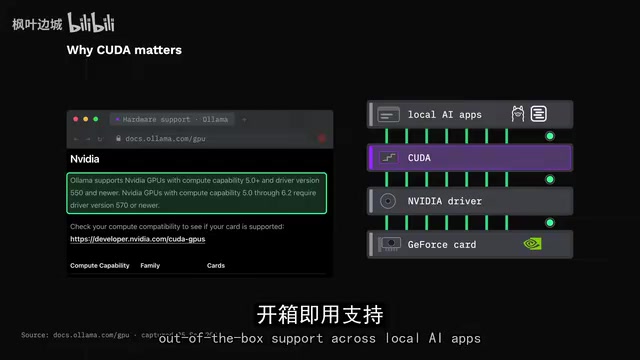
NVIDIA's CUDA enjoys the broadest support and typically offers the best compatibility across local AI tools. AMD GPUs can offer strong value, especially when the software stack supports them well — ROCm on Linux is an important path. The llama.cpp project lists NVIDIA's CUDA, AMD's HIP, Apple Silicon's Metal, Intel GPU's SYCL, and the more general Vulkan as supported backends — but its feature matrix also warns that backend support and speed are inconsistent, and being supported doesn't mean a GPU will be easy to run fast.

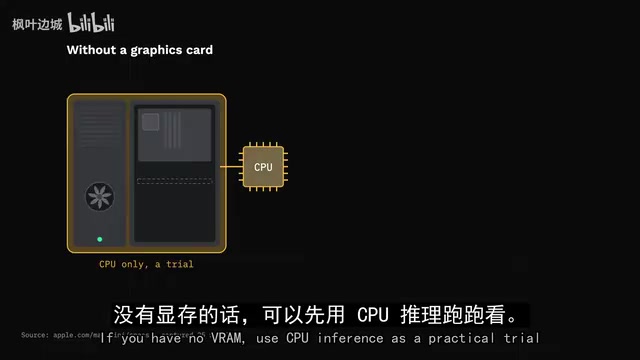
On a Mac, unified memory capacity is often more relevant than the familiar VRAM label. A 32 GB Apple Silicon system can load models that wouldn't fit in a 12 GB GPU, but if the model barely squeezes in, generation speed may still lag behind a smaller model running on a fast discrete GPU. And with no dedicated GPU at all, a modern CPU with 16 or 32 GB of system RAM can still run small quantized models — enough for summarizing short error logs, rewriting functions, or learning how local inference works. Long code reviews and high-speed agent loops, however, will feel like waiting for a webpage that won't load.
The blogger's core conclusion: there's no single hardware winner. Capacity determines what fits, and bandwidth determines how fast each next token gets generated. If the model is split across a GPU and CPU, the link between those two memory pools also becomes part of the performance equation.
The Candidates: Qwen, Gemma, and DeepSeek Each Make Trade-offs
Given a realistic workload for the invoicing app — explain a Python import error and suggest a fix, examine a screenshot of a corrupted form, then review several files and produce a careful change summary — the test covers general reasoning, vision, coding, context handling, and tool use. No single leaderboard captures all of that.
The Qwen family offers the widest size range, from sub-1B to tens of billions of parameters and beyond, with support for both text and image input and compact quantized downloads. Its strength is flexibility — you can scale up or down with your hardware. But the blogger warns: a 2B model and a 35B model differ enormously in quality, memory, and speed. Don't use the largest model's benchmark to predict the smallest.
Google's Gemma family is a serious general-purpose option, oriented toward reasoning, coding, agent workflows, and multimodal understanding. Smaller Gemma variants are especially interesting on constrained machines or where low latency matters. DeepSeekAd plays a different card: the Flash version emphasizes efficient inference and advertises million-token context; the Pro version is a larger mixture-of-experts model. But the blogger highlights a critical distinction — a model appearing in a local model manager doesn't mean every listed variant runs on your machine. If a tag says Cloud, the inference is hosted, and that's not private local inference.
Vision capabilities deserve attention too: if that corrupted form screenshot matters, a text-only model won't be able to examine it just because the app has an image button. Confirm that the specific model actually accepts image input in the runtime you plan to use — and note that image understanding adds to both memory usage and latency.
The MoE (Mixture of Experts) architecture is key to understanding models like DeepSeek Pro. In a traditional dense model, every token passes through all parameters. MoE models divide parameters into multiple "expert" sub-networks and only activate a small subset for each token. This means a large MoE model activates far fewer parameters per inference step than its total count suggests, theoretically requiring less computation for equivalent quality. However, all expert weights still need to be loaded into memory — total parameter count still drives memory requirements; only the compute load is reduced. For local deployment, this means a 671B-parameter MoE model still requires hundreds of gigabytes of memory, and consumer hardware can only run small quantized versions of it.
Don't Be Fooled by Benchmarks: What Actually Matters
Benchmarks measure performance on a defined set of tasks. Coding benchmarks like HumanEval or SWE-bench measure different things — a model that scores well on short function problems may still fail at editing a real repository, preserving existing behavior, or calling tools correctly. The blogger's example: if a model earns a high coding score but misses that an import error is actually caused by a blank invoice date field, that score hasn't answered your question at all.
Tokens per second also has two meanings: prompt processing measures how fast the model reads your input, and generation speed measures how fast it writes the response. A long prompt might sit for a while before the first token appears, even if generation is fast. A model doing 80 tokens/sec isn't automatically better than one doing 35 tokens/sec if the first one produces a wrong fix that costs you 10 minutes to undo.

The blogger's methodology is clear and practical: use public benchmarks for an initial shortlist, then compare finalists with identical prompts, model quantization, context length, runtime, and hardware. Measure time to first token, generation speed, total completion time, and whether the answer actually solves your task — and run several examples, because one lucky response isn't a benchmark. Quantization is another hidden variable: a 4-bit model is smaller and faster, but its answers may differ from the higher-precision version. A full-precision benchmark can't vouch for every compressed variant.
Running Software and Final Recommendations
The model is only half the setup — you also need something to download, run, and present a usable interface. Ollama is the most straightforward starting point on Mac, Windows, and Linux: simple command line, local API, and a large model library, at the cost of a command line and tags that look cryptic at first. LM Studio gives you a graphical model browser, chat interface, and local server; its system requirements note that an 8 GB Mac may only be comfortable with smaller models and moderate context — a useful reminder not to treat minimum app requirements as a comfortable experience. Jan is another approachable open-source-style desktop application.
For advanced users, llama.cpp is the flexible engine underlying many local solutions, supporting a wide range of backends and quantization formats and giving you direct control over context, GPU layers, and server behavior — though it demands more from you in return. On Apple Silicon, MLX-based tools make good use of the unified memory architecture.
The blogger's final recommendations are tiered by need: if you want speed, optimize for a smaller model that fits entirely in fast memory — getting to the first token quickly makes an interactive assistant feel dramatically more responsive. If you want answer quality, scale up the size or use a stronger reasoning model, while making sure the context still fits. The selection method is to pick three candidates rather than thirty — one small and fast, one general-purpose that pushes your memory ceiling, and one specialist tuned to your main task. Give all three the same real prompt and record four things: did it find the actual cause, how long before the first reply, how long for the full answer, and did it fit comfortably without pushing the machine into memory pressure.
For the invoicing app developer, the blogger would choose a general-purpose local model that fits entirely in the machine's fast memory, and only add a coding specialist if repository-scale coding is the primary use case. In the end, for that blank invoice date, the right model is the one that finds the actual cause, fits in your machine, and responds fast enough that you'll actually keep using it. An 8 GB GPU user, a Mac user, and someone with no GPU at all can all get there — they just shouldn't expect the same configuration to be optimal for all three.
GPU layer offloading is an important performance tuning lever in local inference. When a model is too large to fit entirely in VRAM, the runtime can load some layers onto the GPU and leave the rest in system memory for the CPU to handle. Both Ollama and llama.cpp support specifying how many layers to offload via a parameter. More offloaded layers means a higher proportion of GPU acceleration; once you exceed VRAM capacity, the overflow falls back to the CPU, and overall speed becomes limited by the slower of the two, plus the bandwidth of the link between GPU and system memory. As a result, the same model can perform quite differently under different layer configurations — it's worth testing a few settings on your own hardware to find the sweet spot where VRAM is fully used without overflowing.
Related articles

DeepCell: One-Click AI Generation of Documents, Spreadsheets, and Slides
DeepCell tops Product Hunt with one-click generation of documents, spreadsheets, and slides, using the .deepcell format for linked updates, designed for System 2 tasks like modeling and sales reviews.

Doneas: 15-Minute Daily Accountability Calls That Keep Indie Developers From Procrastinating
Doneas is a daily accountability tool for indie developers: plan tasks on Monday, join a 15-minute call with five builders each day, and log deliveries on a public progress page. This article analyzes its core mechanics, effectiveness, and potential issues around retention and matching.

Fastlane 2.0: Fully Automated AI Ad Campaigns, From Creative to Optimization
Fastlane 2.0 is an AI ad automation tool: enter your website and it learns your brand, generates video and image ads, and runs and optimizes them on Meta, TikTok, Instagram, and YouTube.